
Choosing a processor for productivity starts with your workload, not just a core count. You need a different kind of CPU for spreadsheets, video editing, software development, 3D rendering, or a compact home-office setup. This shortlist covers six distinct paths, from the small GMKtec mini PC to workstation-class Threadripper chips with extensive multitasking capacity. You’ll also see where each model fits, what installation demands it creates, and which trade-offs deserve attention before you commit to a motherboard, memory kit, and cooling system.
The Shortlist At A Glance

Intel® Core™ Ultra 9 Processor 285K
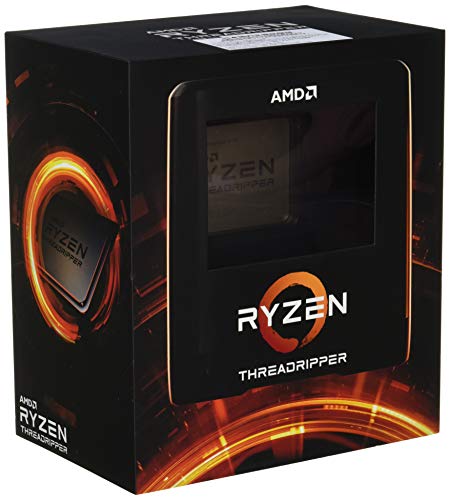
AMD Ryzen Threadripper 3970X

Intel® Core™ Ultra 7 270K Plus

GMKtec Mini PC Ryzen 5 3500U 512GB SSD

AMD Ryzen™ Threadripper™ 7960X 24-Core

Intel® Core™ Ultra 5 250K Plus
More Details On Our Top Picks
Large spreadsheets, code builds, photo batches, and occasional video work all place different demands on a desktop CPU. Intel’s Core Ultra 9 285K uses 24 cores split between 8 performance cores and 16 efficiency cores, so demanding foreground work can share the system with background tasks.
The 5.7 GHz maximum boost specification suits quick bursts such as exporting a document or opening a large project, while DDR5 memory and PCIe 5.0 support give a new build room for fast memory and current expansion hardware. You’ll need an Intel 800 Series motherboard, and the 125W base power rating makes careful cooling and case airflow part of the build plan.
Strong Points
- Twenty-four cores provide substantial room for simultaneous office, creative, and background workloads.
- The hybrid layout can keep lighter background activity separate from demanding foreground tasks.
- A 5.7 GHz boost ceiling supports responsive short-duration work.
- DDR5 and PCIe 5.0 support suit a current-generation desktop build.
- The unlocked design gives experienced builders more tuning control.
Things To Consider
- The 125W base power figure calls for a capable cooler and sensible case ventilation.
- Installation requires an Intel 800 Series motherboard, so older boards won’t provide a compatible home.
Key Specs
Who It Suits Best
You’ll get the most from this CPU as a creator, developer, or advanced desktop builder managing several demanding applications at once.
Where Another Pick Suits Better
Choose the GMKtec Mini PC Ryzen 5 3500U 512GB SSD instead for straightforward office work, media playback, and a small desk setup without a custom build.
Parallel work is the reason to consider the Ryzen Threadripper 3970X. Its 32 cores and 64 threads, where threads are separate scheduling paths for processing tasks, give 3D artists, designers, and heavy multitaskers broad capacity for rendering or compiling while other applications remain open.
The 144MB cache can keep frequently needed data close to the processing cores, and the unlocked design includes automatic overclocking support for experienced enthusiasts. Compared with the Intel Core Ultra 9 285K, this is a more specialized workstation choice, so the platform, cooler, and power requirements deserve attention before installation.
What We Like
- Thirty-two cores and 64 threads suit long renders, complex simulations, and large design projects.
- The 4.5 GHz boost ceiling helps preserve useful responsiveness during lighter tasks.
- A 144MB cache supports data-heavy professional workflows.
- Unlocked controls give experienced desktop builders room to tune the system.
Worth Noting
- The cooler isn’t included, so you must plan cooling separately.
- Workstation-class hardware can require more careful motherboard, case, and power planning than a mainstream desktop.
- Its many cores make the most sense for software that can use parallel processing, not just email and web work.
Technical Sheet
Made For
This processor suits professional designers, artists, engineers, and advanced hobbyists whose software regularly scales across many processing threads.
Consider Something Else When
The Intel Core Ultra 7 270K Plus is a better fit for a newer, more general-purpose desktop handling office work and creative applications.
For a fresh desktop that needs to cover documents, browser-heavy research, coding, and creative applications, the Core Ultra 7 270K Plus offers the same 24-core count as the Ultra 9 285K. The difference appears in its 5.5 GHz maximum boost, a modest step down that still suits quick interactive tasks.
Its 8 performance cores and 16 efficiency cores divide demanding and lighter activity across two core types. DDR5 support and compatibility with Intel 800 Series chipsets make it appropriate for a modern LGA1851 build, though you’ll need to budget for a compatible board and cooling solution. In most mixed-use desktops, that platform balance is more useful than chasing workstation-level thread counts.
Highlights
- Twenty-four cores give demanding creative applications plenty of processing room.
- The hybrid 8-plus-16 layout supports active work alongside background services.
- DDR5 memory support keeps the platform current for a new desktop build.
Trade Offs
- The 125W base power rating means installation should include adequate cooling and airflow.
- You must use an Intel 800 Series motherboard with the matching socket platform.
Feature Snapshot
Right Fit For
You’re a home-office power user, developer, or creator building a modern desktop for varied workloads rather than a single specialized task.
Not Your Match When
Pick the AMD Ryzen Threadripper 7960X 24-Core for professional rendering pipelines that need quad-channel memory and extensive expansion bandwidth.
A processor upgrade isn’t always the answer. The GMKtec mini PC arrives as a complete small desktop with a Ryzen 5 3500U, 16GB of dual-channel DDR4 memory, and a 512GB PCIe SSD, making it a practical route for home-office documents, browser tabs, video playback, and light multitasking.
Its integrated Radeon Vega 8 graphics avoid the need for a separate graphics card, while triple 4K display support can suit a multi-monitor workstation. You also get 2.5GbE networking, HDMI 2.1, USB-C, DisplayPort, Wi-Fi, and Bluetooth, so desk setup is straightforward. You may find the four-core, eight-thread design limiting for serious rendering, but the compact format is far easier to place than any custom Threadripper tower.
Upsides
- Preinstalled memory and storage let you start with office work quickly.
- The small enclosure suits cramped desks, reception counters, and media-room cabinets.
- Three 4K display outputs support a broad workspace for documents and dashboards.
- 2.5GbE, HDMI 2.1, USB-C, and DisplayPort provide flexible connectivity.
- Proxmox support makes the system useful for a compact home lab.
Room For Improvement
- Four cores and eight threads leave less headroom for heavy professional applications.
- Small systems can collect dust around vents, so regular exterior cleaning helps maintain airflow.
- Integrated graphics are better suited to light workloads than demanding 3D production.
Feature Rundown
Who Will Love This
You’ll appreciate this mini PC as a home-office user, student, media-room host, or home-lab beginner who values small size over workstation throughput.
Swap It Out When
The Intel Core Ultra 5 250K Plus suits you better for a custom desktop that needs more cores and modern expansion support.
Professional workflows that move large files, render scenes, or run several virtual machines need more than a fast burst clock. The Ryzen Threadripper 7960X combines 24 cores with 48 threads and a 5.3 GHz maximum boost, giving you a workstation-oriented mix of parallel capacity and quick interactive response.
Quad-channel DDR5 RDIMM support, which uses four memory channels with registered workstation memory, can scale to 1TB and suits large datasets. Its 80 usable PCIe lanes also leave room for substantial storage and expansion hardware. The honest trade-off is the 350W thermal design power and missing cooler, so this chip belongs in a carefully planned workstation rather than a casual office tower.
Standout Traits
- Twenty-four cores and 48 threads suit demanding professional processing.
- The 152MB cache can support projects that repeatedly access large working datasets.
- Quad-channel DDR5 RDIMM support gives memory-intensive applications a broad platform.
- Up to 1TB of supported memory helps with large scenes, datasets, and virtual machines.
- Eighty usable PCIe lanes provide extensive room for high-bandwidth expansion.
Points To Note
- The 350W design demands serious cooling, case airflow, and power planning.
- A cooler isn’t included, adding another component choice during installation.
- Many everyday office applications won’t take advantage of its workstation-scale capacity.
Core Details
Best Suited To
You’re a professional creator, engineer, developer, or prosumer running memory-heavy software and several expansion devices in a dedicated workstation.
A Better Fit Elsewhere
The Intel Core Ultra 9 285K is more suitable for a powerful general desktop with less extreme memory and expansion needs.
For everyday productivity, the Core Ultra 5 250K Plus keeps the build more grounded than the two Threadripper options. Its 18-core arrangement uses 6 performance cores and 12 efficiency cores, giving you useful multitasking capacity for office applications, communication tools, research tabs, and occasional creative work.
The 5.3 GHz maximum boost supports quick bursts, while DDR5 and PCIe 5.0 support leave room for a current motherboard and storage setup. Depending on your application mix, you may not notice much benefit from moving to the Ultra 9 for basic office tasks, but heavier video and compilation work can justify the higher-tier models. A 125W base power rating still calls for a suitable cooler.
Bright Spots
- Eighteen cores provide useful room for multitasking without moving into workstation hardware.
- The 6 performance and 12 efficiency core split suits mixed daily workloads.
- A 5.3 GHz boost target supports responsive application launches and short jobs.
- DDR5 and PCIe 5.0 support give a new build a current platform foundation.
Small Caveats
- The 125W base power specification makes cooling and airflow part of the parts list.
- Intel 800 Series motherboard compatibility limits reuse of older platforms.
At A Glance
Whose Shelf It Belongs On
This processor suits students, home-office professionals, developers, and casual creators building a versatile new desktop.
Another Choice May Suit
The GMKtec Mini PC Ryzen 5 3500U 512GB SSD fits you better when a compact ready-made computer matters more than upgrade flexibility.
How To Choose The Right Cpus For Productivity
Match Core Design to Your Work
Core count describes how many processing units can work at once, while threads describe the number of task paths available to the operating system. High thread counts matter during rendering, compiling, simulation, and batch exports. For documents, web research, accounting software, and communication apps, fast individual cores and sensible multitasking capacity often matter more than workstation-scale totals.
Intel’s hybrid approach combines performance cores for demanding foreground work with efficiency cores for lighter background activity. Threadripper takes a more workstation-focused route, giving you very high parallel capacity for software built to spread work across many threads.
Treat Clock Speed as Part of the Picture
A boost clock is a short-duration maximum speed, not a promise that every workload will run there continuously. Higher boost figures can make launches, interface actions, and lightly threaded tasks feel more responsive, while sustained work depends on cooling, software behavior, and power limits.
The Core Ultra 9 285K reaches up to 5.7 GHz, while the Ultra 7 270K Plus and Ultra 5 250K Plus reach up to 5.5 GHz and 5.3 GHz. The Threadripper 3970X reaches up to 4.5 GHz, and the 7960X reaches up to 5.3 GHz, with their greater appeal coming from core count, memory bandwidth, and expansion capacity.
Plan the Platform Before the CPU
A processor determines more than speed. Intel’s three Core Ultra choices require an Intel 800 Series motherboard and DDR5 memory, while the Threadripper models need a workstation platform and appropriate memory support. Check the socket, chipset, memory type, expansion requirements, and cooler before selecting the processor.
Power and cooling deserve equal attention. The 125W Intel chips need capable thermal management, while the 350W Threadripper 7960X and cooler-free 3970X call for a more deliberate system design.
Think About the Complete Computer
The GMKtec mini PC removes much of the assembly work by combining its Ryzen 5 3500U processor with 16GB memory and a 512GB SSD. That makes it appealing for a small office, media area, or home lab where space and simplicity matter.
A custom CPU build gives you more control over memory, storage, graphics, and future expansion. You’ll gain flexibility with the Intel and AMD desktop chips, but you’ll also need to select every supporting component and keep compatibility details aligned.
What To Weigh Before You Buy
Mistakes Worth Dodging
A common mistake is choosing by core count alone. Sixteen or more cores won’t automatically improve spreadsheet work, web browsing, or software that uses only a few threads. Start with the applications you run daily, then match the processor to their scaling behavior.
Cooling is another easy detail to overlook. A cooler-free Threadripper purchase requires a separate thermal plan, and the Intel chips still need airflow suited to their 125W base power. Check the motherboard socket and memory type before placing any component in your build list.
The Upgrade Payoff
Higher-tier processors cost more because they combine additional cores, larger cache pools, wider memory support, faster platform connections, or greater expansion capacity. Those attributes matter during long renders, large code builds, engineering workloads, and virtual machines.
Spending up makes sense when your work regularly keeps the CPU busy for extended periods or depends on high memory and storage bandwidth. Basic office users usually gain more from sufficient memory, a responsive SSD, and a comfortable display than from Threadripper-class capacity.
Closing Remarks
Your ideal productivity CPU depends on the work behind your screen. Choose the GMKtec mini PC for a compact ready-made office system, the Ultra 5 or Ultra 7 for a modern mixed-use desktop, and the Ultra 9 for heavier creator workloads. Threadripper belongs with professional software, serious rendering, and workstation expansion plans. Match the processor to your applications, then confirm the motherboard, memory, cooling, and power requirements before you build. That approach gives you a faster-feeling computer without paying for capacity your daily tasks won’t use.
