
Choosing Cpus For Rx 580 can feel confusing because the RX 580 appears in both standalone graphics cards and complete desktop towers. You need a processor that keeps everyday games responsive without spending more on hardware your system won’t use. This guide suits you when you’re upgrading an older desktop, building a budget gaming setup, or choosing a ready-made tower for school, streaming, and editing. Each option below is matched to a specific use case, with practical trade-offs included.
The Shortlist At A Glance


More Details On Your Top Picks
Your existing desktop gets a straightforward RX 580 graphics-card upgrade here, with 8GB of GDDR5 memory. GDDR5 is the memory type that stores visual data for the graphics processor, so that capacity suits older competitive games and general 1080p play more comfortably than a low-memory card.
The 2048 stream processors handle parallel graphics work, while the 256-bit memory interface describes the path between the GPU and its memory. You get two DisplayPort connections and HDMI, though DVI users need an adapter or a different card. For most older systems, this is an accessible starting point, but you still need a compatible PCI Express 3.0 slot and adequate case airflow.
Strong Points
- 8GB of GDDR5 gives game textures and multitasking more room.
- The 256-bit interface fits the card’s intended gaming role.
- Freeze Fan Stop can reduce fan activity during lighter desktop work.
- DisplayPort and HDMI cover common modern monitor connections.
- The conventional add-in-card format suits hands-on desktop upgrades.
Things To Consider
- Older power supplies and cramped cases deserve a careful compatibility check before installation.
- Dust buildup around the fan area can gradually affect cooling, so routine cleaning matters.
Key Specs
Who It Suits Best
You get the best fit as a DIY upgrader refreshing an older desktop for everyday gaming and general graphics work.
Consider Something Else When
Choose the MOUGOL AMD Radeon RX 580 8GB Gaming Graphics Card White for a three-display workspace and a stated compact 240 x 135 x 45mm body.
Three outputs make this white MOUGOL card more interesting for a home office than the Kelinx option. HDMI, DisplayPort, and DVI let you build a mixed-monitor desk, which helps you keep a game, browser, and work window visible during a long session.
The dual-fan cooler and 240 x 135 x 45mm dimensions point toward standard ATX and Micro-ATX cases. You may find that size convenient in a compact tower, though the 45mm thickness still deserves a slot-clearance check. The honest trade-off is that a triple-output layout matters far more to multi-screen work than to a single-monitor gaming setup.
What You Like Here
- HDMI, DisplayPort, and DVI support varied monitor collections.
- The 240mm length is easier to plan around than a larger card.
- Dual fans spread cooling across the card during longer sessions.
Worth Noting
- Three connectors add flexibility but don’t help much with a one-screen desk.
- Fans and vents need periodic dust removal in a floor-level computer case.
- Older DVI displays may require careful cable or adapter matching.
At A Glance
Made For
You suit this card best as a home-office user running several monitors from a standard desktop case.
Not Your Match When
The XFX Radeon RX 580 GTS XXX Edition 8GB better suits you as an experienced builder who values dual BIOS and a more established card design.
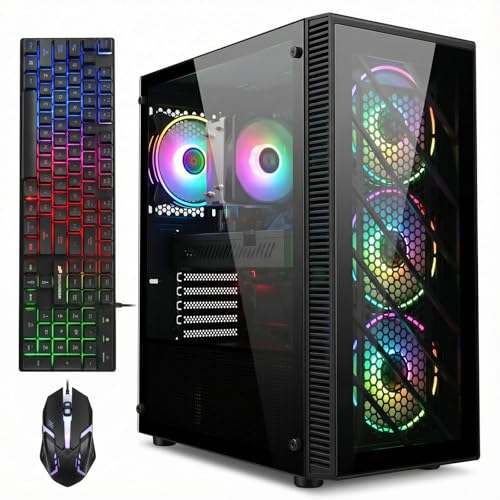
A complete tower changes the question from “which processor fits?” to “which ready-made system fits your desk?” This STGAubron pairs dual Xeon E5 processors with 16GB of DDR4 memory, a 512GB SSD, and an RX 580 8G, giving you a usable base for schoolwork, game sessions, and video projects.
The listed processor speed reaches up to 3.7GHz, while Wi-Fi 6 and Bluetooth 5.0 reduce cable clutter. You also get ARGB fans, Windows 11 Pro, 4K DisplayPort, and HDMI. Compared with the graphics-card-only picks, installation is easier, although desktop towers offer less freedom to choose your own power supply, case, or cooling layout.
Highlights
- 16GB DDR4 supports several open applications during study or editing.
- A 512GB SSD gives quicker everyday file access than a hard drive.
- Built-in Wi-Fi 6 and Bluetooth 5.0 simplify desk setup.
- Windows 11 Pro adds a business-friendly operating-system edition.
- 4K DisplayPort and HDMI expand monitor choices.
Trade Offs
- Dual Xeon hardware is less straightforward to upgrade than choosing a current consumer platform.
- ARGB fans add visual flair, but they also create more surfaces to keep dust-free.
Feature Snapshot
Right Fit For
You get the strongest match as a multitasker who wants one assembled tower for gaming, editing, streaming, and school use.
A Better Fit Elsewhere
The STGAubron Gaming PC Desktop R5 5500 RX 580 8G suits you more as a new-system shopper seeking a newer six-core processor platform.
For a card-only upgrade, XFX gives you several configuration tools that the Kelinx model doesn’t list. The 1386MHz OC+ designation, Dual BIOS, and three DisplayPort outputs plus HDMI and DVI make it appealing for a carefully planned gaming or workstation build.
This renewed card can make sense for you when a professionally prepared pre-owned component fits the project. Condition and remaining service coverage deserve attention on the listing, and the card’s age means cleaning, airflow, and power-supply checks matter more than flashy case lighting. VR Ready support is listed, though your processor and headset setup still influence the experience.
Upsides
- Dual BIOS can provide a useful fallback configuration during maintenance.
- Three DisplayPort outputs suit multi-monitor workstations.
- HDMI and DVI broaden display compatibility.
- 1386MHz OC+ identifies a factory-tuned configuration.
Room For Improvement
- Renewed condition makes cosmetic state and included accessories worth checking carefully.
- Older card hardware may need more attention to dust removal and case ventilation.
- VR use depends on the rest of your computer, not the card alone.
Technical Sheet
Best Suited To
You suit this card as an experienced builder comfortable checking a renewed component and planning a multi-monitor system.
Reach For A Different Pick When
The MOUGOL AMD Radeon RX 580 8GB Gaming Graphics Card White is a better fit for you when a compact, new-looking dual-fan card with three connector types matters more.
The Core i7 platform gives this ready-made STGAubron tower a familiar multitasking profile, while its listed processor speed reaches up to 3.9GHz. You also get an RX 580 with 16G stated in the title, 16GB of RAM, and a 512GB SSD, creating a roomy base for streaming, editing, and home computing.
Wi-Fi 6, Bluetooth 5.0, ARGB fans, HDMI, 4K DisplayPort, and Windows 11 Home keep setup approachable. You may find the Core i7 tower more comfortable than the Xeon models for general desktop software, but the RX 580 remains the graphics limit for demanding modern games. Storage expansion and internal access are worth checking before you build a large media library.
Bright Spots
- 16GB RAM supports simultaneous browsers, creative apps, and games.
- The 512GB SSD keeps everyday loading and file access practical.
- Wireless networking and Bluetooth reduce setup clutter.
- HDMI and 4K DisplayPort support flexible monitor placement.
- Windows 11 Home suits ordinary home and school tasks.
Points To Note
- The RX 580 can constrain demanding games even with a capable Core i7.
- ARGB lighting adds cleaning surfaces without changing graphics capability.
Quick Facts
Who Will Love This
You get the right match as a home user who wants an assembled Core i7 tower for editing, streaming, study, and casual gaming.
Swap It Out When
The STGAubron Gaming PC Desktop R5 5500 RX 580 8G suits you better when a newer processor platform matters more than the listed 16G graphics variant.
R5 5500 is the key reason to consider this tower over the dual Xeon options. Its listed speed reaches up to 4.2GHz, and the six-core design gives you a more current starting point for gaming, streaming, and ordinary creative work.
The system includes 16GB DDR4, a 512GB SSD, Wi-Fi 6, Bluetooth 5.2, ARGB fans, Windows 11 Home, HDMI, and 4K DisplayPort. That combination should feel sensible for a newer desktop setup, though the RX 580 8G keeps expectations grounded for demanding graphics settings. Plan for regular dust cleaning around the fans, particularly in a busy room with pets or carpeting.
Reasons To Buy
- R5 5500 gives the tower a newer processor foundation.
- Up to 4.2GHz supports quick-feeling everyday interaction.
- 16GB DDR4 and a 512GB SSD cover common gaming workloads.
- Bluetooth 5.2 and Wi-Fi 6 simplify current accessory connections.
Minor Gripes
- The RX 580 remains the limiting component for demanding graphics workloads.
- Windows 11 Home lacks the Pro edition included with some listed towers.
- Internal expansion details deserve confirmation before long-term storage planning.
Core Details
Whose Shelf It Belongs On
You get the strongest fit as a first-time desktop owner seeking a current-feeling processor with an established RX 580 graphics card.
Where A Sibling Pick Shines
The STGAubron Gaming PC Desktop Core I7 RX 580 16G is better for you when editing memory capacity and a Core i7 platform take priority.
This final STGAubron tower closely follows the earlier Xeon configuration, with dual Xeon E5 processors, 16GB DDR4, a 512GB SSD, and an RX 580 8G. Windows 11 Pro makes it a sensible desktop for school, home administration, and mixed use where a complete setup matters more than custom component selection.
Wi-Fi 6, Bluetooth 5.0, HDMI, 4K DisplayPort, and ARGB fans cover the practical connections, while the listed processor speed reaches up to 3.7GHz. You may find the system comfortable for several open applications, but the same older-platform trade-off remains: future upgrades can be less straightforward than with the R5 5500 tower. Keep the case vents clear and confirm the included connectivity meets your desk layout.
Plus Points
- Windows 11 Pro suits mixed home, school, and office use.
- 16GB DDR4 and a 512GB SSD create a useful starting configuration.
- Wi-Fi 6 and Bluetooth 5.0 reduce accessory setup work.
Small Caveats
- The Xeon platform is less appealing for a long upgrade path than the R5 5500 option.
- ARGB fans require the same dust care as any ventilated desktop tower.
Details At A Glance
Built With In Mind
You get the right fit as a home or school user who wants Windows 11 Pro and a ready-to-use tower for varied everyday tasks.
Another Choice May Suit
The STGAubron Gaming PC Desktop Dual Xeon E5 RX 580 8G, listed as pick three, suits you more when the same platform is preferred alongside its other configuration details.
How To Choose The Right Cpus For Rx 580
Match the Processor to the Graphics Card
The RX 580 is an older midrange graphics card, so pairing it with an extremely powerful modern processor may leave you paying for CPU capacity that rarely changes gaming results. A six-core chip such as the R5 5500 gives you a sensible base for games, streaming, and ordinary editing without making the graphics card disappear from the equation.
Older Xeon E5 systems can still suit multitasking, especially with 16GB of DDR4 memory, but you need to think about platform age and upgrade flexibility. A Core i7 tower offers another practical middle ground for general desktop use.
Separate a Card Upgrade From a Complete Tower
A standalone card such as the Kelinx, MOUGOL, or XFX requires your existing desktop to have a suitable PCI Express slot, enough physical room, proper power connections, and adequate airflow. Measure the case before installation, then check your monitor inputs so you don’t discover that an adapter is needed after the card arrives.
A complete STGAubron tower removes much of that assembly work. You still need space, display cables, and a suitable desk, but the processor, memory, storage, operating system, and graphics card arrive as one configuration.
Think About Your Actual Workload
For gaming at a single monitor, 8GB graphics memory and a balanced processor are more relevant than a long list of ports. Multi-monitor office users gain more from the MOUGOL card’s HDMI, DisplayPort, and DVI combination, while editors may prefer a complete tower with 16GB RAM and an SSD.
Streaming and editing place more demand on the processor and memory than basic gaming does. You benefit from the R5 5500 or Core i7 configurations when several applications stay open, while the dual Xeon models make sense for a lower-cost workstation-style setup.
Check Long-Term Ownership Details
Dust maintenance matters for every ventilated card and tower, especially in a carpeted office or a room with pets. Keep vents open, inspect fan noise over time, and avoid pushing a compact case into a tight cabinet.
Renewed hardware deserves extra attention to condition, accessories, and service terms on the product page. A complete desktop may be easier to start with, but a card-only purchase gives you more control over the case, power supply, and future component choices.
Things Worth Knowing First
Mistakes Worth Dodging
A common mistake is treating the RX 580 as the only compatibility question. Your case dimensions, power supply, monitor ports, motherboard slot, and operating-system needs all affect whether the setup works smoothly.
You can also overspend on processor strength while leaving the graphics card unchanged. Match the CPU to your games and applications, then reserve room in your plan for airflow, storage, and memory.
Where The Extra Money Goes
Higher-tier options usually cost more because you get a newer processor platform, more flexible connectivity, larger memory capacity, or a complete system instead of a single card. The R5 5500 tower, for example, focuses on a newer CPU foundation, while the Core i7 model emphasizes a familiar multitasking setup.
Spending more makes sense for you when you stream, edit video, use several monitors, or want an assembled computer. A standalone RX 580 remains the more direct route for an older desktop that already has a suitable case and power supply.
Final Verdict
Your best match depends on the computer you already own and the work you expect to do. Kelinx gives you a direct 8GB card upgrade, MOUGOL adds useful three-screen flexibility, and XFX offers a renewed card with Dual BIOS. For complete systems, the R5 5500 tower provides the newer platform, while the Core i7 and Xeon options suit different multitasking preferences. Choose the configuration that leaves enough room for your monitor setup, airflow, storage, and future plans.
