
Finding a suitable LGA 1151 processor or cooling component takes more care than matching a name on a socket. You need to account for the motherboard chipset, BIOS support, memory type, case clearance, and whether you’re replacing a CPU or repairing its mounting hardware. This shortlist covers processors for older Intel systems, compact coolers for cramped cases, and backplates for installation problems. You’ll find practical choices for office desktops, gaming-era upgrades, small-form-factor builds, and hands-on repairs.
The Shortlist At A Glance

Intel E97379-003 Core i3/i5/i7 Socket 1151 CPU Cooler Aluminum Heatsink


Plastic CPU Backplate Bracket for Intel LGA 1150 1151 1155 1156


More Details On Our Top Picks
Basic office desktops often need a straightforward replacement rather than an elaborate cooling tower. This Intel-style unit pairs an aluminum heatsink with a copper insert, while its four-pin connector lets compatible motherboards regulate fan speed during routine work.
The 1200 to 2500 RPM range suits everyday web, office, and media use, though demanding sustained workloads call for more substantial cooling. You may find the supplied fan useful for a practical repair, especially with compatible Core i3, i5, or i7 systems.
Strong Points
- Four-pin control supports motherboard-based fan management.
- Aluminum and copper construction helps move heat away from the processor.
- Broad compatibility includes LGA 1150, 1151, 1155, and 1156 systems.
- The familiar compact layout makes routine dust cleaning manageable.
Things To Consider
- The listing includes a cooler, not a processor, so check the package contents carefully.
- Stock-style cooling has limited headroom for prolonged heavy workloads.
Key Specs
Who It Suits Best
Home repairers and office-PC owners needing uncomplicated Intel-compatible cooling benefit most.
Where Another Pick Suits Better
Choose the Thermalright AXP-90 X53 for a compact case that needs four heat pipes and a 53mm cooler height.
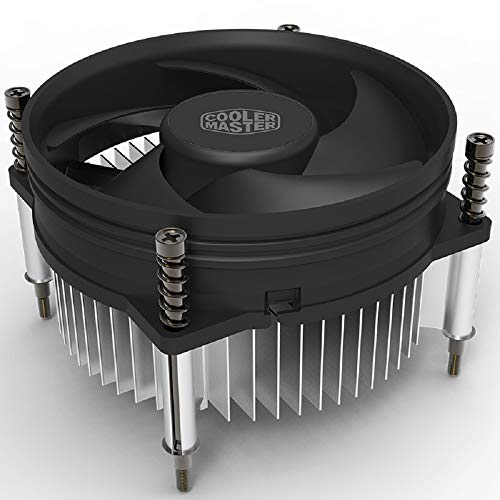
Short cases benefit from a cooler that leaves room around the motherboard, and the i30 focuses on that requirement. Its 92mm fan sits over a 90 by 30mm heatsink, creating a compact replacement for Intel LGA 1150, 1151, 1155, and 1156 desktops.
Compared with the four-pin Intel E97379-003, this model uses a three-pin fan connection, so fan control depends more heavily on the motherboard. In a small office tower or living-room PC, the stated 22 dBA plus-or-minus 3 dBA noise figure may suit quiet surroundings, though sustained heavy loads remain outside its natural comfort zone.
What We Like
- 92mm fan dimensions suit cramped desktop interiors.
- Aluminum heatsink construction keeps the assembly relatively simple to handle.
- 22 dBA plus-or-minus 3 dBA gives the design a quiet-use focus.
Worth Noting
- The three-pin connector offers less direct control than a four-pin PWM connection.
- Dust buildup around the narrow fan frame still calls for periodic cleaning.
- Its compact thermal design is better suited to ordinary workloads than prolonged rendering.
- Confirm the mounting arrangement before opening a tightly packed case.
Feature Snapshot
Made For
Small-form-factor PC owners and office users replacing a basic Intel cooler should consider this model.
Consider Something Else When
The Intel E97379-003 better suits you when four-pin fan control matters more than the i30’s compact layout.
A damaged or missing cooler backplate can stop an otherwise usable LGA 1151 system from being rebuilt. This adjustable black-and-yellow plastic mounting base supports several Intel socket layouts, including LGA 775, 1150, 1151, 1155, 1156, 1200, 1366, and 1700.
The non-conductive plastic construction helps separate the mounting hardware from the motherboard, while adjustable hole positioning can make alignment easier across different boards. One thing worth considering is the installation workload: mounting screws are not included, so you’ll need compatible M3 hardware before the repair can move forward.
Highlights
- Adjustable positioning accommodates several Intel mounting patterns.
- Non-conductive plastic suits the insulating role behind a motherboard.
- Broad socket coverage makes it useful for mixed-generation repair work.
- Its simple shape stores easily in a small parts drawer.
- The separate backplate approach can extend the useful life of an older board.
Trade Offs
- M3 mounting screws must be sourced separately.
- Plastic requires careful tightening during installation to avoid stressing the bracket.
Technical Sheet
Right Fit For
DIY desktop repairers handling several Intel generations and missing cooler backplates are the natural match.
Not Your Match When
The GENNEL Plastic CPU Backplate better suits you when your board uses a fixed LGA 115x hole pattern and you want a simpler layout.
For an LGA 1151 desktop built around an Intel 100- or 200-series chipset, the Core i7-7700 offers four cores and eight threads for office multitasking, editing, and older gaming workloads. Its 3.60 GHz base speed can rise to 4.20 GHz through Intel Turbo Boost, a technology that raises clock speed under suitable conditions.
Integrated Intel UHD Graphics 630 can handle display output without a separate graphics card, which helps during a repair or budget rebuild. The catch is platform specificity: this processor is not a universal fit for every LGA 1151 board, and the renewed format makes condition checks and seller information worth reviewing before installation.
Upsides
- Four cores and eight threads give multitasking room for demanding daily software.
- Turbo operation reaching 4.20 GHz supports responsive bursts of work.
- UHD Graphics 630 can provide display output without a separate graphics card.
- 65W thermal design power suits many established desktop cooling setups.
Room For Improvement
- Compatibility is limited to motherboards using Intel 100- or 200-series chipsets.
- Renewed hardware may arrive in different packaging or cosmetic condition.
- DDR4 and DDR3L memory support still depends on the motherboard design.
At A Glance
Best Suited To
Owners of compatible 100- or 200-series desktops seeking a capable replacement for multitasking and general performance.
A Better Fit Elsewhere
The Intel Core i7-6700K suits you more when you have a compatible 100-series board and specifically want an unlocked processor.
Some LGA 1151 repairs need only a replacement backplate, not a new cooler. This GENNEL bracket uses insulating plastic and a fixed 7.5cm hole spacing for Intel LGA 1150, 1151, 1155, and 1156 mounting arrangements.
Its approximately 9.2 by 8.9cm footprint gives you a clear dimensional reference before disassembling the case. Compared with the adjustable GENNEL backplate, this option is more narrowly focused, which can simplify a standard repair but leaves less flexibility for unusual motherboard hole positions.
Plus Points
- Insulating plastic is appropriate for a back-of-board mounting component.
- Fixed hole spacing makes compatibility easier to check against a standard board.
- Compact dimensions store neatly with spare PC hardware.
- Useful for restoring cooler mounting without replacing a working CPU.
Small Caveats
- M3 mounting screws are not included.
- Fixed spacing offers less adjustment than the GENNEL universal backplate.
- Careful alignment matters during installation, particularly inside a crowded case.
Quick Facts
Who Will Love This
DIY repairers with a standard LGA 115x board and compatible M3 hardware get the clearest fit here.
Look Elsewhere When
The adjustable GENNEL Universal Motherboard Backplate is better for you when several hole patterns or socket generations are involved.
Low-profile cases leave little vertical room, yet a basic stock cooler can feel limiting during longer workloads. The AXP-90 X53 addresses that tension with a 53mm overall height, four 6mm heat pipes, an all-metal platform, and a 90mm TL-9015 PWM fan. PWM means pulse-width modulation, a control method that lets a compatible motherboard vary fan speed.
Compared with the Cooler Master i30, this Thermalright design offers more heat-transfer hardware and a four-pin PWM connection, while keeping the height low. You may find the installation more involved than a basic Intel cooler, but small gaming desktops and compact workstations gain a more substantial cooling path.
Standout Traits
- Four heat pipes move processor heat into the fin structure.
- 53mm height suits cases where standard tower coolers cannot fit.
- PWM fan control can balance airflow and noise automatically.
- All-metal construction supports a more substantial installation than simple stock-style units.
- Intel LGA 115x and 1200 support extends usefulness across several systems.
- AMD AM4 compatibility adds flexibility for mixed-platform households.
Areas To Watch
- Compact coolers still depend on clear case airflow and careful dust removal.
- Four heat pipes and a backplate fastener can make installation less immediate for beginners.
Feature Rundown
Whose Shelf It Belongs On
Compact-build enthusiasts and experienced DIY assemblers who need stronger low-clearance cooling are the best match.
Reach For A Different Pick When
The Cooler Master i30 is a better fit for you when a simpler, smaller everyday replacement matters more than four-pipe cooling.
Skylake-era systems with a compatible LGA 1151 board can still benefit from the Core i7-6700K’s four-core design and 4.00 GHz base frequency. The unlocked multiplier is the defining feature, giving experienced desktop enthusiasts more control over processor clocks when the motherboard and cooling setup support that approach.
Compared with the locked Core i7-7700, this processor suits hands-on tuning rather than a straightforward drop-in upgrade. DDR4 and DDR3L support helps with older platform planning, but you’ll need to verify the board, firmware, memory layout, and cooler before committing to the installation.
Reasons To Buy
- Unlocked design gives enthusiasts more adjustment potential.
- 4.00 GHz base speed suits demanding legacy desktop use.
- Four cores handle gaming, creation, and multitasking workloads from its platform era.
- Support for DDR4 and DDR3L can help with system-specific memory planning.
- The Skylake identity makes platform matching relatively clear.
Points To Note
- Unlocked processors place greater emphasis on suitable cooling and motherboard support.
- Renewed stock can differ in packaging and exterior condition.
- Older LGA 1151 boards may require firmware checking before installation.
Core Details
Built With In Mind
Experienced PC hobbyists upgrading a compatible Skylake desktop and planning manual clock adjustments should focus here.
Swap It Out When
The Intel Core i7-7700 is better for you when you want a simpler locked processor upgrade for a compatible 100- or 200-series board.
How To Choose The Right Cpus For Socket 1151
Start With The Chipset
LGA 1151 covers more than one Intel platform generation, so the socket name alone doesn’t settle compatibility. The Core i7-6700K belongs with 100-series-era boards, while the Core i7-7700 is intended for Intel 100- or 200-series chipsets. Check your motherboard manual or manufacturer support page for processor and firmware support before removing the old chip.
Match The Workload
Four cores and eight threads can still serve office multitasking, web work, older games, and light creation. The i7-7700 combines that layout with a 3.60 GHz base speed and up to 4.20 GHz turbo operation, while the i7-6700K starts at 4.00 GHz and adds an unlocked multiplier. You’ll gain the most from the unlocked model with a compatible board, capable cooling, and an interest in manual tuning.
Check Memory And Graphics
Processor compatibility doesn’t guarantee memory compatibility. The i7-7700 supports DDR4-2133/2400 and DDR3L-1333/1600, but the motherboard determines which memory type and capacity you can actually install. Integrated UHD Graphics 630 on the i7-7700 can provide display output for a repair system, while a separate graphics card may remain necessary for newer games.
Don’t Ignore Cooling Clearance
A processor upgrade and a cooler upgrade often belong in the same conversation. Basic Intel-style units suit ordinary office workloads, whereas the Thermalright AXP-90 X53 gives compact cases four heat pipes and a 53mm height. Measure the case, verify the backplate, and compare the fan connector before choosing, especially in a cramped desktop where installation access is limited.
What To Weigh Before You Buy
Mistakes Worth Dodging
A common error is treating every LGA 1151 board as interchangeable. The socket can look right while the chipset or firmware blocks the selected CPU, so platform records deserve attention before installation.
Cooling hardware creates another easy mix-up. The Intel E97379-003 and Cooler Master i30 are coolers, while both GENNEL items are mounting backplates, not processors. Check whether your repair needs thermal hardware, a mounting base, or the CPU itself.
The Upgrade Payoff
Higher-tier choices generally add more than a larger name. The Thermalright AXP-90 X53 brings four heat pipes, PWM control, and a 53mm profile, while the i7-6700K adds an unlocked multiplier for compatible enthusiast platforms.
Extra capability matters most in a compact workstation, a sustained multitasking system, or a carefully tuned legacy desktop. Basic office machines can stay better served by simpler cooling and a locked processor that matches the existing board.
Closing Remarks
You can still build or repair a useful LGA 1151 desktop, but compatibility checks matter more than the socket label alone. Choose the i7-7700 for balanced multitasking on a supported 100- or 200-series board, the i7-6700K for hands-on Skylake tuning, or the Thermalright AXP-90 X53 for tight case clearance. The Intel E97379-003 and Cooler Master i30 address simpler cooling needs, while GENNEL backplates solve mounting problems. Match the component to your motherboard, workload, and available space, then enjoy a more confident legacy-system upgrade.
