
SolidWorks rewards a fast processor, ample memory, and graphics hardware suited to your modeling habits. You may only need a compact office PC for basic parts, or you may handle large assemblies, rendering, and frequent design revisions. This shortlist covers both ends, including a powerful workstation, two capable desktop systems, entry-level processors, and one tower stand that helps keep your existing computer accessible. The right choice depends on your assembly size, preferred workflow, upgrade plans, and available desk space.
The Shortlist At A Glance

GMKtec G3S Mini PC Intel N95 Processor 8GB RAM 256GB SSD
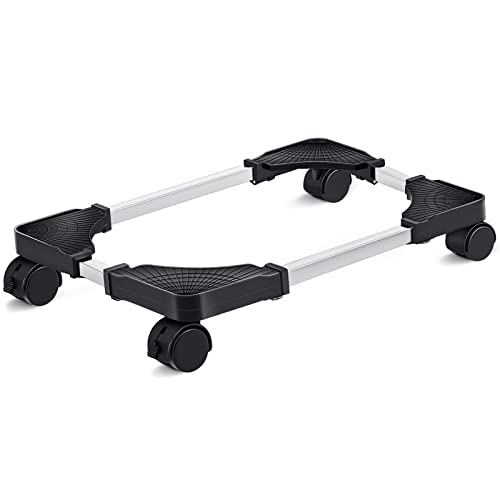
Liitrton Mobile CPU Stand Adjustable Computer Tower Stand

Intel Celeron G5905 Desktop Processor 2 Cores 3.5 GHz LGA1200

Skytech Gaming Azure 3 Gaming PC Ryzen 7 9850X3D RX 9070 XT

GMKtec M5 Ultra Gaming Mini PC Ryzen 7 7730U 32GB RAM 512GB SSD

ACEMAGIC G3A AI Workstation Intel Core i9-13900F RTX 2000 Ada
More Details On Our Top Picks
Desk space matters in a home office, and the G3S keeps its footprint small while providing a 12th-generation Intel N95 processor, 8GB of DDR4 memory, and a 256GB M.2 solid-state drive. An M.2 SSD is a compact storage device that generally makes startup and file access feel more responsive than older hard drives.
The VESA mount suits a clean monitor-back installation, while dual 4K display support helps with documents, reference drawings, and communications. You may find the four-core, four-thread design adequate for light parts and everyday tasks, but complex assemblies and sustained rendering will push it well behind the larger systems here.
Strong Points
- Small chassis works well in a crowded office or workshop.
- VESA mounting can clear valuable desk space.
- Dual 4K output supports a two-screen drafting setup.
- Wi-Fi 5 and Gigabit Ethernet cover common home and office networks.
- The SSD should make routine file handling feel snappier than a mechanical drive.
Things To Consider
- 8GB of memory and 256GB of storage leave limited headroom for large design libraries.
- Owners commonly report that compact systems need clear airflow around the vents during long workloads.
Key Specs
Who It Suits Best
You’ll get the most sensible fit as a beginner or office user handling small models, documentation, and light design review.
Consider Something Else When
Choose the GMKtec M5 Ultra Ryzen 7 7730U for heavier multitasking, more memory, and a better compact workstation foundation.
SolidWorks performance comes from the computer inside the case, but your workspace still affects daily comfort and access. This adjustable steel tower stand supports computer cases from 16.93 to 22.44 inches in length and 9.06 to 14.57 inches in width, making it a useful companion for a full-size desktop rather than a processor itself.
Four 360-degree casters make it easier to move a tower for cable access or floor cleaning, and the locking mechanism helps keep the stand in place. Compared with the fixed mini PCs here, the Liitrton gives you more flexibility around an existing tower, though carpet thickness and case dimensions deserve careful attention.
What We Like
- Adjustable length and width accommodate a broad range of tower cases.
- Rolling access makes rear-panel connections easier to reach.
- Locking casters help prevent unwanted movement during use.
Worth Noting
- It adds no computing power and cannot replace a suitable SolidWorks workstation.
- Measure the case and account for carpet compression before assembly.
- Dust and hair can gather around the wheels, so occasional floor-level cleaning is sensible.
Feature Snapshot
Made For
This stand suits you best when an existing full-size computer needs easier floor access, cable management, and cleaning clearance.
Not Your Match When
The GMKtec G3S N95 Mini PC fits better for you when desk space and low-profile computing matter more than tower mobility.
A processor upgrade only makes sense alongside a compatible motherboard, and the G5905 keeps that requirement clear with its LGA1200 socket and Intel 400-series chipset support. Its two cores and two threads, meaning two parallel processing paths, are better suited to basic computing than demanding 3D design.
The 3.5GHz clock can serve a simple office build, classroom system, or secondary machine for viewing drawings. You may find it workable for small, uncomplicated parts, but large assemblies, simulation, and rendering call for substantially stronger hardware such as the Skytech Azure 3 or ACEMAGIC G3A.
Highlights
- Fixed 3.5GHz operating speed suits straightforward desktop tasks.
- 58W power rating can fit modest home-built systems.
Trade Offs
- The two-core, two-thread layout limits demanding SolidWorks multitasking.
- A thermal solution isn’t included, so your build needs a compatible cooler.
- Compatibility is restricted to Intel 400-series chipset motherboards.
Quick Facts
Right Fit For
You’re best served by this processor as a home-builder assembling an inexpensive secondary PC for basic drawings and office work.
Look Elsewhere When
Choose the ACEMAGIC G3A i9-13900F workstation for professional assemblies, graphics work, and sustained rendering.
Large assemblies and visual work need more than a basic office machine, and the Azure 3 brings a Ryzen 7 9850X3D processor together with an RX 9070 XT graphics card. Its 32GB of DDR5 memory gives you useful room for SolidWorks, browser references, and supporting applications without the tight limits found on the GMKtec G3S.
The 2TB Gen4 NVMe SSD, a high-speed solid-state storage format, leaves space for substantial project folders, while the 360mm liquid cooler is designed to manage heat from demanding components. The honest caveat is size and complexity: a desktop tower with liquid cooling and an 850W Gold ATX 3 power supply needs suitable floor or desk space and more involved upkeep than a mini PC.
Upsides
- Ryzen 7 9850X3D supplies a strong platform for demanding desktop work.
- RX 9070 XT graphics hardware suits detailed visual scenes and GPU-focused tasks.
- 32GB DDR5 memory supports larger assemblies and multitasking.
- 2TB Gen4 NVMe storage reduces pressure on your project library.
- 360mm liquid cooling is appropriate for a high-output desktop configuration.
Room For Improvement
- The full tower requires more room than either compact GMKtec system.
- Liquid cooling introduces a pump and radiator that need more attention than simple air cooling.
Technical Sheet
Best Suited To
This desktop fits you as a serious designer, advanced hobbyist, or creator working with larger models and rendering tasks.
A Better Fit Elsewhere
The GMKtec M5 Ultra 7730U is a better match for you when compact dimensions and simpler everyday ownership matter more than maximum desktop output.
For a compact workstation that doesn’t feel as restricted as the G3S, the M5 Ultra moves to an eight-core, 16-thread Ryzen 7 7730U with 32GB of DDR4 memory. Cores handle separate tasks, while threads let the processor keep more work moving at once, which helps during multitasking and heavier design sessions.
The 512GB PCIe SSD, triple 4K display support, USB-C, Wi-Fi 6E, and dual 2.5GbE LAN connections give you a flexible desk setup. You may find the integrated compact format easier to place than the Skytech Azure 3, although demanding visual work won’t have the same dedicated graphics resources.
Bright Spots
- 32GB of memory gives SolidWorks and background applications more breathing room.
- Eight cores and 16 threads suit multitasking better than the entry-level processors here.
- Triple 4K support works well for a model, references, and documentation across several displays.
- Dual 2.5GbE LAN ports benefit wired office or workstation networks.
Points To Note
- 512GB can feel narrow once large assemblies, exports, and media files accumulate.
- Integrated compact graphics may not suit demanding rendering or advanced visual workloads.
- Owners commonly find that small systems benefit from uncluttered ventilation around the chassis.
Feature Rundown
Who Will Love This
You’ll appreciate this mini PC as a home designer, student, or office professional who wants strong multitasking in a small enclosure.
Another Choice May Suit
The Skytech Azure 3 Ryzen 7 9850X3D fits you better for dedicated graphics power, large assemblies, and sustained rendering.
Professional design work benefits from both CPU throughput and graphics hardware built for workstation tasks. The G3A pairs a 24-core, 32-thread Intel Core i9-13900F with an NVIDIA RTX 2000 Ada professional graphics card carrying 16GB of graphics memory, giving you a far more specialized setup than the integrated graphics in the M5 Ultra.
Its 32GB of DDR5 memory, 1TB PCIe 4.0 SSD, four Mini DisplayPort outputs, and dual LAN connections suit a multi-monitor studio or engineering desk. You may find the compact enclosure attractive in a space-conscious office, but professional components and intensive workloads make cooling, ventilation, and upgrade compatibility worth checking before installation.
Reasons To Buy
- 24 cores and 32 threads provide substantial parallel-processing capacity.
- RTX 2000 Ada graphics with 16GB memory suit professional 3D and rendering workflows.
- 32GB DDR5 supports complex projects and simultaneous applications.
- Four Mini DisplayPort outputs simplify a multi-monitor design station.
- Dual LAN, with 2.5G and 1G connections, supports flexible wired networking.
Honest Caveats
- The 1TB drive offers less project storage than the Skytech Azure 3’s 2TB arrangement.
- Professional graphics hardware can be more than you need for basic part modeling.
Core Details
Built With In Mind
This workstation suits you as a professional designer, engineer, or creator handling complex models, rendering, and multi-display work.
Swap It Out When
The GMKtec M5 Ultra Ryzen 7 7730U is a better fit for you when everyday productivity and compact placement matter more than professional graphics capability.
How To Choose The Right Cpus For Solidworks
Match Processor Design To Your Work
SolidWorks modeling often benefits from strong per-core speed, while rendering and background tasks can take advantage of additional cores and threads. A two-core Celeron suits simple viewing and basic parts, but an eight-core Ryzen 7 gives you more flexibility for multitasking.
Large assemblies, simulation, and export work justify stepping toward the Ryzen 7 9850X3D or Core i9-13900F. You’ll notice the difference most during long sessions with several applications open, not during a quick sketch.
Give Memory And Storage Room
Memory is the workspace where active design data stays available. The 8GB G3S configuration suits light duties, while 32GB options provide a more comfortable base for assemblies, browsers, documentation, and background utilities.
Storage affects how much you can keep locally. A 256GB drive fills quickly, 512GB works for a focused setup, and 1TB or 2TB gives you more room for project versions, exports, and related files.
Choose Graphics For Your Viewport
A dedicated graphics card has its own video memory and handles visual work separately from the processor. The RX 9070 XT in the Skytech desktop targets demanding graphics workloads, while the RTX 2000 Ada in the ACEMAGIC is the more workstation-oriented graphics choice.
Integrated graphics can be adequate for small models and everyday drafting. You’ll want dedicated graphics as model complexity, visual detail, and rendering demands rise.
Don’t Ignore The Physical Setup
A mini PC saves desk space and usually simplifies placement, but ventilation remains important during extended workloads. A full desktop offers more substantial hardware, yet the case, liquid cooler, and power supply require room and careful cable planning.
The Liitrton stand helps with tower access, not processing power. Measure your case before choosing it, especially on carpet, and keep rear ports reachable for display and network connections.
Before You Choose Your Workstation
Mistakes Worth Dodging
Socket compatibility is the first checkpoint for a processor upgrade. The G5905 requires an LGA1200 motherboard using an Intel 400-series chipset, so a physically similar-looking board from another platform won’t solve the compatibility issue.
Memory and graphics are easy to overlook. An 8GB mini PC may handle simple parts, yet larger assemblies can make that capacity feel restrictive, while integrated graphics won’t provide the same viewport resources as a dedicated card.
Where The Extra Money Goes
Higher-tier systems combine faster processors, more memory, larger SSDs, and dedicated graphics. That combination matters during rendering, complex assembly work, and multi-application sessions, where entry-level hardware can slow your workflow.
Spending more makes sense for professional design work or large projects. Basic drafting and occasional viewing don’t require the ACEMAGIC G3A’s workstation graphics, so a compact Ryzen system may offer a more sensible balance.
Closing Remarks
Your best choice depends on the scale of your SolidWorks work rather than a single specification. The GMKtec G3S and Intel Celeron G5905 suit light tasks, the GMKtec M5 Ultra offers compact versatility, and the Skytech Azure 3 brings substantial desktop power. For professional graphics and demanding workloads, the ACEMAGIC G3A is the clearest fit. Measure your workspace, confirm compatibility, and choose the level of hardware that matches the projects you handle most often.
