
You need a desktop that keeps Valorant responsive during long sessions, while still handling voice chat, streaming, schoolwork, or other games. The right CPU matters for high frame rates and quick input response, but the graphics card, memory, storage, cooling, and wireless connection shape your daily experience too. This shortlist covers affordable entry points, balanced midrange systems, and powerful builds for high-refresh monitors. You’ll also find practical trade-offs, so you can match each configuration to your desk, budget, and gaming habits.
The Shortlist At A Glance
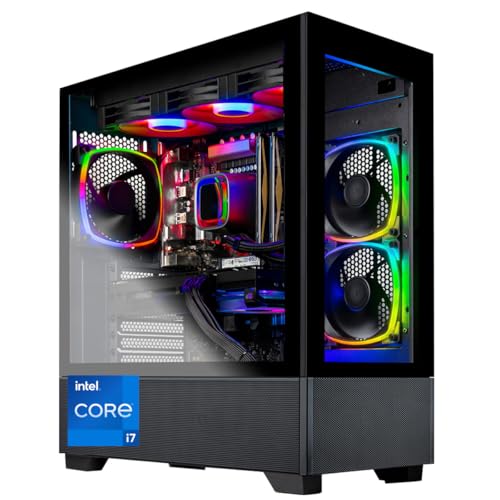
Skytech Gaming PC Desktop Intel Core i7 12700F NVIDIA RTX 4070 Ti 1TB NVME SSD

Skytech Gaming Nebula 2 Gaming PC Intel i5 14400F NVIDIA RTX 3050 1TB NVMe SSD
Skytech Gaming Storm Gaming PC AMD Ryzen 5 5500 NVIDIA RTX 3050 1TB NVMe SSD

Thermaltake LCGS Quartz i1460 Gaming Desktop Intel Core i5-14400F RTX 5060

Thermaltake LCGS View i570-170 Gaming Desktop Intel Core i9-14900KF RTX 5070

STORMCRAFT Phantom RTX 5080 Gaming PC Ryzen 7 9800X3D 32GB DDR5 2TB SSD

Skytech Gaming Archangel 5 Gaming PC Intel i5 14400F NVIDIA RTX 5060 1TB NVMe SSD
More Details On Our Top Picks
The i7-12700F and RTX 4070 Ti give you a substantial step up from the RTX 3050 systems below. Its 16GB DDR4 memory and 1TB NVMe SSD keep the basic setup sensible, while the 360mm all-in-one liquid cooler, which circulates coolant through a radiator, suits long gaming sessions at a desk.
For Valorant on a high-refresh monitor, you get plenty of graphics headroom and a processor suited to multitasking. The honest trade-off is the older DDR4 platform and the potentially more involved maintenance of liquid cooling, so this choice fits you best when you want strong gaming performance without moving into the largest builds.
Strong Points
- RTX 4070 Ti graphics leave room for demanding games beyond Valorant.
- The 1TB NVMe SSD gives you useful space for games and quicker loading than a mechanical drive.
- A 750W Gold PSU supports the higher-power configuration.
- 11AC Wi-Fi helps you avoid a separate wireless adapter.
Things To Consider
- Liquid cooling adds radiator, pump, and tubing components that deserve occasional dust cleaning.
- DDR4 memory is less current than the DDR5 used by several newer choices here.
Key Specs
Who It Suits Best
You’ll appreciate this system for high-refresh competitive play, streaming, and demanding games on a spacious desk.
Where Another Pick Suits Better
Skytech Gaming Archangel 5 Gaming PC suits you more when you want a newer DDR5 platform with a more moderate graphics configuration.
For a first desktop, the Nebula 2 keeps the recipe straightforward: a Core i5-14400F, RTX 3050 6GB, 16GB DDR5 memory, and a 1TB NVMe drive. DDR5 is a newer memory standard that can support a more current upgrade path, while the air cooler avoids pump-related upkeep.
You get a practical setup for Valorant, schoolwork, and everyday applications, with Wi-Fi 5 built in. You may find the RTX 3050 less comfortable for demanding new games at high settings, but its moderate configuration makes sense for a compact gaming routine.
What We Like
- DDR5-6000 memory gives the platform a current feel.
- Air cooling keeps installation and routine cleaning relatively simple.
- One terabyte of NVMe storage gives you room for a useful game library.
Trade Offs
- The RTX 3050 has less graphics headroom than the RTX 5060 and RTX 4070 Ti options.
- Owners commonly need to keep the case intake clear because dust buildup can restrict airflow over time.
- Wi-Fi 5 is functional, though newer wireless standards offer more room in busy homes.
At A Glance
Made For
This setup suits you as a new PC gamer who wants easy setup, modern memory, and sensible everyday capability.
Consider Something Else When
Skytech Gaming Archangel 5 Gaming PC fits you better for a similar CPU class with RTX 5060 graphics.
The Storm takes a familiar route with AMD’s Ryzen 5 5500, RTX 3050 graphics, 16GB DDR4-3200 memory, and a 1TB NVMe SSD. That combination gives you a clear path into Valorant and general desktop use, especially alongside a 1080p monitor.
Compared with the Nebula 2, you get older DDR4 memory and a less current processor platform, but the air cooler keeps ownership uncomplicated. Depending on your wider game library, the RTX 3050 may become the limiting component before the storage does.
Highlights
- The Ryzen 5 5500 offers six cores for gaming and ordinary multitasking.
- NVMe storage helps shorten boot and game-loading waits.
Minor Gripes
- DDR4-3200 is less forward-looking than the DDR5 memory in the Nebula 2.
- RTX 3050 graphics suit moderate settings better than demanding high-resolution play.
- Routine dust removal around the air cooler and case vents remains part of normal ownership.
Technical Sheet
Right Fit For
You’ll find the Storm suitable for a first gaming PC, a family desk, or a 1080p Valorant setup.
Not Your Match When
Skytech Gaming Nebula 2 Gaming PC is a better fit for you when newer DDR5 memory matters more than the familiar Ryzen platform.
A mesh front panel, which uses open material to encourage air movement, gives the Quartz i1460 a practical angle for a smaller gaming desk. The Core i5-14400F pairs with RTX 5060 graphics, 16GB RGB DDR4-3600 memory, and 1TB NVMe M.2 storage.
Compared with the older RTX 3050 choices, the graphics card gives you more breathing room for current games and higher monitor refresh rates. The catch is the DDR4 memory platform, so this compact choice makes the most sense for you when airflow and desk space matter more than the newest memory standard.
Upsides
- Mesh-front airflow design suits sustained sessions in a warm room.
- RTX 5060 graphics create a stronger pairing for competitive gaming.
- RGB DDR4-3600 memory adds visual character without changing the core setup.
- Wi-Fi is built into the desktop for flexible placement.
Room For Improvement
- DDR4 limits how current the memory platform feels beside DDR5 alternatives.
- Compact cases can make internal dust cleaning and cable access less convenient.
Feature Snapshot
Who Will Love This
This desktop suits you when you have limited desk space and want a clean, airflow-aware gaming system.
Look Elsewhere When
Skytech Gaming Archangel 5 Gaming PC is a better fit for you when DDR5 memory and a similar RTX 5060 class matter more than compact design.
The View i570-170 is built for you when a gaming desktop also needs to look at home in a visible office or studio. Its Core i9-14900KF, RTX 5070, 32GB DDR5-6000 RGB memory, and 1TB NVMe M.2 storage create a much stronger multitasking base than the Quartz i1460.
Edge-to-edge tempered glass and a dual-chamber layout emphasize the internal hardware, while the 240mm AIO cooler supports the high-end processor. You may find the glass demands more frequent dust attention, and Valorant alone won’t use all this capacity, but editing, streaming, and several demanding applications can justify the extra room.
Bright Spots
- 32GB DDR5 memory gives you comfortable space for games, chat, browsers, and creative software.
- RTX 5070 graphics suit high-refresh gaming and heavier visual workloads.
- Dual-chamber construction helps separate the showcase area from cable management.
- Tempered glass makes the RGB memory and internal components visible.
- The 240mm AIO cooler is appropriately sized for a high-output processor.
Points To Note
- Glass panels show fingerprints and dust more readily than a closed metal side panel.
- Liquid cooling requires more care during cleaning and component access.
Feature Rundown
Best Suited To
You’ll get the most from this desktop as a streamer, creator, or enthusiast who wants strong gaming power and a display-oriented case.
A Better Fit Elsewhere
Thermaltake LCGS Quartz i1460 Gaming Desktop suits you more when a compact footprint and lower-complexity cooling take priority.
For you, the Phantom is the capacity-first option: Ryzen 7 9800X3D processing, RTX 5080 16GB GDDR7 graphics, 32GB DDR5-6000 memory, and a 2TB NVMe Gen4 SSD. Gen4 describes a faster PCIe storage interface, giving you a spacious, quick library for large games and applications.
The 360mm AIO cooler, seven adjustable ARGB fans, and 850W Gold power supply match the ambitious hardware. In your room, that combination may mean more fan sound and more dust-cleaning duties than the Archangel 5, but it gives you considerable room for high-refresh gaming and demanding workloads.
Reasons To Buy
- Ryzen 7 9800X3D processing is designed around demanding gaming use.
- RTX 5080 graphics and 16GB GDDR7 provide extensive visual headroom.
- 2TB storage reduces the need to manage a smaller game library.
- 32GB DDR5-6000 memory supports gaming alongside heavy background applications.
- The included RGB keyboard and mouse help you start with fewer desk accessories.
- A 360mm cooler and seven ARGB fans suit sustained high-output use.
Honest Caveats
- The large cooling and fan setup can make cleaning more involved.
- Its capacity is excessive for a Valorant-only setup, so you may not use the full hardware headroom.
- At 17 by 9.25 by 17 inches, you’ll need generous floor or desk clearance.
Core Details
Whose Shelf It Belongs On
This desktop suits you as an enthusiast who plays demanding games, streams, creates content, and wants substantial storage.
Swap It Out When
Skytech Gaming Nebula 2 Gaming PC fits you better for a simpler first desktop focused on Valorant and everyday applications.
The Archangel 5 brings the same Core i5-14400F class found in the Nebula 2, then pairs it with RTX 5060 graphics and 16GB DDR5-6000 memory. That balance makes sense for you when Valorant is the priority but your desktop also needs to handle newer games and regular work.
A 750W Gold PSU gives the system useful power capacity, while the 1TB NVMe SSD keeps storage quick and manageable. You may find the 16GB memory adequate for gaming but tighter during heavy browser, streaming, and creative workloads, which is the main reason to consider the larger Thermaltake View.
Plus Points
- RTX 5060 graphics offer a clear step beyond the RTX 3050 systems.
- DDR5-6000 memory gives you a current platform for everyday gaming.
- A 750W Gold PSU leaves useful power room for the listed hardware.
- Wi-Fi adds placement flexibility for bedrooms, offices, and shared spaces.
Small Caveats
- 16GB may feel restrictive during heavy streaming or creator workloads.
- Air cooling is straightforward, though you’ll still need to clear dust from vents periodically.
Quick Facts
Built With In Mind
This desktop suits you as a competitive gamer who wants a modern, ready-to-use system for gaming and ordinary home tasks.
Reach For A Different Pick When
STORMCRAFT Phantom RTX 5080 Gaming PC suits you more for enthusiast gaming, large game libraries, and demanding multitasking.
How To Choose The Right Cpus For Valorant
Start With The Processor Class
Valorant benefits from strong per-core speed and responsive scheduling, meaning the CPU can handle game instructions quickly without spreading every task across many cores. The Intel Core i5-14400F systems give you a sensible middle ground, while the Ryzen 5 5500 offers a more entry-level route.
For streaming, recording, browser tabs, or voice chat alongside the game, extra cores and threads become more useful. The Core i7-12700F, Core i9-14900KF, and Ryzen 7 9800X3D systems give you more room, though the larger processors make less sense for a simple game-only desk.
Match The Graphics Card To Your Monitor
A CPU cannot create a smooth display alone. Your graphics card renders each frame, so the RTX 3050 options suit moderate 1080p use, while RTX 5060, RTX 4070 Ti, RTX 5070, and RTX 5080 systems give you more freedom for higher settings, higher resolutions, and other demanding games.
Your monitor’s refresh rate should guide the pairing. A standard display won’t need the same graphics headroom as a 240Hz competitive panel, where consistent frame delivery matters more.
Treat Memory And Storage As Daily-Use Features
Sixteen gigabytes of RAM is a practical starting point for gaming, but 32GB gives you more comfort during streaming, editing, and heavy multitasking. DDR5 is the newer memory standard in the Nebula 2, Archangel 5, View, and Phantom, while DDR4 remains serviceable in the Storm, Quartz, and i7 system.
An NVMe SSD uses a fast solid-state storage interface, so games and Windows generally load more quickly than they would from a mechanical hard drive. A 1TB drive suits a moderate library, while the Phantom’s 2TB capacity reduces the need to uninstall larger games.
Check Cooling, Power, And Desk Space
Air cooling keeps the maintenance routine familiar, while an AIO liquid cooler uses a pump, coolant loop, and radiator to move heat away from the processor. The larger 240mm and 360mm units suit high-output systems, but they add more components to clean and monitor.
Measure your desk or floor area before choosing a case. Also check your wireless environment, since Wi-Fi 5 can work well in many homes but may face more congestion in a busy shared network.
What To Weigh Before You Buy
Mistakes Worth Dodging
A common mistake is choosing a powerful CPU while overlooking the graphics card or monitor. For Valorant, the CPU matters, but your display resolution, refresh rate, and graphics settings determine how much of the system you’ll notice during play.
You can also underestimate storage. A 1TB SSD is comfortable for a moderate library, while large modern games can consume space quickly. Leave room for Windows, updates, recordings, and applications rather than treating the printed capacity as entirely available.
Where The Extra Money Goes
Higher-tier desktops spend more on several parts at once: stronger processors, larger graphics cards, faster memory, greater storage, and more elaborate cooling. The Phantom and View also make more sense for streaming, creative workloads, or several demanding applications running together.
Paying more makes sense for you when you use a high-refresh or high-resolution monitor and expect to keep the desktop for demanding games. A simpler setup focused on Valorant can stay with the Nebula 2, Storm, Quartz, or Archangel 5 without carrying hardware you rarely use.
Final Verdict
You can choose the Skytech Nebula 2 or Storm for a straightforward entry into Valorant, while the Archangel 5 and Quartz i1460 offer a stronger modern graphics balance. The i7 system gives you more graphics headroom, and the Thermaltake View or STORMCRAFT Phantom suits demanding multitasking and enthusiast use. Match the processor to your background applications, then match the graphics card to your monitor rather than chasing specifications alone. A well-balanced desktop will feel more satisfying at your desk than an oversized configuration that spends most of its capacity unused.
