
You need a processor that keeps headset tracking, game physics, and background apps moving without turning setup into a parts-matching puzzle. This shortlist covers standalone VR, complete gaming desktops, modern CPU upgrades, and a phone-based headset for casual viewing. You’ll find practical options for a first PC build, demanding simulation games, and older systems that still use an X299 motherboard. The key is matching CPU class, graphics hardware, memory support, and headset type to the way you play.
The Shortlist At A Glance

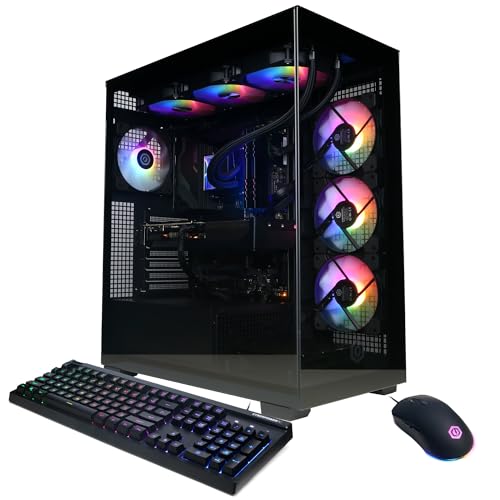
CyberPowerPC Gamer Xtreme VR Gaming PC

Intel Core Ultra 7 Processor 270K Plus

Intel BX80673I77820X Core i7-7820X Processor

Meta Quest 2 Advanced All-In-One VR Headset 256 GB (Renewed)

3D VR Glasses VR Headset 4.5-7inch Phones
More Details On Our Top Picks
For a compact desktop build, six cores and 12 processing threads give you room for a VR game, voice chat, and ordinary background tasks without demanding a high-end platform. The integrated AMD Radeon graphics are useful during setup or troubleshooting, although demanding headset gaming still calls for a separate graphics card.
A 4.4 GHz maximum boost refers to the highest stated operating speed for suitable workloads, while unlocked tuning gives experienced builders extra control. DDR4 support and the AM4 socket make this a sensible fit for an existing budget-oriented platform, but you may find the older memory and socket standards less attractive for a brand-new enthusiast build.
Strong Points
- Six cores and 12 threads suit everyday multitasking around a VR session.
- Built-in Radeon graphics can help you configure a display before adding a dedicated card.
- DDR4 support keeps compatible memory choices straightforward for an AM4 build.
- Unlocked operation gives experienced PC builders tuning flexibility.
Things To Consider
- Serious VR gaming still depends heavily on a separate graphics card.
- AM4 and DDR4 limit forward platform expansion compared with the Intel Core Ultra 7 Processor 270K Plus.
- Extra cooling attention may be needed during extended high-load use after tuning.
Key Specs
Who It Suits Best
You’ll get the most sense from this processor in an entry-level or midrange AM4 desktop that pairs it with a dedicated VR graphics card.
Where Another Pick Suits Better
Choose the CyberPowerPC Gamer Xtreme VR Gaming PC instead for a ready-to-use system with stronger dedicated graphics and included memory and storage.
Room-scale VR and demanding simulation games benefit from a complete system that already brings the processor, graphics card, memory, and storage together. The Intel Core i9-14900KF supplies 24 cores, while the GeForce RTX 5070 with 12GB of graphics memory handles the visual workload that the Ryzen 5 5500GT leaves to a separate card.
With 32GB of DDR5 memory, a 2TB PCIe 4.0 NVMe solid-state drive, liquid CPU cooling, and Windows 11 Home, you avoid much of the parts-selection work. You may find the large case, RGB lighting, and wired port array more desktop-focused than needed for a small room, but the HDMI and three DisplayPort connections suit multi-display setups.
What We Like
- High-core-count processing supports VR games, streaming, and demanding desktop work.
- The RTX 5070 12GB graphics card is purpose-built for visually intensive play.
- Two terabytes of PCIe 4.0 NVMe storage gives installed games useful breathing room.
- Liquid CPU cooling and a tempered side panel suit a performance-oriented desk setup.
- WiFi 5, Bluetooth 4.2, wired LAN, and 7.1-channel audio cover varied connection needs.
Worth Noting
- A prebuilt desktop gives you less control over the exact internal component brands.
- Liquid cooling adds another component to monitor during long-term ownership.
- The tower may be excessive for standalone headset owners who don’t need a gaming PC.
Feature Snapshot
Made For
You’ll appreciate this desktop most for demanding PC VR, simulation titles, streaming, and creative workloads at a dedicated gaming desk.
Consider Something Else When
The Meta Quest 2 Advanced All-In-One VR Headset suits you better for cable-free, console-free sessions without a tower.
New enthusiast builds get a more current foundation here than the AM4-based AMD Ryzen 5 5500GT. The 24-core layout combines eight performance cores, designed for demanding foreground work, with 16 efficiency cores for lighter background tasks, and the stated maximum speed reaches 5.5 GHz.
Support for DDR5 and PCIe 5.0 and 4.0 points toward newer memory and expansion hardware, while the LGA1851 socket requires an Intel 800 Series chipset motherboard. That platform commitment matters, so you may find this choice less appealing as a drop-in upgrade for an older system.
Highlights
- Twenty-four cores suit demanding games, creation software, and multitasking.
- Eight performance cores focus on intensive foreground applications.
- Sixteen efficiency cores help carry lighter background activity.
- DDR5 and PCIe 5.0 support give a new build more current expansion options.
Trade Offs
- You need an LGA1851 motherboard with an Intel 800 Series chipset.
- DDR5 memory and a new board can make installation more involved than an AM4 refresh.
Technical Sheet
Right Fit For
You’ll find the strongest match in a fresh enthusiast PC intended for demanding VR, high-speed storage, and future platform expansion.
Not Your Match When
The Intel BX80673I77820X Core i7-7820X Processor fits better for an existing X299 system that needs platform continuity.
An older processor can still make sense when your desktop already uses the X299 chipset. This Core i7 option is best viewed as a continuity upgrade for that platform, not as the foundation for a new VR computer built around current memory and expansion standards.
For casual PC VR, the graphics card remains a major part of the experience, and this processor doesn’t include stated integrated graphics in the supplied information. You may find installation and troubleshooting easier inside a familiar X299 system, though older platform parts can take more care to source and maintain.
Upsides
- Direct X299 compatibility helps preserve an existing motherboard investment.
- Its desktop processor format suits custom PC upgrades rather than a standalone headset.
Room For Improvement
- It belongs to an older platform than the Intel Core Ultra 7 Processor 270K Plus.
- You need a separate graphics solution for PC-based VR.
- Older X299 systems may require extra attention to cooling, firmware, and compatible parts.
Quick Facts
Who Will Love This
You’re the right match as an X299 desktop owner seeking a compatible processor for moderate VR and general workstation use.
Look Elsewhere When
The CyberPowerPC Gamer Xtreme VR Gaming PC makes more sense for you as a first-time PC VR shopper who wants graphics, memory, and storage included.
You don’t need a separate CPU at all for standalone VR, and that’s the important distinction here. The Meta Quest 2 combines its own processing hardware, display, tracking, and controls in one headset, making it convenient for travel, family rooms, and quick sessions without a desktop.
The 256GB capacity gives you more room for installed experiences than smaller storage versions, while 1832 by 1920 pixels per eye supports detailed viewing. As a renewed item, condition and included accessories deserve close inspection on the listing, and you may prefer the phone-based 3D VR Glasses for very casual viewing.
Bright Spots
- All-in-one construction avoids PC assembly and cable management.
- 256GB storage gives you useful space for a broader installed library.
- Hand tracking supports interaction without relying on controllers for every task.
- The stated display resolution supports clear game and media presentation.
Small Caveats
- Renewed condition makes listing details and included accessories worth checking carefully.
- Standalone hardware does not replace a powerful desktop for the most demanding PC VR titles.
- Headset lenses, facial interface, and controllers need regular gentle cleaning and careful storage.
At A Glance
Best Suited To
You’ll benefit most as a beginner or traveler who wants standalone VR without assembling a computer.
A Better Fit Elsewhere
The CyberPowerPC Gamer Xtreme VR Gaming PC is a stronger fit for you when demanding PC-based graphics and desktop multitasking matter most.
Phone-based VR takes a very different path from the Meta Quest 2. You place a compatible 4.5 to 7-inch phone inside the headset, then use the optical housing for panoramic video, simple games, and casual media in a lightweight package.
Adjustable pupil distance, meaning the spacing between the lens centers, helps you align the view to your eyes, while the T-shaped headband accommodates different head sizes. The honest trade-off is that your phone supplies the processing and display, so app compatibility, phone fit, and comfort may vary more than with a dedicated headset.
Plus Points
- Supports a broad 4.5 to 7-inch phone size range.
- Adjustable pupil distance helps you fine-tune lens alignment.
- Lightweight construction suits short sessions at home or outdoors.
- A T-shaped headband accommodates different head sizes.
- Large lens barrels support a wider stated field of view.
Areas To Watch
- Your phone’s screen, battery, and VR app support determine much of the experience.
- Long sessions may feel less comfortable because phone weight sits inside the front housing.
- Lens surfaces and the phone compartment need careful cleaning to avoid dust buildup.
Feature Rundown
Whose Shelf It Belongs On
You’ll find this most suitable for casual phone-based VR, simple panoramic videos, and short sessions with an already-compatible large-screen phone.
Swap It Out When
The Meta Quest 2 Advanced All-In-One VR Headset suits you more for dedicated tracking, built-in processing, and a self-contained VR setup.
How To Choose The Right Cpus For Virtual Reality
Start With The Whole VR System
A CPU handles game logic, physics, input processing, and background software, but the graphics card usually carries the heaviest visual load in PC VR. That makes the CyberPowerPC Gamer Xtreme VR Gaming PC a different kind of choice from the Ryzen 5 5500GT or Intel Core Ultra 7 Processor 270K Plus, since the desktop already includes dedicated graphics.
You should match the processor to the headset and games you actually use. Standalone hardware such as the Meta Quest 2 needs no desktop CPU, while a PC headset benefits from balanced processor and graphics performance.
Match Core Count To Your Habits
Core count describes how many independent processing units a CPU has, while threads represent task paths the processor can manage. Six cores and 12 threads can suit a first gaming desktop, but 24-core designs give you more headroom for streaming, creation software, simulation, and background tasks.
For most casual VR sessions, spending more on cores alone won’t solve a graphics limitation. A balanced system usually feels better than a powerful processor paired with an undersized graphics card.
Check Socket And Memory Compatibility
The Ryzen 5 5500GT uses the AM4 platform and DDR4 memory. The Intel Core Ultra 7 Processor 270K Plus requires LGA1851 hardware, an Intel 800 Series chipset motherboard, and DDR5 memory, while the Core i7-7820X points toward an X299 system.
That distinction affects installation, parts cost, and future upgrade options. Check the motherboard socket, chipset, memory generation, and cooling arrangement before you commit to a CPU.
Plan For Heat And Physical Setup
Higher processing capacity can make cooling, case airflow, and power planning more important during long gaming sessions. A liquid-cooled prebuilt reduces assembly work, while a standalone CPU purchase leaves you responsible for a compatible cooler and motherboard.
You’ll also want enough USB and display connectivity for your headset, sensors, monitor, and accessories. A desktop used in a small room benefits from tidy cable routing and accessible ports, not just raw processing speed.
Things Worth Knowing First
Mistakes Worth Dodging
A common mistake is choosing a CPU from the title alone and ignoring the graphics card. PC VR performance depends on the complete system, so check the graphics hardware, memory, storage, headset connection, and motherboard together.
You can also overlook platform age. An X299-compatible processor may suit an existing desktop, but a new build generally needs a clear reason to use an older socket and memory standard.
Where The Extra Money Goes
Higher-tier choices usually combine more cores, newer memory support, faster expansion standards, or a stronger graphics card. Those upgrades matter most for demanding simulation, streaming, creation work, and a desktop expected to remain useful for several years.
Casual phone-based viewing doesn’t need that investment, and standalone VR can bypass desktop parts entirely. Spend more when your headset, software, and multitasking habits can actually use the added capability.
Closing Remarks
You can choose the Ryzen 5 5500GT for a measured AM4 build, the CyberPowerPC desktop for a ready-made PC VR system, or the Intel Core Ultra 7 Processor 270K Plus for a fresh enthusiast platform. The older Core i7-7820X makes sense mainly for X299 owners, while the Meta Quest 2 and phone-based headset serve people who don’t need a desktop CPU. Start with your headset and graphics needs, then select the processor platform that fits your space, skills, and upgrade plans.
