
Choosing a computer for VR means balancing processor speed, graphics power, memory, cooling, and headset compatibility. You need enough headroom for smooth sessions, but you may also want a machine that handles streaming, work, or regular gaming without turning your desk into a repair project. This shortlist includes powerful prebuilt desktops, a replacement PlayStation VR processor unit, and a Dell-specific cooling module. You can match each option to your headset, room, and upgrade plans rather than judging every item by its processor name alone.
The Shortlist At A Glance
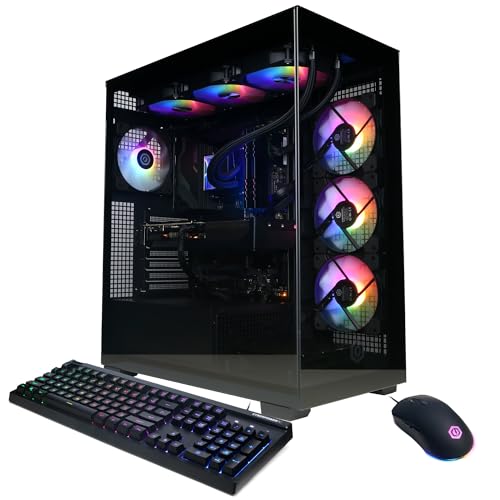
CyberPowerPC Gamer Xtreme VR Gaming PC Intel Core i9-14900KF GeForce RTX 5070
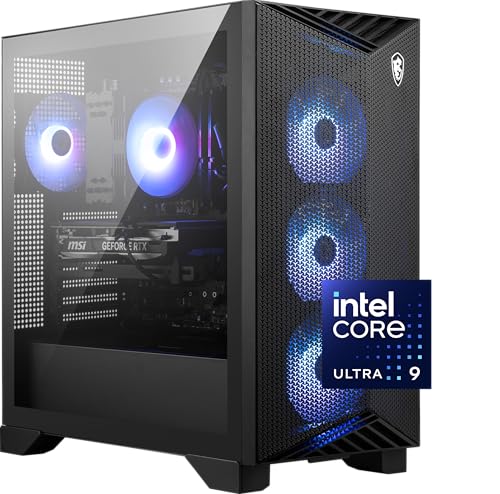
msi Aegis R2 AI Gaming Desktop Intel Core Ultra 9 285 GeForce RTX 5070Ti

Processor for Sony PlayStation VR PS4 Virtual Reality Headset CUH-ZVR1

Deal4GO Large CPU VR Heatsink Module J46J2 Small VRM Heatsink for Dell Alienware Aurora R10

msi Codex R2 Gaming Desktop PC GeForce RTX 5070 Intel Core i5-14400F

STORMCRAFT Falcon AI Gaming PC R7 7800X3D RX 9070 XT 16G
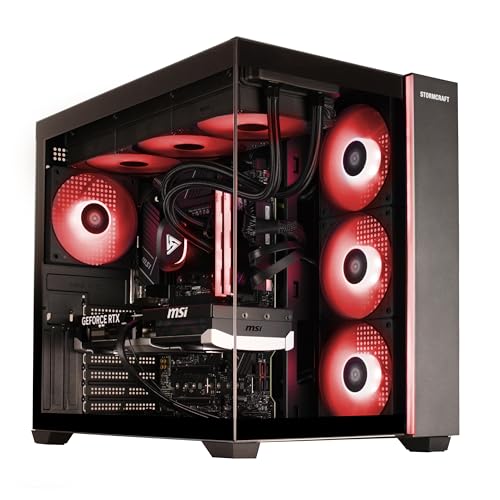
STORMCRAFT Falcon Prebuilt RTX 5070 Gaming PC R7 7800X3D
More Details On Our Top Picks
Daily VR sessions, demanding simulators, and desktop multitasking all suit the 24-core Core i9-14900KF. The RTX 5070 supplies 12GB of graphics memory, while 32GB of DDR5 memory gives you room for the headset software, game, voice chat, and background tools.
The liquid-cooled processor and tempered side panel give the tower a gaming-focused setup, with RGB lighting adding visual flair. You may find the WiFi 5 standard less appealing in a crowded home network, but wired LAN remains available for a headset area near the router.
Strong Points
- 24-core processor suits heavy simulation and multitasking.
- 2TB PCIe 4.0 NVMe SSD provides generous game storage and quick loading.
- Four DisplayPort connections and one HDMI output offer flexible display layouts.
- Liquid cooling can help keep the high-output CPU manageable during long sessions.
- Keyboard and mouse let you start using the desktop without adding those basics separately.
Things To Consider
- WiFi 5 and Bluetooth 4.2 are older wireless standards than the MSI Codex R2 offers.
- Liquid cooling adds a pump and radiator that require more attention than a basic air cooler.
Key Specs
Who It Suits Best
You get the most from this tower as a serious VR player who also runs simulators, streams, or demanding creative software.
Consider Something Else When
Choose the STORMCRAFT Falcon AI Gaming PC for a stronger graphics-memory package and a 360mm liquid cooler.
The Aegis R2 steps above CyberPowerPC’s Gamer Xtreme with a Core Ultra 9 285 and GeForce RTX 5070 Ti. That pairing gives your headset setup a premium performance profile, while the 32GB DDR5 and 2TB M.2 NVMe SSD keep the rest of the desktop feeling well provisioned.
Air cooling keeps the design mechanically simpler than liquid-cooled alternatives, which can make dust maintenance more familiar. You may prefer the quieter potential of a liquid system during extended sessions, yet the USB Type-C connection is a useful modern touch for desks filled with current accessories.
What We Like
- Core Ultra 9 285 is suited to demanding games and productivity workloads.
- RTX 5070 Ti provides a higher graphics tier than the RTX 5070 systems here.
- 2TB M.2 NVMe storage gives your headset library breathing room.
Worth Noting
- Air cooling may need regular dust removal in a warm gaming room.
- The stronger components make this more machine than a casual VR setup requires.
- The source lists Windows 11 Home, so business users may need a different edition.
Feature Snapshot
Made For
This desktop fits experienced PC gamers who want a higher-tier VR platform for demanding games and creative workloads.
Not Your Match When
Pick the msi Codex R2 for a less elaborate desktop focused on first-time VR use and mainstream gaming.
This item belongs in a different part of the category. Rather than acting as a desktop CPU, the CUH-ZVR1 processor unit is the external processing box used with the original PlayStation VR headset for PS4.
That makes it relevant for a console setup with a missing or damaged processor box, not for PC VR. The renewed condition deserves careful attention, and you may want to compare the listing details against your exact headset cables before committing.
Highlights
- Targets the CUH-ZVR1 PlayStation VR system directly.
- Useful for restoring a PS4 VR setup without replacing the complete headset.
Trade Offs
- It isn’t a general-purpose computer processor or a PC VR upgrade.
- Renewed hardware may show cosmetic variation, so listing photos and included items deserve review.
- Cable compatibility matters during installation and storage.
Quick Facts
Right Fit For
You benefit most as a PS4 owner restoring an original PlayStation VR arrangement, rather than building a computer-based headset station.
Look Elsewhere When
Choose the CyberPowerPC Gamer Xtreme for PC VR, modern desktop gaming, and large multitasking workloads.
For a Dell Alienware Aurora R10 Ryzen Edition, cooling hardware can matter more than a new desktop. This Deal4GO set pairs a large CPU VR heatsink with a smaller VRM heatsink, the latter helping cool the motherboard power-delivery area around the processor.
It makes sense during a repair or parts refresh, especially for an Aurora R10 that has lost a matching heatsink. The honest read is narrow compatibility, so you need the Aurora R10 Ryzen Edition and the listed J46J2 and 4D5V9 part references before installation.
Upsides
- Combines the large and small heatsink pieces needed for the specified arrangement.
- Provides a focused replacement path instead of replacing an entire desktop.
- Model numbers make compatibility checking more precise.
Room For Improvement
- It serves one Alienware desktop family rather than a broad range of systems.
- Installation requires careful removal, cleaning, and thermal interface handling.
- It doesn’t add VR graphics capability by itself.
Technical Sheet
Best Suited To
This component suits a technically confident Aurora R10 owner handling a compatible cooling replacement.
Where A Sibling Pick Shines
Choose the STORMCRAFT Falcon Prebuilt RTX 5070 Gaming PC for a complete VR desktop rather than a repair component.
The Codex R2 takes a sensible route for a first PC VR desktop: an Intel Core i5-14400F, RTX 5070 with 12GB, and 32GB of DDR5 memory. You get a capable graphics foundation without moving into the higher processor tiers used by the Aegis R2 or Falcon systems.
WiFi 6E is useful in a busy home network, while air cooling keeps routine dust cleaning familiar. Storage is the main compromise, since the 1TB NVMe SSD fills sooner once you install several large games and creative applications.
Bright Spots
- RTX 5070 graphics suit modern VR gaming and high-detail desktop play.
- 32GB DDR5 supports headset software, games, and everyday multitasking.
- WiFi 6E offers a newer wireless connection standard than the CyberPowerPC system.
- Air cooling simplifies routine cleaning compared with a liquid-cooled tower.
Points To Note
- 1TB of storage leaves less room for a growing VR library.
- The Core i5 processor has less multitasking headroom than the Core i9 and Core Ultra 9 options.
- Long-term storage planning may lead you toward an additional drive.
At A Glance
Who Will Love This
This desktop suits a first-time PC VR player who wants strong graphics, modern wireless networking, and manageable everyday ownership.
Swap It Out When
Reach for the msi Aegis R2 when you run heavy creative applications or want more built-in storage and CPU reserve.
A Ryzen 7 7800X3D and RX 9070 XT with 16GB of graphics memory give this Falcon a distinct AMD-focused profile. The 360mm all-in-one cooler, meaning a sealed liquid cooling assembly with a large radiator, is built for sustained gaming loads rather than a compact office role.
That combination suits long VR sessions, high-refresh play, and game design work. You may find the 1TB SSD restrictive after a few large installations, and the liquid cooler plus ARGB fans means more components to monitor than the air-cooled MSI Codex R2.
Reasons To Buy
- RX 9070 XT carries 16GB of graphics memory for detailed virtual environments.
- Ryzen 7 7800X3D is a strong fit for CPU-sensitive gaming workloads.
- 360mm AIO cooling gives the processor substantial thermal hardware.
- 850W power supply supports the listed performance-focused configuration.
- USB-C, Bluetooth, and WiFi cover common desk and headset accessories.
Minor Gripes
- 1TB storage can fill quickly with VR games, recordings, and design files.
- Liquid cooling and ARGB fans add cleaning and cable-management work.
Feature Rundown
Who Should Grab It
This tower is aimed at serious PC gamers, creators, and VR users who value AMD graphics memory and substantial cooling hardware.
Another Choice May Suit
Choose the STORMCRAFT Falcon Prebuilt RTX 5070 Gaming PC for a similar Ryzen 7 7800X3D base with a different graphics platform.
The second Falcon keeps the Ryzen 7 7800X3D but pairs it with an RTX 5070, 32GB of DDR5 memory, and a 1TB SSD. That makes it a middle path between the MSI Codex R2’s mainstream CPU and the RX 9070 XT Falcon’s larger graphics-memory allocation.
An AMD B850 chipset provides the stated platform, while 6000MHz RGB memory, an 850W power supply, and a 360mm AIO create a performance-minded foundation. For most home setups, you may find this combination well suited to VR, esports, streaming, and regular desktop use, though storage expansion remains worth planning.
Plus Points
- Ryzen 7 7800X3D gives the system a gaming-focused CPU foundation.
- RTX 5070 graphics with 12GB suits current VR and high-resolution gaming.
- 32GB DDR5 at 6000MHz supports demanding multitasking.
- 360mm AIO cooling and an 850W power supply match the performance-oriented design.
Small Caveats
- 1TB storage may require expansion for a large game collection.
- The liquid cooling system needs more careful dust and hardware monitoring than simple air cooling.
- The RTX 5070 has less graphics memory than the RX 9070 XT Falcon.
Core Details
The Right Fit
This computer suits VR players who want a strong gaming CPU, current graphics, and enough memory for streaming or competitive play.
Reach For A Different Pick When
Choose the STORMCRAFT Falcon AI Gaming PC when your priority is 16GB of graphics memory for more demanding visual workloads.
How To Choose The Right Cpus For Vr
Start With The Graphics Card
For PC VR, the graphics card usually carries the largest rendering burden. Look at the GPU model and graphics memory together, since 12GB and 16GB can give you different room for detailed textures, high-resolution output, and demanding games. The RTX 5070 desktops offer 12GB, while the STORMCRAFT Falcon AI uses an RX 9070 XT with 16GB.
Match CPU Headroom To Your Routine
A CPU handles game logic, physics, background programs, and headset software. Core count describes how many processing units work in parallel, while clock speed describes how quickly those units operate. A Core i5-14400F suits a straightforward gaming desk, while the Core i9-14900KF and Ryzen 7 7800X3D make more sense for simulation, streaming, creation, and heavy multitasking.
Treat Memory And Storage As Daily Comfort
Thirty-two gigabytes of DDR5 memory appears across the full desktop selection, giving you a comfortable starting point for VR games and desktop applications. Storage affects how often you manage installations: 1TB works for a focused library, while 2TB gives you more breathing room. NVMe SSDs use a fast storage interface that reduces loading delays compared with older mechanical drives.
Don’t Forget Cooling And Connections
Long sessions place steady demand on the processor and graphics card, so cooling design matters in a warm room or enclosed desk. Air cooling is easier to understand and clean, while a 360mm AIO provides a larger liquid-cooling arrangement with added pump hardware. Check USB-C, USB-A, DisplayPort, HDMI, wireless networking, and wired LAN against your headset accessories before setting up.
Things Worth Knowing First
Mistakes Worth Dodging
A common mistake is treating every item with “VR” in its title as a complete VR computer. The Sony CUH-ZVR1 unit supports a PS4 headset setup, while the Deal4GO item is a Dell Aurora R10 cooling replacement. Confirm your platform, headset generation, and connection needs before choosing.
Storage is another easy detail to overlook. A 1TB SSD can feel generous at first, yet several large games, recordings, and design files can reduce that space quickly. Leave room for expansion or select a 2TB configuration from the start.
Where The Extra Money Goes
Higher-tier desktops generally combine a stronger processor, a more capable graphics card, larger storage, or more elaborate cooling. Paying more makes sense for demanding simulators, high-resolution headsets, streaming, and creative work that keeps several applications open.
A modest system remains sensible for occasional VR gaming. You gain more value from the MSI Codex R2 when your headset use is focused and your desktop workload stays light, while the Aegis R2 or Falcon systems suit sustained performance demands.
Final Verdict
Your best match depends on the setup behind the headset. Choose CyberPowerPC Gamer Xtreme for broad CPU and storage headroom, MSI Aegis R2 for a higher graphics tier, or MSI Codex R2 for a practical first desktop. The two STORMCRAFT Falcons suit serious gaming, with the RX 9070 XT model offering 16GB of graphics memory. For console repair, choose the Sony processor unit, and for an Aurora R10 cooling fix, choose Deal4GO. Match the platform first, then spend according to your actual games and workload.
