
X4: Foundations rewards a desktop that can handle large simulations, busy stations, and frequent shifts between trading, combat, and construction. You need more than a high clock speed alone, because core count, platform age, cooling, and upgrade room all shape the experience. This shortlist covers capable AM4 processors, compact coolers, an older AM3 option for legacy systems, and several cooling upgrades for sustained desktop use. You’ll find the strongest match for a new build, a budget refresh, or a small-form-factor computer without sorting through unrelated specifications.
The Shortlist At A Glance

AMD Ryzen 9 5900XT Desktop Processor

Thermaltake Gravity A2 CPU Cooler AM4 AM5
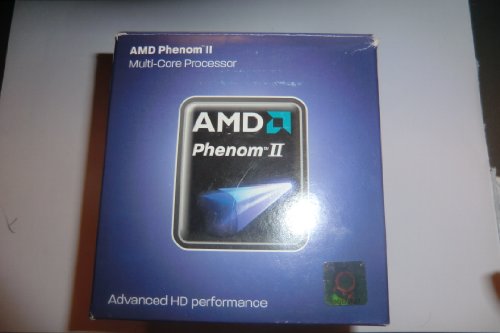
AMD Phenom II X4 945 Deneb Processor

AMD Ryzen 3 3200G with Radeon Graphics

Thermalright Peerless Assassin 120 Digital White CPU Cooler
Ryzen 7 Wraith Prism RGB CPU Cooler
SCYTHE Big Shuriken 4 Low Profile CPU Cooler
More Details On Our Top Picks
Large X4: Foundations empires benefit from the Ryzen 9 5900XT’s 16 cores and 32 threads, especially during long sessions with trading, construction, and background simulation all active. Zen 3 is the processor architecture here, while the unlocked design leaves room for manual tuning on a compatible AM4 board.
The 4.8 GHz maximum boost and 72 MB cache suit demanding desktop work as well as gaming, and DDR4-3200 support keeps the platform practical for an existing AM4 computer. You’ll need a separate cooler because none is included, so the Thermaltake Gravity A2 is not the right pairing for this processor’s load range. For most AM4 owners, this remains the serious upgrade path, though a new cooling budget is part of the plan.
Strong Points
- Sixteen cores and 32 threads give you substantial headroom for simulation-heavy play and multitasking.
- The 4.8 GHz boost specification supports responsive menu work and fast transitions during active sessions.
- AM4 and DDR4 compatibility can help you extend an existing desktop instead of replacing every major component.
- Unlocked operation suits experienced desktop builders who understand motherboard, power, and temperature limits.
Things To Consider
- You must supply a suitable CPU cooler, and crowded cases need careful airflow planning.
- Manual tuning adds setup work and makes cleaning dust from the cooler and case more important.
Key Specs
Who It Suits Best
You’ll gain the most from this processor as an AM4 owner running large fleets, multiple applications, or creative workloads.
Consider Something Else When
Choose the AMD Ryzen 3 3200G instead for a modest AM4 desktop that needs built-in graphics and a bundled cooler.
Small AM4 cases often leave little room above the socket, and the Gravity A2 answers that problem with a 60 mm-high aluminum heatsink and a 92 mm PWM fan. PWM means the motherboard can adjust fan speed according to temperature, which is useful during quiet browsing and busier game sessions alike.
The cooler carries a stated 95 W support level and also fits AM5, making it a sensible match for moderate processors rather than the Ryzen 9 5900XT. You may find the compact layout easier to install around tall memory modules, though its modest thermal ceiling leaves less room for sustained heavy loads. Regular dust removal around the narrow fin structure should help preserve airflow.
What We Like
- The 60 mm height suits compact cases that reject taller tower coolers.
- AM4 and AM5 support gives you flexibility across two AMD desktop platforms.
- A 1200 to 3500 RPM control range lets you balance idle acoustics and active cooling.
Trade Offs
- The 95 W rating makes this a poor fit for the 5900XT under sustained demanding use.
- Aluminum extrusion keeps the design light and compact, but it offers less mass than a large dual-tower cooler.
- Compact fins require more frequent attention in dusty rooms.
Feature Snapshot
Made For
You’ll find the best fit in a compact AM4 or AM5 desktop using a moderate-wattage processor.
Not Your Match When
Reach for the Thermalright Peerless Assassin 120 Digital White for a taller case and sustained high-load cooling.
For an older AM3 desktop, the Phenom II X4 945 offers four cores at 3.0 GHz and a 95 W rating. That makes it relevant mainly to you when a matching motherboard already sits on your desk, rather than as the foundation for a new X4: Foundations computer.
The 4×512 KB L2 cache describes four separate 512 KB pools close to the processing cores, while the Deneb design belongs to an earlier generation than the Ryzen choices here. You may find it adequate for a basic legacy setup, but modern simulation demands can expose its age quickly. Confirm the socket, firmware support, memory platform, and cooler mounting before committing.
Highlights
- Four physical cores can extend the useful life of a compatible AM3 desktop.
- The 3.0 GHz frequency suits basic desktop duties and lighter gaming loads on older hardware.
Minor Gripes
- AM3 compatibility sharply limits modern upgrade paths and platform features.
- Legacy systems may require careful cleaning, fresh thermal compound, and a cooler with the correct mounting hardware.
- You should expect less simulation headroom than the AM4 Ryzen processors in this list.
Quick Facts
Right Fit For
You’ll suit this processor best when you’re restoring an AM3 desktop and already have compatible supporting hardware.
Look Elsewhere When
Select the AMD Ryzen 9 5900XT for a substantial AM4 upgrade and much greater simulation multitasking capacity.
Integrated Radeon Vega 8 graphics make the Ryzen 3 3200G useful for a straightforward desktop without a separate graphics card. You get four cores, a 3.6 GHz base clock, and a 4.0 GHz maximum boost, which creates a practical starting point for lighter X4: Foundations sessions and everyday work.
The included Wraith Stealth cooler simplifies assembly, while the unlocked processor leaves room for experienced tuning. Compared with the Phenom II X4 945, this AM4 option gives you a newer platform and integrated graphics, but the four-core design has limited room for a large, heavily populated galaxy. You’ll appreciate the simple maintenance, though the bundled cooler still needs unobstructed case airflow.
Upsides
- Radeon Vega 8 graphics can handle display output without a separate graphics card.
- The bundled Wraith Stealth cooler reduces the number of components needed during assembly.
- AM4 support gives you a more practical upgrade platform than the older AM3 processor.
- Four cores and a 4.0 GHz boost suit everyday computing and lighter gaming.
- Unlocked operation gives you an optional tuning path rather than forcing extra complexity.
Room For Improvement
- Four cores provide less simulation headroom than the Ryzen 9 5900XT.
- Integrated graphics share system resources, so demanding visual settings may require careful adjustment.
At A Glance
Best Suited To
You’ll get the clearest value from this choice as a beginner building a modest AM4 desktop with integrated graphics.
Where A Sibling Pick Shines
Choose the AMD Ryzen 9 5900XT for large simulations, heavy multitasking, and a substantial AM4 performance step.
Long X4: Foundations sessions place more value on sustained cooling, and the Peerless Assassin 120 Digital White approaches that job with a dual-tower heatsink, two fans, and six 6 mm heatpipes. A heatpipe transfers heat away from the processor into the fin stacks, while the magnetic top cover adds a visible display element without changing the basic air-cooling layout.
Its 162 mm overall height makes case clearance the first thing to verify, especially beside tall memory or in a narrow mid-tower. You may find this substantial cooler better suited to the Ryzen 9 5900XT than the Gravity A2, but installation takes more room and dust removal involves two fan areas. The white finish also rewards careful cable routing and regular cleaning.
Reasons To Buy
- Dual towers and six heatpipes provide a larger heat-dissipation surface for extended workloads.
- The 120 mm fans move more air than the compact 92 mm Gravity A2 design.
- AM4, AM5, and several Intel sockets support future platform changes.
- The magnetic display cover gives a white build a coordinated visual finish.
Points To Note
- The 162 mm height can restrict case choice and memory clearance.
- Two fans and a deep fin stack require more installation and cleaning access.
- Large air coolers can obscure nearby motherboard components.
Details At A Glance
Who Will Love This
You’re the right match when sustained gaming or simulation loads meet a roomy case and you want a substantial air cooler.
Swap It Out When
Use the SCYTHE Big Shuriken 4 for a Mini-ITX enclosure where 162 mm of cooler height cannot fit.
RGB lighting and a copper-core base give this Wraith Prism-style cooler a more visual presence than the plain Gravity A2. AM4 and AM5 compatibility makes it useful across several AMD desktop generations, while pre-applied thermal paste can shorten the assembly process for a replacement build.
The dual-speed PWM fan offers a low or high operating mode, so you can favor quieter everyday use or stronger airflow during gaming. One thing worth considering is the broad compatibility claim: socket support does not automatically mean equal cooling suitability for every Ryzen 7 or Ryzen 9 chip. You’ll need to match the cooler to your processor’s thermal demands and keep the fan and copper base clear of dust.
Bright Spots
- AM4 and AM5 support gives you a flexible option for AMD-focused upgrades.
- The copper-core base helps transfer heat from the processor into the heatsink.
- Pre-applied thermal paste reduces one installation step for a replacement cooler.
- RGB lighting suits a side-window desktop where the cooler is part of the visual layout.
Small Caveats
- You may need to confirm clearance and processor suitability before using it with a high-output chip.
- RGB wiring adds another cable to route and maintain inside the case.
- The included paste limits your choice of compound during the first installation.
Core Details
Built With In Mind
You’ll suit this cooler as an AMD desktop owner who wants socket flexibility, straightforward installation, and visible RGB styling.
A Better Fit Elsewhere
Select the Thermalright Peerless Assassin 120 Digital White for a larger cooler aimed at sustained heavy workloads in a spacious case.
Small-form-factor desktops need cooling that respects height limits, and the Big Shuriken 4 stands 67 mm tall with a footprint of 4.7 by 4.8 inches. Six heatpipes spread heat through the cooler while the low profile leaves more room for a compact case lid, making it a more natural fit for Mini-ITX builds than the Peerless Assassin.
The listed 200 W capacity and 31.78 dB sound figure suggest a strong specification sheet for a compact design, though case ventilation still controls real-world results. You may find installation more cramped around memory and motherboard components, so plan the cable path before securing the fan. Its AM5 and LGA1851 support also keeps it relevant for newer desktop platforms.
Best Bits
- The 67 mm height supports compact cases that cannot accept conventional tower coolers.
- Six heatpipes provide a larger heat-transfer route than many basic low-profile designs.
- AM5 and LGA1851 support gives you current AMD and Intel platform flexibility.
Areas To Watch
- Low-profile mounting can be more fiddly around dense Mini-ITX layouts.
- The compact form may leave less thermal margin than the much larger Peerless Assassin during prolonged high-load use.
Technical Sheet
The Right Fit
You’ll benefit most as a Mini-ITX builder or compact-desktop owner who needs low height without abandoning multi-heatpipe cooling.
Reach For A Different Pick When
Choose the Thermaltake Gravity A2 for a simpler, smaller AM4 or AM5 cooler in a moderate-wattage system.
How To Choose The Right Cpus For X4 Foundations
Start With Simulation Headroom
X4: Foundations can become more demanding as your universe grows, so you should weigh core count alongside boost speed. A processor with many cores and threads gives you more room for background simulation, browser tabs, voice chat, and recording software. The Ryzen 9 5900XT makes the strongest case here for an existing AM4 desktop, while the Ryzen 3 3200G suits a smaller starting system.
Clock speed still matters because short, active tasks benefit from quick single-core response. A high boost figure helps menus and interactions feel responsive, but it cannot fully replace additional cores during a large late-game empire.
Match The Socket To Your Motherboard
Socket compatibility comes first. AM4 processors need an AM4 board, AM3 processors need an AM3 board, and a cooler’s socket list does not make the processor itself cross-compatible. Check the motherboard model, firmware support, memory type, and expansion standard before choosing an upgrade.
You also need to separate platform refreshes from complete builds. The Phenom II X4 945 only makes practical sense for an existing AM3 computer, while the Ryzen choices belong to more modern AM4 systems.
Plan Cooling Around Workload
A cooler removes heat from the processor through a heatsink and fan, then relies on case airflow to move that heat outside the enclosure. The compact Gravity A2 works for moderate loads and tight cases, while the Peerless Assassin offers a much larger dual-tower design for sustained activity.
Your case height matters just as much as the cooler rating. A 162 mm tower may suit a roomy mid-tower, but a 67 mm Big Shuriken 4 is easier to place in a Mini-ITX enclosure.
Consider Graphics And Upgrade Plans
The Ryzen 3 3200G includes Radeon Vega 8 graphics, so you can assemble a display-ready desktop without a separate graphics card. That convenience helps with entry-level systems, but a dedicated graphics card may become necessary as visual demands rise.
For an AM4 desktop, the Ryzen 9 5900XT offers a longer performance runway than the four-core choices. You’ll spend more time checking cooling and motherboard support, but the extra planning makes sense for large fleets and heavier multitasking.
Things Worth Knowing First
Mistakes Worth Dodging
You can lose time by choosing a processor before checking the motherboard socket. An AM3 board cannot turn into an AM4 platform through a BIOS update, and a cooler listed for AM5 does not make an AM3 processor compatible.
Cooler height causes another common problem. Measure from the motherboard surface to the side panel, then compare that space with the cooler’s stated height. Also check memory clearance around large dual-tower heatsinks.
The Upgrade Payoff
Higher-tier processors cost more because you’re paying for additional cores, threads, cache, newer platform support, or higher sustained workload capacity. You’ll notice that difference most during large simulations, multitasking, and long sessions rather than basic desktop use.
A larger cooler also adds cost and physical bulk because it uses more fin area, heatpipes, or fans. Paying more makes sense for a Ryzen 9 system or a desktop that runs demanding workloads regularly, while a compact four-core build may gain more from careful airflow than from an oversized heatsink.
Final Verdict
You’ll get the clearest X4: Foundations upgrade from the AMD Ryzen 9 5900XT when your AM4 desktop already has suitable memory and motherboard support. The Ryzen 3 3200G keeps entry-level builds straightforward, while the Phenom II X4 945 belongs only in a compatible legacy system. For cooling, choose the Peerless Assassin for roomy high-load desktops, the Big Shuriken 4 for compact cases, or the Gravity A2 for moderate systems with strict height limits. Match every choice to your socket, case, and expected fleet size.
