
A well-matched CPU helps your RTX 3060 Ti spend less time waiting and more time rendering smooth gameplay. You’ll find practical options here for 1080p gaming, 1440p play, streaming, and compact builds, with attention to each card’s cooling design, memory, and fit. Since these listings are graphics cards rather than processors, use them to judge the CPU pairing your system needs around the GPU’s size and performance class. The goal is straightforward: avoid paying for processor power you won’t use, while leaving enough headroom for demanding games and background apps.
The Shortlist At A Glance

MSI RTX 3060 Ti Ventus 2X 8G OCV1 LHR
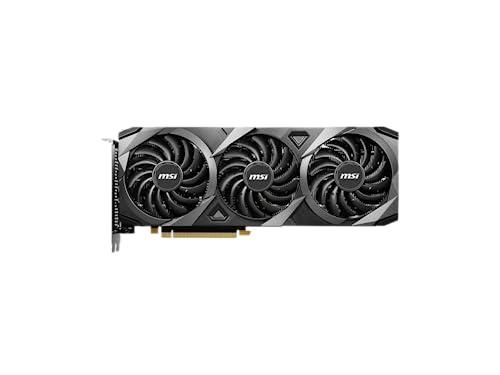
MSI RTX 3060 Ti Ventus 3X 8G OC LHR

EVGA RTX 3060 Ti XC Gaming 08G-P5-3663-KL Renewed
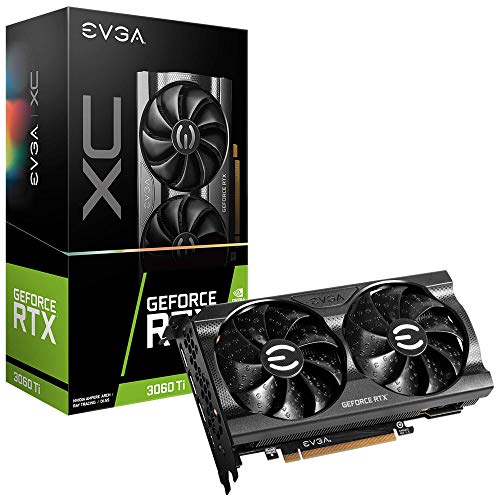
EVGA RTX 3060 Ti XC Gaming 08G-P5-3663-KL
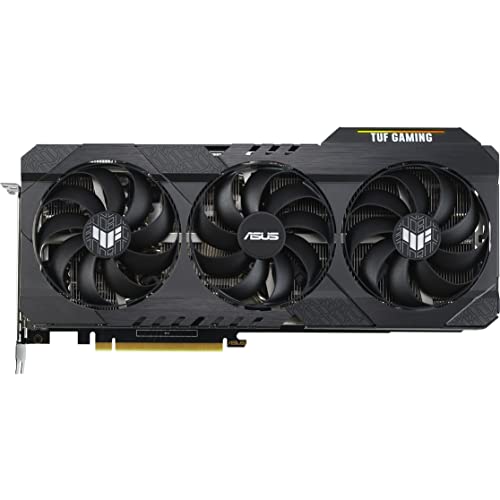
ASUS TUF Gaming RTX 3060 Ti V2 OC Edition
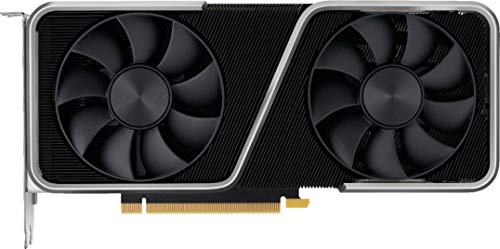
GeForce Nvidia RTX 3060 Ti Founders Edition 8GB
NVIDIA RTX 3060 Ti Founders Edition 8GB Renewed
More Details On Our Top Picks
For a regular 1080p or 1440p gaming tower, the two-fan Ventus 2X keeps the design focused rather than oversized. Its 1695 MHz boost clock describes the stated peak operating speed, while 8GB of GDDR6 memory gives the GPU room for modern texture loads.
The card suits a midrange CPU pairing, especially for esports play, single-player games, and everyday creative work. You may find the dual-fan format easier to place in a crowded case than the larger three-fan options, though compact cooling can demand better case airflow during long sessions.
Strong Points
- Dual-fan cooling is easier to accommodate in many standard-size cases.
- 8GB GDDR6 supports detailed game settings without requiring a higher graphics tier.
- Ray-tracing and Tensor Cores support lighting effects and AI-assisted graphics features.
- Support coverage and claim assistance are listed with the item.
Things To Consider
- A two-fan cooler may pass more heat into the case than a larger three-fan design during extended play.
- Dust buildup around the fans can gradually reduce airflow, so routine cleaning matters.
Key Specs
Who It Suits Best
You’ll get the clearest fit from this card in a mainstream gaming PC with a balanced six-core-class CPU and ordinary case airflow.
Where Another Pick Suits Better
Choose MSI RTX 3060 Ti Ventus 3X 8G OC LHR instead for longer gaming sessions in a roomy case where extra cooling capacity matters more.
Three Torx Fan 3 fans give this Ventus version a different ownership profile from the compact MSI RTX 3060 Ti Ventus 2X. More fans can spread cooling work across a larger assembly, which may suit a desktop used for long gaming blocks or GPU-heavy creative sessions.
The NVIDIA GeForce RTX 3060 Ti LHR chipset and 8GB GDDR6 memory keep the underlying performance class familiar. In your case, the practical catch is clearance: a three-fan card needs more room and sensible front-to-back airflow, so a small tower may be a poor match.
What We Like
- Three-fan cooling gives sustained workloads a more substantial thermal setup.
- 8GB GDDR6 memory fits the card’s 3060 Ti performance tier.
- The listed 1695 MHz boost clock provides a clear reference point for system planning.
Trade Offs
- The longer cooler can complicate installation beside front fans, drive cages, or cable runs.
- More fans mean more surfaces to keep clear of dust over the life of the build.
- Its cooling advantage matters less in short, light gaming sessions.
Feature Snapshot
Made For
This choice fits desktop gamers and creators with roomy cases, steady airflow, and a CPU strong enough for high frame-rate play.
Consider Something Else When
MSI RTX 3060 Ti Ventus 2X 8G OCV1 LHR suits compact cases better, particularly for straightforward 1080p systems.
A renewed EVGA XC Gaming card can make sense for a careful system upgrade, especially alongside a capable mainstream CPU that already sits in your case. The metal backplate adds structure behind the board, while 8GB GDDR6 keeps the graphics memory aligned with the other 3060 Ti options here.
The renewed status deserves attention because cosmetic condition and prior ownership can differ from a new retail unit. You may prefer this route for a secondary gaming PC or a cost-conscious rebuild, but inspect the listing terms and plan for careful installation rather than assuming every accessory is included.
Upsides
- Metal backplate gives the card a more finished rear surface and added board support.
- 8GB GDDR6 is appropriate for mainstream gaming and general GPU work.
Minor Gripes
- Renewed condition can mean more variation in appearance and included packaging.
- Prior use makes dust inspection and fan-noise checks sensible after installation.
- A compact cooler may be less comfortable in a poorly ventilated case.
Technical Sheet
Right Fit For
This item is best suited to experienced upgraders comfortable with renewed hardware and a carefully checked secondary or budget gaming build.
Not Your Match When
EVGA RTX 3060 Ti XC Gaming 08G-P5-3663-KL in its standard listing is a better fit for you when a new-condition purchase matters more than keeping the initial outlay down.
The standard EVGA XC Gaming listing keeps the same model identity as the renewed version but removes the renewed-condition compromise. Its stated 1710 MHz boost clock is slightly higher than the MSI Ventus listings, and the metal backplate suits a tidy, carefully assembled gaming tower.
For 1080p gaming, a six-core processor with solid single-thread performance should keep the pairing sensible, while a stronger CPU helps high-refresh play in lighter titles. In your workspace, the honest consideration is that this card’s compact focus may not offer the same cooling margin as ASUS TUF Gaming RTX 3060 Ti V2 OC Edition.
Highlights
- 1710 MHz boost clock gives you a clearly stated operating target.
- Metal backplate contributes to a more supported and finished card design.
- 8GB GDDR6 matches the memory capacity found across this GPU class.
- New-condition positioning may suit a primary gaming system more than the renewed EVGA version.
Room For Improvement
- The smaller cooling format may need stronger case ventilation during extended workloads.
- Cleaning around the fan intake remains part of normal graphics-card upkeep.
Quick Facts
Best Suited To
You’ll find the strongest match in a primary 1080p or moderate 1440p gaming PC with balanced airflow and a responsive midrange CPU.
A Better Fit Elsewhere
ASUS TUF Gaming RTX 3060 Ti V2 OC Edition suits you better for a larger case and longer workloads that place more emphasis on its triple-fan design.
ASUS TUF Gaming RTX 3060 Ti V2 OC Edition takes the cooling brief further with three axial-tech fans and dual ball fan bearings. Axial fans use shaped blades to direct air through the heatsink, while ball bearings support the fan mechanism, making this a sensible choice for a gaming room that sees long sessions.
PCIe 4.0 is the connection standard listed for the card, and HDMI 2.1 plus DisplayPort 1.4a gives your modern monitor setup useful port coverage. Depending on your case clearance, the larger cooler may be worth the space, though it can be more card than a short 1080p build needs.
Strong Points
- Triple axial-tech fan cooling is suited to sustained gaming and creator workloads.
- Dual ball fan bearings support a durable-feeling fan design.
- HDMI 2.1 and DisplayPort 1.4a broaden display compatibility.
- GPU Tweak II provides software-based adjustment and monitoring tools.
- PCIe 4.0 fits newer platform builds.
Points To Note
- The larger cooling assembly needs careful clearance planning before installation.
- Three fans create more intake areas to clean than a compact two-fan card.
Feature Rundown
Who Will Love This
You’ll appreciate this card most in a spacious gaming tower paired with a strong modern CPU for high-refresh gaming and lengthy creative sessions.
Swap It Out When
EVGA RTX 3060 Ti XC Gaming 08G-P5-3663-KL is a better fit for you when a smaller, less elaborate cooler suits a compact case.
A Founders Edition card appeals to you when visual restraint matters as much as frame rates. The 8GB graphics memory, PCIe 4.0 connection, and Ampere architecture place it in the same broad performance family as the MSI and EVGA cards, while the reference-style design gives a clean look in a glass-sided build.
Its fit depends more on your case airflow and CPU balance than on extra software features. You may find it especially attractive for a minimalist workstation that also handles gaming, although ASUS TUF Gaming RTX 3060 Ti V2 OC Edition offers a more cooling-focused direction for sustained loads.
Bright Spots
- Founders Edition styling works well in restrained, coordinated PC builds.
- PCIe 4.0 aligns with newer desktop platforms.
- 8GB memory supports the card’s intended gaming and creator workload class.
Small Caveats
- Reference-style cooling may leave less thermal flexibility than a larger partner cooler.
- Check internal airflow and dust levels regularly in a closed-front case.
- Port and clearance details deserve a careful check before a multi-monitor installation.
Core Details
Built With In Mind
This card suits you as a style-conscious gamer or creator assembling a clean desktop with a balanced CPU and moderate airflow.
Reach For A Different Pick When
MSI RTX 3060 Ti Ventus 3X 8G OC LHR fits you better for a roomy case and a workload that keeps the GPU busy for hours.
Space-conscious builds benefit from the listed full-height, dual-slot format of this renewed Founders Edition card. Its 8GB GDDR6 memory uses a 256-bit bus, meaning the memory interface has a 256-bit-wide data path for moving graphics information.
The stated maximum resolution of 7680 x 4320 gives you a clear output ceiling, though your monitor and game settings still determine the practical experience. Since this is renewed hardware, you’ll want to inspect condition information closely and leave room around the dual-slot card for airflow and cable access.
Plus Points
- Full-height, dual-slot construction suits many conventional desktop layouts.
- 256-bit memory interface gives the specification sheet useful detail for planning.
- 8GB GDDR6 supports mainstream gaming and visual workloads.
- Founders Edition styling keeps the build visually restrained.
Areas To Watch
- Renewed condition can bring cosmetic variation between individual units.
- A dual-slot format still occupies meaningful expansion space beside the card.
- Regular dust removal helps preserve airflow around the cooling assembly.
At A Glance
Whose Shelf It Belongs On
This option is suited to you as a careful upgrader fitting a 3060 Ti into a standard tower while keeping renewed hardware in consideration.
Another Choice May Suit
GeForce Nvidia RTX 3060 Ti Founders Edition 8GB is the better fit for you when you prefer the same design direction without the renewed listing.
How To Choose The Right Cpus To Pair With 3060 Ti
Match CPU Strength To Your Resolution
Your display resolution changes the processor balance. At 1080p with a high-refresh monitor, the CPU handles more frame preparation, so strong single-core speed and good game-thread performance matter. At 1440p, the RTX 3060 Ti usually carries more of the rendering load, allowing a sensible six-core processor to make better financial sense.
A 60 Hz display places less demand on frame delivery than a 165 Hz panel. Competitive games benefit from a faster processor more visibly than slower-paced strategy or story-focused titles, particularly during busy scenes with many characters or simulated objects.
Think About Core Count And Background Work
A core is an independent processing unit inside the CPU, while a thread is a stream of instructions that a core can manage. Six cores with simultaneous multithreading give you a useful middle ground for gaming, voice chat, browser tabs, and light recording.
Content creation, software builds, and streaming push the case for eight cores. You’ll gain smoother multitasking, but the extra CPU capacity may sit unused during ordinary 1440p gaming, so pair the processor tier with the tasks you actually perform.
Keep Platform Compatibility In View
Your motherboard socket, chipset, BIOS support, and memory type must match the CPU. A powerful processor is not a drop-in upgrade across every platform, and a board with limited power delivery may restrict sensible choices.
PCIe 4.0 support matters to the graphics-card platform, but the RTX 3060 Ti does not require an elaborate motherboard to provide a good gaming experience. Check socket support first, then confirm cooler clearance, memory compatibility, and the power supply before choosing a processor.
Build Around Your Case And Monitor
The graphics cards above range from compact dual-fan designs to larger triple-fan coolers. A CPU with a substantial cooler can make a compact case even tighter, so leave room for front-to-back airflow and accessible cable routing.
For a quiet home office that also handles games, prioritize balanced heat output and a cooler that fits your chassis. For a dedicated gaming tower, a stronger processor and higher-refresh display can justify more headroom, especially with MSI RTX 3060 Ti Ventus 3X 8G OC LHR or ASUS TUF Gaming RTX 3060 Ti V2 OC Edition.
Before You Commit To A Pairing
Mistakes Worth Dodging
A common mistake is pairing the RTX 3060 Ti with a processor chosen only by core count. Clock behavior, architecture, motherboard support, and the games you play also shape frame consistency, so compare the complete platform rather than one number.
You can also overlook the display. A CPU designed around very high refresh rates brings less value to a 60 Hz monitor, while a basic processor may hold back a 165 Hz esports setup. Match the processor to the screen and workload first.
Where The Extra Money Goes
Higher-tier CPUs usually cost more because they offer stronger per-core performance, additional cores, larger cache designs, or newer platform features. Those gains matter most for streaming, video work, simulation-heavy games, and high-refresh 1080p play.
For ordinary 1440p gaming with an RTX 3060 Ti, the upgrade makes sense when background applications and creator tasks share the system. A moderate six-core choice remains more sensible for a focused gaming PC, especially with the compact EVGA or MSI dual-fan cards.
Final Verdict
You’ll get the most balanced system from a CPU that matches your resolution, refresh rate, and workload rather than chasing excess specifications. MSI RTX 3060 Ti Ventus 2X 8G OCV1 LHR fits compact mainstream builds, while ASUS TUF Gaming RTX 3060 Ti V2 OC Edition suits spacious systems with longer workloads. Renewed EVGA and Founders Edition options can work for careful upgraders who review condition details closely. Check your motherboard, case clearance, cooling, and display before settling on the pairing that fits your everyday use.
