
Your RTX 3070 needs a processor that keeps gaming smooth without forcing you into an expensive platform change. This shortlist covers standalone CPUs, complete desktops, and a power cable that can solve a specific RTX 3000 connection problem. You’ll find sensible choices for 1080p and 1440p gaming, streaming, creative workloads, and custom PC upgrades. The key is matching core count, motherboard socket, memory type, and cooling needs to your existing hardware.
The Shortlist At A Glance
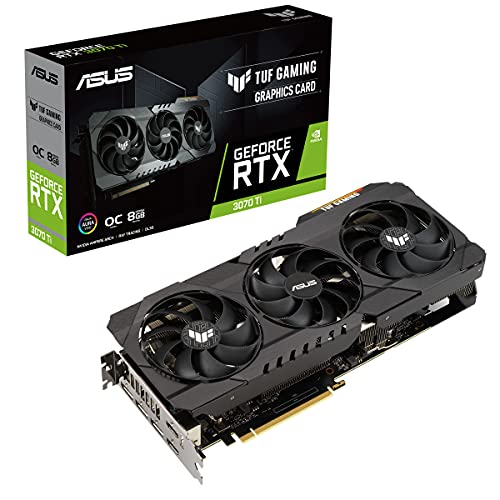
ASUS TUF Gaming GeForce RTX 3070 Ti OC Edition Graphics Card

Intel Core i5-12400F Desktop Processor
CyberPowerPC Gamer Xtreme VR Gaming PC with Core i5-13400F

GIGABYTE GeForce RTX 3070 Ti Gaming OC 8G Graphics Card

AMD Ryzen 9 5900XT 16-Core Desktop Processor
EZDIY-FAB RTX 3000 12 Pin to Dual 8 Pin Sleeved Extension Cable
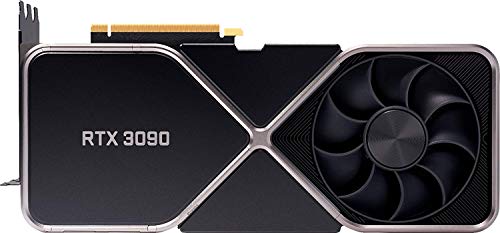
NVIDIA GeForce RTX 3090 Founders Edition Graphics Card
More Details On Our Top Picks
A large RTX 3070 Ti card needs a case with generous clearance and sensible airflow, and this ASUS model leans into that requirement with three Axial-tech fans and a MaxContact heatsink. The heatsink is the metal cooling surface that transfers heat away from the graphics processor, so the design suits long gaming sessions better than a cramped single-fan layout.
You may find the sturdy TUF construction appealing for a frequently used gaming tower, especially alongside a six-core CPU such as the Intel Core i5-12400F. The trade-off is size and power planning, so compact cases and modest power supplies deserve careful checking before installation.
Strong Points
- Three fans spread cooling across the large graphics card during extended play.
- 8GB of GDDR6X memory supports demanding 1440p gaming workloads.
- HDMI 2.1 and DisplayPort 1.4a suit modern monitors and televisions.
- Dual ball-bearing fans are designed for repeated operation in a busy gaming room.
- GPU Tweak II gives you software-based tuning and monitoring controls.
Things To Consider
- The triple-fan body can complicate installation in shorter or narrow cases.
- Dust buildup around multiple fans calls for routine cleaning to preserve airflow.
Key Specs
Who It Suits Best
You’ll get the most from this card in a well-ventilated mid-tower used for sustained 1440p gaming.
Consider Something Else When
Choose the Intel Core i5-12400F instead for a CPU upgrade, especially for a new custom build that already has a compatible graphics card.
For a straightforward RTX 3070 gaming build, the six-core, 12-thread Intel Core i5-12400F keeps the focus on useful gaming value rather than excess capacity. Its 2.5GHz base speed can rise to 4.4GHz turbo, while the included Laminar RM1 cooler simplifies a first installation.
The “F” suffix means you need a separate graphics card, which makes sense beside an RTX 3070 but removes basic display output for troubleshooting. You may find DDR4 support helpful for reusing existing memory, while DDR5 support leaves room for a newer platform configuration.
What We Like
- Six cores and 12 threads handle gaming, browsing, and everyday multitasking comfortably.
- Support for both DDR4 and DDR5 gives you more motherboard planning flexibility.
- PCIe Gen 4.0 and Gen 5.0 support keeps storage and expansion options open.
Worth Noting
- Because processor graphics are absent, display troubleshooting depends on the installed GPU.
- The 600-series chipset requirement limits compatibility with older boards.
- Long rendering sessions may justify a stronger cooler than the included unit.
At A Glance
Made For
This processor fits new builders and upgraders seeking a sensible gaming CPU for an RTX 3070 and a 600-series board.
Not Your Match When
The AMD Ryzen 9 5900XT suits you better for AM4-based editing, streaming, and heavy parallel workloads.
A complete desktop removes the socket, memory, storage, and operating-system puzzle, giving you a ready-made route into RTX-class gaming. The Core i5-13400F, 16GB of DDR5 memory, RTX 4060 8GB graphics, and 1TB PCIe Gen4 solid-state drive create a practical base for gaming, schoolwork, and streaming.
WiFi readiness is useful for rooms without a convenient wired connection, while Windows 11 Home reduces setup time. The honest trade-off is that this desktop contains an RTX 4060 rather than an RTX 3070, so it belongs on this list as a complete alternative for someone who wants a current, assembled system instead of a CPU-only pairing.
Highlights
- Preassembled hardware saves you the effort of matching every internal component.
- 16GB of DDR5 memory supports modern gaming and everyday multitasking.
- The 1TB PCIe Gen4 SSD gives games and applications a roomy fast-storage starting point.
- Windows 11 Home and WiFi readiness make the first setup more approachable.
Trade Offs
- The included RTX 4060 changes the comparison from an RTX 3070 upgrade to a complete-system choice.
- Prebuilt desktops offer less control over the exact power supply, cooling layout, and upgrade path.
Feature Snapshot
Right Fit For
You’ll appreciate this desktop most as a first gaming PC or a simple replacement for an aging family computer.
Reach For A Different Pick When
Choose the ASUS TUF Gaming GeForce RTX 3070 Ti OC Edition Graphics Card for a custom system that already has a capable CPU.
GIGABYTE’s RTX 3070 Ti gives you another strong graphics-card route, with a WINDFORCE 3X cooler using three fans and alternate spinning to manage turbulent airflow. Its 1830MHz core clock and 8GB of GDDR6X memory suit a high-refresh 1440p setup paired with a capable six- or eight-core CPU.
The metal back plate adds structure and gives the card a finished look inside a windowed case. Depending on your case layout, you may find the large cooler demands more room than a compact card, and the multiple fans deserve occasional dust removal.
Upsides
- Three-fan cooling spreads heat across the card during long gaming sessions.
- Alternate fan rotation is designed to improve airflow behavior around the cooler.
- Two HDMI 2.1 and two DisplayPort 1.4 outputs support several display arrangements.
- The back plate adds support and helps the card look tidy in a showcase build.
Room For Improvement
- 8GB of graphics memory can feel restrictive in some newer high-texture workloads.
- A three-fan card may need careful clearance planning around front fans or drive cages.
- Online registration is required for the listed four-year coverage period.
Technical Sheet
Best Suited To
This card suits you as a 1440p gamer building a ventilated tower around a strong midrange CPU.
Look Elsewhere When
The NVIDIA GeForce RTX 3090 Founders Edition makes more sense for you when large graphics-memory capacity matters more than compact system planning.
Sixteen cores and 32 threads give the Ryzen 9 5900XT a clear role beyond ordinary gaming. A thread is a stream of work a core can process, so this chip is well suited to streaming, video work, compiling, and gaming at the same time on an existing AM4 system.
Its unlocked design permits manual tuning, while DDR4-3200 and PCIe 4.0 support keep the platform familiar for many established builds. You’ll need to supply a separate cooler, and the older AM4 socket limits this choice to compatible motherboards rather than a fresh DDR5 platform.
Plus Points
- 16 cores and 32 threads give demanding multitasking plenty of headroom.
- Up to 4.8GHz boost speed supports responsive gaming and interactive workloads.
- 72MB of cache helps keep frequently used data close to the processor.
- Unlocked operation gives experienced PC builders manual tuning flexibility.
- PCIe 4.0 support pairs naturally with an RTX 3070-class expansion setup.
Points To Note
- A cooler isn’t included, so installation requires a separately selected thermal solution.
- AM4 and DDR4 compatibility may limit long-term platform expansion compared with newer sockets.
Core Details
Who Will Love This
You’re a strong match for this CPU when you already own an AM4 motherboard and combine gaming with editing or live streaming.
Swap It Out When
The Intel Core i5-13400F inside the CyberPowerPC Gamer Xtreme VR suits you more when you want a complete desktop without separate cooler selection.
A CPU cannot solve every RTX 3070 installation problem, and this cable addresses a very specific one. It extends a 12-pin connection to two 8-pin PCIe power plugs for compatible RTX 3000 Founders Edition cards, helping you route power more neatly through a custom case.
The 30cm length gives you useful reach around a standard gaming chassis, while the PET sleeve and included combs help keep parallel wires orderly. You may find the fit unsuitable for a non-Founders Edition card, so connector matching matters more here than processor choice.
Best Bits
- Converts a compatible 12-pin GPU connection to dual 8-pin PCIe plugs.
- 30cm of reach helps route cables around a graphics card and motherboard tray.
- 18AWG wire provides a substantial construction for compatible desktop power routing.
- PET sleeving and combs give custom builds a cleaner interior appearance.
Small Caveats
- Compatibility centers on specified RTX 3000 Founders Edition cards, not every RTX 3070 variant.
- Extra cable length can make routing untidy in compact cases.
- Connector seating and cable path deserve careful attention during installation.
Feature Card
Whose Shelf It Belongs On
This cable fits you as a custom-PC builder using a compatible RTX 3000 Founders Edition card and dual 8-pin PSU leads.
Another Choice May Suit
The GIGABYTE GeForce RTX 3070 Ti Gaming OC 8G is a better fit for you when your card uses its own direct power connectors and needs upgraded cooling instead.
The RTX 3090 sits outside a typical RTX 3070 pairing because its 24GB of GDDR6X memory targets much heavier graphics workloads. That capacity can help you work with large video timelines, 3D scenes, and high-resolution assets, while the 384-bit memory interface gives the card a broad data path.
For ordinary 1440p gaming, you may not need that much headroom, and the large Founders Edition design calls for a spacious, well-ventilated case. Compared with the 8GB ASUS TUF card, this NVIDIA option makes more sense for creative applications than for a modest gaming upgrade.
Bright Spots
- 24GB of GDDR6X memory suits large creative projects and high-resolution assets.
- A 384-bit interface gives the memory subsystem a broad specified data path.
- Three DisplayPort 1.4a outputs and HDMI 2.1 support multi-display workstations.
- Ampere RT and Tensor cores support ray-traced and AI-assisted graphics workloads.
Honest Caveats
- The card’s substantial physical design may challenge compact cases and tight cable runs.
- Its large memory capacity offers less benefit for straightforward 1080p gaming.
- Older hardware can require careful case airflow and power planning.
Quick Facts
Built With In Mind
This card suits you as a creator or workstation owner handling large GPU-memory workloads alongside gaming.
Where A Sibling Pick Shines
The ASUS TUF Gaming GeForce RTX 3070 Ti OC Edition is a better fit for you when gaming value, smaller memory demands, and a focused 1440p build matter more.
How To Choose The Right Cpus To Pair With 3070
Start With Your Existing Platform
Socket compatibility comes first. The Intel Core i5-12400F uses a 600-series chipset family and supports DDR4 or DDR5, while the Ryzen 9 5900XT uses AMD’s AM4 platform and DDR4-3200. A CPU upgrade normally requires a matching motherboard, and a memory change may follow, so check those three parts before choosing a processor.
An RTX 3070 generally pairs comfortably with a modern six-core gaming CPU. Streamers, editors, and people who keep many demanding applications open gain more from 12, 16, or 32 processing threads than someone focused mainly on gaming.
Match CPU Strength To Your Monitor
At 1080p with a high refresh rate, CPU limits become more visible because the processor must prepare many frames quickly. The Core i5-12400F is a sensible fit for this use, while the Ryzen 9 5900XT gives you more room for background encoding and creative work.
At 1440p, graphics demand usually carries more of the workload, making a balanced six- or eight-core CPU practical. A stronger processor still helps with simulation-heavy games and minimum frame rates, but spending on cores you never use can leave less room for storage, cooling, or memory.
Don’t Ignore Cooling And Power
A processor’s included cooler can simplify installation, as shown by the Core i5-12400F, but long rendering sessions may justify a larger aftermarket cooler. The Ryzen 9 5900XT arrives without one, so you need to account for cooler clearance, thermal paste, and case airflow.
Your graphics card also affects power planning. Large triple-fan cards such as the ASUS TUF and GIGABYTE RTX 3070 Ti need adequate case space, while the EZDIY-FAB cable only suits a defined Founders Edition connector arrangement.
Consider A Complete Desktop
A complete system such as the CyberPowerPC Gamer Xtreme combines the processor, memory, storage, operating system, and graphics card. That path suits you when installation time matters more than selecting every component individually.
Custom parts make more sense when you already own a case, memory, motherboard, or RTX 3070. You gain control over cooling and future upgrades, but you also take responsibility for compatibility checks and cable management.
Things Worth Knowing First
Mistakes Worth Dodging
A common mistake is choosing a CPU by core count alone. Socket type, memory generation, motherboard support, cooler clearance, and monitor resolution all influence the result. You’ll also want to distinguish a CPU-only upgrade from a complete desktop, since the CyberPowerPC option already includes its own graphics card.
Power connectors create another easy installation trap. The EZDIY-FAB cable is not a universal RTX 3070 accessory, so match the card’s connector style before adding it to your build.
The Upgrade Payoff
Higher-tier processors cost more because they often provide additional cores, threads, cache, and tuning flexibility. The Ryzen 9 5900XT earns that extra capacity for you during editing, streaming, compiling, and other parallel workloads, not necessarily during ordinary gaming.
A stronger graphics card follows the same logic. The RTX 3090’s 24GB memory pool matters for large creative projects, while the 8GB RTX 3070 Ti models remain more proportionate for a focused gaming PC.
The Takeaway
For a straightforward custom RTX 3070 gaming build, the Intel Core i5-12400F offers a sensible balance of cores, platform flexibility, and setup simplicity. You’ll gain more from the AMD Ryzen 9 5900XT when your AM4 system also handles streaming or creative work. The CyberPowerPC desktop suits a complete-system upgrade, while the ASUS and GIGABYTE cards address graphics performance rather than CPU needs. Choose the RTX 3090 for large memory workloads, and select the EZDIY-FAB cable only after confirming connector compatibility.
