
Pairing the Radeon RX 9070 XT with the right processor helps you avoid wasted graphics power, uneven frame delivery, and unnecessary platform changes. You’ll find six graphics cards here for replacement or custom builds, plus one complete Thermaltake desktop for a simpler route. Daily gaming, high-refresh 1440p play, creative software, case clearance, and upgrade plans all point toward different choices. Use the comparison table for a fast scan, then review the practical trade-offs before choosing your setup.
The Shortlist At A Glance

Gigabyte Radeon RX 9070 XT Gaming OC 16G Graphics Card
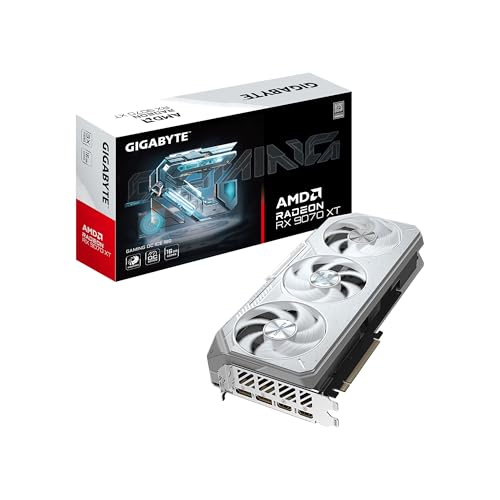
GIGABYTE Radeon RX 9070 XT Gaming OC ICE 16G Graphics Card

ASUS Prime Radeon RX 9070 XT OC Edition Graphics Card

ASRock Radeon RX 9070 XT Steel Legend 16GB Graphics Card

Sapphire Pure Radeon RX 9070 XT Gaming OC 16GB

Thermaltake LCGS View 7897XS-270 Gaming Desktop
Sapphire 11348-01-20G Nitro+ Radeon RX 9070 XT Graphics Card
More Details On Our Top Picks
The 16GB GDDR6 memory gives demanding games room for detailed textures, while the 256-bit memory interface describes the data path between the graphics processor and memory. That combination suits high-resolution gaming and creative workloads, though your case still needs suitable airflow for a large discrete card.
Gigabyte adds WINDFORCE cooling, RGB lighting, a reinforced structure, and Dual BIOS, meaning you can choose between performance-oriented and quieter firmware profiles. Daily players who switch between headphones-on sessions and quieter desktop work may appreciate that flexibility. In our view, it offers a sensible starting point beside the more specialized cards below.
Strong Points
- 16GB of GDDR6 supports demanding game assets and graphics applications.
- Dual BIOS gives you a quieter operating option for ordinary desktop work.
- Reinforced construction helps the card feel better suited to long-term installation.
- RGB lighting works well in a visible side-panel build.
Things To Consider
- Owners commonly report that triple-fan card maintenance means regular dust removal around the cooler.
- The feature-rich design may be more than you need for a basic 1080p system.
Key Specs
Who It Suits Best
You’ll find the strongest fit in a custom gaming desktop for high-refresh 1440p play and occasional creative work.
Where Another Pick Suits Better
ASUS Prime Radeon RX 9070 XT OC Edition suits you more when a 2.5-slot design matters inside a tighter case.
A white graphics card can anchor a light-themed case, and this Gaming OC ICE version adds more than a color change. You get 16GB GDDR6, a 256-bit interface, PCIe 5.0, HDMI and DisplayPort 2.1, plus a 2.7-slot form factor. That width gives the cooler more room, yet you’ll need to check adjacent expansion slots before installation.
Hawk Fan cooling, server-grade thermal gel, and a reinforced structure make this appealing for long gaming sessions. You may find the pale finish shows dust more readily than a dark shroud, so a visible showcase case benefits from periodic cleaning. Compared with the first Gigabyte card, this version prioritizes a distinct visual theme and updated display connectivity.
What We Like
- 16GB GDDR6 gives modern games substantial texture capacity.
- HDMI and DisplayPort 2.1 support suits newer high-resolution displays.
- Hawk Fan cooling is a useful match for extended gaming sessions.
Worth Noting
- The 2.7-slot profile can complicate multi-card or crowded motherboard layouts.
- Owners commonly report that light-colored cooling shrouds need more visible dust care.
- Verify case clearance before committing to this larger cooler design.
At A Glance
Made For
You’ll appreciate this option most in a white or color-coordinated desktop used for high-resolution gaming.
Consider Something Else When
ASRock Radeon RX 9070 XT Steel Legend suits you better when a reinforced metal frame and triple-fan layout matter more than a white theme.
Case compatibility takes center stage here. The 2.5-slot design occupies less vertical space than the ASRock Steel Legend and the 2.7-slot GIGABYTE ICE, while axial-tech fans use longer blades and a barrier ring to direct airflow toward the heatsink. For a compact mid-tower, that balance can make installation less frustrating.
Dual ball bearings support the fan assembly, and Dual BIOS gives you two operating profiles. ASUS GPU Guard adds physical support around the graphics card, though you still need careful handling during installation. The honest read is straightforward: you gain a tidy footprint and practical hardware touches, but the smaller profile may not appeal to shoppers seeking the most elaborate cooler design.
Highlights
- The 2.5-slot layout opens more room around neighboring motherboard slots.
- Axial-tech fan geometry directs cooling airflow into the card.
- Dual BIOS lets you choose between performance and quieter operation.
- GPU Guard adds support around the graphics card during handling.
- Ball-bearing fans are suited to frequent gaming use.
Trade Offs
- Owners commonly report that compact multi-fan cards still need dust cleaning to maintain airflow.
- A 2.5-slot design remains too large for some slim cases.
Technical Sheet
Right Fit For
You’ll get the most from this card in a space-conscious custom desktop where clearance and orderly cable access matter.
A Better Fit Elsewhere
Gigabyte Radeon RX 9070 XT Gaming OC 16G suits you more for RGB-focused builds that have room for a broader cooler.
ASRock takes a sturdier, larger approach with a triple-fan cooler and reinforced metal frame. The card measures 298 x 131 x 58 mm, so those dimensions should guide your case selection rather than a quick visual check. For a spacious airflow-oriented tower, the added structure can feel reassuring during installation.
The listed 2970 MHz core frequency and RDNA 4 architecture target demanding gaming, while Polychrome SYNC helps coordinate lighting with compatible components. Depending on your case, the 2.9-slot design may crowd cable routes or nearby slots. Compared with ASUS Prime, this is the choice for physical scale and reinforcement, not compact placement.
Upsides
- Triple fans spread cooling across a large heatsink area.
- The metal frame adds support for a substantial installed card.
- Polychrome SYNC suits coordinated lighting inside a showcase desktop.
- 2970 MHz is the listed core frequency for this model.
Room For Improvement
- The 2.9-slot body demands careful clearance planning.
- Two 8-pin PCIe power connectors are required for installation.
- The listing recommends an 800W power supply, so existing systems may need a power-platform review.
- Owners commonly report that triple-fan coolers require routine dust removal around the blades.
Feature Snapshot
Best Suited To
You’ll suit this card best with a spacious tower, strong airflow planning, and a power supply aligned with its listed requirements.
Look Elsewhere When
ASUS Prime Radeon RX 9070 XT OC Edition is a better fit for you inside a narrower case or a slot-congested workstation.
Sapphire keeps the description refreshingly focused: a Pure Gaming OC card with 16GB of memory and four display outputs. Dual HDMI and dual DisplayPort make it useful for a gaming screen plus side monitors, though your desk setup still depends on the display cables you already own. For a clean custom build, that output mix solves a practical problem without adding unnecessary complexity.
The available source data leaves dimensions, cooler layout, and clock details unspecified, so you’ll need to confirm physical fit on the listing before installation. In most home gaming setups, the simple specification set is easy to understand, but it gives you less information for advance airflow planning. Sapphire Nitro+ offers a richer published feature set for enthusiasts who want more detail.
Bright Spots
- 16GB memory supports detailed gaming workloads.
- Two HDMI and two DisplayPort connections suit multi-screen desks.
- The focused feature list makes the card easy to compare for a straightforward build.
Small Caveats
- The listing does not provide dimensions in the supplied data, so case clearance requires confirmation.
- Owners commonly report that any multi-fan graphics card benefits from periodic dust cleaning.
- Detailed cooler and clock information is less visible here than on several other choices.
- Multi-monitor users should check the exact display-input arrangement before installation.
Quick Facts
Who Will Love This
You’ll find the best match in a clean custom gaming desktop where multi-monitor connectivity matters more than elaborate published cooler details.
Not Your Match When
Sapphire 11348-01-20G Nitro+ Radeon RX 9070 XT suits you more when you want a fuller set of listed memory and output specifications.
For you, the easiest way to pair a processor with a Radeon RX 9070 XT may be a complete desktop rather than a parts list. Thermaltake combines the graphics card with an AMD Ryzen 7 7800X3D, 32GB of DDR5 memory rated at 5600MT/s, and a 1TB NVMe M.2 solid-state drive. The result is a ready-made foundation for gaming, multitasking, and quick application loading.
The edge-to-edge tempered-glass case puts the components on display, while a 240mm all-in-one cooler handles processor heat through a liquid-filled radiator system. You’ll need to accept less component-by-component control than a custom build, and the 1TB drive may fill quickly beside a large game library. For first-time desktop owners, that convenience may outweigh the reduced freedom to select every part.
Reasons To Buy
- The Ryzen 7 7800X3D gives the RX 9070 XT a gaming-focused processor pairing.
- 32GB DDR5 supports gaming alongside streaming, browsers, and creative software.
- A 1TB NVMe M.2 drive helps reduce loading friction in daily use.
- Tempered glass showcases the internal lighting and hardware.
- The 240mm all-in-one cooler provides a dedicated processor cooling solution.
Points To Note
- Storage capacity may feel limiting for a large modern game collection.
- Owners commonly report that tempered-glass panels show fingerprints and dust clearly.
Details At A Glance
Perfect Match For
You’ll suit this desktop best as a first gaming PC owner who wants the RX 9070 XT and Ryzen 7 7800X3D assembled together.
Swap It Out When
Gigabyte Radeon RX 9070 XT Gaming OC 16G is a better fit for you when you already own a compatible desktop and want only a graphics-card upgrade.
The Nitro+ name brings a more enthusiast-oriented specification sheet to this shortlist. You get AMD RDNA 4, 16GB GDDR6 memory, a 256-bit interface, and two HDMI plus two DisplayPort outputs. Those details suit you well for a high-resolution gaming desk with several displays, although the supplied information does not include physical dimensions.
Compared with Sapphire Pure, this version tells you more about the memory architecture and graphics platform, making system planning easier. You may still want to confirm cooler size and power requirements on the listing before putting it into a compact case. That small extra check is worthwhile for a long-term custom build.
Plus Points
- AMD RDNA 4 identifies the graphics architecture used by the card.
- 16GB GDDR6 and a 256-bit interface suit demanding game settings.
- Four total display outputs support flexible multi-monitor arrangements.
- The detailed memory information helps you compare it with simpler listings.
Areas To Watch
- Physical dimensions are not supplied here, so case planning needs an additional listing check.
- Owners commonly report that enthusiast graphics cards need careful dust management around their coolers.
- The richer feature set may be unnecessary for a basic single-screen setup.
Core Details
Whose Shelf It Belongs On
You’ll get the best fit as an enthusiast building a long-lived gaming desktop with several displays and detailed graphics needs.
Reach For A Different Pick When
Thermaltake LCGS View 7897XS-270 suits you more when you want the processor, memory, storage, and graphics card supplied as one desktop.
How To Choose The Right Cpus To Pair With 9070 Xt
Match CPU Class To Your Resolution
At 1440p and 4K, the graphics card usually carries more of the workload, so a capable modern processor with enough cores and strong gaming responsiveness makes sense. At 1080p with a very high refresh display, CPU limits become easier to notice because the processor must prepare more frames.
Your target game matters too. Competitive titles, simulation games, and large strategy maps often place heavier demands on the CPU than visually rich single-player games. A Ryzen 7 7800X3D, as used in the Thermaltake desktop, suits gaming-focused systems, while a higher-core processor may appeal more for rendering, encoding, and heavy multitasking.
Consider Platform Age And Upgrade Plans
A processor pairing involves more than the chip. You also need a compatible motherboard socket, suitable memory, adequate cooling, and a power supply that can support the complete system. The Thermaltake desktop reduces that planning work, while a standalone card leaves every platform decision in your hands.
Plan two or three years ahead rather than focusing only on current frame rates. A stronger CPU can help maintain smooth minimum frame delivery as games become more demanding, but overspending on processor power makes less sense when your monitor remains 60Hz.
Check Cooling, Case Space, And Memory
CPU cooling affects sustained operation, noise, and installation comfort. Large air coolers and liquid radiators need physical room, while the graphics card also occupies expansion space and adds heat inside the case.
Memory capacity matters for more than games. 32GB is a comfortable target for gaming with browsers, voice chat, and streaming tools open, while creative workloads may justify more. You’ll also want dual-channel memory, meaning two matched memory modules working together, rather than a single module that can restrict bandwidth.
Balance The Whole System
Avoid pairing a high-end graphics card with a weak processor simply because the graphics card is easier to upgrade later. At the same time, a very expensive CPU brings little benefit to a 4K system that spends most of its workload on the GPU.
For a new custom build, compare total platform cost, not just processor cost. A slightly less expensive CPU may leave room for better cooling, faster storage, or a case with stronger airflow, all of which affect daily ownership.
Things Worth Knowing First
Mistakes Worth Dodging
The most common error is ignoring physical fit. Graphics cards can occupy 2.5, 2.7, or 2.9 slots, and the ASRock Steel Legend also lists exact dimensions, so measure the case and check nearby expansion slots before installation.
Power planning deserves equal attention. Confirm the required connectors, power supply guidance, and available cable reach rather than assuming an older supply will transfer easily into a new build. You’ll also want to check whether the motherboard, memory, and cooler match the chosen CPU platform.
Where The Extra Money Goes
Higher-tier processors typically cost more because they combine stronger gaming responsiveness, more cores, newer platform features, or greater multitasking headroom. That extra capacity makes sense for high-refresh gaming, streaming, editing, and long ownership cycles.
Your monitor and workload should decide the upgrade. A 4K single-player setup may gain less from a premium CPU than a 1080p esports system chasing very high frame rates. Spend up when the processor removes a clear workload limit, not just because the graphics card belongs to a high-performance class.
Final Verdict
You’ll find the right pairing by matching processor strength, resolution, refresh rate, cooling, and case space rather than chasing a single specification. Thermaltake’s complete desktop makes the transition easy, while ASUS Prime helps space-conscious custom builders. Gigabyte, ASRock, and Sapphire give you different approaches to cooling, appearance, display connectivity, and installation planning. Start with your monitor and the games you play most, then verify motherboard compatibility, memory, power connections, and clearance. A balanced system should feel smooth today while leaving you comfortable with the ownership decisions that come next.
