
Integrated graphics can keep your desktop build compact, affordable, and ready for everyday display output without a separate graphics card. That matters for office work, school projects, media playback, light gaming, and a first PC build where every component needs to earn its space. You’ll also find major differences between modern DDR5 platforms, older AM4 options, and high-end chips that still need a discrete graphics card. The shortlist below separates those use cases clearly, so you can match the processor to your monitor setup, games, creative workload, and upgrade plans.
The Shortlist At A Glance

Intel Core i9-14900KF New Gaming Desktop Processor

Intel Core Ultra 5 Desktop Processor 225

AMD Ryzen 5 3400G Computer CPU Processors

Micro Center Ultra 9 285K CPU Motherboard Combo
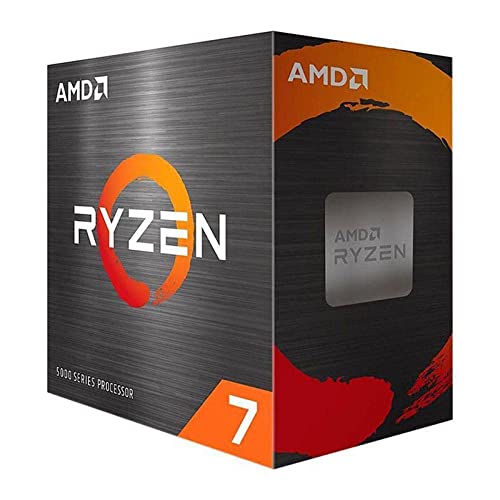
AMD Ryzen 7 5700G Desktop Processor with Radeon Graphics

AMD Ryzen 5 5500 Desktop Processor with Wraith Stealth Cooler

AMD Ryzen 5 9600X Desktop Processor
More Details On These Top Picks
Heavy gaming, video work, and demanding multitasking call for substantial CPU capacity, and this unlocked Intel chip brings 24 cores split between eight performance cores and 16 efficiency cores. Its 6.0 GHz boost ceiling and 32 threads suit a desktop paired with a discrete graphics card, not a compact machine built around processor graphics.
The KF suffix matters because integrated graphics aren’t included, so display output depends on your separate graphics card. You may appreciate the broad DDR4 and DDR5 memory support during a platform upgrade, though motherboard compatibility and cooling deserve careful planning for a 125W base-power processor.
Strong Points
- Twenty-four cores provide useful headroom for rendering, streaming, and large creative projects.
- Unlocked operation gives experienced desktop builders room to tune performance.
- PCIe 5.0 and PCIe 4.0 support keeps the platform suited to current expansion hardware.
- DDR4 and DDR5 compatibility gives you more motherboard and memory planning flexibility.
Things To Consider
- No integrated graphics means a separate graphics card is required for display output.
- The 125W base rating makes a capable cooler and a well-ventilated case sensible ownership choices.
Key Specs
Who It Suits Best
You’ll get the most from this chip as an enthusiast gamer or creator already planning a discrete graphics card and substantial cooling.
Where Another Pick Suits Better
Choose the Intel Core Ultra 5 Desktop Processor 225 for a lower-power new build that includes integrated Intel graphics.
A 65W base-power design makes the Core Ultra 5 225 a sensible center for a quiet home office, study station, or everyday gaming desktop. Its 10-core hybrid layout uses six performance cores and four efficiency cores, while integrated Intel graphics handles display duties without forcing a graphics-card purchase.
The included Laminar RM2 cooler simplifies a first build, although demanding gaming still benefits from a separate graphics card. Compared with the older AM4 choices here, this processor moves you to DDR5 memory and an Intel 800 Series motherboard, so the modern platform comes with a larger component changeover.
What We Like
- Integrated graphics lets you run multiple everyday display tasks before adding a graphics card.
- The 65W base rating fits modest cooling plans and office-oriented cases.
- DDR5 support gives new builds a current memory foundation.
Worth Noting
- Compatibility is limited to Intel 800 Series chipset motherboards.
- Ten cores and 14 threads leave less heavy-workload headroom than the Ultra 9 bundle.
- Compact stock cooling is convenient, but sustained intensive workloads may call for more cooling capacity.
Feature Snapshot
Made For
Home office users, students, and casual gamers building a current Intel desktop with integrated display capability should consider this option first.
Consider Something Else When
The AMD Ryzen 7 5700G suits you better for an established AM4 system needing more cores and Radeon graphics.
Small AM4 builds often need a straightforward processor that can display an image without a separate card. The Ryzen 5 3400G combines four cores and eight threads with Radeon RX Vega 11 integrated graphics, making it suited to office work, media use, and lighter gaming in a modest desktop.
A 65W TDP, or thermal design power, gives you a manageable cooling target, and the included Wraith Stealth fan keeps the parts list short. The trade-off is age: compared with the Ryzen 7 5700G, you get fewer cores and less cache, so demanding editing and newer games may expose the platform’s limits.
Highlights
- Radeon RX Vega 11 graphics removes the need for a separate display card in a basic build.
- The bundled Wraith Stealth fan reduces installation steps and cooler shopping.
- AM4 socket support suits existing compatible boards and compact upgrade projects.
- Four cores and eight threads remain suitable for browsing, documents, and media playback.
- Up to 4.2 GHz boost supports brisk response during everyday bursts.
Trade Offs
- Four cores provide less room for streaming or heavy creative multitasking.
- Older AM4 hardware requires careful motherboard and memory compatibility checks.
- Owners commonly keep the cooler and case free of dust to preserve airflow around the compact build.
Technical Sheet
Right Fit For
You’re a beginner or home-office builder reusing an AM4 board and seeking integrated graphics for basic computing.
Look Elsewhere When
The Ryzen 7 5700G is a stronger match for you when your AM4 desktop also needs eight cores for heavier multitasking.
A processor and motherboard bundle can remove a major compatibility headache from a new desktop build. This package pairs the Ultra 9 285K with a TUF Gaming Z890-Plus WiFi board, giving you 24 cores, 24 threads, integrated Intel graphics, and an LGA1851 foundation in one coordinated purchase.
The unlocked 5.7 GHz ceiling appeals to enthusiasts, while the board adds WiFi-oriented gaming features and a more complete platform starting point. You may find the bundle excessive for email and light browsing, but workstation projects, high-refresh gaming with a discrete card, and long-term expansion make its scale easier to justify.
Upsides
- Twenty-four cores support large creative applications and sustained multitasking.
- Integrated Intel graphics provides basic display output during initial setup or troubleshooting.
- The included LGA1851 motherboard reduces socket-matching decisions during assembly.
- WiFi features on the board suit a desktop positioned away from a wired network jack.
Room For Improvement
- High-end parts require a capable case, power supply, and cooling plan.
- The LGA1851 platform doesn’t suit an older motherboard reuse project.
Feature Rundown
Best Suited To
You’re an enthusiast assembling a new, feature-heavy desktop for creative work, gaming, and future component expansion.
A Better Fit Elsewhere
The Intel Core Ultra 5 Desktop Processor 225 is more suitable for you when a lower-power standalone CPU and simpler build are the priority.
For an AM4 desktop that needs more than basic office capacity, the Ryzen 7 5700G offers eight cores and 16 threads alongside Radeon integrated graphics. That combination works well in a family computer, small editing station, or gaming desktop where a separate graphics card isn’t part of the first build.
The 4.6 GHz maximum boost and bundled Wraith Stealth cooler make the setup approachable, while unlocked operation leaves room for experienced tuning. Compared with the four-core Ryzen 5 3400G, you get more multitasking capacity, though an AM4 platform gives you less forward-facing upgrade room than the Ryzen 5 9600X’s AM5 base.
Bright Spots
- Eight cores and 16 threads handle browser-heavy work, office apps, and moderate creation together.
- Radeon graphics keeps a basic gaming and media desktop usable without a separate card.
- The included Wraith Stealth cooler simplifies a practical home build.
- Unlocked settings give experienced users additional tuning flexibility.
Points To Note
- AM4 limits the long-term platform path compared with newer AM5 options.
- Integrated graphics share system resources, so memory selection and configuration matter for graphics-heavy tasks.
- Small cases may need extra airflow during extended workloads.
Quick Facts
Who Will Love This
You’re building a capable family, office, or entry gaming PC around an existing AM4 motherboard and want integrated Radeon graphics.
Not Your Match When
The AMD Ryzen 5 9600X better suits you for a new AM5 build where current platform features matter more than integrated graphics.
The Ryzen 5 5500 makes sense for an AM4 gaming desktop that already includes, or will soon include, a discrete graphics card. Six cores and 12 threads give you a solid base for popular games and regular multitasking, while the bundled Wraith Stealth cooler keeps installation uncomplicated.
Its 4.2 GHz maximum boost and DDR4-3200 support fit an established memory ecosystem. The key limitation is straightforward: processor graphics aren’t included, so this isn’t the choice for a monitor-ready build without a separate card. In most existing AM4 systems, that trade-off can be reasonable.
Plus Points
- Six cores and 12 threads suit gaming, streaming, and everyday desktop use.
- The included cooler helps keep a midrange build’s parts list manageable.
- DDR4-3200 support works with many established AM4 memory kits.
Small Caveats
- No integrated graphics means a discrete graphics card is necessary.
- Six cores offer less creative-work capacity than the Ryzen 7 5700G.
Core Details
Who Should Grab It
You’re upgrading an AM4 gaming desktop with a separate graphics card and want six-core performance with a supplied cooler.
Reach For A Different Pick When
The AMD Ryzen 5 3400G is a better fit for you when integrated Radeon graphics matter more than newer six-core processing.
New gaming desktops built around a separate graphics card can use the Ryzen 5 9600X as a modern six-core foundation. Its 12 threads, Zen 5 architecture, 5.4 GHz maximum boost, and AM5 socket target current systems rather than recycled AM4 hardware.
DDR5-5600 support and 38MB of cache add to its forward-looking appeal, while the unlocked design suits careful enthusiasts. Integrated graphics aren’t listed for this model, so you’ll need a discrete card for gaming and display output. That makes it a stronger platform upgrade than a basic office choice, but not a fit for a graphics-card-free build.
Reasons To Buy
- Zen 5 architecture gives a new AM5 system a current processing base.
- Five-point-four GHz maximum boost supports quick game and application response.
- DDR5-5600 support aligns with newer memory platforms.
- Unlocked operation provides tuning flexibility for experienced desktop builders.
Areas To Watch
- A separate graphics card is needed because integrated graphics aren’t specified here.
- You’ll need an AM5 motherboard and DDR5 memory, so an AM4 reuse plan won’t carry over.
- A suitable cooler must be included in your build plan.
At A Glance
Built With In Mind
You’re a gaming enthusiast or creator planning a new AM5 desktop with a separate graphics card and current DDR5 memory.
Swap It Out When
The Intel Core Ultra 5 Desktop Processor 225 suits you more for a new build that needs integrated graphics for display output.
How To Choose The Right Cpus With Integrated Graphics
Start With Display Needs
Integrated graphics place the display engine inside the processor, so you can connect a monitor without a separate graphics card. That helps you build a compact office PC, a media desktop, or a troubleshooting system with fewer parts. Confirm that the chosen processor actually includes graphics, because the i9-14900KF, Ryzen 5 5500, and Ryzen 5 9600X require separate graphics hardware.
Match Cores To Your Work
Core count describes the number of processing units, while threads represent the work streams the CPU can manage. Four cores and eight threads can cover browsing and documents, six cores and 12 threads suit gaming with a graphics card, and eight or more cores make heavier multitasking easier. Video editing, code compilation, streaming, and large spreadsheets all benefit from extra processing room.
Check The Platform Before Ordering
Socket type determines which motherboard physically and electronically supports the processor. AM4 options such as the Ryzen 5 3400G and Ryzen 7 5700G can suit an existing system, while AM5 and LGA1851 require newer boards and DDR5 planning. The Intel Ultra 5 225 uses an 800 Series board, and the Ultra 9 bundle includes its matching Z890 platform, which can simplify a new build.
Plan Cooling And Expansion
TDP is a design reference for expected heat output, not a complete measure of real-world power use. A 65W processor generally fits simpler cooling, while high-core unlocked chips deserve a stronger cooling and airflow plan. Think about your next two upgrades too: a graphics card, additional storage, or faster memory can affect case space, power delivery, and motherboard selection.
What To Weigh Before You Buy
Mistakes Worth Dodging
A common mistake is choosing a CPU because it has a high boost frequency while overlooking graphics support. A fast chip without integrated graphics still needs a separate card for monitor output, which changes the build plan immediately.
Socket confusion causes another avoidable problem. AM4, AM5, LGA1700, and LGA1851 are different platforms, so match the processor, motherboard, and memory before placing each part in your cart.
Where The Extra Money Goes
Higher-tier processors generally provide more cores, newer architecture, larger cache, faster memory support, or a broader upgrade path. Those features matter during rendering, streaming, large project work, and high-refresh gaming, but they add little value to a desktop used mainly for documents and video playback.
Paying more makes sense when your workload keeps the CPU busy for long periods or when a new platform will stay in service for several years. For a basic family PC, the Core Ultra 5 225 or Ryzen 7 5700G may leave more room in your build plan for storage, memory, or a better display.
Final Verdict
Your ideal choice depends on whether integrated graphics are essential or merely convenient. The Intel Core Ultra 5 225 offers a current, efficient foundation with processor graphics, while the Ryzen 7 5700G remains appealing for AM4 desktops needing more cores. Choose the Ryzen 5 3400G for a basic older-platform build, and reserve the i9-14900KF, Ryzen 5 5500, Ryzen 5 9600X, and Ultra 9 bundle for systems using a separate graphics card. Match the socket, memory, cooling, and display plan first, then choose the performance level that fits your daily work.
