
Choosing a graphics card for a 3060 Ti build means balancing cooling, case space, display support, and long-session comfort. You need a card that fits your chassis and power setup without turning routine gaming, editing, or streaming into a troubleshooting project. The seven options below cover compact builds, larger cooling systems, creator-focused designs, and familiar reference styling. Each one uses 8GB GDDR6 memory, while the cooler, clock speed, dimensions, and exterior design create the meaningful differences.
The Shortlist At A Glance

MSI Gaming GeForce RTX 3060 Ti Ventus 2X 8G OCV1 LHR
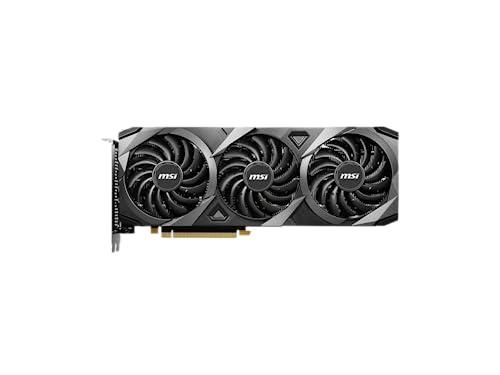
MSI Gaming GeForce RTX 3060 Ti Ventus 3X 8G OC LHR
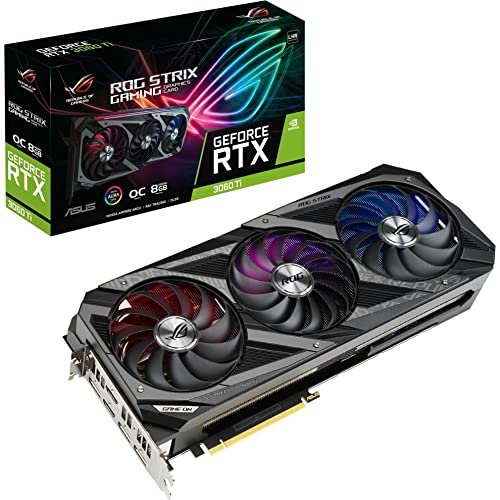
ASUS ROG Strix RTX 3060 Ti V2 OC Edition
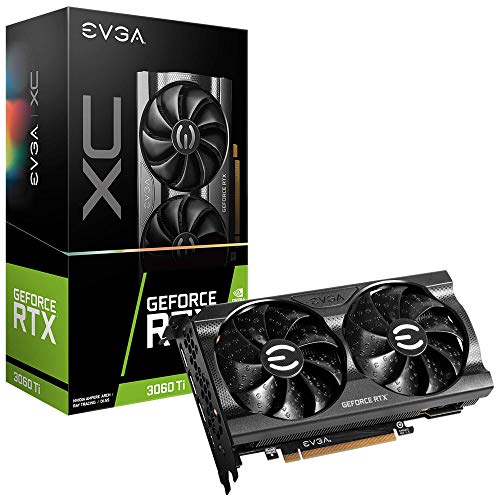
EVGA GeForce RTX 3060 Ti XC Gaming 08G-P5-3663-KL

GIGABYTE GeForce RTX 3060 Ti Vision OC 8G REV2.0
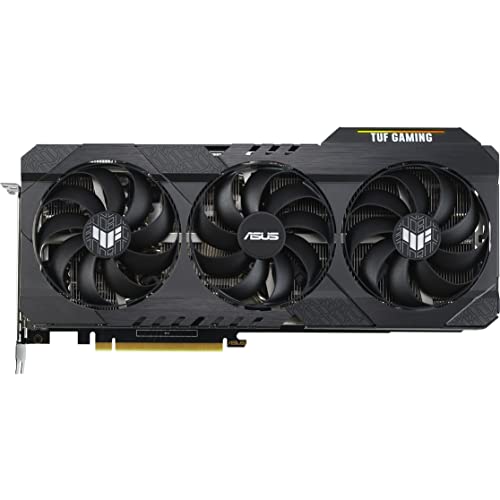
ASUS TUF Gaming RTX 3060 Ti V2 OC Edition
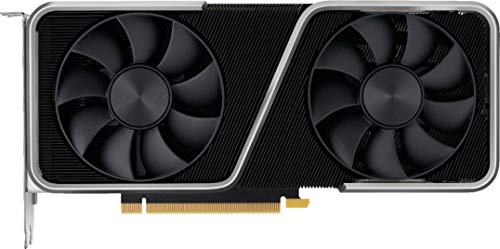
GeForce Nvidia RTX 3060 Ti Founders Edition 8GB
More Details On Our Top Picks
For a standard mid-tower gaming desktop, the Ventus 2X keeps the formula straightforward: an RTX 3060 Ti GPU, 8GB of GDDR6 memory, and two Torx Fan 3 fans in a restrained chassis. The 1695 MHz boost clock and 256-bit memory interface suit 1080p and many 1440p gaming setups, while the dual-fan layout leaves more room around the card than larger three-fan designs.
You may find this layout easier to install in a crowded case, especially alongside a large CPU cooler or extra storage drives. The trade-off is less cooler surface area than the MSI Ventus 3X, so a case with clear front-to-back airflow makes more sense for long gaming sessions.
Strong Points
- Dual-fan cooling offers a practical fit for many mid-tower cases.
- 8GB GDDR6 memory supports current gaming and creative workloads within the card’s class.
- The 1695 MHz boost clock provides a clear reference point for system planning.
- Torx Fan 3 hardware gives the cooling system a defined design rather than a generic fan setup.
Things To Consider
- Two fans provide less cooling area than the three-fan alternatives in this list.
- Dust buildup around the fan inlets will still call for periodic case cleaning.
Key Specs
Who It Suits Best
You’ll get the most practical fit as a mainstream gamer building a mid-tower system with limited room around the graphics slot.
Consider Something Else When
Choose MSI Gaming GeForce RTX 3060 Ti Ventus 3X 8G OC LHR instead for a roomy case and a stronger preference for three-fan cooling.
Three Torx Fan 3 fans change the ownership conversation here. The Ventus 3X pairs that larger cooling arrangement with an RTX 3060 Ti LHR chipset, 8GB GDDR6 memory, a 1695 MHz boost clock, and a 256-bit interface, making it a sensible match for extended gaming or rendering sessions in a well-ventilated desktop.
Compared with the Ventus 2X, this version gives airflow more room to spread across the heatsink, but the larger body demands closer attention to case clearance. In most gaming rooms, the extra fan can make sustained workloads feel less demanding on the cooling system, though installation and dusting take slightly more care.
What We Like
- Three-fan cooling gives heat more area to move through during long sessions.
- 8GB GDDR6 memory and the 256-bit interface suit the intended RTX 3060 Ti class.
- The factory-listed 1695 MHz boost clock simplifies comparisons with the smaller MSI card.
Worth Noting
- The larger cooler can create clearance issues near front radiators, drive cages, or side panels.
- More fan hardware means more surfaces to keep clear of dust over time.
- The listing identifies a newer model variation, so you should confirm the exact version before checkout.
At A Glance
Made For
This card fits desktop gamers and creators who have a ventilated case with enough room for a larger three-fan graphics card.
Not Your Match When
ASUS ROG Strix RTX 3060 Ti V2 OC Edition suits you better when premium cooling hardware and a larger enthusiast-style design matter more than compact installation.
Large cases and demanding schedules make the ROG Strix easier to appreciate. Its PCIe 4.0 connection, 8GB GDDR6 memory, HDMI 2.1, DisplayPort 1.4a, Axial-tech fan design, and 2.9-slot form point toward a substantial card built for sustained desktop use.
The extra slot width can help the cooler manage heat, but it also affects expansion slots and case clearance. You may find the design worthwhile for long gaming sessions or GPU-assisted creative work, while small-form-factor builders will have a much easier time with the EVGA XC Gaming.
Highlights
- Axial-tech fans focus airflow through a sizable cooling assembly.
- HDMI 2.1 supports newer display setups that need the updated connection standard.
- DisplayPort 1.4a adds flexibility for multiple modern monitors.
- PCIe 4.0 compatibility fits newer motherboards and current platform planning.
- GPU Tweak II provides a software route for monitoring and adjustment.
Trade Offs
- The 2.9-slot design can block adjacent expansion space.
- Large coolers require careful support and dust removal inside a busy case.
Technical Sheet
Right Fit For
You’ll appreciate this option most as an enthusiast gamer or creator with a spacious case, multiple displays, and long workload sessions.
Where Another Pick Suits Better
ASUS TUF Gaming RTX 3060 Ti V2 OC Edition is a better fit for you when a metal-shrouded, three-fan layout and dual ball-bearing fans matter most.
Compact cases often force a choice between card clearance and cooling hardware, which gives the EVGA XC Gaming a clear purpose. It combines the RTX 3060 Ti platform with 8GB GDDR6 memory, a listed 1710 MHz boost clock, and a metal backplate in a more space-conscious design.
The backplate adds structure and helps shield the rear of the board, while the smaller format can simplify installation around front-mounted storage. The honest caveat is that compact cooling designs may need stronger case airflow during long sessions than the larger ASUS cards.
Upsides
- The 1710 MHz boost clock gives this card a clearly stated factory setting.
- Its compact XC design helps you plan a build around tighter internal clearance.
- The metal backplate adds rigidity and gives the exposed rear a cleaner finish.
Room For Improvement
- Smaller cooling hardware can place more importance on front-to-back case airflow.
- Backplate cleaning needs a soft, dry approach around the ventilation openings.
- Large workloads may make a bigger three-fan card more comfortable for your system.
Feature Snapshot
Who Will Love This
This card suits you as a space-conscious builder assembling a compact or tightly packed gaming desktop.
Swap It Out When
MSI Gaming GeForce RTX 3060 Ti Ventus 3X 8G OC LHR fits you better when your case has room and sustained cooling takes priority.
White and silver builds get a more coordinated option in the Vision OC. Its 1755 MHz core clock, 8GB GDDR6 memory on a 256-bit interface, WINDFORCE 3X cooling, RGB Fusion 2.0 lighting, and metal backplate give you both visual consistency and a substantial cooling package.
Compared with the darker MSI and EVGA designs, the Vision OC makes case appearance part of the decision. Depending on your case layout, the three-fan cooler may need careful clearance planning, but creators who spend time editing, rendering, or streaming may value the larger thermal setup.
Bright Spots
- The 1755 MHz core clock is the highest listed clock among these cards.
- WINDFORCE 3X uses three fans for broader cooling coverage.
- RGB Fusion 2.0 lets compatible lighting become part of the build’s visual theme.
- The metal backplate adds rear support and complements the card’s design.
- 8GB GDDR6 and a 256-bit interface support gaming and creator workloads.
Points To Note
- The light exterior can show dust more readily in open or brightly lit cases.
- Three fans and a backplate make case clearance worth checking before installation.
Quick Facts
Best Suited To
You’ll find the strongest match as a creator, streamer, or gaming enthusiast building a spacious white or silver desktop.
A Better Fit Elsewhere
EVGA GeForce RTX 3060 Ti XC Gaming 08G-P5-3663-KL suits you more when a compact black card matters more than lighting and three-fan cooling.
Builders who keep a desktop running through long gaming nights may prefer the TUF’s substantial construction. The card combines PCIe 4.0, 8GB GDDR6, HDMI 2.1, DisplayPort 1.4a, a metal shroud, three axial-tech fans, and dual ball fan bearings, which use bearing assemblies designed for repeated rotation.
That hardware gives the TUF a durable, workmanlike character beside the more style-focused GIGABYTE Vision OC. One thing worth considering is the added size and weight, so you’ll want a spacious case and careful support around the graphics slot.
Reasons To Buy
- The metal shroud gives the exterior a sturdy feel for a long-term desktop build.
- Dual ball fan bearings are suited to frequent fan operation.
- Three axial-tech fans distribute airflow across the cooler.
- HDMI 2.1 and DisplayPort 1.4a support varied modern display arrangements.
Minor Gripes
- The larger body needs more clearance than the EVGA XC Gaming.
- Heavy cooling hardware makes careful installation and graphics-card support sensible.
- Metal surfaces still need routine dust removal around fan openings.
Feature Rundown
Built With In Mind
This model fits you as a durability-minded gamer or creator with a roomy desktop and recurring long workloads.
Reach For A Different Pick When
ASUS ROG Strix RTX 3060 Ti V2 OC Edition makes more sense for you when GPU Tweak II monitoring and a 2.9-slot enthusiast layout are higher priorities.
A reference-style card can appeal to you when a clean, understated build matters more than RGB lighting or an oversized cooler. The Founders Edition pairs the RTX 3060 Ti platform with 8GB GDDR6 memory and PCI Express 4.0 support, giving a straightforward foundation for gaming and creative software.
Compared with the ASUS and GIGABYTE cards, this option keeps the presentation more restrained. You may find that simplicity easier to blend into a minimalist desktop, while the absence of extra listed cooler or software details makes case airflow and system compatibility especially important to review before installation.
Plus Points
- The reference design suits clean, understated desktop builds.
- 8GB GDDR6 memory provides dedicated space for game textures and visual workloads.
- PCI Express 4.0 support matches newer motherboard platforms.
Small Caveats
- The listing provides fewer specific cooler details than the partner-card options.
- Minimalist styling may not suit you when coordinated lighting is a major goal.
Core Details
Whose Shelf It Belongs On
This card suits you as a minimalist builder who wants a reference-style RTX 3060 Ti for a clean gaming or work desktop.
Another Choice May Suit
GIGABYTE GeForce RTX 3060 Ti Vision OC 8G REV2.0 fits you better when three-fan cooling, RGB Fusion 2.0, and a white-and-silver theme matter.
How To Choose The Right Cpuses For 3060 Ti
Start With Case Clearance
Graphics cards vary sharply in cooler size. A dual-fan card such as the MSI Ventus 2X or EVGA XC Gaming can simplify installation in a compact mid-tower, while the ASUS ROG Strix, ASUS TUF, and GIGABYTE Vision OC need more room around the graphics slot. Measure available length, slot thickness, and nearby drive or radiator space before choosing.
A 2.9-slot card can occupy space that you planned for another expansion card. Your case’s front intake path matters too, especially during long gaming sessions or rendering work.
Match Cooling To Your Routine
Two fans keep the design smaller, but three fans spread airflow across a broader heatsink. You’ll usually get the most sensible match from a dual-fan model for mixed daily gaming, office work, and occasional editing. Regular rendering, streaming, or long sessions make the larger MSI, ASUS, and GIGABYTE coolers more appealing.
Fan bearings also deserve attention. The ASUS TUF lists dual ball bearings, a specific hardware detail that may appeal to you during frequent use, though every cooler still benefits from periodic dust removal.
Check Display And Platform Compatibility
PCIe 4.0 describes the motherboard expansion connection, while HDMI and DisplayPort describe the display outputs. The ASUS cards list HDMI 2.1 and DisplayPort 1.4a, which can suit newer monitor or television setups. Confirm that your display cables and motherboard provide the connections you actually plan to use.
All seven cards center on 8GB GDDR6 memory, so the main comparison is not memory capacity. Focus on cooling, clock setting, physical size, design, and the specific output arrangement.
Consider The Whole Desktop
Your power supply, airflow, CPU cooler, and case layout work as a system. A larger card may suit an open, well-ventilated tower but create installation friction in a compact enclosure. For a first custom build, the MSI Ventus 2X or EVGA XC Gaming keeps the physical planning more manageable, while experienced builders may prefer the ASUS or GIGABYTE designs for their additional hardware features.
Things Worth Knowing First
Mistakes Worth Dodging
A common mistake is choosing by GPU name alone and ignoring cooler dimensions. Check the graphics slot area, front radiator position, drive cages, and room for power cables before placing the card in your system plan.
You should also confirm the exact model variation on the listing. The MSI Ventus 3X page identifies a newer model option, so matching the model name and visual details helps you avoid ordering the wrong version.
What Separates Premium From Basic
Higher-tier cards often add larger heatsinks, extra fans, metal exterior parts, more detailed fan hardware, lighting controls, or broader display connectivity. Those additions matter most during sustained workloads, in carefully styled desktops, or in systems where quiet thermal behavior is a priority.
A compact gaming PC may gain more from the EVGA XC Gaming’s space-conscious design than from a larger premium cooler. Spending more makes sense when your case has room and your routine includes long sessions, rendering, streaming, or a strong preference for specialized features.
Final Verdict
You can choose confidently by matching the card to your case, airflow, display setup, and daily workload rather than focusing only on the RTX 3060 Ti name. MSI’s Ventus 2X keeps installation approachable, EVGA helps compact builders, and the larger ASUS, MSI, and GIGABYTE models suit sustained desktop use. The Founders Edition keeps styling restrained, while the TUF adds a sturdy, practical character. Measure first, confirm the exact variant, and choose the cooler that fits your real workspace.
