
A cluttered desktop can make good audio hardware hard to appreciate, especially when a laptop, game console, and television all compete for the same inputs. I treat a desktop DAC as a way to convert digital audio into clean analog signals for headphones, speakers, or another amplifier. The right choice depends less on chipset prestige than on output format, headphone power, and how the unit will fit into the listening setup.
The Leading Options At A Glance

AIYIMA A80 Bluetooth Stereo DAC Amplifier
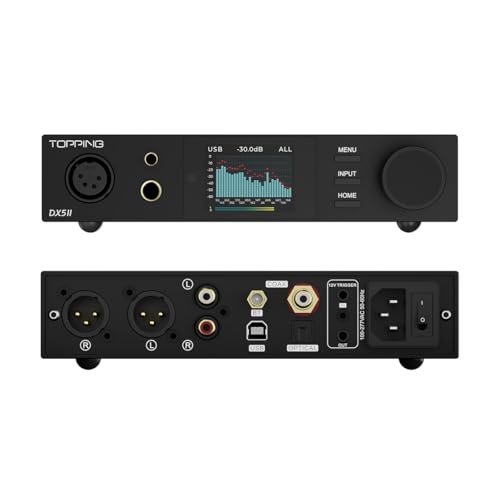
Topping DX5II Fully Balanced DAC Headphone Amp Combo, 10-Band PEQ, DSD512

Topping D50 III Desktop DAC Preamplifier with PEQ, Bluetooth 5.1

Topping DX3pro+ Desktop DAC Headphone Amplifier with Bluetooth 5.0

FiiO KA13 Portable DAC Dongle with 3.5mm and 4.4mm Outputs, 550mW Desktop Mode

Fosi Audio SK02 Desktop DAC Amp with USB, Optical, 3.5mm and 4.4mm Outputs
The Details Behind The Selections
The AIYIMA A80 brings decoding and a Class D power amplifier into one desktop unit. Class D amplifiers use switching circuitry for efficient power delivery, and here that section is rated for up to 300 watts per channel. I find the combination most convincing for a compact speaker system that also needs USB, optical, coaxial, Bluetooth, and balanced TRS inputs.
Unlike the Topping DX5II, which concentrates on headphone amplification, the A80 can also feed powered or passive speakers through its amplifier section. A digital VU display adds useful feedback for volume and source status, although the software-defined display is more about presentation than sound quality.
The Upside
- The integrated amplifier reduces the need for separate speaker and decoding boxes.
- Balanced TRS input can reduce interference carried through a long analog connection.
- Bluetooth, USB, optical, and coaxial inputs cover most desktop source options.
- SUB pre-out and adjustable 2.0 or 2.1 configurations suit compact speaker arrangements.
- The 12V trigger connection supports automated or multi-component control systems.
Worth Noting
- Desktop space matters because the unit combines several functional sections rather than acting as a simple dongle.
- Speaker compatibility still depends on impedance and power handling, so system requirements deserve a close check.
Technical Sheet
Who It Suits Best
This suits a listener building one compact system for music, games, television, and desktop speakers.
Where Another Pick Suits Better
Headphone-focused listeners gain more from the Topping DX5II because it includes multiple headphone outputs and substantial output power.
The Topping DX5II is built around two ES9039Q2M converters, with one assigned to each channel. Balanced operation carries left and right signals separately, and the headphone section reaches 7,600mW per channel into 16-ohm headphones. That reserve makes the unit appealing for large headphones that need more voltage than a portable adapter can provide.
The ten-band PEQ control is another reason I would consider this model for a serious desktop headphone rig. PEQ, or parametric equalization, adjusts specific frequency ranges while allowing precise control over gain and bandwidth, although that software workflow adds more setup work than a basic volume control.
Well-Handled Touches
- Dual decoding chips support a fully balanced signal path.
- High output power supports power-hungry full-size headphones.
- Three headphone connections cover single-ended, balanced, and XLR setups.
- Saved PEQ profiles suit different headphones and listening preferences.
- Bluetooth 5.1 includes LDAC, aptX Adaptive, aptX HD, AAC, and SBC.
Small Caveats
- PEQ adjustment requires compatible desktop software and profile setup.
- The advanced headphone options may be unnecessary for easy-to-drive earbuds or entry-level headphones.
Made For
This model fits an enthusiast with demanding headphones who values balanced output, configurability, and substantial power.
Consider Something Else When
A smaller and simpler setup is better served by the FiiO KA13, which offers a portable USB-C form and a 550mW desktop mode.
The Topping D50 III is a desktop DAC and preamplifier rather than a headphone power station. Its RCA and TRS line outputs are intended for powered speakers or a separate amplifier, making it a practical center for a computer-based system. I also appreciate the combination of USB, optical, coaxial, and Bluetooth sources without needing a separate streamer.
Ten-band PEQ operates through USB and supports imported and saved curves for more exact headphone or speaker adjustment. Compared with the AIYIMA A80, the D50 III prioritizes line-level control and flexible computer compatibility rather than supplying a high-power speaker amplifier.
What Pays Off
- RCA and balanced TRS outputs support active speakers and external amplifiers.
- USB decoding works with major desktop operating systems, with a Windows driver step for ASIO applications.
- PEQ curves can be imported, exported, and saved for different setups.
- Bluetooth 5.1 supports LDAC and aptX-family wireless codecs.
- A 12V trigger output can coordinate the unit with compatible equipment.
Practical Considerations
- ASIO use on Windows requires driver installation and configuration.
- PEQ is limited to USB input, so wireless or optical sources bypass that control.
Quick Facts
Right Fit For
This fits someone using a computer as the main source and powered speakers or a separate power amplifier.
Not Your Match When
Direct headphone amplification deserves priority, and the Topping DX5II includes that role with substantially greater output power.
The Topping DX3pro+ takes a more compact approach than the DX5II while preserving a useful mix of digital inputs, wireless decoding, and analog outputs. The ES9038Q2M handles decoding, while the XU208 provides the USB interface and the NFCA section serves the headphone amplifier. That makes the unit suitable for a small desk with a varied collection of sources.
Bluetooth 5.0 and LDAC support are useful for casual listening, while USB, optical, and coaxial connections cover computers, televisions, and disc sources. I would treat this as the straightforward option when advanced PEQ profiles and multiple balanced headphone jacks are not central to the setup.
Real-World Strengths
- USB, optical, coaxial, and Bluetooth provide several practical source options.
- The headphone amplifier supports a direct desktop listening path.
- Line output permits connection to an external amplifier or active speakers.
- LDAC and aptX support suit higher-quality wireless listening.
- The remote adds convenience for source and volume control.
Trade Offs
- The DX5II offers a more sophisticated balanced headphone section and PEQ control.
- Older Bluetooth 5.0 hardware is less forward-looking than the Bluetooth 5.1 models in this list.
Best Suited To
This is a sensible fit for a mixed-source desktop setup that needs both headphone and line-level connections.
Look Elsewhere When
Travelers and mobile listeners will find the FiiO KA13 easier to carry between a computer, phone, and pair of headphones.
The FiiO KA13 starts with a more mobile proposition than the larger desktop combinations. Its USB-C connection works with compatible computers, phones, tablets, and music players, while 3.5mm and 4.4mm outputs cover conventional and balanced headphones. For a commuter moving between a laptop and a phone, that flexibility is hard to overlook.
Desktop mode raises balanced output to 550mW, giving the dongle more authority with higher-impedance headphones than its compact body initially suggests. Two CS43131 DAC chips and a pair of SGM8262 op-amps handle conversion and amplification, though the KA13 remains focused on personal listening rather than line-level speaker control.
Key Advantages
- The dongle format suits travel, shared desks, and phone-based listening.
- Both single-ended and balanced headphone connections are available.
- Dual CS43131 chips provide separate conversion channels.
- Desktop mode adds useful power for less-easy-to-drive headphones.
Where It May Fall Short
- The headphone-focused design does not replace a speaker amplifier or preamplifier.
- Balanced output requires compatible 4.4mm headphones and cabling.
Feature Snapshot
Who Will Love This
This appeals to a mobile listener who wants balanced headphone support across several USB-C devices.
A Better Fit Elsewhere
A permanent desktop system with powered speakers is better served by the Topping D50 III and its line-level outputs.
The Fosi Audio SK02 combines a compact desktop footprint with a CNC-machined aluminum body and a sandblasted finish. USB and optical inputs cover computers, laptops, CD players, televisions, and projectors. I like that it can operate as a headphone amplifier or as a preamp feeding active speakers or a separate power amplifier.
Its headphone section supports 3.5mm single-ended and 4.4mm balanced connections, with stated suitability for 16-ohm through 300-ohm models. DSD256 and PCM decoding up to 384kHz/32-bit make it a natural middle ground between a simple dongle and a larger desktop DAC.
A Few Highlights
- The aluminum construction gives the compact unit a refined desktop appearance.
- Balanced and single-ended headphone outputs cover common connection types.
- Preamp use expands compatibility with active speakers and passive systems.
- Optical input supports televisions, projectors, and other digital sources.
- The stated 16-ohm to 300-ohm range covers many common headphones.
Some Limits To Know
- Using the preamp role requires compatible powered speakers or another amplifier downstream.
- An optical source must provide a compatible digital audio output.
Core Details
Who Should Grab It
This suits someone who wants one polished box for headphones, a computer, and a television-based desktop system.
Another Choice May Suit
The Topping DX5II is the stronger choice for detailed PEQ control and considerably greater power with difficult headphones.
What Matters Before Building A Desktop Audio System
Start With The Output Path
A DAC converts digital audio into an analog signal, but the destination determines which connections matter. Headphones need a dedicated amplifier section, while powered speakers require line-level outputs and a separate power stage. A passive speaker system needs both, so an all-in-one amplifier such as the AIYIMA A80 offers a different path from a preamp-focused model.
Match The Connection Type
Balanced connections carry left and right signals on separate paths, which can help reject interference in longer cable runs. Single-ended connections remain simpler and work with more headphones and speakers. I would check the available socket on the headphone, amplifier, computer, or television before choosing a model built around 4.4mm, 4-pin XLR, TRS, or RCA connections.
Consider Headphone Power And Impedance
Headphone sensitivity describes how much voltage is needed to produce a given sound level. Low-sensitivity models generally benefit from more amplifier power, while sensitive in-ear monitors make low noise and adjustable output important. The Topping DX5II targets the high-power end, the FiiO KA13 offers a portable 550mW desktop mode, and the Fosi Audio SK02 fits the middle ground.
Keep Software Requirements In View
PEQ gives precise control over narrow frequency regions, but it requires compatible software and a little setup work. LDAC supports higher-quality wireless audio, although both the transmitting device and receiving unit must support the codec. USB audio also needs driver attention in certain Windows applications, making operating-system compatibility part of the practical decision.
Two Details That Shape The Choice
Mistakes Worth Dodging
A common mistake is choosing by resolution numbers alone, since a high figure cannot compensate for the wrong output connection. Another is overlooking source support, particularly when LDAC, PEQ, or a driver-dependent USB workflow is involved. I would match the DAC to the actual headphone, speaker, cable, and computer before considering extra decoding formats.
What Separates Premium From Basic
Costlier desktop DACs commonly add balanced circuitry, stronger headphone amplification, finer controls, or more capable equalization software. Those features matter most with demanding headphones, long signal paths, or a system intended to grow. For a small pair of easy-to-drive earbuds, a simpler adapter may provide the essential improvement without occupying extra desk space.
Frequently Asked Questions
Do I Need a Desktop DAC for Headphones?
A desktop DAC is most useful when the built-in headphone output of a computer or phone does not provide enough power or control. It can also improve access to higher-resolution files and balanced headphone output, although the source device still determines what can be decoded.
Is a Balanced DAC Always Better?
Balanced connections can reduce interference and provide separate signal paths for both channels, but compatibility matters. Headphones, cables, source hardware, and the DAC must all support the relevant balanced format for the full benefit to be available.
What Does PEQ Mean in a Desktop DAC?
PEQ means parametric equalization, a method that adjusts selected frequency bands with control over center frequency, gain, and bandwidth. It helps correct headphone or speaker response, though creating and saving accurate profiles requires some measurement and setup work.
Can a Desktop DAC Drive Passive Speakers?
Some desktop DACs include a speaker amplifier, while others provide only preamp or line-level outputs. The AIYIMA A80 includes an amplifier section; a model such as the Topping D50 III needs powered speakers or a separate power amplifier.
Does Bluetooth Reduce Audio Quality?
Bluetooth may compress the signal depending on the codec and source settings. LDAC can carry higher-resolution audio, but a wired USB or optical connection generally preserves the original digital file with fewer variables in the chain.
