
A cramped home-office desk makes a large desktop feel like an unwelcome roommate, yet a small computer still has to handle video calls, spreadsheets, browser tabs, and shared files without becoming frustrating. I’ve organized six complete desktop builds around that practical balance, from compact Lenovo ThinkCentre models to roomier HP business systems with more memory, storage, and display support.
Each system offers a distinct path for common workspaces. The HP ProDesk 600 G6 SFF serves as a capable office workhorse, while the HP Elite 805 G9 brings a newer business platform and integrated Radeon graphics. Lenovo’s ThinkCentre neo 50q Gen 5 family leads to three options: one especially compact configuration, one with a well-rounded 16GB/512GB setup, and one built around the latest Intel Core 5 210H processor. Finally, the HP M01-F0020 serves as an affordable entry point for study and everyday computing.
The Leading Options At A Glance

HP ProDesk 600 G6 SFF, 32GB RAM
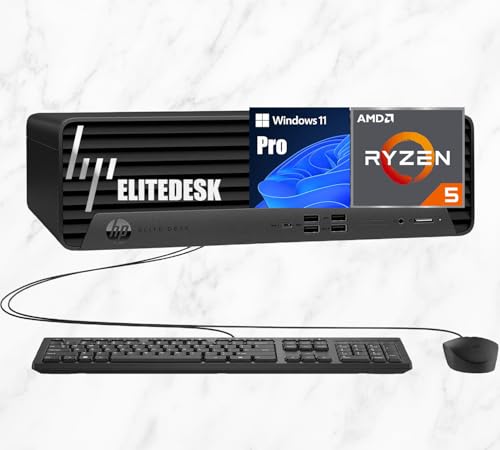
HP Elite 805 G9 SFF Business Desktop, Ryzen 5, Radeon 740M, 16GB DDR5, 256GB SSD
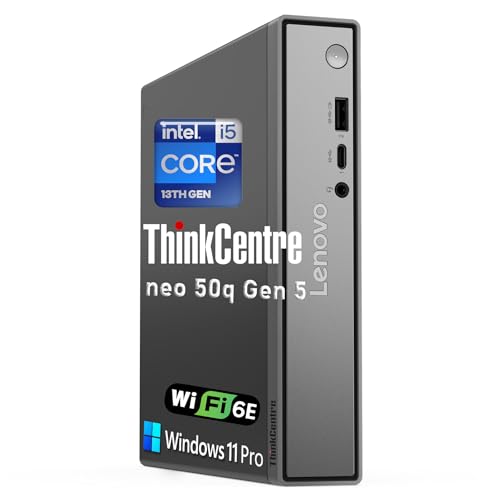
Lenovo ThinkCentre neo 50q Gen 5 Tiny Desktop

Lenovo ThinkCentre neo 50q Gen 5, 16GB DDR5, 512GB, Wi-Fi 6

Lenovo ThinkCentre neo 50q Gen 5 1L

HP M01-F0020 Desktop, Ryzen 3 3200G, 8GB RAM, 512GB SSD, Windows 10
The Details Behind The Selections
The HP ProDesk 600 G6 SFF brings more memory and storage than most compact office alternatives, making it a sensible choice for spreadsheets, document work, and several applications running at once. Its 10.6-by-3.7-by-11.9-inch chassis remains small enough for a home office, although it takes more room than the Lenovo Tiny models.
The Intel Core i5-10400F provides six cores and 12 threads, a practical foundation for routine productivity and communication. Windows 11 Pro adds remote desktop access and BitLocker, which is Microsoft’s disk-encryption feature, while the included keyboard, mouse, and USB Wi-Fi adapter simplify initial setup.
A Strong Showing
- The 32GB of DDR4 memory gives office applications comfortable room to coexist.
- A 1TB PCIe NVMe SSD provides quick access and substantial local file capacity.
- Separate HDMI and DVI outputs support two displays for split-screen work.
- USB-C, USB 3.0, Gigabit Ethernet, and wireless connectivity cover common connection needs.
Points To Note
- The GeForce GT 610 is suited to basic display output rather than demanding graphics work.
- The larger SFF enclosure takes more desk space than the ThinkCentre Tiny systems.
Key Specs
Made For Busy Offices
A finance, administration, or home-office professional benefits most from the generous memory, local storage, and dual-display support.
A Better Fit Elsewhere
The Lenovo ThinkCentre neo 50q Gen 5 Tiny Desktop suits a compact workstation where desk space matters more than storage capacity.
Compared with the ProDesk 600, the HP Elite 805 G9 brings a newer business platform and faster solid-state storage, but less room for local files. That combination makes it a practical choice for an active office where documents can live on a network drive rather than inside a large internal drive.
The Ryzen 5 processor has six cores, 12 threads, and boost speeds up to 5.0GHz. Radeon 740M integrated graphics handle everyday visual output, while the included neural processing unit, or NPU, provides hardware support for selected AI workloads. The listing also includes 24/7 support and a protection plan, though coverage levels vary.
Notable Upsides
- DDR5 memory provides a more current platform for everyday office workloads.
- PCIe NVMe storage supports quick access with a more compact 256GB capacity.
- The wired keyboard and mouse form a practical office setup from the start.
- Windows 11 Pro supports remote access and common business controls.
Worth Noting
- Local storage is modest for large media libraries or extensive offline project files.
- 16GB of memory is useful, though the ProDesk offers twice that amount.
Right Fit For Hybrid Work
A hybrid team member handling calls, documents, and cloud-based applications gets a modern, well-connected business desktop.
Where A Sibling Pick Shines
The HP ProDesk 600 G6 SFF fits a data-heavy office that values 32GB memory and a 1TB SSD over newer platform features.
A tiny workstation solves the desk-crowding problem more effectively than any SFF tower, and the ThinkCentre neo 50q Gen 5 measures only 7.05 by 7.20 by 1.42 inches. I can imagine it mounted behind a monitor or tucked beneath a compact workstation without occupying valuable surface area.
The Intel Core i5-13420H combines eight cores, 12 threads, and speeds up to 4.6GHz, which makes it a credible fit for business applications, video calls, and general multitasking. Compared with the HP Elite 805 G9, its defining advantage is physical scale rather than memory or integrated graphics.
Real-World Strengths
- The 1.42-inch height fits neatly behind larger displays.
- Eight processor cores support several routine office tasks at once.
- The 12MB cache helps retain data close to the processor during frequent work.
- The compact size suits shared desks and home offices with limited room.
Small Caveats
- Port selection and upgrade options deserve close attention before purchase.
- Included protection coverage varies by plan, so the selected coverage needs careful review.
Feature Snapshot
Built With Small Desks In Mind
A professional working from a compact or shared desk gains the most from this unobtrusive Lenovo form factor.
Consider Something Else When
The HP ProDesk 600 G6 SFF suits a workspace needing 32GB memory, a 1TB SSD, and more conventional expansion flexibility.
This ThinkCentre neo 50q Gen 5 configuration offers the most balanced version of the tiny Lenovo desktop. It retains the same compact dimensions as the smaller listing, but adds 16GB of DDR5 memory, a 512GB PCIe solid-state drive, Wi-Fi 6, Windows 11 Pro, and a black finish.
For a wireless office, that combination reduces the need for Ethernet cables around the desk. Wi-Fi 6 represents a newer wireless standard designed for efficient handling across compatible routers and devices. I would favor this version over the plainer ThinkCentre listing for a daily setup involving downloads, browser-heavy work, and communication software.
Useful Touches
- 16GB of DDR5 memory suits routine multitasking and communication tools.
- The 512GB PCIe SSD offers twice the local capacity of the Elite 805 G9.
- Built-in Wi-Fi 6 supports a cleaner, cable-light desk arrangement.
- Windows 11 Pro adds remote access and business-oriented system controls.
Practical Considerations
- Storage remains below the 1TB capacity of the HP ProDesk 600 G6 SFF.
- Compatibility with a mounted display and its cable arrangement needs checking before installation.
Made For Wireless Offices
A hybrid professional who values a small footprint, modern memory, and wireless connectivity gets a particularly coherent package here.
Another Choice May Suit
The HP Elite 805 G9 SFF Business Desktop suits a mixed office that values integrated Radeon graphics and an NPU over local storage capacity.
The ThinkCentre neo 50q Gen 5 1L pairs the familiar compact Lenovo format with a newer Intel Core 5 210H processor. That processor uses a hybrid core design, dividing eight cores into four performance cores for demanding tasks and four efficiency cores for lighter background work.
The approach feels sensible in an office where communication applications, documents, and background services run together. Compared with the Core i5-13420H ThinkCentre, this model presents the newer platform as its main point of distinction. The listing also includes 24/7 support and protection options, with coverage varying by plan.
Good Reasons To Consider
- Eight cores support multitasking across productivity applications.
- Four performance cores handle heavier foreground tasks in a compact chassis.
- Four efficiency cores assist lighter background workloads.
- Boost speeds reach up to 4.8GHz for responsive everyday operation.
Where It May Fall Short
- The compact design may limit convenient storage expansion.
- Core allocation can vary by workload, so heavy sustained tasks deserve realistic expectations.
Core Details
Who Will Love This
A performance-conscious office professional with a cramped desk gets a compact system built around a current processor architecture.
Swap It Out When
The ThinkCentre neo 50q Gen 5 with Wi-Fi 6 suits an office that needs confirmed memory, storage, and wireless specifications in one listing.
The HP M01-F0020 is the straightforward option for a study desk, reception area, or secondary office computer. Its Ryzen 3 3200G processor and 512GB SSD cover the essentials: documents, browsing, video playback, and ordinary communication applications. Eight USB ports also provide plenty of room for peripherals in a fixed workstation.
The limitation is memory, with 8GB serving a lighter workload than the other systems here. The 2020 model designation and Windows 10 Home also make this a more dated platform. It can still make sense for basic tasks, but I would not choose it for heavy multitasking or demanding modern games.
What Earns Its Place
- The 512GB SSD provides useful local storage for documents and media.
- Eight USB ports simplify connections for a permanent desk setup.
- Windows 10 Home covers common personal and study applications.
- The Ryzen 3 3200G provides a straightforward entry point for basic computing.
Less-Strong Areas
- 8GB of RAM is the main constraint for many simultaneous applications.
- The older platform is less appealing for resource-heavy gaming or demanding creative work.
Quick Facts
Best Suited To Simple Routines
A student or occasional office user gains a straightforward computer for writing, browsing, lessons, and video calls.
Look Elsewhere When
The Lenovo ThinkCentre neo 50q Gen 5 Tiny Desktop suits a more modern workspace that needs greater memory and a newer processor platform.
What Counts Before Buying a Desktop Build
Processor Fit Comes First
A processor determines how comfortably the system handles concurrent work, but core count alone does not tell the whole story. The Core i5 models suit demanding office routines, while the Ryzen 3 option is more appropriate for lighter study and productivity tasks. I prioritize a processor with enough headroom for the applications used throughout the day.
Memory Changes Daily Comfort
The difference between 8GB and 32GB becomes noticeable when many browser tabs, office applications, and communication windows remain open. Sixteen gigabytes serves as a sensible middle ground for most professional routines. The 8GB HP model is more appropriate for occasional use or a separate, lightweight computer.
Storage and Display Needs Shape the Fit
A 1TB drive reduces the need to manage local files manually, while 256GB and 512GB configurations require closer attention to document volume. Dual-display support matters for spreadsheet analysis, writing, and reference-heavy work. I would also check the physical dimensions and connection requirements before ordering a compact model.
Compact Designs Need Practical Setup Planning
The ThinkCentre Tiny models solve limited-desk problems elegantly, but their size makes cable routing and mounting relevant. The HP SFF systems provide a more conventional enclosure and greater local storage in the ProDesk configuration. Matching the chassis to the available space prevents a compact computer from becoming inconvenient during setup.
Common Desktop Build Traps to Avoid
Mistakes Worth Dodging
Selecting by processor generation while ignoring memory can leave a new computer struggling with ordinary multitasking. I would also avoid assuming every compact case includes the ports, storage, or wireless features shown by a different configuration in the same family.
Where The Extra Money Goes
Additional money commonly buys more memory, larger SSDs, newer processors, and business-oriented operating systems. Those upgrades matter most for long workdays, heavy multitasking, and local media storage. A basic model remains sensible for a secondary computer with lighter responsibilities.
Frequently Asked Questions
Which is the smallest desktop build in this list?
The Lenovo ThinkCentre neo 50q Gen 5 Tiny Desktop is the smallest, measuring 7.05 by 7.20 by 1.42 inches. Its compact size suits tight or shared desks.
Is 32GB of RAM necessary for office work?
Thirty-two gigabytes is useful when many applications stay open or large business files occupy memory. Sixteen gigabytes handles most standard routines, while 8GB suits lighter use.
Which model offers the most local storage?
The HP ProDesk 600 G6 SFF provides a 1TB PCIe NVMe SSD. The ThinkCentre neo 50q Gen 5 with 512GB storage comes second among the configurations with confirmed capacities.
Do all six desktop builds support two monitors?
Only the HP ProDesk 600 G6 has explicitly listed HDMI and DVI outputs for two displays. Display support on the remaining systems depends on their specific port and graphics configurations.
Which desktop is best for a small study space?
The HP M01-F0020 works for basic writing, browsing, lessons, and video calls. The ThinkCentre neo 50q Gen 5 Tiny Desktop is the stronger choice when desk space and a newer platform matter most.
Final Verdict
I would choose the HP ProDesk 600 G6 SFF for a busy office needing ample memory, storage, and two screens. The ThinkCentre neo 50q Gen 5 family takes over when desk space is scarce, with the 16GB/512GB Wi-Fi 6 version offering the most balanced configuration. The HP Elite 805 G9 fits modern business use, while the M01-F0020 remains a practical basic computer for lighter routines.
