
A tidy desk rarely starts with the computer itself. It starts with deciding how much screen space matters, how much room the hardware can take, and whether the connections already exist or need another purchase. I focus on six practical options for home offices, study areas, and compact workspaces, including complete desktops, standalone monitors, and docks for laptop-based setups.
A Fast Comparison Of The Options

ANYHDD P2725H 27-Inch Full HD 1920 x 1080 Monitor with USB Hub and Cables

Apple 2024 Mac mini Desktop Computer, M4 10-Core CPU and GPU, 16GB Unified Memory, 256GB SSD

ASUS V500 Desktop Computer, Core i7, 64GB RAM, 512GB PCIe, Wi-Fi 6, Windows 11

Dell P2425H 24-Inch Full HD 100Hz IPS Monitor with Adjustable Stand, DisplayPort and HDMI

Dell Pro Dock WD25 USB-C Dock with 100W Power and Dual 4K Display Support
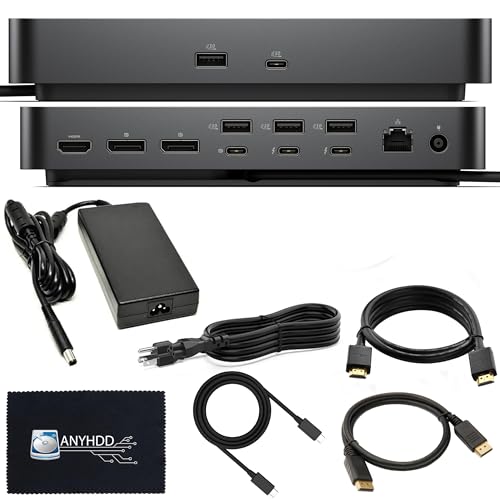
Dell SD25TB4 Pro Thunderbolt 4 Smart Dock, 8K Display Support, 180W Adapter
Taking A Closer Look At The Options
A desk with spreadsheets, browser tabs, and a video call needs more visible area than a compact laptop screen provides. The ANYHDD P2725H gives that workspace a 27-inch canvas at 1920 x 1080, while its built-in USB hub can shorten the cable run to the computer. It looks most useful beside a full-size tower in a home office, although the resolution is less detailed than the 4K support offered by the ASUS V500.
Unlike the Apple Mac mini reviewed later, this is a display rather than a complete computer, so separate hardware remains necessary. IPS technology, which produces more consistent color and viewing angles than basic twisted-narrow panels, should suit mixed office work. I see it as the more practical option for someone who already owns capable computer hardware and wants a larger, adjustable workspace.
Everyday Wins
- A 27-inch panel leaves room for multiple windows without excessive desk depth.
- The 100 Hz refresh rate makes routine scrolling and cursor movement look smooth.
- Height, tilt, swivel, and pivot adjustments help set a comfortable viewing position.
- Four USB Type-A ports reduce the need for a separate hub in some setups.
- HDMI, DisplayPort, and VGA provide several paths to older and newer computers.
Things To Consider
- Full HD is a sensible office resolution, though fine detail on a 27-inch screen can appear less crisp than 4K.
- The monitor does not include a desktop, so existing computer specifications determine application performance.
Feature Snapshot
Who It Suits Best
This monitor best suits office-focused professionals and students who want a large, adjustable Full HD display and already own a suitable computer.
A Better Fit Elsewhere
The Dell P2425H monitor offers a more compact 24-inch footprint for desks where every inch of depth matters.
The Mac mini makes the strongest sense when desk space, not expandability, drives the decision. At five by five inches, it can sit beside a display or beneath a shelf without taking over the work surface. I would favor this setup for a tidy creative desk, a shared family workspace, or a small office where a full-size tower would be visually and physically out of place.
Apple silicon combines the processor, graphics, and memory in one system, while unified memory gives graphics-intensive applications access to the same 16 GB pool as the rest of the Mac. Compared with the 64 GB ASUS V500, this configuration offers far less memory headroom, but the M4 chip and 10-core graphics make the smaller system appealing for Apple-centered creative workflows.
Well-Handled Touches
- The five-inch footprint leaves substantial room for a monitor, keyboard, and documents.
- The 10-core CPU and 10-core GPU configuration supports demanding desktop workloads.
- Unified memory can improve graphics performance by allowing shared access to system memory.
- Front and rear ports keep frequently connected devices within reach.
- The 256 GB SSD keeps the storage configuration simple and compact.
Room For Improvement
- Sixteen gigabytes of unified memory may become restrictive with large creative files or numerous demanding applications open at once.
- A separate display is required because the Mac mini does not include one.
Made For
Creative professionals and Apple users working in compact studios will appreciate the combination of M4 performance and a minimal desk footprint.
Reach For A Different Pick When
The ASUS V500 desktop computer better suits intensive multitasking that calls for 64 GB of RAM and more conventional storage expansion.
The ASUS V500 is built for a desk that already has room for a conventional mini tower and a separate screen. Its 64 GB of RAM gives demanding office applications, large spreadsheets, and creative projects much more working memory than the 16 GB Mac mini configuration. That distinction matters for heavy multitasking, even though both systems include an i7 or M4-class processor and modern connectivity.
Two-monitor support at up to 4K makes this a practical center for a financial office, engineering workstation, or content-production desk. Wi-Fi 6 provides a high-capacity wireless connection, while the included keyboard and mouse cover the basic control setup. It is less convenient than the Mac mini for a minimalist apartment, but more adaptable for a fixed professional workstation.
What It Does Well
- Sixty-four gigabytes of RAM supports memory-heavy multitasking.
- The Core i7 processor reaches speeds of up to 4.9 GHz for demanding work.
- DisplayPort and HDMI connections support a two-monitor arrangement with 4K output.
- Wi-Fi 6 handles high-bandwidth wireless traffic across compatible devices.
- A keyboard and mouse are included for a more complete starting point.
Possible Compromises
- The mini-tower format takes considerably more space than the five-inch Mac mini.
- No monitor is included, and the 512 GB PCIe drive may fill quickly with large media files.
Key Specs
Right Fit For
This desktop fits power users, small businesses, and technical professionals who routinely run several demanding applications at once.
Another Choice May Suit
The Apple 2024 Mac mini desktop computer suits people who value a five-inch footprint and an Apple-centered workflow more than 64 GB of memory.
A 24-inch display is a useful middle ground for a compact workstation where a 27-inch model would crowd the desk. The Dell P2425H provides Full HD resolution, a 100 Hz refresh rate, and IPS viewing angles without demanding the same physical footprint as the ANYHDD P2725H. That makes it a sensible center screen for a dorm room, shared office, or dual-monitor arrangement.
The stand supports height, tilt, swivel, and pivot adjustments, which matters more than the first glance suggests on a crowded desk. Its 250 cd/m² brightness, anti-glare coating, and blue-light filter can make prolonged office sessions more comfortable. Compared with the 27-inch ANYHDD, the Dell preserves many of the same core panel features while trading some viewing area for a smaller footprint.
Good Reasons To Consider
- The 24-inch screen balances useful area with a manageable desk footprint.
- IPS technology provides broad viewing angles for shared workspaces.
- Full HD resolution fits everyday office, study, and communication tasks.
- The included stand offers several physical adjustments for comfortable positioning.
Practical Considerations
- A separate desktop or laptop is required to drive the display.
- Full HD becomes less detailed on larger screens, so the 24-inch size is a sensible match for this resolution.
Built With In Mind
This monitor suits students, remote workers, and shared-space users who value an adjustable display that occupies less room than a 27-inch model.
Look Elsewhere When
The ANYHDD P2725H 27-inch monitor better suits productivity-focused users who want a larger canvas and a four-port USB hub.
A laptop can feel like two different machines at a fixed office desk. The Dell Pro Dock WD25 addresses that problem by turning one USB-C connection into a wired workstation with displays, peripherals, data ports, and laptop charging. I would consider it for a business desk where the laptop travels regularly but the screen, keyboard, mouse, and network remain in place.
The dock supports dual 4K displays through HDMI 2.1, two DisplayPort 1.4 connections, and a USB-C multifunction display port. That provides more display choices than the single-screen monitor options in this roundup. Power delivery of up to 100W for laptops is useful, although the host computer still needs compatible USB-C video, data, and charging support.
Useful Touches
- One USB-C connection can consolidate power, video, and peripheral connections.
- Dual 4K support suits side-by-side work and detailed reference material.
- Four USB-A 3.2 Gen 2 ports accommodate common accessories.
- A USB-C 3.2 Gen 2 port supports modern storage and accessories.
Things To Weigh
- The host laptop must support USB-C display output and compatible power delivery.
- The dock supplies connectivity, but it does not include a computer or monitor.
Feature Rundown
Who Will Love This
Hybrid workers and business professionals will appreciate the clean transition between a traveling laptop and a permanent multi-display desk.
Reach For A Different Pick When
The Dell SD25TB4 Pro dock better suits Thunderbolt 4 workstations that need higher data bandwidth and broader display support.
Thunderbolt 4 changes the role of a docking station because it combines high-speed data transfer, display support, and power delivery over a single connection. The Dell SD25TB4 Pro is aimed at demanding desks with advanced displays, fast storage, and multiple high-bandwidth peripherals. I would reserve it for a Thunderbolt-capable laptop or workstation rather than a basic computer with only standard USB-C.
Its 180-watt adapter provides more charging capacity than the 100-watt WD25, while the modular design allows the dock to be updated as workstation needs change. Support for an 8K display is another meaningful distinction, though the host computer and individual display must support the intended resolution and refresh combination. Compared with the WD25, this is the more specialized choice.
Real Benefits
- Thunderbolt 4 supports high-bandwidth data alongside display and power connections.
- The 180W adapter offers greater laptop charging capacity than the WD25.
- Support for an 8K display suits advanced, high-resolution workstation setups.
- The swappable module design supports future dock upgrades.
Potential Drawbacks
- The computer must include a compatible Thunderbolt 4 connection.
- Its specialized capabilities may be unnecessary for a standard home-office laptop.
Technical Highlights
The Right Fit
This dock fits engineers, video professionals, and advanced creators using Thunderbolt 4 computers and high-resolution displays.
Consider Something Else When
The Dell Pro Dock WD25 better suits ordinary business laptops that need dual 4K displays and up to 100 watts of charging.
Match The Machine To The Work
Start With The Workload
The Mac mini suits Apple-centered creative work and compact desks, while the ASUS V500 offers 64 GB of memory for intensive multitasking. I would consider virtual machines, large media libraries, heavy spreadsheets, and numerous simultaneous applications before settling on either configuration. The practical question is how much work remains open at once, not merely how fast the processor appears on paper.
Match The Display To The Desk
A 27-inch monitor gives office workers more room for side-by-side windows, but a 24-inch display is easier to position on a crowded desk. Resolution matters too: Full HD remains practical for everyday office work, while the ASUS V500’s 4K support is more appropriate for detailed professional content. I would prioritize desk depth and viewing distance before treating screen size as the only measure of quality.
Check Connections Before Buying
A dock only simplifies a setup when the computer supports the required connection. USB-C docking depends on compatible display output and power delivery, while the SD25TB4 requires Thunderbolt 4. DisplayPort, HDMI, and USB-A connections cover many desk accessories, so I would check the existing computer ports and peripheral inventory before assembling a workstation around a dock.
Think About Space And Serviceability
The Mac mini occupies only five by five inches, while the ASUS V500 uses a larger mini-tower format. That difference affects storage, placement, and the number of nearby devices. I would also account for cable management and leave enough room around vents, stands, and monitor adjustments. A compact arrangement feels better when it remains accessible after everything is connected.
Practical Lessons Before The First Connection
Mistakes Worth Dodging
A common mistake is judging a complete desktop by the computer alone while overlooking the monitor, stand, and required cables. Another is choosing a dock before confirming the host port supports video, data, and charging. I would line up every planned display and accessory with the available connections first, since a neat-looking desk can become frustrating when a single missing cable or incompatible port disrupts the setup.
Where The Extra Money Goes
Higher-end models often add faster processors, more memory, higher display bandwidth, or greater charging capacity. The ASUS V500’s 64 GB is meaningful for memory-heavy work, while the SD25TB4’s Thunderbolt connection and 180-watt adapter serve more advanced equipment. I would pay for those additions only when the everyday workload requires them, rather than treating extra specifications as useful by default.
Frequently Asked Questions
Is the Apple Mac mini a complete desktop setup?
The Apple 2024 Mac mini is a complete desktop computer, but it does not include a monitor, keyboard, or mouse. I would pair it with the ANYHDD P2725H for a larger workspace or the Dell P2425H for a smaller desk.
Which desktop has the most memory?
The ASUS V500 includes 64 GB of RAM, compared with 16 GB of unified memory in the listed Apple Mac mini configuration. The ASUS option therefore offers more headroom for memory-heavy multitasking and large working files.
Is Full HD enough for office work?
Full HD at 1920 x 1080 is suitable for standard office applications, browsing, documents, and video calls. I would favor a 4K-capable system for fine text, detailed graphics, or large work areas where greater pixel density matters.
Do the docking stations include a computer?
Neither listed dock includes a desktop or laptop. The Dell Pro Dock WD25 requires a compatible USB-C host, while the Dell SD25TB4 Pro is designed around Thunderbolt 4 connectivity.
Can a dock support two monitors?
The Dell Pro Dock WD25 supports dual 4K displays through its HDMI, DisplayPort, and USB-C display connections. The SD25TB4 provides broader high-resolution support for compatible Thunderbolt 4 workstations and advanced screens.
Final Verdict
I would choose the Apple 2024 Mac mini for a compact creative desk, the ASUS V500 for memory-heavy professional work, and the ANYHDD P2725H for an expansive Full HD workspace. The Dell P2425H handles tighter desks better, while the WD25 and SD25TB4 turn compatible laptops into more permanent workstations. The strongest setup is the one whose connections, screen size, and processing demands match the desk as it will actually be used.
