
A trading workstation needs to keep charts, news feeds, order platforms, and communication apps open without becoming desk clutter. I built this roundup around that daily workflow, with compact towers and mini PCs that provide useful storage, flexible displays, and modern connectivity. My focus is on practical fit for active traders, home-office setups, and anyone managing a busy market day from a dedicated computer.
The Picks In Brief

Acer Aspire Desktop Computer 8GB DDR5 512GB PCIe SSD Intel N150

MeLE Quieter 4C N100 16GB

MeLE PCG02 Pro N5100 8GB eMMC
MeLE Quieter 4C N150 16GB 512GB

MeLE PCG02 N100 Stick 8GB Win11 Pro
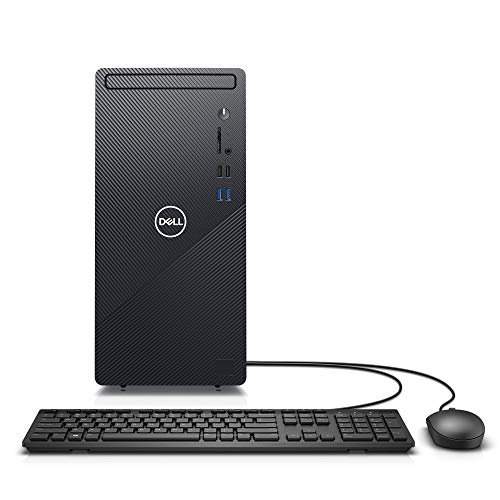
Dell Inspiron 3880 Core i5 Desktop 12GB DDR4 512GB SSD Win10 Pro Black
The Strengths Of Each Pick
The Acer Aspire brings together a compact 8-liter chassis, 8GB of DDR5 memory, and a 512GB PCIe SSD, making it a sensible starting point for a home trading desk. I appreciate the inclusion of Wi-Fi 6, RJ45 Ethernet, HDMI, and DisplayPort because a trader may use a wired network while connecting the computer to more than one display.
Compared with the smaller MeLE options, this Acer has a more conventional tower shape and comes with a wired keyboard and mouse. The Intel N150 is designed for ordinary office tasks, so I would treat this as a light-duty analysis station rather than a heavily loaded workstation.
Well-Handled Touches
- The 512GB PCIe SSD gives charts, documents, and applications quick local storage.
- HDMI and DisplayPort support flexible multi-screen trading layouts.
- Wi-Fi 6, Bluetooth 5.2, and RJ45 cover both wireless and wired connections.
- The 8-liter chassis leaves more desk space than a full-size tower.
Trade Offs
- I would check memory needs against the demands of charting software, virtual machines, and multiple browser-based platforms.
- The front USB-C port does not replace the need to verify which display adapter fits the chosen monitor.
At A Glance
Who It Suits Best
I recommend this Acer for a home-office trader who wants a conventional computer with bundled peripherals and a manageable footprint.
Consider Something Else When
The MeLE Quieter 4C N150 16GB 512GB suits a trader who prioritizes a fanless mini-PC design and three-display support over bundled peripherals.
Quiet operation and a small footprint make the MeLE Quieter 4C attractive for a trading desk with limited room. Its fanless enclosure removes the mechanical noise produced by a conventional cooling fan, which may be useful during long sessions with calls running alongside charts. I see it as a clean fit for a small home office.
The 16GB of LPDDR5 memory provides more working room than the 8GB Acer configuration, while two HDMI connections and a full-function USB-C port support a three-display arrangement. Storage can also grow through a microSD card or an internal M.2 2280 drive, which helps traders accumulate research files over time.
Points In Its Favor
- Passive cooling keeps the desk quieter during extended chart watching.
- Two HDMI ports and USB-C support three simultaneous 4K displays at 60Hz.
- The 16GB memory configuration gives browser-heavy workflows more room.
- Storage expansion provides a path for additional research data.
Practical Considerations
- The fanless case can reach 55°C to 70°C, so I would leave ventilation space around it.
- PD 3.0 charging requires a suitable power source rated for at least 36W.
Made For
I would pair this MeLE with a trader who wants quiet operation, three monitors, and expandable storage in a compact enclosure.
Not Your Match When
The Dell Inspiron 3880 Core i5 Desktop 12GB DDR4 512GB SSD Win10 Pro Black fits a full-size desk and heavier multitasking load better.
The MeLE PCG02 Pro turns the stick-computer concept into a practical option for a trader who works across several locations. Two built-in HDMI 2.0 ports can feed separate or duplicated displays, while USB PD 3.0 allows compatible power banks and portable power stations to run the system. That flexibility matters more to me than raw processing power.
Its quad-core N5100 processor, 8GB DDR4 memory, and 256GB eMMC provide a modest platform for remote dashboards, browsing, and routine analysis. Unlike the MeLE Quieter 4C N100 16GB, this stick cannot accept an internal SSD because of its limited PCB space, although microSD expansion remains available.
Practical Pluses
- The stick format travels easily between a home office, hotel room, or shared workspace.
- Dual HDMI outputs support two-display market monitoring.
- USB PD 3.0 broadens the range of compatible portable power sources.
- The fanless enclosure provides quiet operation without a cooling fan.
Small Caveats
- The 8GB memory and N5100 processor are modest for intensive charting or several virtual environments.
- Internal SSD installation is unavailable on this model.
Feature Snapshot
Right Fit For
This MeLE suits a mobile trader who mainly needs cloud dashboards, communication tools, and two lightweight displays away from a permanent desk.
A Better Fit Elsewhere
The MeLE PCG02 N100 Stick 8GB Win11 Pro offers a newer processor and Pro edition for traders who need more computing capacity while remaining portable.
The MeLE Business Grade Quieter 4C combines the N150 processor, 16GB of memory, and a 512GB drive in a fanless mini PC. Windows 11 Pro gives it a stronger fit for professional software and business-oriented workflows than the Home edition on the Acer Aspire. I would pay attention to that operating-system distinction when building a dedicated trading machine.
Two HDMI ports and a full-function USB-C connection allow three displays, each supporting 4K at 60Hz according to the listed specifications. The internal M.2 2280 slot and microSD reader also make storage growth straightforward, which is useful for locally stored price histories and research archives.
Positive Takeaways
- The 16GB memory configuration supports several trading and communication applications at once.
- Windows 11 Pro provides broader administrative options than the Home edition.
- Three-display support creates a flexible chart-and-news arrangement.
- Storage expansion supports growing research libraries.
Areas To Watch
- The N150 is an efficient processor rather than a high-end workstation chip.
- I would verify Linux or Ubuntu support needs alongside the included operating system.
Key Specs
Best Suited To
I recommend this MeLE to a professional trader who values Pro operating-system features, quiet operation, and multiple screens in a compact station.
Skip It When
The Dell Inspiron 3880 Core i5 Desktop 12GB DDR4 512GB SSD Win10 Pro Black suits a trader who prefers a full-size chassis and a Core i5 processor.
The MeLE PCG02 N100 Stick brings a newer quad-core N100 processor to the portable stick format, making it more compelling for market monitoring than the older N5100 model. Windows 11 Pro adds a professional operating system, and the 8GB LPDDR5 memory helps keep several lightweight applications responsive. I see this combination as useful for a trader moving between locations.
The main limitation is storage. Its 128GB eMMC provides less room than the 256GB in the MeLE PCG02 Pro N5100 8GB eMMC, which may matter for traders saving charts, historical data, and project files locally. The stick format also requires attention to display adapters and a compatible power source before leaving home.
What Makes Sense
- The N100 processor gives the stick format more headroom than the earlier N5100 configuration.
- Windows 11 Pro supports professional software and administration needs.
- The compact stick is easy to carry between desks and temporary workspaces.
- LPDDR5 memory helps maintain responsiveness across several open applications.
Points To Note
- The 128GB storage capacity is modest for locally retained research data.
- I would confirm display-adapter support and power requirements before traveling.
Who Will Love This
This stick PC suits a mobile trader who relies mainly on cloud-based platforms and needs Windows 11 Pro in a highly portable form.
Another Choice May Suit
The Acer Aspire Desktop Computer 8GB DDR5 512GB PCIe SSD Intel N150 serves a fixed trading desk better because it includes a keyboard, mouse, and larger storage drive.
The Dell Inspiron 3880 is the most conventional workstation in this group, with a 10th-generation Core i5 processor and a full-size desktop chassis. I associate that larger form factor with a permanent trading desk where storage access, serviceability, and a Core i5 chip matter more than taking up minimal space. The listed 2-year on-site coverage also adds a useful ownership consideration.
Its 12GB DDR4 memory and 512GB solid-state drive form a practical combination for charts, research documents, and communication tools. Compared with the MeLE choices, the Dell trades desk space for a more traditional computing layout. The Windows 10 Pro label deserves attention during any operating-system planning for a long-term setup.
The Case For It
- The Core i5 processor provides a stronger foundation for demanding multitasking than the N-series mini PCs.
- The full-size chassis suits a permanent home-office trading station.
- A 512GB SSD provides practical room for applications and active research files.
- Two-year on-site coverage adds support beyond the basic computer purchase.
Less Ideal Details
- The larger desktop occupies more space than a stick PC or mini PC.
- I would check current software requirements against the Windows 10 Pro operating system.
Quick Facts
Built With In Mind
I recommend the Inspiron 3880 for a full-time trader who keeps a fixed desk and prefers a Core i5 system with a conventional chassis.
Where Another Pick Suits Better
The MeLE Quieter 4C N100 16GB offers a quieter, smaller alternative for a trader who values desk space and fanless operation.
What Matters Before Building a Trading Workstation
Start With the Daily Software Load
I would begin by listing every program that must remain open during a typical session. Charting platforms, web dashboards, order terminals, spreadsheets, and communication tools each place different demands on memory and graphics, so the number of open applications matters more than the category label on the box.
Confirm Monitor and Network Connections
A multi-screen trading setup needs matching display outputs and suitable cables or adapters. I would also decide between Ethernet and Wi-Fi before ordering, since a wired connection can reduce dependence on network conditions in a fixed office.
Match Memory and Storage to Growth
DDR5 or DDR4 memory gives the operating system room to manage multiple applications, while an SSD keeps program and file access responsive. Expansion options deserve attention when market histories, research libraries, or recorded sessions will accumulate over time.
Account for the Whole Desk
Mini PCs free up considerable space, but they may require separate display, keyboard, mouse, and power arrangements. A full-size tower takes more room, although it can provide a more conventional internal layout and stronger processor choices for intensive workloads.
Trading Desktop Shopping Pitfalls and Upgrade Value
Mistakes Worth Dodging
I would avoid judging a computer solely by screen count, since unsupported display arrangements can create setup headaches. It is also easy to overlook memory, adapter requirements, or the operating system, all of which affect daily use more than a small difference in chassis size.
When Paying More Pays Off
A more capable processor or additional memory becomes worthwhile when charting, research, and communication software share one machine. The Dell Inspiron 3880 makes that case through its Core i5 chip, while the larger MeLE configurations provide more memory and storage in a compact case.
Frequently Asked Questions
Is a desktop better than a laptop for stock trading?
A desktop often provides more flexibility for multiple monitors, cooling, storage, and peripherals. A portable stick PC suits a trader who works across different locations, but a permanent desk setup usually has more room for expansion.
How much RAM is practical for trading software?
I would consider 8GB a basic configuration for standard applications and 16GB more comfortable for numerous browser tabs, charts, and communication tools. Complex datasets or virtual environments can require additional memory.
Do mini PCs support multiple monitors?
Several models in this roundup support multiple displays through combinations of HDMI and USB-C. I would verify the exact output arrangement, resolution, refresh rate, and required adapters for the intended screens.
Is Wi-Fi 6 necessary for a trading computer?
Wi-Fi 6 offers modern wireless connectivity, but Ethernet remains a practical option for a fixed trading desk. The deciding factors are network stability, router capability, and the trader’s preferred setup.
Should a trading computer have an SSD?
An SSD is preferable for faster program loading and file access, particularly with chart software and large research collections. The Acer Aspire, both 16GB MeLE mini PCs, and the Dell Inspiron provide SSD-based storage configurations.
Final Verdict
I would choose the Acer Aspire for a fixed home desk, the MeLE Quieter 4C N150 16GB 512GB for a compact professional setup, and the MeLE PCG02 N100 Stick 8GB Win11 Pro for portable monitoring. The Dell Inspiron 3880 earns consideration when a Core i5 processor and full-size chassis matter most. Match the machine to the software, monitors, and working space before making the final call.
