
A crowded timeline can make a modest desktop feel painfully slow, especially when preview playback stutters and the drive struggles with large project files. I built this shortlist around affordable systems with enough processor power, memory, storage, and display connectivity to support practical video work without chasing unnecessary extras.
Several options fit different editing routines. The Skytech Crystal Gaming PC makes the strongest case for accelerated graphics and heavy effects, while the Dell OptiPlex 7020 offers a compact business desktop with extensive display support. For basic editing, the Dell ECT1250 and HP desktop towers prioritize memory, storage, and everyday responsiveness.
How The Shortlist Stacks Up

Dell OptiPlex 7020 Business Desktop PC, 14th Gen i5-14500, 8GB DDR5, 512GB SSD

Dell ECT1250 Tower PC, 14th Gen Intel, 16GB DDR5, 512GB SSD
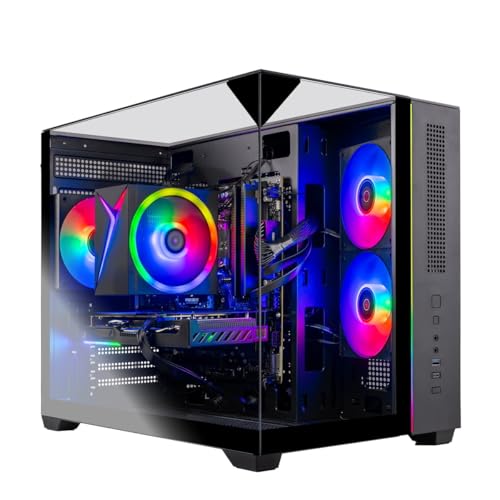
Skytech Crystal Gaming PC, Ryzen 7 7700, RTX 5060 Ti 8GB, 32GB DDR5

HP Desktop Tower PC, Core i5-10400F, 16GB DDR4, 256GB PCIe SSD, Windows 11 Pro

HP Pro Tower 290 G9 PC, Core i3-13100, 32GB RAM, 1TB SSD, Windows 11 Pro

HP ProDesk 600 G2 SFF PC, Core i5, 16GB RAM, 1TB SSD, Renewed
A Breakdown Of The Leading Choices
The OptiPlex 7020 SFF fits an editor who wants a capable CPU beside a small monitor instead of a full tower. Its 14-core i5-14500 combines six performance cores with eight efficiency cores, giving Adobe applications and background tasks a useful mix of processing power. Unlike the ECT1250, it offers a more compact 11.5-inch-wide chassis and support for as many as four displays.
That display capacity works well for a home editing suite with a preview monitor beside a reference screen. Wi-Fi 6E, Bluetooth, 10 USB ports, and Gigabit Ethernet cover common studio connections, while the included keyboard and mouse reduce setup friction. The honest catch is that 8GB of memory leaves less breathing room than I would want for large timelines.
Reasons It Performs
- The 14-core processor handles multitasking without moving to a much larger system.
- Four-display support keeps previews, timelines, and reference material visible.
- Two DisplayPorts, HDMI, and USB Type-C provide flexible monitor connections.
- The compact chassis preserves desk space in a home office.
- Windows 11 Pro and business-oriented connectivity suit an office workflow.
Small Caveats
- 8GB RAM is modest for heavy multitasking, and memory may be limited on this configuration.
- Integrated Intel graphics are less suitable than a dedicated GPU for demanding effects or sustained high-resolution playback.
Core Details
Built With In Mind
This model suits a home-office editor working across several screens with mixed office and light creative tasks.
Where A Sibling Pick Shines
The Skytech Crystal Gaming PC serves editors who need dedicated RTX graphics and 32GB of memory for heavier effects.
The ECT1250 prioritizes the parts that make a modest editing workstation feel comfortable during ordinary school, office, and freelance projects. Its 16GB of DDR5 memory gives me more room for browser tabs, communication apps, and an editing application than the OptiPlex 7020’s 8GB configuration. The 14th-generation Core i3 is less forceful than the OptiPlex i5, but it remains sensible for shorter footage and straightforward timelines.
Its 12.76-inch-wide tower fits below many desks, although it needs more room than the OptiPlex SFF. Dual-monitor flexibility comes through HDMI 2.1 and DisplayPort 1.4, while front USB Type-C is convenient for direct device connections. I see this as a solid learning and light-production system rather than a machine built for intensive visual effects.
Well-Handled Touches
- 16GB DDR5 supports comfortable multitasking around an editor.
- The 512GB PCIe NVMe drive keeps applications and recent assets quick to access.
- Wi-Fi 6, Bluetooth, and Gigabit Ethernet cover common connection methods.
- Front USB Type-C and an SD reader simplify peripheral access.
- Windows 11 Pro adds business features such as BitLocker and remote management.
Where It Is Less Suited
- Intel UHD Graphics 730 is integrated, so heavy effects and demanding playback remain limited.
- The four-core i3 has less processing headroom than the i5-14500 in the OptiPlex 7020.
- 512GB of storage may require careful project organization for large footage libraries.
The Right Fit
This tower suits students, administrative users, and beginner editors handling mostly 1080p footage on a modest budget.
A Better Fit Elsewhere
The Skytech Crystal Gaming PC better serves freelancers who regularly add motion graphics, filters, or GPU-accelerated effects.
Among these six systems, the Crystal Gaming PC has the most directly relevant graphics hardware for demanding video work. Its RTX 5060 Ti carries 8GB of dedicated GDDR7 video memory, which gives demanding filters, 3D elements, and high-resolution previews more graphical headroom than the integrated processors used by the Dell and HP business desktops. That distinction matters once effects become part of the workflow.
The Ryzen 7 7700, 32GB of DDR5 memory, and 1TB NVMe drive make this a comfortable editing and multitasking combination. It suits a freelancer working on client projects, while the 650W Gold power supply provides suitable capacity for the listed components. I would still match the system to the resolution and effects in an actual project rather than assume every editing task needs this level of hardware.
A Few Highlights
- RTX 5060 Ti 8GB graphics provide dedicated VRAM for accelerated creative work.
- Ryzen 7 7700 offers eight cores for editing, encoding, and background applications.
- 32GB DDR5 comfortably accommodates complex timelines and multiple applications.
- The 1TB NVMe drive provides useful room for footage, caches, and project files.
- HDMI and DisplayPort outputs support a conventional editing display setup.
Trade Offs
- It is excessive for basic cuts, school assignments, and office editing.
- The graphics-card manufacturer can vary, so I would check the final component listing before ordering.
Feature Snapshot
Who Will Love This
This desktop suits an ambitious editor or freelancer working with motion graphics, detailed effects, and demanding export timelines.
Look Elsewhere When
The Dell ECT1250 is a more restrained fit for light editing, office duties, and users who do not need dedicated graphics.
The i5-10400F gives this HP tower a familiar six-core processor reaching up to 4.3GHz, which is adequate for basic trimming, sequencing, and encoding. Paired with 16GB of RAM, it can handle a modest editing session alongside browser tabs and office applications. Compared with the Skytech Crystal Gaming PC, however, it lacks the dedicated graphics setup that makes demanding effects and high-resolution previews more comfortable.
Its appeal comes from simplicity for a shared family or student computer. A wireless adapter, keyboard, mouse, and Windows 11 Pro create a ready-made starting point, while the tower format leaves room for internal expansion. The 256GB PCIe SSD is fast, but it is also the constraint I would examine first because video files can consume that capacity quickly.
Why It Works Well
- The six-core processor provides capable performance for basic video cuts and exports.
- 16GB of memory supports standard office and creative multitasking.
- The included keyboard, mouse, and wireless adapter simplify initial setup.
- Windows 11 Pro adds useful management and data-protection features.
Details To Watch
- No dedicated graphics card is identified, and the F-series processor requires separate graphics hardware.
- 256GB is limited for long-form footage, raw clips, and large project caches.
- Older DDR4 memory offers less capacity headroom than the 32GB configurations elsewhere in this shortlist.
Made For
This system suits a student or family member editing shorter clips, completing coursework, and handling general computing tasks.
Another Choice May Suit
The HP Pro Tower 290 G9 better serves an editor who needs more memory, a larger SSD, and additional file capacity.
The Pro Tower 290 G9 takes a different approach from the ECT1250. Instead of prioritizing a stronger processor, it surrounds a 13th-generation Core i3 with 32GB of RAM and a 1TB SSD. That balance makes it useful for long editing sessions, large scratch folders, and multitasking with cloud storage, communication, and editing software open at once.
Its display setup uses HDMI and VGA for two monitors, and Wi-Fi 5, Bluetooth 5, and Gigabit Ethernet cover wired and wireless connections. A wired keyboard and mouse are included, and the optical-drive-free design keeps the front simple. I would regard this as a productive workhorse for assembly cuts and routine post-production rather than a high-end effects machine.
Practical Advantages
- 32GB of RAM gives editing applications and background tasks generous room.
- The 1TB SSD provides substantially more local media capacity than smaller configurations.
- Wi-Fi 5, Bluetooth 5, and Gigabit Ethernet provide flexible networking.
- HDMI and VGA support a practical two-monitor arrangement.
- The included keyboard, mouse, and Windows 11 Pro simplify office deployment.
Points To Note
- The four-core i3 is less powerful than the six- and eight-core processors in several alternatives.
- Intel UHD Graphics 730 is not a substitute for dedicated editing graphics.
- VGA is dated, so modern display compatibility depends on the available HDMI port and adapters.
Key Product Details
Best Suited To
This tower fits an editor working with substantial media libraries and several applications open during routine post-production.
Swap It Out When
The Skytech Crystal Gaming PC is the stronger fit for editors who rely on GPU-accelerated effects rather than large file capacity alone.
The ProDesk 600 G2 SFF combines a compact format with an unusual amount of flexibility for a renewed office desktop. Its 6th-generation Core i5 runs at 3.2GHz and handles basic timeline navigation, trimming, and media management. That processor is considerably older than the other CPUs in this roundup, yet 16GB of RAM and a 1TB SSD give it useful longevity for straightforward editing.
Three-monitor support is the distinguishing feature for a compact editing desk. HD Graphics 530 can drive 4K displays, although it remains an integrated solution. I would use this machine for monitoring, scripting, rough cuts, and auxiliary screens, while a separate system handles intensive rendering or effects. The renewed condition also deserves a careful look before purchase.
The Helpful Details
- Three-monitor support provides a useful editing and monitoring layout.
- The 1TB SSD offers more media capacity than several newer budget configurations.
- 16GB of memory supports standard multitasking and moderate editing projects.
- Wi-Fi and Bluetooth provide convenient wireless access.
Factors To Consider
- The 6th-generation Core i5 has limited headroom for intensive effects and modern workloads.
- HD Graphics 530 is integrated rather than a dedicated editing GPU.
- As a renewed system, I would inspect its condition, included accessories, and listed support terms carefully.
Quick Facts
Who Should Grab It
This small renewed desktop suits a practical editor building a compact three-screen monitoring and rough-cut station.
Consider Something Else When
The HP Pro Tower 290 G9 better serves someone who prioritizes a newer processor and 32GB of memory over maximum display count.
What Actually Matters In A Budget Editing PC
CPU And Graphics Serve Different Purposes
The processor handles timeline work, exports, compression, and background tasks, while the graphics processor renders previews and effects. Integrated Intel graphics can support basic editing, but a dedicated GPU becomes more useful as resolution, effects, and motion graphics increase. I match the hardware to the actual workload rather than treating either component as a substitute for the other.
Memory And Storage Set The Editing Limits
RAM allows an editor, browser, export process, and communication app to remain open without excessive swapping. An SSD reduces delays when launching software and opening recent project files, while its capacity determines how much footage fits locally. For longer projects, 32GB of memory and at least 1TB of storage create a more comfortable working margin.
Displays Change The Workflow
DisplayPort and HDMI are the modern connections I prioritize, and USB Type-C can simplify certain monitor setups. Multi-monitor support is valuable for placing a preview beside a timeline or reference monitor. I also account for desk space, because a capable tower that crowds out the editing area may be less convenient than a smaller system with sufficient ports.
Buy For The Workload
A student making short social edits needs less graphics power than a freelancer preparing motion-heavy client projects. My rule is to prioritize adequate memory and storage first, then add graphics capability when the edit demands it. This prevents an expensive specification from serving a simple task better than a balanced system.
Separating Practical Needs From Expensive Add-ons
Common Shopping Slip Ups
I see many shoppers focus on core count while overlooking memory, graphics, or storage capacity. Another common mistake is assuming every editing task requires a gaming-style discrete GPU. I also check whether the case has room for the required drives and whether the display outputs match the existing monitors.
Why Top Tier Costs More
Higher-tier systems often contribute more capable processors, dedicated graphics, faster memory, larger SSDs, or roomier power supplies. The extra hardware earns its place when complex effects, 4K footage, and continuous exports are routine. For basic 1080p editing, a balanced midrange configuration can preserve the same core workflow without unnecessary components.
Frequently Asked Questions
How much RAM do I need for video editing?
I recommend at least 16GB of RAM for basic editing, while 32GB suits larger timelines and multiple applications. Integrated graphics also share system memory, so additional capacity can help during demanding previews.
Is a dedicated graphics card necessary for video editing?
I find dedicated graphics most useful for GPU-accelerated effects, motion graphics, 3D work, and high-resolution playback. Basic cuts and exports can run on systems with Intel integrated graphics, though preview performance may be less comfortable.
Should I choose a desktop tower or small-form-factor PC?
I favor a tower for easier storage and component expansion, while a small-form-factor PC suits a smaller desk with several monitors. The Dell OptiPlex 7020 and HP ProDesk 600 G2 make sense when desk space matters more than expandability.
Does a 512GB SSD work for video editing?
A 512GB SSD works for focused projects with careful file organization, but large footage libraries can fill it quickly. I look for at least 1TB when long recordings, raw clips, and several project versions are involved.
Does Windows 11 Pro matter for editing?
Windows 11 Pro provides useful management, security, and BitLocker features, while the editing applications run on standard Windows editions. I consider it beneficial for a shared office computer or a workstation that stores sensitive client material.
Final Verdict
I would choose the Skytech Crystal Gaming PC for effects-heavy editing, the Dell OptiPlex 7020 for a compact multi-screen office, and the HP Pro Tower 290 G9 for generous memory and storage. The Dell ECT1250 offers the most balanced route into lighter editing, while the HP ProDesk 600 G2 SFF serves a compact three-screen setup. Match the machine to the real footage, effects, and workflow rather than the longest specification list.
