
A cramped desk can make a powerful computer feel like a liability, while a full-size tower can swallow space without improving the work done on it. I focus on six practical options for gamers, home offices, and everyday users, paying close attention to processor capability, memory, storage, physical size, and expansion potential.
The Leading Options At A Glance

Olialia RTX 3060 Ti 8GB PC
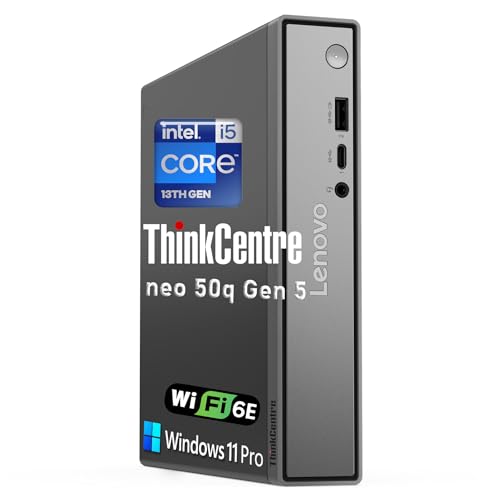
Lenovo ThinkCentre neo 50q Tiny

Lenovo ThinkCentre neo 50q 16GB DDR5 512GB SSD Desktop

Lenovo ThinkCentre neo 50q 1L
HP Pro Tower 290 G9 1TB SSD

HP Pavilion TP01-0050 i5-9400 12GB 1TB HDD Desktop
The Olialia RTX 3060 Ti 8GB PC is the clear gaming-focused option here, pairing a Ryzen 5 5500 with an RTX 3060 Ti and 8GB of dedicated GDDR6 graphics memory. Dedicated memory handles demanding game textures and GPU-accelerated editing, while the six-core processor leaves room for streaming software and other background tasks.
Unlike the compact Lenovo systems that follow, this tower comes with 32GB of DDR4 memory, a 1TB PCIe solid-state drive, and seven ARGB fans. I see the strongest fit at a gaming desk or a creator’s station where graphics performance, multi-monitor connections, and visible component lighting matter more than a minimal footprint.
Noteworthy Benefits
- The RTX 3060 Ti provides a substantial step beyond integrated graphics for 1440p-oriented gaming and accelerated creative work.
- Thirty-two gigabytes of DDR4 RAM supports serious multitasking without relying on virtual memory for common workflows.
- A 1TB PCIe SSD gives games and applications a much more responsive storage base than a mechanical drive.
- Wi-Fi 6 AX200, Bluetooth, Gigabit Ethernet, USB-C, HDMI, and three DisplayPort outputs support flexible desk setups.
- Tempered-glass panels and a lighting remote suit someone who wants a gaming system to look as deliberate as it performs.
Points To Note
- The full tower needs considerably more floor or shelf space than the 1L Lenovo alternatives.
- The 600W power supply and ARGB cooling add complexity that a quiet office system may not need.
Key Specs
Built With In Mind
This system best suits gamers, streamers, and creative hobbyists who want dedicated graphics without moving to a much larger workstation tower.
Where Another Pick Suits Better
Home and office users who value a nearly invisible footprint will find the Lenovo ThinkCentre neo 50q 1L more practical.
A business trip does not require a bag full of cables, and that is where the Lenovo ThinkCentre neo 50q Tiny makes its strongest case. Its chassis measures about 7.05 by 7.20 by 1.42 inches, so it can sit behind a monitor or under a desk without competing with the larger Olialia tower for space.
The Intel Core i5-13420H provides eight cores, 12 threads, speeds up to 4.6GHz, and a 12MB cache. Those details suit office applications, video calls, and routine multitasking, although the listing’s focus on the processor and enclosure makes this more of a space-saving business desktop than a gaming system.
Benefits That Matter
- The tiny footprint makes placement behind a display or beneath a desk straightforward.
- Eight processor cores support several productivity applications and communication tools at once.
- The 4.6GHz maximum clock offers useful headroom for responsive everyday computing.
Worth Noting
- Mini desktops generally offer less internal expansion room than full-size towers, so accessory plans deserve an early check.
Right Fit
This mini desktop suits office workers, students, and hybrid employees who need a permanent computer in a small or shared workspace.
A Better Fit Elsewhere
Power users who need a discrete graphics card and greater internal expansion will find more room in the HP Pro Tower 290 G9 1TB SSD.
The Lenovo ThinkCentre neo 50q 16GB DDR5 512GB SSD Desktop adds the practical details missing from a bare processor comparison. It combines 16GB of DDR5 memory, a 512GB PCIe solid-state drive, Wi-Fi 6, and Windows 11 Pro with the same compact 50q format, making it a more complete office package.
Compared with the preceding Lenovo ThinkCentre neo 50q Tiny, this configuration makes the daily experience easier to plan because memory, storage, and connectivity are stated plainly. I would favor it for a managed home office, while the Olialia RTX 3060 Ti 8GB PC remains the natural alternative for graphics-intensive work.
Real Benefits
- DDR5 memory handles office multitasking more efficiently than many older systems with similar core counts.
- The 512GB PCIe SSD provides quick access to active projects, applications, and routine files.
- Wi-Fi 6 reduces cable clutter and suits flexible shared workspaces.
- Windows 11 Pro supports a current business-oriented environment without requiring a separate tower.
Practical Considerations
- A 512GB drive can fill quickly with large media files or an extensive game library.
- The compact enclosure leaves less room for adding drives and expansion cards later.
Feature Snapshot
Made For
This configuration best fits home-office professionals and students who want a complete, compact computer with business-oriented software.
Swap It Out When
Creative professionals needing dedicated graphics should choose the Olialia RTX 3060 Ti 8GB PC instead.
The Lenovo ThinkCentre neo 50q 1L takes a different route through the compact desktop category. Its Core 5 210H uses a hybrid processor design with four performance cores and four efficiency cores, allowing the system to divide routine background work from more demanding foreground tasks.
That processor reaches up to 4.8GHz and carries a 12MB smart cache, giving it a useful combination of speed and efficiency. For office work in a tiny office or reception area, it feels like a sensible middle ground between the plainer ThinkCentre neo 50q Tiny and the larger HP business tower.
The Practical Payoff
- The hybrid core design balances demanding work with quieter, less intensive background tasks.
- A one-liter chassis preserves desk space and suits mounted or tucked-away installations.
Less Ideal Details
- The compact chassis provides less room for storage and expansion than a conventional tower.
- Four efficiency cores handle lighter work, while the performance cores remain essential for demanding applications.
- Gaming remains outside its strongest use case because no dedicated graphics configuration is listed.
At A Glance
Who Should Grab It
This model suits office managers and remote workers who need a small permanent system for mixed communication and administrative tasks.
Look Elsewhere When
Shoppers who need a larger storage capacity and more expansion room will find the HP Pro Tower 290 G9 1TB SSD more accommodating.
The HP Pro Tower 290 G9 1TB SSD is the roomier choice for an office that has room for a traditional tower. Its Intel Core i5-12500 combines six cores, a boost speed up to 4.6GHz, and 18MB of cache, providing solid handling of business applications, communication platforms, and several active work windows.
Memory and storage make this configuration especially useful for mixed workloads. Thirty-two gigabytes of DDR4 RAM supports concurrent applications, while the 1TB PCIe NVMe solid-state drive provides quick access to active files and leaves more room for locally stored business data than the smaller Lenovo configurations.
What Pays Off
- Thirty-two gigabytes of RAM supports heavy multitasking and memory-heavy office applications.
- The 1TB PCIe NVMe drive combines generous capacity with fast everyday access.
- Six processor cores and a 4.6GHz boost clock handle business software and concurrent tasks.
- The traditional tower offers more internal expansion potential than a one-liter mini desktop.
- The 18MB cache provides useful local storage for frequently accessed instructions and data.
Trade Offs
- The larger enclosure consumes more desk or floor space than the ThinkCentre 50q systems.
- A 1TB drive can still become restrictive for extensive 4K media, project archives, or a large game collection.
The Right Fit
This tower best suits work-from-home professionals, small offices, and power users who need substantial memory and storage in a conventional chassis.
Another Choice May Suit
Users creating a compact multi-monitor gaming station should consider the Olialia RTX 3060 Ti 8GB PC for its dedicated graphics hardware.
The HP Pavilion TP01-0050 i5-9400 12GB 1TB HDD Desktop favors a familiar family-computer layout with a useful mix of solid-state and mechanical storage. The 256GB SSD gives the operating system and active applications a quicker place to live, while the 1TB hard drive provides bulk room for documents, media, and archived files.
Its sixth-generation Core i5-9400 runs at 2.9GHz across six cores, which remains approachable for browsing, schoolwork, video calls, and household software. Compared with the HP Pro Tower 290 G9 1TB SSD, it offers less current processing and memory capacity, but it serves a different, more storage-oriented household role.
A Favorable Mix
- Dual storage combines fast SSD access with inexpensive room for larger files on the hard drive.
- The six-core processor handles routine home computing and simultaneous communication applications.
- The natural-silver Pavilion enclosure fits comfortably into a home office or shared study area.
Softer Spots
- Twelve gigabytes of memory leaves less breathing room for memory-heavy applications than the HP Pro Tower configuration.
- The older i5-9400 processor and mechanical hard drive will feel less responsive than newer SSD-first systems.
Technical Highlights
Whose Shelf It Belongs On
This desktop suits families and students handling everyday school tasks, household files, browsing, and video calls from a shared computer.
Reach For A Different Pick When
Gamers and advanced creators should move to the Olialia RTX 3060 Ti 8GB PC for dedicated graphics and more processing headroom.
Match the Chassis to Your Workspace
A desktop should fit the room and the workload, not simply occupy the largest available space. I start with the desk because it determines whether a full tower remains convenient or becomes a permanent obstacle. Mini systems suit reception areas, shared desks, and monitor-mounted arrangements, while conventional towers make more sense where components may be added later.
Processor Workload First
A processor handles the central calculations that keep software responsive. The Ryzen 5 5500 in the Olialia system is intended to balance six cores with gaming, while the Core i5 options in the Lenovo systems lean toward office work and communication. The Core i5-12500 in the HP Pro Tower also provides six cores, making it the more conventional choice for a roomy business workstation.
Memory and Storage Serve Different Purposes
Memory provides temporary working space for open programs, while storage retains files and applications. A 32GB configuration supports heavier multitasking, and 16GB is a practical office amount. Storage speed also matters: an SSD keeps active programs responsive, while a mechanical hard drive works better for inexpensive bulk storage than for applications.
Size and Connections Shape Daily Use
Mini desktops can free an entire shelf, although internal expansion may be limited. Full towers are easier to service and generally offer more room for additional drives or cards, but they demand more space. I also check display outputs, network options, and mount placement before ordering, since those details determine whether the system works neatly with an existing monitor and desk arrangement.
Two Details That Shape the Decision
Mistakes Worth Dodging
A common mistake is judging a computer by core count alone. Memory, storage type, graphics capability, and physical placement can matter more in daily use. Another mistake is buying a large tower for a cramped desk, or a mini desktop without considering future expansion. Matching the chassis to the room prevents an otherwise capable system from becoming frustrating.
The Upgrade Payoff
Higher-tier systems often spend more on dedicated graphics, additional memory, faster processors, or larger solid-state drives. Those upgrades help with gaming, complex multitasking, and media-heavy files, but modest office work may not need them. Spending more is most useful when the everyday workload regularly strains a basic configuration.
Frequently Asked Questions
Are mini desktops slower than full-size towers?
Mini desktops are not inherently slower because of their size, though they may have fewer upgrade options. Processor, memory, graphics, and cooling specifications determine performance more directly.
How much RAM does a home desktop need?
Sixteen gigabytes suits most office, school, and communication tasks, while 32GB provides more room for intensive multitasking and demanding applications. The right amount depends on how many programs run simultaneously.
Is a tower better for gaming?
A full-size gaming tower is usually easier to upgrade and can accommodate more powerful graphics and cooling components. A compact system still works for lighter games when its graphics capability matches the games involved.
Does a 1TB drive provide enough storage?
It offers useful capacity for documents, applications, and moderate media collections. Video libraries, project archives, and extensive game installations can fill it quickly, so larger drives or planned external storage may help.
Should I consider upgradeability before purchasing?
Yes, especially for a full tower. Check available memory slots, drive bays, expansion slots, and the size of the power supply before planning future component additions.
Final Verdict
The Olialia RTX 3060 Ti 8GB PC serves gamers and creators, while the Lenovo ThinkCentre systems make sense where desk space is scarce. The HP Pro Tower 290 G9 1TB SSD suits demanding office work, and the HP Pavilion TP01-0050 offers a familiar family-computer setup. Match the hardware to the room, the software, and the tasks that happen every day.
