
Accounting work puts a premium on steady performance, accessible files, and a display arrangement that supports hours of spreadsheets, invoices, and reporting. I chose these desktops for small offices, independent bookkeepers, and finance teams that need capable hardware without an oversized workstation.
My strongest all-round recommendation is the HP Desktop Pro Tower because it combines 32GB of memory, a 1TB NVMe drive, extensive ports, and a compact enclosure. The Dell 23.8-inch All-in-One serves people who value a tidy workstation, while the Sage 50 subscription is the software-focused companion for teams that still want a structured bookkeeping platform.
A Side-By-Side Look

HP Desktop Pro Tower i3 32GB RAM 1TB SSD

HP ProDesk 600 G6 SFF i5 32GB 1TB SSD

Dell Pro Tower i3-14100 16GB DDR5 512GB SSD
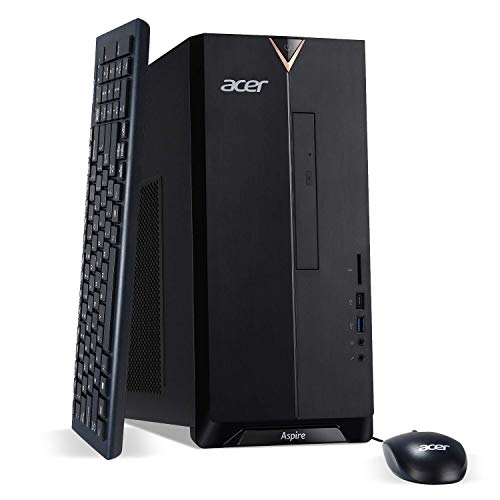
Acer Aspire TC-895-UA91 i3-10100 8GB 512GB NVMe Desktop

Dell 23.8-inch FHD All-in-One Core 3 100U

SAGE 50 Premium Accounting 2026 U.S. Retail 3-user 1-year Code
The Details Behind The Selections
I see the HP Desktop Pro Tower as the most practical foundation for an office that balances spreadsheets, browser-based reporting, invoicing, and calls. The 13th-generation Core i3 provides four cores and eight threads, while 32GB of RAM gives room for several financial applications and browser tabs to remain open. That combination feels more relevant than raw processing power alone for a full day of administrative work.
The 1TB PCIe NVMe SSD adds room for local documents, records, and business software without forcing constant movement to external storage. Compared with the Dell Pro Tower, this HP offers more memory and storage, though its enclosure is larger than the compact ProDesk 600 G6.
Useful Highlights
- 32GB of RAM supports heavy spreadsheet sessions and multiple open applications.
- A 1TB NVMe drive combines quick file access with generous local capacity.
- Front and rear USB ports simplify connections for drives, keyboards, and monitors.
- HDMI and VGA outputs provide useful flexibility for existing office displays.
- TPM 2.0 adds a hardware-based layer for sensitive business information.
Things To Consider
- The tower measures 6.10 by 11.93 by 13.27 inches, so desk clearance deserves attention.
- The Core i3 is sensible for office workloads but less suitable for intensive graphics or engineering tasks.
Key Specs
Built With In Mind
This tower fits small accounting offices and multi-application workers who value memory, storage, and flexible connectivity.
A Better Fit Elsewhere
The HP ProDesk 600 G6 SFF i5 32GB 1TB SSD suits finance teams that need six-core processing and dual-monitor support in a narrower enclosure.
Small desks and two-monitor accounting stations make the ProDesk 600 G6 appealing. Its small-form-factor enclosure measures 10.6 by 3.7 by 11.9 inches, considerably narrower than a conventional tower, yet it carries a six-core Core i5-10400F and 32GB of DDR4 memory. I would favor that extra core count for heavy spreadsheet and reporting schedules, depending on how many demanding applications run together.
The dedicated GeForce GT 610 includes HDMI and DVI connections for two displays, which is a more concrete accounting advantage than the HP Desktop Pro Tower’s wider port selection. The trade-off is that the GT 610 is an entry-level graphics card rather than a solution for demanding visual work.
Useful Strengths
- Six CPU cores support concurrent spreadsheets, reporting tools, and browser sessions.
- 32GB of RAM creates ample working memory for complex office routines.
- HDMI and DVI outputs support a two-monitor accounting setup.
- The narrow chassis preserves usable desk and cabinet space.
- Windows 11 Pro adds business functions such as BitLocker and remote desktop access.
Worth Noting
- The dedicated GT 1030 is better suited to basic graphics than intensive design work.
- Unlike the ProTower, this compact model has fewer convenient front-facing ports.
Technical Sheet
Right Fit For
Finance professionals working across two monitors in a compact office benefit most from this configuration.
Where A Sibling Pick Shines
The HP Desktop Pro Tower i3 32GB RAM 1TB SSD is the better choice for shared offices that need more front USB access and a wider range of display outputs.
The Dell Pro Tower brings a newer platform to a familiar tower format. Its 14th-generation Core i3-14100 has four cores, eight threads, and a maximum boost speed of 4.7GHz, giving it a useful edge in responsive single-task work. For daily bookkeeping, reporting, and customer records, I see it as a sensible fit for teams that want current processing hardware without moving to a larger workstation.
DDR5 memory handles routine office data more efficiently than earlier DDR4 designs, while the 512GB PCIe SSD provides quick startup and application loading. Windows 11 Pro adds BitLocker, remote desktop, and business management tools, making this tower more suitable for managed offices than the Acer Aspire’s home-oriented configuration.
What Pays Off
- The 4.7GHz boost speed supports responsive document and spreadsheet work.
- 16GB of DDR5 memory handles several standard accounting applications.
- Windows 11 Pro includes useful security and remote-access functions.
- DisplayPort 1.4 and HDMI 2.1 provide modern display options.
Possible Compromises
- Its 512GB capacity is half the storage offered by the two HP towers.
- Four CPU cores trail the six-core processor in the HP ProDesk 600 G6.
Made For
Small businesses using Windows Pro and moderate local storage fit well with this Dell Pro Tower.
Reach For A Different Pick When
The HP Desktop Pro Tower i3 32GB RAM 1TB SSD suits teams that handle large local archives or keep more applications and browser tabs open.
The Aspire TC-895-UA91 is the straightforward option in this group. A 10th-generation Core i3-10100, 8GB of DDR4 memory, and a 512GB NVMe SSD cover the essentials for invoicing, data entry, web-based reporting, and routine spreadsheet work. I would place it in a home office or a straightforward small business rather than a demanding finance department.
Two unusual features add practical value. The 8X DVD writer supports discs for archival or legacy workflows, while Wi-Fi 6 and a USB Type-C port provide modern wireless and peripheral connections. The main limitation is the 8GB memory allocation, especially compared with the 32GB configurations across the two HP picks.
The Case For It
- NVMe storage keeps document opening and system response snappy.
- Wi-Fi 6 supports a cable-free office connection.
- The USB Type-C port adds a useful modern peripheral connection.
- An optical drive remains available for disc-based records.
Minor Gripes
- 8GB of RAM is the lightest memory configuration here.
- Windows 10 Home lacks the remote desktop and BitLocker features associated with the Pro-based alternatives.
Feature Snapshot
Who It Suits Best
Home-based bookkeepers and solo office workers with modest file volumes are the strongest audience for this Acer.
Consider Something Else When
The Dell Pro Tower i3-14100 16GB DDR5 512GB SSD offers a better path for business users who need Windows Pro and more memory.
A separate monitor and tower can quickly cover a home-office desk, so the appeal of the Dell All-in-One is immediately clear. Its 23.8-inch full-HD display is combined with a Core 3 100U processor in one enclosure, creating a compact setup for bookkeeping, invoicing, email, and spreadsheet review. I see it as a sensible option for a household office where simplicity matters more than internal expansion.
The IPS panel covers 99% of the sRGB color space, a useful feature for people who also handle charts or presentation material. Dell ComfortView Plus is designed for more comfortable viewing during extended sessions, although comfort varies by person and environment. Compared with the Acer tower, this machine trades separate components for a cleaner footprint.
The Good Stuff
- The integrated display removes the need for a separate desktop monitor.
- Full-HD IPS resolution supports detailed financial documents.
- 99% sRGB coverage helps charts and business graphics look more accurate.
- The one-piece design suits compact and organized workspaces.
- Windows 11 Home provides a current desktop foundation.
Small Caveats
- The 23.8-inch screen may feel modest for comparing several large spreadsheets.
- Windows 11 Home may not meet an employer’s requirement for Pro-only management and security features.
Who Will Love This
Independent bookkeepers and remote workers who want a tidy, integrated display and computer will appreciate this design.
Another Choice May Suit
The HP ProDesk 600 G6 SFF i5 32GB 1TB SSD better serves a dual-monitor office that values expandability and more working memory.
I need to separate hardware from software here: the Sage 50 Premium Accounting 2026 U.S. Retail Essential Edition is a one-year subscription code for up to three users, not another computer. It becomes a practical addition to any of the desktops in this roundup for a retail business that wants structured bookkeeping, invoicing, job costing, and financial management in one application.
Its online delivery suits teams that want to begin using the platform without relying on a boxed disc, although an internet connection and compatible PC remain necessary. The three-user allowance also gives a small shop, studio, or independent practice enough room to share the system without stretching a single-user arrangement.
Positive Takeaways
- Bookkeeping and invoicing tools address core daily accounting tasks.
- Job costing supports businesses that track work by project or service.
- Financial management features provide a more structured workflow.
- Three-user access suits a small team sharing one business system.
- Online code delivery keeps the purchase focused on installation and setup.
Points To Keep In Mind
- This one-year subscription requires renewal after the first term.
- The U.S. retail edition may not suit every regional accounting requirement.
- A compatible desktop and internet connection remain part of the setup.
Included Details
Best Suited To
Small U.S. retail operations with up to three staff members need this edition for a unified accounting workflow.
Swap It Out When
Those who need only a computer should choose the HP Desktop Pro Tower i3 32GB RAM 1TB SSD instead of treating this software subscription as hardware.
What Matters in an Accounting Desktop
Memory for open financial applications
RAM is temporary working space, so it determines how comfortably spreadsheets, browsers, and accounting programs coexist. I would look for 16GB as a practical minimum for regular work, while 32GB offers more breathing room for large spreadsheets, multiple browser sessions, and reporting tools.
Storage for local records
A PCIe NVMe SSD provides faster access than a conventional hard drive. Capacity matters just as much: the HP towers include 1TB, while the Dell Pro Tower and Acer Aspire provide 512GB. Local archives, media attachments, and business software can consume room quickly, so a network drive may complement either figure.
Processing capacity for busy periods
More cores help with heavy multitasking, especially when several reporting applications run alongside calls. The ProDesk 600 G6 offers six cores, while the other tower choices use four-core processors. Accounting work is often more affected by memory and storage than by graphics, making processor headroom most useful during month-end reporting and large file imports.
Display and desk arrangement
A separate tower supports multiple monitors and flexible viewing angles, which helps when comparing ledgers or keeping reference documents visible. The Dell All-in-One reduces cable clutter by combining the display and computer, but a 23.8-inch panel may be modest for complex side-by-side work. Physical desk space and monitor placement deserve the same attention as the processor.
Avoidable Errors Before Purchase
Common Shopping Slip Ups
The easiest mistake is focusing on processor model while overlooking memory and storage. Another is assuming every desktop includes an operating system, display, keyboard, or mouse, so I verify the complete configuration before buying. A third mistake is neglecting desk space, especially with a tower and two monitors.
What The Higher Tier Buys
Additional memory, more cores, larger storage, and newer connectivity improve multitasking and reduce the chance of constant file transfers. Those upgrades matter most for growing teams, bulky spreadsheets, and multiple displays. A basic setup remains sensible for light invoicing and straightforward recordkeeping.
Frequently Asked Questions
Is 32GB of RAM necessary for accounting software?
Thirty-two gigabytes is helpful rather than essential for every accounting task. I consider it worthwhile for large spreadsheets, multiple browser tabs, several open applications, and busy multi-user offices.
Does a desktop need a dedicated graphics card for accounting?
Most routine bookkeeping relies more on the processor, memory, and display than on advanced graphics. The ProDesk 600 G6’s dedicated card is useful for dual-monitor output, while heavier visual or technical work may justify a stronger alternative.
Can Sage 50 replace a desktop computer?
No, Sage 50 is accounting software rather than hardware. It runs on a compatible PC and adds bookkeeping, invoicing, job costing, and financial management tools to a suitable computer setup.
Which storage capacity suits a small business?
Five hundred twelve gigabytes works for many small offices that keep primary records in cloud services. One terabyte offers more room for local archives, attachments, software, and offline project files.
Is an All-in-One better for accounting?
An All-in-One reduces desk clutter and combines the display with the computer. A separate tower can be better for multiple monitors, larger workspaces, and teams that value more connectivity options.
Final Verdict
I would start with the HP Desktop Pro Tower for a balanced accounting setup, then add the Sage 50 subscription when a structured bookkeeping platform is part of the plan. The ProDesk 600 G6 makes more sense for dual-monitor offices, while the Dell All-in-One serves compact workspaces especially well. Match the hardware to the number of people, files, and screens in daily use rather than paying for capabilities that never get used.
