
A crowded studio desk can make simple recording decisions harder than they should be. I keep my setup organized around one clear job for each device: capture, monitor, convert, or shape a signal, which makes this roundup of Apogee desktop audio gear easier to navigate.
These options cover distinct parts of the production chain. Symphony Desktop Elite handles higher-end recording and mixing, Groove AE focuses on headphone monitoring, Duet 3 supports direct computer recording, and the microphones and Jam X serve more specialized vocal, podcast, streaming, and instrument workflows.
A Quick View Of The Lineup

Apogee Symphony Desktop Elite Interface
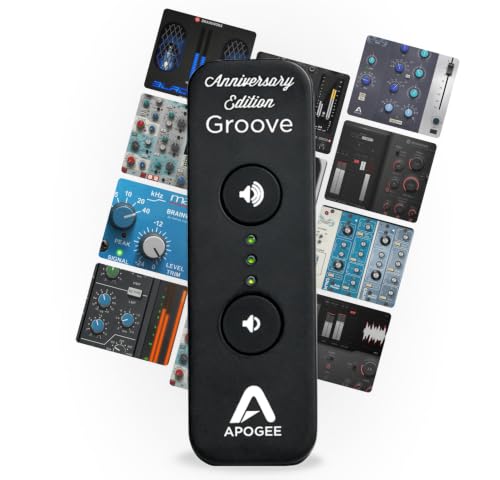
Apogee Groove AE Headphone Amp

Apogee Duet 3 Premium Interface

Apogee MiC Plus Condenser Microphone

Apogee Hype Mic USB Microphone with Analog Compression

Apogee Jam X USB-C Guitar Interface
More Details On Our Top Picks
Symphony Desktop Elite brings recording, conversion, monitoring, and mix processing into one desktop unit. I find its appeal strongest for a dedicated home studio where vocals, instruments, and reference monitoring all need to share a dependable signal path. The touch screen provides direct access to settings without turning the interface into a control surface for every DAW function.
The interface can deliver up to 75 dB of preamp gain, giving condenser microphones useful headroom in a compact recording space. Two modeled preamp options, Neve 1066 and Ampex 601, add character before the signal reaches the DAW. Compared with simpler one-device setups, Symphony concentrates more recording decisions at the desk, so experienced producers may appreciate the control while newcomers may see it as more than they need.
Where It Excels
- Up to 75 dB of gain supports demanding condenser microphones.
- Neve 1066 and Ampex 601 models offer two distinct starting points.
- DualPath monitoring keeps recording and monitoring effects connected to the DAW.
- The touch screen makes hardware adjustments fast and visible.
- Six hardware DSP and two native plug-ins cover several mix-processing needs.
Points To Note
- The extensive feature set may exceed the needs of a simple voice-over desk.
- The included USB-A and USB-C cables help with computer connections, but port selection still matters on the chosen workstation.
Key Specs
Who It Suits Best
I recommend Symphony Desktop Elite to producers who want detailed recording control and integrated mixing tools in one professional desktop setup.
Where Another Pick Suits Better
Apogee Duet 3 Premium Interface suits solo creators who value direct recording and platform support over the larger Symphony feature set.
Groove AE has a narrower purpose than Symphony Desktop Elite: it turns a digital audio source into a headphone signal for listening or mixing. I see it as a sensible addition to a desktop setup that already has a capable recording interface but needs a dedicated headphone output. Its USB-C connection also suits modern computer-centered workflows.
This is a monitoring tool rather than a microphone recording front end, so it serves a different part of the production chain. The 40th Anniversary Edition designation gives the model a clear identity, but the practical attraction is simpler: focused headphone monitoring for hi-fi listening and mix work. Depending on the rest of the desk, that narrow role may be exactly what is needed.
What Earns Its Place
- Provides a dedicated route from digital audio to headphones.
- USB-C suits current desktop computer connections.
- Complements a recording interface without duplicating its microphone role.
Small Caveats
- Its headphone-oriented design does not replace an audio interface with microphone inputs.
Made For
Groove AE fits headphone-focused listeners and mixers who want a dedicated USB-C monitoring device for an already equipped computer.
Consider Something Else When
Apogee Symphony Desktop Elite Interface is the better fit for producers who need microphone capture, preamps, and headphone monitoring within one device.
Duet 3 Premium Interface is built around the straightforward needs of a computer-based recording desk. I find it especially relevant for vocals, instruments, podcasting, and live streaming, where a reliable connection to the computer matters more than an expansive hardware control surface. It supports Mac, Windows, and iOS, giving the same interface a useful role across different working environments.
Its preamps provide up to 65 dB of gain, while 48V phantom power supports condenser microphones that require external power. Compared with the MiC Plus, Duet 3 acts as the central connection point for multiple kinds of instruments and microphones. The trade-off is less visible hardware processing than Symphony offers, which may make it more approachable for straightforward sessions.
Bright Spots
- Up to 65 dB of preamp gain handles quiet microphones with room to spare.
- 48V phantom power supports suitable condenser microphones.
- Mac, Windows, and iOS compatibility broadens its working range.
- The interface fits vocals, instruments, streaming, and podcast recording.
Worth Bearing In Mind
- Phantom power should only be applied to microphones designed for it.
- Mobile sessions still require compatible ports and compatible recording software.
Feature Snapshot
The Right Fit
Duet 3 Premium Interface best suits solo musicians, vocalists, and podcasters who want flexible computer recording without a feature-heavy control surface.
A Better Fit Elsewhere
Apogee Symphony Desktop Elite Interface suits producers who need richer preamp modeling, hardware processing, and more extensive monitoring control.
MiC Plus puts the microphone and digital conversion in one compact device, removing the separate audio interface from a straightforward voice recording setup. I appreciate that approach for narration, podcasting, voice-over sessions, and focused vocal recording. The cardioid condenser capsule concentrates on sound from the front, which works well when the microphone sits close to the speaker.
Digital recording runs up to 24-bit/96 kHz, giving the file plenty of detail for editing and production. First Take, the included podcast application, can connect as many as four Apogee microphones to one computer or USB hub. That makes MiC Plus less isolated than a conventional single-microphone setup, although the cardioid pattern remains the more important consideration for room placement.
Advantages To Know
- Combines a condenser microphone with a direct digital connection.
- Supports recording at up to 24-bit/96 kHz resolution.
- First Take accommodates up to four connected Apogee microphones.
- Works with Mac, Windows, and iOS systems.
Details To Watch
- The cardioid pattern is less flexible for spacious or distant room recording.
Core Details
Who Will Love This
MiC Plus is a strong match for narrators, remote podcasters, and vocal creators who want direct USB recording and a cardioid capture pattern.
Swap It Out When
Apogee Hype Mic USB Microphone with Analog Compression better fits creators who need a built-in compressor for consistent spoken-word levels.
Hype Mic serves creators who want a stable spoken-word signal without adding another box beside the computer. Its built-in analog compressor reduces the impact of sudden vocal level changes before the signal enters the recording software. That makes it useful for podcast dialogue, gaming commentary, streaming, vocals, and instruments where a more even level can simplify the mix.
First Take also supports as many as four Apogee microphones through one computer or USB hub, so a solo creator can expand beyond one voice when the session requires it. Compared with MiC Plus, Hype Mic adds signal shaping at the microphone stage, while MiC Plus leaves more of the processing role to the computer. For a closely spoken voice in a controlled room, Hype Mic may be the more convenient choice.
Useful Strengths
- Built-in analog compression helps control spoken-word variation.
- USB connection keeps the recording path compact.
- Works for vocals, instruments, streaming, podcasts, and gaming.
- First Take supports a multi-microphone podcast workflow.
Possible Compromises
- Analog compression affects the tone before software processing, so naturally dynamic performances may need careful listening.
Built With In Mind
Hype Mic suits podcasters, streamers, and gaming creators who value a consistent spoken level in a simple USB recording setup.
Reach For A Different Pick When
Apogee MiC Plus Condenser Microphone is the better fit for vocals and narration where preserving natural variation matters more than built-in compression.
Jam X connects guitars, basses, and synthesizers to a computer or iOS device through USB-C, giving instrument players a direct path into a recording application. Its distinguishing feature is the built-in analog compressor, a hardware control that evens out variations before the signal reaches the software. I see that as useful for fast home-studio takes where the performer wants a fuller, more consistent sound without opening a plug-in window.
Compared with Duet 3 Premium Interface, Jam X is aimed specifically at instrument tracking rather than general-purpose microphone recording. That narrower focus keeps the decision simple for guitarists and bedroom producers. The trade-off appears when a session needs multiple microphones, voice, and instruments together, because those broader recording demands call for a more general interface.
Strengths Worth Knowing
- USB-C connection supports modern computers and iOS devices.
- Analog compression shapes the instrument signal before software processing.
- Guitar, bass, and synthesizer inputs cover common home-studio sessions.
- Direct computer recording reduces the need for extra signal chains.
Less-Strong Areas
- Its instrument-focused design is less appropriate for a microphone-centered vocal session.
Important Details
Whose Shelf It Belongs On
Jam X fits bedroom guitarists, bass players, and synth hobbyists who want direct USB-C recording with hardware compression.
Not Your Match When
Apogee Duet 3 Premium Interface suits creators whose sessions include vocals, microphones, streaming, and broader computer-based recording tasks.
Building A Desktop Recording Path That Fits
Start With The Signal Path
I begin by deciding whether the desk needs capture, monitoring, conversion, or several functions at once. A microphone such as MiC Plus handles capture and conversion together, while Duet 3 or Symphony Desktop Elite acts as the central interface. Groove AE occupies a narrower role by concentrating on headphone monitoring.
Match Inputs To The Session
A singer may prioritize microphone gain and phantom power, whereas a guitarist may prioritize an instrument input and hardware compression. Phantom power supplies the voltage required by compatible condenser microphones. I also check connection type, since USB-C support does not remove the need for a compatible port and suitable recording application.
Separate Monitoring From Recording
Headphone monitoring helps with performance and detailed mix decisions, but it is not the same task as capturing a microphone signal. A separate DAC and headphone amplifier can suit an already equipped studio, while an all-in-one interface reduces cable clutter. The right balance depends on the existing gear rather than the number of features on a box.
Consider Software Control At The Same Time
Hardware processing gives hands-on control, yet the recorded signal still enters a DAW, which is software used to record, edit, and mix audio. Symphony Desktop Elite brings several plug-ins and monitoring routes into that workflow. I would also check whether the computer, operating system, and intended recording software support the chosen device before completing the setup.
Desktop Audio Production Buying Mistakes
Mistakes Worth Dodging
One common mistake is choosing by connection count without considering the actual session, since a guitar, voice, and stereo playback setup may not require the same interface. Another is overlooking microphone power requirements or assuming a headphone amplifier can capture a vocal. I also avoid buying a narrow specialist tool for a broad recording plan.
What The Higher Tier Buys
The more elaborate Symphony Desktop Elite model adds preamp modeling, touch-screen control, hardware processing, and deeper DAW integration. That extra capability can justify itself for producers working across vocals, instruments, and mixing. For a single spoken-word microphone, Duet 3 or MiC Plus may provide a more relevant level of control.
Frequently Asked Questions
Is Symphony Desktop Elite suitable for vocal recording?
I consider Symphony Desktop Elite suitable for vocal recording because it offers up to 75 dB of preamp gain, two preamp models, and touchscreen control. Its larger feature set is most useful for producers recording more than a simple voice-over.
Is Groove AE an audio interface?
Groove AE functions as a USB-C DAC and headphone amplifier for digital listening and mixing. I would pair it with an existing interface when microphone recording is also part of the setup.
Does Duet 3 support condenser microphones?
Duet 3 provides up to 65 dB of gain and 48V phantom power for compatible condenser microphones. It supports Mac, Windows, and iOS systems for different recording environments.
Is MiC Plus suitable for podcasts?
MiC Plus works for podcasts because it records directly through USB and First Take supports up to four Apogee microphones. Its cardioid pattern makes close positioning important.
Can Jam X record a guitar?
Jam X is designed to connect guitars, basses, and synthesizers to a computer or iOS device. Its built-in analog compressor provides signal control before software processing.
Closing Remarks
My desk would look different depending on the work: Symphony Desktop Elite for a broad production setup, Duet 3 for direct computer recording, and Groove AE for focused headphone monitoring. MiC Plus and Hype Mic serve creators who want a microphone-first path, while Jam X gives instrument players a compact starting point. The most useful choice is the one that handles the actual signal path without adding hardware the session will not use.
