
A developer setting up a compact workspace needs enough processing power for code editors, browser tabs, containers, and virtual machines without crowding the desk. These HP desktops range from a streamlined 24-inch all-in-one to mini PCs built for multiple displays and a desktop with unusually generous storage. I compare their processors, memory, connectivity, and screen support to help developers match each machine to a realistic development setup.
A Side-By-Side Look

HP Mini Desktop PC for Office Work, Intel i7-12700T, 16GB RAM, 512GB SSD, Windows 11 Pro
HP Mini Desktop PC for Office Work, Intel i7-12700T, 32GB RAM, 1TB SSD, Windows 11 Pro
HP Mini Desktop PC for Office Work, Intel i7-12700T, 16GB RAM, 1TB SSD, Windows 11 Pro
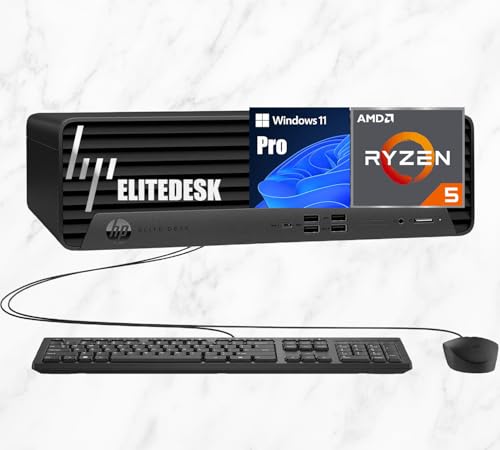
HP Elite 805 G9 SFF Desktop, Ryzen 5 6-Core, 16GB DDR5, 256GB SSD, Radeon 740M
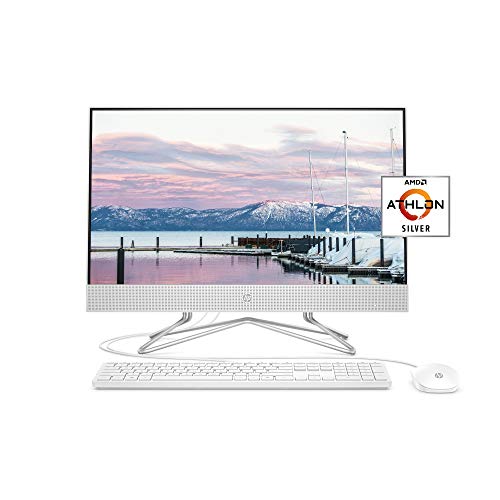
HP 24-inch All-in-One Desktop, Athlon Silver 3050U, 8GB RAM

HP OmniDesk Desktop, Ryzen 5, 32GB DDR5, 3TB Storage, Quad Monitor
A Breakdown Of The Leading Choices
A cramped home office can still support a serious development workflow with this 6.97-inch HP mini desktop. Its 12-core Intel Core i7-12700T processor reaches up to 4.7GHz, while 16GB of DDR4 memory, meaning the fourth-generation memory standard, gives a code editor, terminal, and several browser-based tools room to operate together.
Three displays are the defining attraction for developers who keep documentation, code, and test results visible at once. Compared with the 24-inch all-in-one, this machine frees desk space, though I would consider the 512GB storage less suitable for large local repositories, virtual-machine images, and container data together.
Where It Excels
- Supports three 4K displays through two DisplayPort 1.4 connections and one HDMI 2.1 connection.
- The 6.97-inch enclosure suits compact workspaces and shared development areas.
- Seven USB ports, including two USB-C ports rated at 20Gbps, support modern peripherals.
- Windows 11 Pro, a wired keyboard, mouse, and 90W adapter are included.
Things To Consider
- The 512GB NVMe drive leaves less room for expansive local development assets.
- Three-monitor productivity depends on compatible displays, cables, and suitable desk space.
Key Specs
Built With In Mind
Developers working across multiple screens from a compact desk gain the most from this configuration.
A Better Fit Elsewhere
Developers running memory-heavy containers benefit more from the 32GB configuration in the HP Mini Desktop PC for Office Work, Intel i7-12700T, 32GB RAM, 1TB SSD, Windows 11 Pro.
Development environments that hold several services, virtual machines, or browser consoles benefit from the extra headroom in this mini PC. The same 12-core i7-12700T processor and 6.97-inch enclosure remain, but 32GB of DDR4 memory gives demanding workflows more room to remain responsive.
A 1TB NVMe drive, which uses a high-speed flash-storage interface, also reduces the pressure to keep every project and dependency on a secondary drive. For a developer with a large local repository, that is a meaningful change from the 512GB HP Mini Desktop PC for Office Work, Intel i7-12700T, 16GB RAM, 512GB SSD, Windows 11 Pro.
Reasons It Performs
- 32GB of memory accommodates containers, virtual machines, and multiple development tools more comfortably.
- The 1TB NVMe drive provides useful capacity for repositories, dependencies, and project files.
- Three 4K outputs support a code-and-documentation arrangement.
- The compact enclosure preserves desk space without adding a full tower.
Practical Considerations
- Memory-heavy projects still benefit from disciplined container and virtual-machine management.
- Multi-monitor setups require compatible displays and the necessary video cables.
Technical Sheet
Who Will Love This
Developers handling containers, local services, and large project folders gain the most from this higher-memory configuration.
Consider Something Else When
Developers needing four displays benefit more from the quad-monitor arrangement in the HP OmniDesk Desktop, Ryzen 5, 32GB DDR5, 3TB Storage, Quad Monitor.
This configuration balances storage and desk footprint more neatly than the 512GB version of the same mini PC. The 1TB drive gives local repositories and container layers more breathing room, while the processor remains suitable for compilation, browser-based documentation, and connected development tools.
Sixteen gigabytes of DDR4 is the key compromise. It can support a demanding everyday workload, but developers running several virtual machines at once may eventually notice the difference from the 32GB model. For ordinary web and application development in a small office, the balance looks sensible.
Real Benefits
- The 1TB drive offers more room for source repositories and project dependencies.
- Three 4K display outputs support a focused multi-screen development layout.
- The small 6.97-inch enclosure leaves more workspace for keyboard, mouse, and notebooks.
- Windows 11 Pro and wired input devices provide a straightforward starting setup.
Small Caveats
- Heavy container or virtual-machine workloads may need the additional memory of the 32GB model.
- The 512GB alternative may suit projects that keep most files on external or network storage.
The Right Fit
Full-stack developers who need generous storage but do not routinely run many memory-intensive services fit this model well.
Another Choice May Suit
Developers managing several virtual machines gain more flexibility from the HP Mini Desktop PC for Office Work, Intel i7-12700T, 32GB RAM, 1TB SSD, Windows 11 Pro.
The HP Elite 805 G9 brings a conventional small-form-factor chassis to development offices where a compact mini PC may seem too limited. Its six-core Ryzen 5 processor reaches up to 5.0GHz, and 16GB of DDR5 memory provides a modern platform for standard business applications and development tools.
Unlike the Ryzen-equipped OmniDesk option, this smaller desktop pairs its memory with a 256GB SSD. That makes it better suited to managed workspaces where projects live on a network or external drive, and less appealing for developers who retain large repositories directly on the system.
Strengths Worth Knowing
- The six-core Ryzen 5 processor supports responsive compilation and parallel tasks.
- DDR5 memory provides a newer memory generation than the DDR4 mini PCs.
- Radeon 740M integrated graphics support everyday visual workloads without a separate graphics card.
- The small-form-factor design suits office desks and managed development spaces.
Points To Note
- The 256GB SSD is compact for large source repositories and local container images.
- A 16GB memory configuration may be modest for several simultaneous virtual machines.
Feature Snapshot
Who Should Grab It
Developers in corporate offices benefit from this business-oriented small-form-factor system and its conventional desktop layout.
Swap It Out When
Developers keeping substantial local data benefit more from the HP OmniDesk Desktop, Ryzen 5, 32GB DDR5, 3TB Storage, Quad Monitor.
A small apartment office benefits from having the computer and display housed in one 24-inch unit. The adjustable tilt stand supports different viewing angles, while the three-sided narrow bezel keeps the screen visually compact without requiring a separate desktop tower.
This is the least demanding configuration in the group, and that matters. Eight gigabytes of memory and a 256GB SSD can handle lighter coding tasks, documentation, and everyday office work, but heavy builds and multiple development services may require a larger memory allowance.
What Stands Out
- The integrated design removes the need for a separate monitor and desktop tower.
- An adjustable tilt stand supports different working positions.
- The built-in camera includes a physical privacy slider.
- Built-in speakers and Wi-Fi connectivity create a tidy, self-contained setup.
Less Ideal Details
- Eight gigabytes of memory is the main constraint for memory-intensive development tools.
- The 256GB SSD offers little room for local repositories, dependency caches, and container images.
Made For
Beginner developers and light-duty programmers working from a minimal home office fit this all-in-one arrangement.
Look Elsewhere When
Full-stack developers running builds and services benefit more from the HP Mini Desktop PC for Office Work, Intel i7-12700T, 16GB RAM, 1TB SSD, Windows 11 Pro.
A four-monitor development station needs room for code, API documentation, browser tools, and live test output. The HP OmniDesk Desktop addresses that arrangement with quad-monitor support, 32GB of DDR5 memory, and a Ryzen 5 8500G processor that reaches up to 5.0GHz.
Storage is the major attraction. A 2TB SSD handles active projects and tools, while a 1TB hard drive provides separate space for archives or larger working sets. Compared with the HP Mini Desktop PC for Office Work, Intel i7-12700T, 32GB RAM, 1TB SSD, Windows 11 Pro, this desktop trades compact dimensions for capacity and screen reach.
Useful Touches
- Quad-monitor support serves complex development layouts and extensive monitoring needs.
- 32GB of DDR5 memory supports concurrent services, editors, and browser sessions.
- The 3TB mixed-storage arrangement separates fast SSD access from bulk hard-drive storage.
- Wi-Fi 6 provides a newer wireless networking standard for compatible routers.
- A wireless keyboard and mouse reduce cable clutter around the workstation.
Trade-Offs To Consider
- The full desktop occupies more room than a 6.97-inch mini PC.
- Four displays require suitable desk space, mounts or stands, and compatible connections.
At A Glance
The Right Fit
Data-focused developers running four displays and maintaining large local file collections fit this configuration.
Where A Sibling Pick Shines
Developers who prioritize a nearly cable-free desk benefit more from the 24-inch HP 24-inch All-in-One Desktop, Athlon Silver 3050U, 8GB RAM.
What Development Work Really Requires
Start with the workload
Lightweight web editing, documentation, and terminal work place a modest demand on memory, while containers, local databases, virtual machines, and large builds need considerably more headroom. I start by counting the tools expected to remain open and the services expected to run simultaneously.
Check display requirements
DisplayPort and HDMI are physical connections used to carry video and audio between a computer and a monitor. Two displays may suit a clean editing setup, while three or four screens become valuable for separating code, documentation, logs, and application previews.
Match storage to the files
An SSD, or solid-state drive, offers fast access to active projects and development tools. A hard drive adds inexpensive capacity for archives, but it should not be mistaken for an equal substitute when large dependency folders need to be opened frequently.
Leave room for growth
Memory is easier to overlook than storage because both are expressed in gigabytes, yet they serve different purposes. Extra RAM lets several running applications coexist, while extra disk capacity accommodates larger repositories and build artifacts. I would prioritize memory first for virtualized workflows and storage first for extensive local datasets.
Before Committing To A Development Desktop
Common Shopping Slip Ups
Many developers focus on processor model alone and overlook memory, display wiring, or storage. A careful setup check includes the number of monitors, the ports on those displays, and the size of the local project collection.
Where The Extra Money Goes
Higher configurations commonly add memory, SSD capacity, or display outputs rather than introducing a different operating system. Those upgrades matter most when concurrent services, local virtual machines, and multiple high-resolution screens are part of the normal workflow.
Frequently Asked Questions
How much RAM does a development desktop need?
Sixteen gigabytes suits many coding tasks, while 32GB provides more room for containers, virtual machines, and many open tools. The actual demand depends on the services and applications running simultaneously.
Is a mini desktop suitable for software development?
A mini desktop can support coding, web projects, and many professional development workflows. Models with multiple display outputs and 16GB or 32GB of memory suit heavier multi-service environments.
Do I need a separate graphics card?
Many development tasks run well with integrated graphics such as Radeon 740M. Specialized rendering, graphics compilation, or demanding 3D work may justify a separate graphics card.
How much storage should a developer keep locally?
The amount depends on repository size, dependencies, containers, and virtual-machine images. A 1TB SSD offers a useful balance for active projects, while a 3TB mixed-storage system suits larger local collections.
Is an all-in-one desktop better for development?
An all-in-one reduces cable clutter and fits small rooms, but its specifications may limit heavier workloads. Developers prioritizing memory, storage, or multiple monitors often receive more flexibility from a mini PC or conventional desktop.
Final Verdict
The HP Mini Desktop PC for Office Work, Intel i7-12700T, 16GB RAM, 1TB SSD, Windows 11 Pro offers the most balanced development setup in this group. The 32GB version handles heavier concurrent workloads, the Elite 805 G9 suits managed offices, and the OmniDesk serves four-monitor data stations. The 24-inch all-in-one remains the cleanest choice for lighter development and minimal desks.
