
A photo-editing desktop has to handle more than opening an image file. Large catalogs, layered PSDs, color grading, and multiple monitors can turn a compact machine into a frustrating bottleneck.
I understand the decision from the desk side, where screen quality, memory, storage, and graphics capability each solve a different part of the editing workflow. The six options here range from accessible all-in-ones to a professional workstation tower, giving me a practical way to match each system to a specific creative routine.
A Quick View Of The Lineup

Apple 2024 iMac M4 24-inch All-in-One Desktop, 16GB Unified Memory, 512GB SSD, Silver

HP Mini Desktop PC, Intel i7-12700T, 16GB RAM, 1TB SSD, 3X 4K, Windows 11 Pro
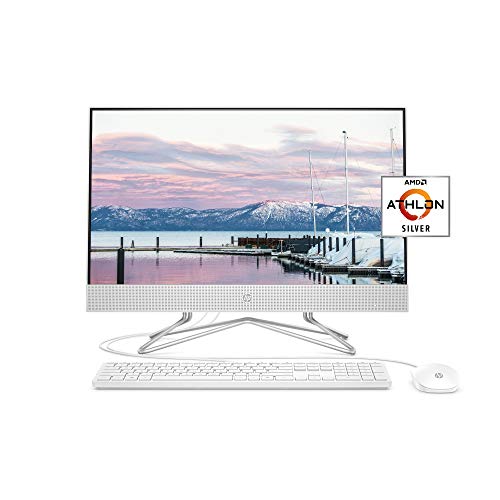
HP 24-inch All-in-One, Athlon Silver 3050U, 8GB RAM

PCSP ThinkStation P520 Tower, Xeon W-2123, 64GB DDR4, 512GB SSD, Quadro M2000

HP 27-inch FHD Touchscreen All-in-One, Core Ultra 5 225U, 64GB, 2TB SSD
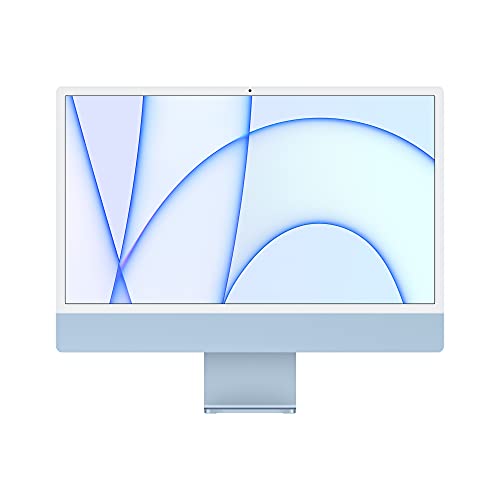
Apple 2021 iMac M1 24-inch All-in-One Desktop, 8GB RAM, 256GB SSD, Blue
More On The Choices That Made The List
The 24-inch Retina display makes the 2024 iMac a natural centerpiece for a color-sensitive editing desk. I would favor it for a creator who wants a polished, self-contained setup without assembling separate components.
Unlike the HP mini, this machine includes its display and computer in one enclosure. The M4 chip provides 10 CPU cores and 10 GPU cores, while unified memory lets the system and graphics share access to the same 16GB pool, a useful design for integrated creative software.
Standout Benefits
- The Retina panel keeps the editing interface crisp and self-contained.
- Ten CPU cores support multitasking around a busy editing session.
- Ten GPU cores benefit graphics-heavy tasks and on-screen previews.
- Unified memory gives CPU and graphics access to the same 16GB.
- The 512GB SSD provides room for a substantial working catalog.
Points To Note
- Sixteen gigabytes can be modest for unusually large RAW catalogs or heavily layered files.
- The 24-inch panel is smaller than the HP 27-inch touchscreen alternative.
- Apple software compatibility remains the main workflow check.
At A Glance
Who It Suits Best
This iMac fits Mac-based creators who prioritize display quality, a tidy desk, and balanced performance for standard photo editing.
Where Another Pick Suits Better
Creators managing very large libraries benefit more from the HP 27-inch touchscreen, with 64GB of memory and a 2TB SSD.
Photo editing does not always need a large tower or a permanently built-in display. I see the appeal of this HP Mini for a compact studio where the computer disappears beside the monitor and leaves the desk open.
Its 12th-generation Intel Core i7-12700T has 12 cores, 16GB of DDR4 memory, and a 1TB NVMe SSD. Support for three 4K outputs also makes it relevant to editors who compare images across multiple screens, although the enclosure itself measures just 6.97 inches.
What Helps Most
- The compact enclosure preserves desk space in tight studios.
- Three 4K outputs support a demanding multi-monitor arrangement.
- The 12-core processor handles editing alongside other applications.
- The included stand, keyboard, and mouse simplify setup.
Practical Considerations
- No display is included, so the total setup still requires a monitor.
- Sixteen gigabytes may be limiting for extremely large working sets.
- Windows 11 Pro suits business and creative software familiar with Windows.
Quick Facts
The Right Fit
This mini PC best suits Windows-based creators who already own suitable displays and value desk space over an all-in-one design.
Consider Something Else When
A complete single-system setup suits the Apple 2024 iMac better because it includes the display and Mac software integration.
A straightforward editing desk does not always require workstation hardware. I would consider this HP all-in-one for basic corrections, personal galleries, and a computer that mainly handles photos rather than demanding video or large commercial projects.
The 24-inch display uses a slim three-sided bezel and sits on an adjustable tilt stand. A camera with a physical privacy switch, built-in speakers, and Wi-Fi make it more of a general-purpose household computer than a dedicated editing station.
The Upside
- The all-in-one design reduces the number of separate desk components.
- The tilt stand supports different viewing positions during long sessions.
- The privacy switch provides a simple way to cover the built-in camera.
- Built-in speakers add convenience for casual media review.
Some Limits To Know
- Eight gigabytes of memory is the main constraint for complex editing work.
- The 256GB SSD requires careful catalog and project-file management.
- Windows 10 Home limits some professional management features.
Built With In Mind
This model suits a beginner or household user who mainly crops images, applies basic corrections, and manages a modest personal photo collection.
Look Elsewhere When
Professionals handling extensive RAW libraries or layered composites get more useful capacity from the PCSP ThinkStation P520 with 64GB of memory.
Among the all-in-ones, the ThinkStation P520 takes a different approach with a full tower, a Xeon processor, and a discrete Quadro graphics card. In my view, that combination serves legacy professional workflows better than a compact general-purpose system.
The 64GB of DDR4 memory is the headline feature, with “unified” memory reserved for systems such as the iMac. Quadro M2000 provides 4GB of dedicated graphics memory, which matters for specialized software that benefits from a separate graphics processor.
Everyday Wins
- Sixty-four gigabytes supports large projects and multitasking.
- The Quadro M2000 provides dedicated graphics memory.
- A 512GB NVMe SSD keeps active files on fast local storage.
- Windows 11 Pro includes professional system controls.
Trade-Offs To Consider
- The tower requires considerably more desk or floor space.
- The Xeon W-2123 has four cores, so fewer cores handle parallel work.
- Its renewed status calls for a close inspection before purchase.
Technical Reference
Who Will Love This
This workstation suits experienced editors using established Windows applications that benefit from abundant memory and dedicated graphics hardware.
A Better Fit Elsewhere
Creators wanting a smaller footprint and a newer all-in-one design receive a more suitable setup in the HP 27-inch touchscreen model.
Large photo libraries and active editing sessions can consume both memory and storage quickly. This HP all-in-one addresses both demands with 64GB of DDR5 RAM and a 2TB SSD, making it a strong choice for creators who keep many files close at hand.
The 27-inch full HD touchscreen gives editing software a larger canvas, while the 12-core Intel Core Ultra 5 225U handles multitasking. Unlike the renewed ThinkStation, this machine arrives in an all-in-one form with a keyboard, mouse, and 64GB flash drive included.
Notable Gains
- The 2TB SSD holds large libraries without constant file juggling.
- Sixty-four gigabytes of DDR5 handles large working sets comfortably.
- The 27-inch touchscreen provides a large interactive workspace.
- Windows 11 Home supports a broad range of editing applications.
Details To Watch
- Touch controls are an extra rather than a necessity for photo editing.
- The opened package reflects a system modified for RAM and storage upgrades.
Feature Snapshot
Made For
This HP fits Windows creators with extensive photo archives, large working sets, and a preference for a roomy touchscreen all-in-one.
When Another Pick Fits Better
Color-focused Mac workflows align more closely with the Apple 2024 iMac and its Retina display.
The M1 iMac remains a straightforward way to build a Mac-based photo-editing station around a 24-inch Retina display. I find it most convincing for a focused workflow involving Lightroom-style cataloging, layered adjustments, and connected Apple devices.
Its M1 chip combines an eight-core CPU with an eight-core GPU in a compact all-in-one enclosure. Interaction with iPhone and iPad adds convenience for moving images, while matching accessories keep the desk visually consistent.
Useful Touches
- The Retina display creates a sharp, dedicated editing surface.
- Eight CPU and GPU cores support a capable creative workflow.
- iPhone and iPad compatibility assists with image transfers.
Less Ideal Details
- Eight gigabytes of memory can constrain large project files.
- The 256GB SSD has limited room for extensive archives.
- The 2021 processor generation trails the M4 model in specification.
Whose Shelf It Belongs On
This iMac suits a Mac-oriented creator with a moderate photo library and a preference for a simple, integrated setup.
Where A Sibling Pick Shines
Creators managing heavier multitasking and larger files receive more headroom from the Apple 2024 iMac with 16GB of unified memory and a 512GB SSD.
What I Prioritize Before Committing to an Editing Desktop
Memory and working files
I start with memory because an editing application, operating system, and several large image files all need space at once. Sixteen gigabytes handles a typical personal workflow, while 32GB or more becomes more relevant for extensive catalogs, layered files, and simultaneous creative applications.
Graphics and display quality
A dedicated graphics card can help compatible software render complex previews, but screen quality also shapes the editing experience. I compare panel size, resolution, color-focused features, and the number of supported external displays rather than treating processor speed as the only measure.
Storage and desk layout
An NVMe SSD, meaning a solid-state drive using the fast NVMe interface, keeps active files responsive. I also account for catalog size, project backups, and available desk space, since a roomy all-in-one and a workstation tower demand very different setups.
A Few Desktop Decisions Worth Getting Right
Mistakes Worth Dodging
I would avoid judging a desktop by processor cores alone. Memory, graphics support, display quality, and storage all affect editing, while choosing an operating system outside an established software workflow can create extra friction.
When Paying More Pays Off
The additional expense can make sense when it buys 64GB of memory, a larger solid-state drive, or dedicated graphics hardware. I would pay more for those specific improvements only when the workload genuinely needs them, not for an unclear claim of faster performance.
Frequently Asked Questions for Desktop For Photo Editing
How much memory do I need for photo editing?
I usually recommend at least 16GB for standard editing and 32GB or more for large catalogs and layered projects. Memory capacity helps when many applications and image files remain open together.
Is a dedicated graphics card necessary?
I consider dedicated graphics more relevant for complex previews, specialized effects, and professional applications with particular driver requirements. Standard photo correction can fit within the capabilities of a capable integrated system.
Is an all-in-one better than a tower for editing?
I favor an all-in-one for a tidy, self-contained desk, while a tower offers more room for expansion and separate display choices. The better fit depends on desk space, monitor preferences, and the applications involved.
Does a larger monitor improve photo editing?
I find a larger display helpful for comparing images, arranging tools, and reviewing details without constant window switching. Resolution and color-related features still matter, so screen size alone does not determine editing quality.
Should I choose a Mac or Windows desktop?
I choose the platform already used by my editing software, plugins, and file-sharing process. The Apple iMac options suit established Mac workflows, while the HP and PCSP models offer stronger choices for Windows-based setups.
Final Verdict
I would start with the Apple 2024 iMac for a polished, display-focused setup, the HP Mini for a compact multi-monitor desk, or the HP 27-inch touchscreen for high-capacity editing. The PCSP ThinkStation makes more sense for specialized Windows workflows, while the M1 iMac remains a simple option for a focused Mac setup.
The right desktop is the one whose memory, storage, graphics, and display match the actual editing load, not merely the largest specification sheet.
