
A rendering desktop has to keep a 3D viewport responsive while exporting a detailed scene, compiling shaders, or handling a long video export. I built this shortlist around that workload, separating full-size systems with dedicated graphics from compact mini desktops that trade gaming performance for a much smaller footprint.
The HP OMEN 45L Ryzen 7 RTX 3060 Ti Desktop sits near the middle of the list because it combines a Ryzen 7 5700X processor, 32GB of memory, and a full-size RTX 3060 Ti graphics card without requiring a custom build. The Lenovo ThinkCentre models make more sense for CPU-driven rendering and tight workspaces, while the NIMO and Legion towers provide the graphics hardware most demanding 3D, AI, and video workflows favor.
Your Options, Compared

HP OMEN 45L Ryzen 7 RTX 3060 Ti Desktop
NIMO RTX 5060 8GB Gaming Desktop, Core i5-14400F, 16GB DDR5, 1TB SSD, 650W PSU
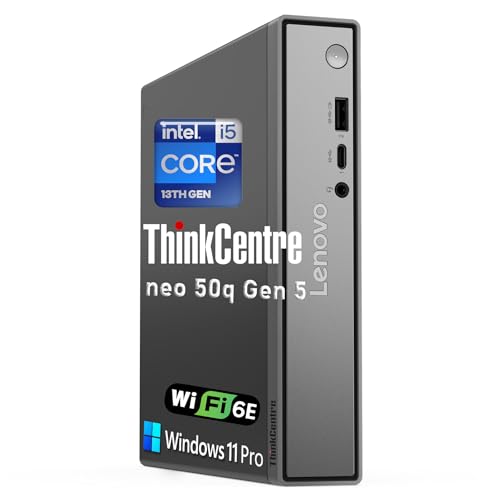
Lenovo ThinkCentre neo 50q Gen 5 Tiny Desktop

Lenovo ThinkCentre neo 50q Gen 5 i5-13420H Tiny Desktop

Lenovo ThinkCentre neo 50q Gen 5 1L Mini Desktop

Lenovo Legion Tower 5i, Core Ultra 7 265F, RTX 5070 Ti, 32GB Memory, 1TB
A Breakdown Of The Leading Choices
The HP OMEN 45L Ryzen 7 RTX 3060 Ti Desktop brings together the parts I look for in a balanced creator system. Its Ryzen 7 5700X has eight cores and a 4.60GHz boost clock, while the RTX 3060 Ti provides a separate graphics processor for GPU-accelerated scenes, ray tracing, and DLSS-supported output.
Unlike the compact ThinkCentre options later in the list, this full-size tower has room for an AIO liquid cooler, three 120mm ARGB intake fans, and an 800W power supply. I see it as a sensible center point for 3D artists and video editors, though projects with unusually complex scenes may still demand more memory.
The Upside
- The RTX 3060 Ti’s 8GB of GDDR6 memory gives 3D applications dedicated graphics resources instead of relying on the processor alone.
- Thirty-two gigabytes of DDR4 memory gives me room to keep a renderer, scene editor, and reference applications open at the same time.
- The 1TB PCIe NVMe SSD keeps project files on a fast storage device, which matters during application starts and asset transfers.
- HDMI, DisplayPort, USB-C, and fast USB ports support a multi-monitor studio setup without requiring a separate card for basic connectivity.
Things To Consider
- The tower needs substantially more desk and floor space than the 1L Lenovo mini desktops.
- I would check project memory requirements carefully because 32GB is useful but finite for exceptionally dense scenes.
Key Specs
Built With In Mind
This suits a freelance 3D artist or video editor who needs dedicated graphics, substantial memory, and expandability in a full-size workstation.
A Better Fit Elsewhere
Creative professionals working primarily in a tiny studio will find the Lenovo ThinkCentre neo 50q Gen 5 i5-13420H Tiny Desktop easier to accommodate.
The NIMO RTX 5060 8GB Gaming Desktop puts newer graphics hardware in an already assembled system. I see the appeal for creators who also game or experiment with local AI tools, since the RTX 5060 uses 8GB of GDDR7 and supports ray tracing, DLSS, and AI-oriented workloads.
Its Core i5-14400F has 10 cores and 16 threads, making it more adaptable than a basic office machine. The 16GB of DDR5 memory remains the main constraint in my view, particularly for a studio that combines large scenes, local AI models, and several demanding applications at once.
Everyday Perks
- The prebuilt format removes the need to select a motherboard, graphics card, cooling system, and power supply as separate parts.
- Four ARGB fans and a dual-tower air cooler provide active cooling without the complexity of a liquid-cooling loop.
- ASUS B760M Wi-Fi motherboard connectivity includes HDMI 2.1, DisplayPort 1.4, and eight USB ports.
- Dual-channel DDR5 and a PCIe 4.0 SSD suit a mixed workload of asset browsing, editing, and gaming.
Practical Considerations
- Sixteen gigabytes of memory is the sensible first upgrade to consider for large rendering projects.
- The 650W power supply is more modest than the HP OMEN 45L Ryzen 7 RTX 3060 Ti Desktop’s 800W unit, so future expansion deserves attention.
Feature Snapshot
Made For
This fits a hybrid creator who wants a ready-to-use RTX 5060 system for local AI, 3D experiments, video work, and gaming.
Where Another Pick Shines
Professionals handling memory-heavy scenes will find the 32GB memory in the HP OMEN 45L Ryzen 7 RTX 3060 Ti Desktop more comfortable.
The Lenovo ThinkCentre neo 50q Gen 5 Tiny Desktop takes a different approach to rendering. Its Core i5-13420H has eight cores, 12 threads, a 4.6GHz peak clock, and 12MB of cache, giving it enough processor capability for office applications, light content work, and CPU-based rendering.
At 7.05 by 7.20 by 1.42 inches, this machine can sit beside a monitor or tuck beneath a desk. I find that physical restraint useful in a crowded home studio, but the compact format makes it a better match for lightweight scenes than for GPU-heavy visualization.
What It Does Well
- The eight-core processor handles several routine productivity tasks without demanding a full tower.
- The tiny chassis preserves desk space and can be mounted close to a display.
- Windows applications can remain responsive during CPU-driven background renders in moderate projects.
Where It May Fall Short
- I would check the graphics configuration before assigning GPU-accelerated 3D work to this system.
- The small chassis offers less physical room for expansion than either full-size gaming tower in this roundup.
The Right Fit
This desktop suits a space-conscious professional handling office tasks, light 3D work, and CPU-based rendering in a shared area.
Another Choice May Suit
A creator who needs dedicated graphics for real-time 3D scenes will find the NIMO RTX 5060 8GB Gaming Desktop more purpose-built.
The Lenovo ThinkCentre neo 50q Gen 5 i5-13420H Tiny Desktop adds several practical details to the basic ThinkCentre configuration in the preceding review. It includes 16GB of DDR5 memory, a 512GB PCIe SSD, Wi-Fi 6, and Windows 11 Pro, giving me a more complete package for daily production work.
The processor remains the same eight-core, 12-thread Core i5-13420H, so this is still primarily a compact productivity platform rather than a dedicated rendering tower. The trade-off is clear: the machine saves space and arrives with a useful core configuration, but a graphics-focused project calls for one of the larger systems.
Useful Strengths
- Sixteen gigabytes of DDR5 memory provides a useful starting point for creator applications and several background processes.
- A 512GB PCIe SSD keeps active projects and assets on fast local storage.
- Windows 11 Pro gives a business-focused workstation a more appropriate operating environment for professional use.
- Wi-Fi 6 supports a cable-light setup in shared studios and home offices.
Smaller Caveats
- The half-terabyte capacity may fill quickly once source footage, textures, and render outputs accumulate.
- I would keep GPU-intensive visualization on a system with a more substantial graphics configuration.
Key Product Details
Who Will Love This
This configuration suits a professional office worker who also runs light 3D tasks and values a complete, compact Windows workstation.
Reach For A Different Pick When
A full-time 3D artist will gain more practical headroom from the Lenovo Legion Tower 5i, Core Ultra 7 265F, RTX 5070 Ti, 32GB Memory, 1TB.
The Lenovo ThinkCentre neo 50q Gen 5 1L Mini Desktop continues the space-saving theme with a newer Intel Core 5 210H processor. Its hybrid design uses four performance cores and four efficiency cores across 12 threads, reaching up to 4.8GHz for demanding office and productivity tasks.
I would treat this as a flexible small-form-factor workstation rather than a high-end rendering machine. The 1L designation makes it especially useful behind a monitor or in a studio where every bit of desk space matters, and the newer processor gives it a capable foundation for multitasking.
Practical Pluses
- The hybrid processor divides performance and efficiency cores across different workload demands.
- A 1L chassis is among the smallest desktop formats in this roundup.
- The 12-thread processor supports smooth multitasking across business and lightweight creator applications.
Details To Watch
- The compact case may require extra planning for large internal expansion hardware.
- Heavy 3D scenes remain better matched to a full tower with dedicated graphics and more memory.
Whose Shelf It Belongs On
This mini desktop suits a small home office, reception area, or shared creative space where desk footprint matters more than expansion room.
Consider Something Else When
Heavy multitasking and larger project libraries will feel more natural on the Lenovo ThinkCentre neo 50q Gen 5 i5-13420H Tiny Desktop with 16GB DDR5 and a 512GB SSD.
The Lenovo Legion Tower 5i, Core Ultra 7 265F, RTX 5070 Ti, 32GB Memory, 1TB is the most demanding configuration here, and I would shortlist it for serious real-time 3D, AI, or gaming work. The RTX 5070 Ti handles ray tracing and DLSS, while 32GB of system memory gives heavy applications more room to operate.
Its Core Ultra 7 265F processor and 1TB drive complete a balanced high-end tower. Legion Coldfront cooling addresses heat during sustained workloads, although the physical bulk and graphics ambition make this less convenient for a compact office than either ThinkCentre option.
Where It Delivers
- The RTX 5070 Ti provides dedicated graphics hardware suited to detailed 3D scenes, ray tracing, and AI-assisted workflows.
- Thirty-two gigabytes of memory helps with complex scene data, video timelines, and multiple creator applications.
- A 1TB drive offers useful capacity for source files, caches, projects, and completed renders.
- Legion Coldfront cooling is designed to manage sustained heat during demanding computing sessions.
- The combined processor and graphics configuration supports both rendering work and gaming without a separate machine.
Trade-Offs To Consider
- The full tower requires more space than the 1L and tiny ThinkCentre models.
- I would confirm desk clearance and nearby power arrangements before installing a system of this class.
Technical Highlights
Best Suited To
This tower suits a professional 3D artist, game developer, or video creator handling substantial assets and sustained rendering tasks.
Swap It Out When
A small office with modest rendering needs will find the Lenovo ThinkCentre neo 50q Gen 5 1L Mini Desktop far easier to place and manage.
What Actually Matters For A Rendering PC
Start With The Renderer
I start by identifying the engine, application, or export type. GPU-rendered scenes place graphics memory and graphics performance at the center of the decision, while CPU rendering gives the processor and system memory more influence. A mixed workload deserves attention to both sides rather than a graphics-first assumption.
Memory And Storage
Thirty-two gigabytes gives me comfortable headroom for large scenes, video editing, and several applications running together. Sixteen gigabytes can work for lighter projects, though I would consider adding memory when possible. A 1TB drive is convenient for media libraries, while smaller SSDs demand more attention to project storage and asset organization.
Match The Chassis
A full tower generally provides more room for cooling, expansion cards, and larger storage setups. A mini desktop can turn a small studio into a usable workstation, but expansion plans deserve a closer look. I would measure the intended desk or wall area first, then confirm that the display, accessories, and cables have enough room around the chosen form factor.
Two Decisions That Prevent Regret
Mistakes Worth Dodging
I would avoid choosing solely by gaming performance, since game frame rates do not directly predict render times. Another common mistake is ignoring graphics memory in a GPU-heavy scene. I also check the actual workspace and project size before selecting a chassis or storage capacity.
What The Higher Tier Buys
A higher tier usually adds stronger graphics, more memory, larger storage, or better cooling. That matters most for detailed real-time scenes, heavy multitasking, and long production cycles. A modest CPU-rendering setup can often use the compact Lenovo systems more efficiently.
Frequently Asked Questions
Is A Gaming Desktop Good For Rendering?
A gaming desktop can be excellent for rendering when it has suitable graphics memory, system memory, cooling, and storage. I would prioritize the renderer and project size over gaming labels or decorative lighting.
Do I Need 32GB Of Memory For 3D Rendering?
Thirty-two gigabytes provides comfortable room for large scenes, video timelines, and several applications running together. Smaller projects can work with 16GB, though memory-intensive work benefits from additional capacity.
Does Desktop Size Affect Rendering Performance?
Size does not directly determine speed, but it influences cooling, expansion options, and available hardware. I would focus on the processor, graphics card, memory, and storage first, then choose the chassis that fits the workspace.
Is A Prebuilt Rendering Desktop Easier To Use?
A prebuilt system removes component selection, assembly, and initial troubleshooting from the setup process. It suits creators who want a ready-to-use machine, although component compatibility and upgrade room still deserve attention.
Which Option Is Best For A Small Studio?
The Lenovo ThinkCentre neo 50q Gen 5 1L Mini Desktop favors a small footprint and office-focused work. GPU-heavy 3D or local AI projects call for one of the full-size RTX systems instead.
Final Verdict
I would choose the HP OMEN 45L Ryzen 7 RTX 3060 Ti Desktop for balanced 3D and video work, the NIMO RTX 5060 8GB Gaming Desktop for a ready-made hybrid gaming system, and the Lenovo Legion Tower 5i for demanding graphics workloads. The ThinkCentre options remain the practical answer when desk space matters more than rendering power.
