
A desktop should make daily tasks feel straightforward, whether that means managing appointments, keeping in touch with family, handling household accounts, or joining an online class. I focus on readable displays, touch navigation, simple peripherals, dependable everyday performance, and accessories that reduce friction at a shared desk. The right setup depends less on technical ambition than on comfort, clarity, and the routines already in place.
A Quick View Of The Lineup
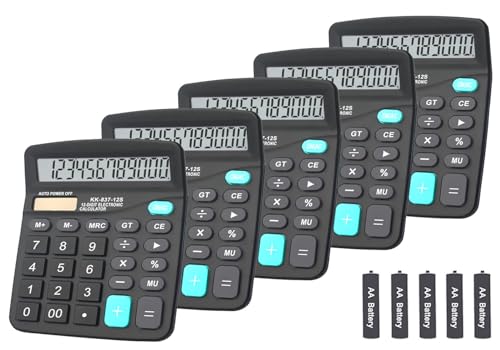
BESTWYA Desk Calculator
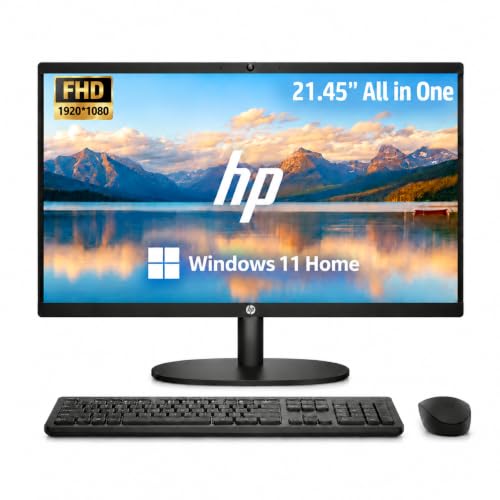
HP Touchscreen All-in-One, 8GB/512GB

HP Touchscreen All-in-One, 16GB/1TB

HP Touchscreen All-in-One, 16GB/512GB
HP Touchscreen All-in-One, 32GB/1TB
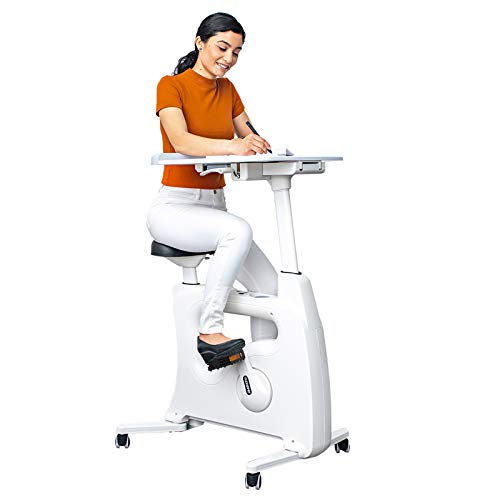
FLEXISPOT V9 Exercise Bike with 2D Desk, 8-Level Resistance
Taking A Closer Look At The Options
A calculator remains a useful addition to a senior-friendly desk, particularly for splitting bills, tracking a shopping list, or checking arithmetic without navigating a computer interface. The BESTWYA model puts a 12-digit display behind large, responsive keys, making it easier to use than a small screen and keypad.
Unlike the HP all-in-one computers later in this lineup, this is a single-purpose accessory that adds little visual clutter. The pack of five may also suit households or offices that need more than one unit, although the display has no backlight.
Well-Handled Touches
- Large keys support deliberate entry with less visual searching.
- The angled 12-digit display keeps figures readable from a seated position.
- Solar and AA battery power cover bright rooms and dimmer workspaces.
Points To Note
- The unlit display becomes difficult to read when both sunlight and the backup battery are unavailable.
- This handles standard arithmetic rather than the full range of tasks expected from a desktop computer.
Key Specs
Made For
This calculator suits older adults and anyone who prefers large physical controls over touchscreen data entry.
Consider Something Else When
The HP Touchscreen All-in-One, 8GB/512GB serves better for email, video calls, documents, and online learning.
A 23.8-inch touchscreen can make a shared family computer feel less intimidating, especially when icons and controls can be selected directly instead of through a small pointer. This HP all-in-one combines the computer, display, camera, and speakers in one unit, which should keep most home-office desks relatively uncluttered.
Compared with the calculator in the first pick, this machine supports a much broader routine. Full HD, meaning 1920 by 1080 pixels, gives documents and video calls a clear canvas, while the anti-glare IPS panel may be more comfortable than a reflective screen in a bright room.
Notable Upsides
- Touch input offers a direct alternative to mouse-based navigation.
- IPS technology provides wide viewing angles for shared screens.
- The integrated camera and speakers simplify video calls.
- A keyboard and mouse are included for familiar desktop navigation.
Practical Considerations
- The full-size display needs a stable surface with enough room for comfortable viewing.
- Windows 11 Pro introduces more interface depth than a basic appliance, so initial setup may require assistance.
Right Fit For
This model fits households seeking one computer for browsing, appointments, family messaging, and light document work.
A Better Fit Elsewhere
The HP Touchscreen All-in-One, 16GB/1TB offers more memory and storage for heavier multitasking and larger file collections.
This configuration lands in the practical middle of the HP lineup, pairing 16GB of memory with 1TB of solid-state storage. RAM, short for random-access memory, helps active applications run smoothly, while an SSD stores data on solid-state chips and supports quicker loading compared with a conventional hard drive.
That balance feels relevant to a senior household that might keep a video call open while checking email or working on a document. The 23.8-inch touchscreen still provides direct navigation, although the shared Intel Core i3-N300 processor is more naturally suited to everyday tasks than demanding creative software.
Standout Benefits
- 16GB of memory supports several routine applications at once.
- A 1TB SSD provides ample room for documents, photos, and applications.
- Touch and mouse inputs support different comfort preferences.
- Wi-Fi 6 and Bluetooth 5.3 handle modern wireless connections.
Where It Is Less Suited
- The i3-N300 processor is not aimed at intensive editing or advanced computing.
- Screen cleaning and touch operation may require a little more care than a conventional monitor.
Feature Snapshot
Best Suited To
This model suits active adults and older adults who browse, communicate, and manage documents throughout the day.
Where A Sibling Pick Shines
The HP Touchscreen All-in-One, 32GB/1TB gives memory-heavy routines more headroom without changing the familiar all-in-one layout.
The appeal of this model is its combination of 16GB of memory and a more modest 512GB storage designation. It suits a computer used mainly for web browsing, email, video calls, and documents, especially when a large local photo or video library is not part of the routine.
Compared with the 1TB version, this configuration preserves the same 23.8-inch touchscreen, wide-viewing-angle IPS display, Windows 11 Pro, and included keyboard and mouse. For most everyday routines, the extra capacity in the larger model may matter less than keeping the setup simple and uncluttered.
Where It Helps
- 16GB RAM provides comfortable headroom for standard applications.
- The touchscreen supports direct, legible interaction.
- The anti-glare finish helps with reflections in bright rooms.
- Integrated components reduce cable and equipment clutter.
Details To Watch
- Large photo, video, or project libraries may fill a 512GB drive more quickly.
- Some expanded software functions can require additional learning time.
Who Will Love This
This desktop suits adults who want capable memory, touch navigation, and moderate local storage for a shared home computer.
Another Choice May Suit
The HP Touchscreen All-in-One, 16GB/1TB suits households that regularly retain substantial media and document collections locally.
With 32GB of memory, this configuration gives a household more room to move among applications, browser tabs, and communication tools. That extra capacity may prove useful when a desktop serves as a shared command center for appointments, messages, coursework, and occasional video calls.
It retains the familiar 23.8-inch Full HD touchscreen, integrated camera, speakers, keyboard, and mouse found in the lower configurations. The honest catch is that additional memory cannot overcome every processor limitation, and the Intel Core i3-N300 still positions this as an everyday system rather than a workstation.
Useful Highlights
- 32GB RAM supports memory-intensive multitasking.
- 1TB SSD holds extensive documents, media, and applications.
- Touch input adds flexibility beyond mouse control.
- The IR camera supports video calls and compatible sign-in functions.
- AI Noise Removal helps reduce background sound during calls.
Small Caveats
- Extra memory may provide little visible benefit in a light daily routine.
- The large touchscreen requires adequate desk space and a stable viewing position.
Core Details
The Right Fit
This model suits shared households that run many applications, attend regular video calls, and keep substantial files on the computer.
Reach For A Different Pick When
The HP Touchscreen All-in-One, 16GB/1TB provides nearly the same storage with less memory for a primarily browsing-and-communication routine.
At a shared computer desk, movement can be easier to fit into the day when exercise equipment and workspace come together. The FLEXISPOT V9 pairs an exercise bike with a 2D desktop, while a removable desk lets the cycling and computer functions stand apart according to the available space.
Eight resistance levels provide a range of pedaling demands, and the LCD tracking display gives the user visible performance information during a session. Compared with the stationary HP computers, this is not a conventional desktop, but it may be the more engaging choice for a home-office routine built around activity.
Useful Strengths
- Combines pedaling and desk work in one footprint.
- The 2D desktop permits movement in two directions.
- Eight resistance levels accommodate varied routines.
- Removable desk adds flexibility to the setup.
- LCD tracking keeps exercise information visible.
Things To Weigh
- Desk space and movement clearance need checking before assembly.
- Accidental-damage and breakdown coverage depends on the selected service terms.
Quick Facts
Whose Shelf It Belongs On
This setup suits older adults who want light movement integrated into a home-office routine and have adequate floor space.
Swap It Out When
The HP Touchscreen All-in-One, 16GB/1TB serves better when the priority is stationary computing without exercise equipment.
What Matters Most In A Senior-Friendly Desktop
Screen Comfort Comes First
A large Full HD display offers room for readable text, enlarged controls, and comfortable video calls. IPS technology, which produces wide viewing angles, can also help when family members gather around the screen. Touch input adds another navigation method, though a mouse and keyboard remain valuable for detailed work.
Memory And Storage Match The Routine
RAM supports applications while they remain open, and an SSD provides local storage with rapid loading. A 16GB configuration handles typical browsing, messaging, and document routines well, while 32GB offers additional room for heavier multitasking. The HP Touchscreen All-in-One, 8GB/512GB may suit a lighter routine with limited local files.
Accessories Should Reduce Friction
Large-button calculators help with arithmetic without opening a computer application. An under-desk exercise bike serves a different purpose, combining movement with computer access. Before adding either accessory, I would consider legroom, lighting, reach, and the amount of space already occupied at the desk.
Common Desktop-Buying Pitfalls
Mistakes Worth Dodging
Choosing by memory alone can oversimplify the decision. Processor capability, screen visibility, storage needs, and comfortable input methods all shape daily use. Touchscreens also need regular cleaning, while large displays require enough desk depth for an upright viewing position.
What The Higher Tier Adds
The 32GB HP model mainly provides extra memory, while the 1TB variants add local storage. Those additions help with concurrent applications or sizable media collections, though a 16GB configuration can still cover ordinary browsing, communication, and document work. The most useful upgrade is the one tied to a real routine.
Frequently Asked Questions
What Is The Easiest Desktop For Seniors To Use?
The HP Touchscreen All-in-One, 8GB/512GB is among the easiest to approach because touch, mouse, and keyboard inputs are all available. Its 23.8-inch display provides ample room for enlarged text and familiar desktop software.
Is 16GB RAM Enough For Everyday Computer Use?
Yes, 16GB RAM is suitable for typical browsing, email, video calls, documents, and several applications running together. The HP Touchscreen All-in-One, 16GB/1TB also provides generous storage for files retained locally.
Does A Touchscreen Desktop Need A Mouse?
No, but a mouse can be more precise for small text, spreadsheets, and prolonged document work. The HP models include a matching keyboard and mouse while also supporting direct touch interaction.
Which Option Is Better For Storing Photos And Videos?
The HP Touchscreen All-in-One, 16GB/1TB offers twice the listed storage of the 512GB configuration. The HP Touchscreen All-in-One, 32GB/1TB adds memory for busy application use while retaining the same 1TB storage capacity.
Can An Exercise Bike Be Used With A Desktop Computer?
Yes, the FLEXISPOT V9 combines an exercise bike with a movable 2D desktop. The arrangement requires enough floor and desk space for pedaling, computer use, and the removable desk component.
Final Verdict
The HP Touchscreen All-in-One, 16GB/1TB offers the most balanced foundation for ordinary home computing, with a readable touchscreen, adequate memory, and generous storage. The 8GB model favors a simpler setup, while the 32GB version suits heavier multitasking. The BESTWYA calculator and FLEXISPOT V9 serve distinct needs at the same desk: straightforward arithmetic and active work, respectively. The most comfortable choice is the one that matches the household’s actual routine without adding unnecessary complexity.
