
A reception counter, a shared office, and a back-office workstation rarely need the same desktop. I focus on six compact and traditional systems that balance everyday office work, connectivity, storage, and physical space for growing small businesses in 2026.
The Leading Options At A Glance
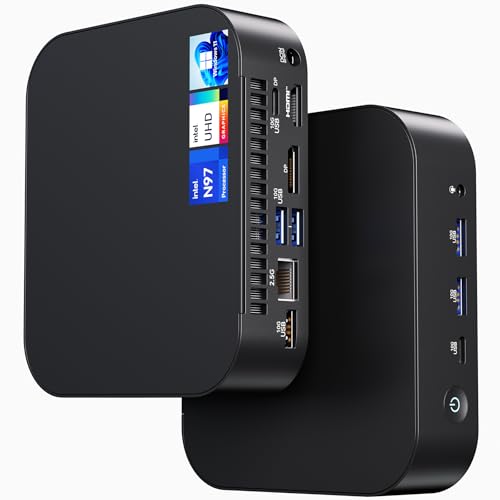
Intel NUC 14 Essential Mini PC N97, 8GB RAM, 256GB SSD, Win 11 Pro

Glorlin Ryzen 5 6600H Mini PC, 16GB LPDDR5, 512GB NVMe SSD

ASUS NUC 13 Pro i5-1340P Barebone Kit, 8K/4K UHD, Gigabit Ethernet, Wi-Fi 6
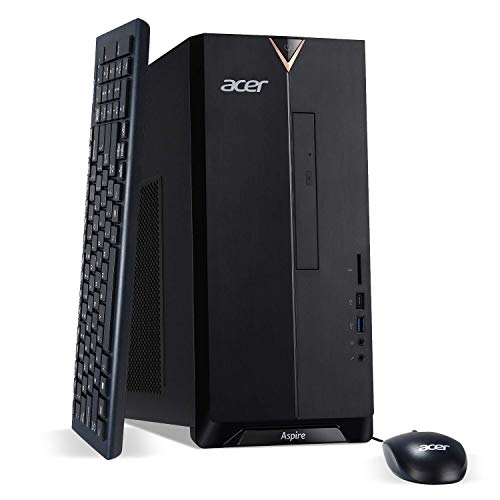
Acer Aspire TC-895-UA91, Core i3-10100, 8GB DDR4, 512GB NVMe SSD

Lenovo ThinkCentre neo 50q, Core i5, 16GB, 512GB SSD

Intel NUC 13 Pro, 16GB RAM, 512GB SSD
Meet The Standout Selections
A reception counter does not need a large tower sitting beside it. The Intel NUC 14 Essential places an N97 processor, 8GB of memory, and a 256GB solid-state drive into a compact enclosure suited to office tasks, point-of-sale stations, and digital signs. For most routine business software, this ready-made arrangement removes the assembly work that complicates a barebone system.
Windows 11 Pro adds the management features expected in a workplace, while Wi-Fi 6E and Bluetooth 5.3 cover modern wireless accessories. Unlike the Glorlin Ryzen model reviewed later, this system favors a simple setup and compact deployment over higher memory capacity and multiple display support.
The Case For It
- Windows 11 Pro arrives ready for business use and familiar administrative tools.
- The 256GB SSD gives basic documents and applications a fast, compact storage base.
- Wi-Fi 6E reduces reliance on network cables in offices with good wireless coverage.
- The small enclosure suits reception desks, shared counters, and display stations.
Points To Note
- For teams running many browser tabs and office applications at once, 8GB of memory can feel limited.
- The 256GB drive leaves less room for large local media libraries than the 512GB alternatives.
Essential Details
Who It Suits Best
This model benefits reception teams, retail counters, and office managers who need Windows 11 Pro in a compact, ready-to-deploy system.
Where Another Pick Suits Better
The Glorlin Ryzen 5 6600H Mini PC offers 16GB of memory and 512GB of storage for teams handling heavier multitasking or several displays.
The Glorlin system makes sense when one compact computer must handle office applications, media work, and more than one screen. Its Ryzen 5 6600H processor has six cores and twelve threads, while 16GB of LPDDR5 memory gives multitasking more room than the Intel NUC 14 Essential. For most creative offices, that extra capacity is the deciding factor.
Triple 4K display support can serve a design studio, trading desk, or control station without three separate computers. Dual wired networking also gives administrators an option for separating business and device traffic, although a single-network office may never need that extra connection.
What Works In Its Favor
- Six processor cores support demanding office multitasking and light creative work.
- 16GB of LPDDR5 memory provides useful headroom for multiple open applications.
- The 512GB NVMe SSD provides high-speed storage with twice the capacity of the Intel NUC 14.
- Triple 4K output suits command centers and multi-screen workstations.
- Dual LAN ports offer a practical option for segmented network setups.
A Few Limitations
- Dual LAN networking adds little value in a small office operating on one network.
Feature Snapshot
Made For
Creative teams, trading offices, and technical workplaces benefit most from the combination of processor capacity, memory, and multiple displays.
Consider Something Else When
The Lenovo ThinkCentre neo 50q Gen 5 is a stronger fit for compact deployments that prioritize Windows 11 Pro and a 7.05-by-7.20-inch footprint.
Workshops and managed offices sometimes need the computer built around a standard set of parts. The ASUS NUC 13 Pro barebone kit supplies an Intel Core i5-1340P processor but leaves memory, storage, and the operating system for the installer to select. That control is valuable when hardware must match an existing fleet.
Gigabit Ethernet, Wi-Fi 6, and VESA mounting support make it adaptable to fixed desks and display installations. Compared with the complete Glorlin system, the additional component choice comes with more setup work, so this is a practical choice for someone comfortable building or configuring PCs.
A Favorable Mix
- The Core i5-1340P provides a capable platform for standard business applications.
- Component freedom lets an administrator standardize memory and storage across several systems.
Practical Considerations
- No memory is included, so installation cannot begin with the processor alone.
- No storage drive or operating system is included, adding configuration and setup steps.
- This route favors technical staff or a business with an established installation process.
Right Fit For
IT departments and experienced computer assemblers benefit from choosing compatible memory, storage, and Windows installation components themselves.
A Better Fit Elsewhere
The Intel NUC 13 Pro with 16GB of RAM and a 512GB SSD serves offices that want a complete system without separate component purchases.
A full-size desktop still makes sense where desk space is plentiful and legacy media matters. The Acer Aspire TC-895-UA91 includes an optical drive, a desktop enclosure, and 512GB of NVMe storage for fast file access. NVMe is a solid-state interface designed for quicker response than conventional hard drives.
The four-core Core i3 processor handles routine office work, while 8GB of DDR4 memory supports standard applications. Compared with the mini PCs in this group, the Acer offers a larger chassis and built-in DVD drive, making it more relevant to media libraries or facilities that still use physical discs.
Everyday Perks
- Windows 10 Home provides a ready starting point for general home-office and small-business use.
- The 512GB NVMe SSD provides fast storage and more capacity than the Intel NUC 14.
- A USB 3.2 Type-C port supports modern peripherals and accessories.
Small Caveats
- Windows 10 Home lacks the business administration features included with Windows 11 Pro.
- The 8GB memory limit suits standard workloads better than intensive multitasking.
Quick Facts
Who Will Love This
Offices with available desk space and a continuing need for optical media benefit most from this traditional desktop format.
Look Elsewhere When
The Lenovo ThinkCentre neo 50q Gen 5 fits better where a small footprint, DDR5 memory, and Windows 11 Pro matter more than a DVD drive.
The Lenovo ThinkCentre neo 50q Gen 5 brings together the features that matter most in a modern office: Windows 11 Pro, 16GB of DDR5 memory, and a 512GB PCIe solid-state drive. The Core i5-13420H has eight cores and twelve threads, giving it room for office applications, conferencing, and several active work windows.
Its enclosure measures 7.05 by 7.20 inches and stands 1.42 inches tall, so it fits more neatly than a conventional tower on a reception or shared desk. Compared with the Acer Aspire, the Lenovo sacrifices the built-in optical drive but gains a much smaller footprint and a more current Windows edition.
Real Benefits
- Windows 11 Pro supports business administration and familiar office workflows.
- 16GB of DDR5 provides comfortable room for multitasking and heavier applications.
- The 512GB PCIe SSD stores business files while maintaining quick response.
- Eight processor cores balance productivity and conferencing workloads.
- Wi-Fi 6 supports modern office networks without requiring a wired connection.
- The tiny chassis saves valuable space on reception and shared-service counters.
Details To Watch
- The slim enclosure requires careful placement to leave room for cables and airflow.
The Right Fit
Managed offices, reception counters, and hybrid teams benefit from the combination of Windows 11 Pro, 16GB memory, and a compact enclosure.
Another Choice May Suit
The ASUS NUC 13 Pro barebone kit fits technical organizations that require complete control over memory, storage, and operating-system selection.
The complete Intel NUC 13 Pro configuration lands in a useful middle ground between a ready-made mini PC and a barebone kit. It pairs the Core i5-1340P processor with 16GB of RAM, a 512GB SSD, and Windows 11 Pro. That combination suits an office that wants a professional setup without selecting each component separately.
The 12-core processor handles browser-heavy office work, spreadsheets, document editing, and video meetings with sensible flexibility. Compared with the Glorlin system, the specification is similarly well equipped for daily use, though the Glorlin lists triple-display support and dual LAN connectivity for more specialized workstations.
Advantages To Know
- The complete package includes memory, storage, and Windows 11 Pro.
- 16GB of RAM supports several active applications and large document work.
- The 512GB SSD balances quick file access with useful local capacity.
Trade-Offs To Consider
- The storage capacity remains more appropriate for local files than large media collections.
- Triple-display and dual-network support are not part of the listed configuration.
Technical Highlights
Whose Shelf It Belongs On
Professional home offices and compact business workstations benefit from a complete Windows 11 Pro system with balanced memory and storage.
Reach For A Different Pick When
The Glorlin Ryzen 5 6600H Mini PC serves multi-screen creative offices better because it explicitly supports triple 4K output and dual LAN connections.
Matching a Desktop to Actual Office Work
A small-business desktop should reflect the applications running each day, not simply the largest specification available. I start with the workload and then check the space, connections, and support requirements around it.
Match the Workload
Office documents, email, invoicing, and web applications place modest demands on a compact system. Media editing, large spreadsheets, and frequent video calls benefit from more processor capacity and memory, making the Glorlin Ryzen 5 6600H or Lenovo ThinkCentre neo 50q Gen 5 more convincing choices for demanding roles.
Plan Memory and Storage
RAM, or random access memory, holds active applications and data, while an SSD stores files and programs. For routine office use, 8GB can be workable, but 16GB creates more room for concurrent tasks; 256GB suits lighter document storage, whereas 512GB gives local projects and media files greater breathing room.
Check Connections and Deployment
Display output, wired networking, wireless standards, and mounting options determine whether a desktop fits smoothly into an existing workplace. A complete Windows system is simpler for general staff, while a barebone kit makes sense where an internal team already manages component compatibility and operating-system installation.
Practical Desktop Buying Pitfalls
Wrong Turns To Avoid
A specification list can distract from the actual job a computer performs. Before comparing processors, I check display needs, network ports, desk space, and whether staff will install the system themselves; buying the wrong form factor can create installation problems that no processor upgrade solves.
What The Higher Tier Buys
Moving up usually adds processor capacity, faster memory, more storage, or specialized connections. Those improvements matter for concurrent applications, demanding media, multiple screens, and larger local file collections, while a simpler setup remains sensible for ordinary administrative work.
Frequently Asked Questions
Are Mini PCs Good for Small Business Work?
Yes, mini PCs handle standard office applications, communications, invoicing, and digital signage while taking up little desk space. The Intel NUC 14 Essential, Lenovo ThinkCentre neo 50q, and complete Intel NUC 13 Pro are practical choices for routine workplace use.
Is a Barebone Desktop Worth the Extra Setup?
A barebone desktop can fit a standardized fleet well, but it requires compatible memory, storage, and an operating system. The ASUS NUC 13 Pro barebone kit makes the most sense for a business with an established installation process or technical staff.
How Much Memory Does a Small Office Desktop Need?
Eight gigabytes can handle standard office applications, while 16GB is preferable for heavy browser use, large spreadsheets, and frequent multitasking. The Glorlin, Lenovo, and complete Intel NUC 13 Pro configurations include 16GB for greater flexibility.
Is Windows 11 Pro Better Than Windows 10 Home for Business?
Windows 11 Pro includes business-oriented administration and management capabilities that Windows 10 Home does not provide. It is a stronger fit for managed offices, shared workstations, and staff who need more control over system settings and accounts.
Which Desktop Is Best for Multiple Displays?
The Glorlin Ryzen 5 6600H Mini PC explicitly supports triple 4K output, making it the clearest fit for multi-screen offices. Its dual LAN ports also provide additional network separation that the other complete configurations do not list.
Wrap Up
I favor the Lenovo ThinkCentre neo 50q Gen 5 for most compact business deployments because it combines Windows 11 Pro, 16GB of memory, and a practical footprint. The Glorlin system stands out for multiple displays, the Intel NUC 14 Essential suits simple service counters, and the complete Intel NUC 13 Pro offers a balanced middle path.
