
A cluttered desk can leave a large monitor competing with keyboards, cables, and paperwork for the same small patch of workspace. I understand the appeal of lifting the display off the desk, especially for compact home offices, shared workstations, production areas, and control rooms. The right wall mount depends on screen weight, VESA compatibility, wall construction, and whether the setup needs one display, two displays, or a complete workstation.
The Shortlist At A Glance

Mount-It! Wall Workstation System
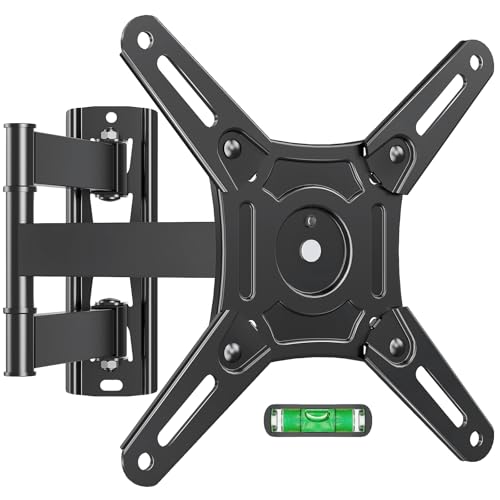
ELIVED Full Motion TV Mount

MOUNTUP Fully Adjustable Single Monitor Wall Mount for 32-Inch Displays

monTEK Zero-Clearance Single Monitor Wall Mount, 17–32-Inch Full Motion

MOUNTUP Fully Adjustable Dual Monitor Wall Mount for 32-Inch Displays

monTEK Dual Monitor Mount
What Each Pick Brings To The Table
A wall-mounted display becomes much more useful in a warehouse or control room when the keyboard and computer tower join the arrangement. The Mount-It! Wall Workstation System places both on one vertical pole, freeing the desk for documents, production materials, or standing work.
Its unusual strength is capacity. It accepts flat, curved, or true-ultrawide displays from 17 to 49 inches and supports up to 44 pounds through VESA, the standard four-hole pattern used by most displays. That range goes well beyond the smaller screens accepted by the remaining mounts.
Real Benefits
- The 49-inch limit suits large control displays and serious production monitors.
- Tilt, swivel, rotation, and gas-spring height adjustment simplify shared viewing.
- The sliding keyboard tray brings input devices into reach without occupying the desk.
- A separate padded computer-tower mount keeps the main unit off the floor.
- Integrated cable management reduces clutter around the workstation.
Practical Considerations
- Installation calls for a wood stud, brick, or solid concrete wall rather than unsupported drywall.
- The wall pole and separate computer-tower bracket require more planning than a basic display arm.
Key Specs
Who It Suits Best
I favor this system for warehouse cells, production floors, control rooms, and spacious offices needing a large display with a dedicated keyboard and computer tower.
Another Choice May Suit
The MOUNTUP Fully Adjustable Single Monitor Wall Mount for 32-Inch Displays is simpler for a home office that only needs to lift one screen from the desk.
A television that shares a room with a desktop often needs more flexibility than a fixed screen bracket. The ELIVED Full Motion TV Mount rotates and swivels through 90 degrees in either direction, making it practical for moving between a television position and a more comfortable viewing angle.
Compared with the Mount-It! Wall Workstation System, this option concentrates on the display alone. Its broader 14-to-42-inch range works for media rooms, offices, and mixed television-monitor setups, but there is no keyboard tray or computer-tower holder.
A Few Highlights
- The 42-inch capacity accommodates larger televisions and wide desktop displays.
- A 44-pound limit provides a useful margin for substantial screens.
- The rotating and swiveling structure makes changing screen position straightforward.
Small Caveats
- Installation requires a single wood stud, brick, or concrete wall.
- The mounting pattern must fall within the supported VESA range of 75x75mm through 200x200mm.
- It offers display support only, so a separate desk remains necessary for input devices.
The Right Fit
I see this mount as a sensible choice for a media room, shared office television, or desk setup that combines television-sized viewing with wall mounting.
Swap It Out When
The Mount-It! Wall Workstation System fits better for a standing work area that needs a keyboard tray, computer-tower mount, and support for a display as large as 49 inches.
For a desk that holds one monitor, the MOUNTUP Fully Adjustable Single Monitor Wall Mount for 32-Inch Displays offers a direct route to more usable surface area. It accepts flat or curved screens, which makes it suitable for a study desk, compact office, or creative workspace.
Its 19.8-pound capacity is lower than the ELIVED Full Motion TV Mount, but that limitation rarely matters for a typical desktop display. The supporting arm also adjusts for different viewing positions without adding a second screen or peripheral tray.
Where It Delivers
- It lifts the display from the desk while preserving full-motion positioning.
- Flat and curved monitor compatibility broadens the available display choices.
- The single-arm layout keeps installation and daily adjustment uncomplicated.
Things To Weigh
- Drywall alone is not a supported installation surface.
- The 32-inch limit excludes larger ultrawide displays.
- The 19.8-pound rating is lower than the 44-pound capacity of the ELIVED mount.
Feature Snapshot
Made For
I recommend this arm for a home office or study space where one display needs frequent repositioning and simple wall support.
A Better Fit Elsewhere
The monTEK Zero-Clearance Single Monitor Wall Mount, 17–32-Inch Full Motion offers a better fit for narrow rooms because it retracts to 3.8 inches from the wall.
A narrow room can make a projecting monitor arm feel more imposing than the display itself. The monTEK Zero-Clearance Single Monitor Wall Mount, 17–32-Inch Full Motion retracts to 3.8 inches from the wall, giving the screen a smaller footprint when it is not being adjusted.
Its mechanical spring and thickened steel construction differ from the flexible-arm approach used by the MOUNTUP mount. That spring design is intended to resist movement caused by typing or desk activity, which may feel useful in a frequently touched workspace.
What Makes Sense
- The 3.8-inch retraction works well in tight rooms.
- Each arm supports a screen weighing up to 20 pounds.
- The mechanical spring helps limit visible screen shake.
- Full-motion movement supports several viewing positions.
- Wood stud, brick, and concrete surfaces are supported.
Where It Is Less Suited
- Drywall alone does not appear among the supported wall types.
- The 20-pound limit is below the capacity of the ELIVED and Mount-It! mounts.
Quick Facts
Who Will Love This
I suggest this mount for compact offices, dorm-style rooms, and workstations where a low wall gap and steady screen positioning matter most.
Where A Sibling Pick Shines
The MOUNTUP Fully Adjustable Single Monitor Wall Mount for 32-Inch Displays serves users who prefer a conventional flexible arm and a 19.8-pound minimum load rating.
A desk that carries a laptop-style display, a separate reference screen, and a pile of notes has little room to spare. The MOUNTUP Fully Adjustable Dual Monitor Wall Mount for 32-Inch Displays moves both screens upward while keeping each arm independently adjustable.
Compared with the monTEK Zero-Clearance Single Monitor Wall Mount, 17–32-Inch Full Motion, this model prioritizes a two-screen layout. Both accept common desktop sizes, but this option provides more screen capacity without adding the Mount-It! keyboard tray and tower bracket.
Practical Pluses
- Two independently adjustable arms create a flexible workstation layout.
- Each display can weigh between 4.4 and 19.8 pounds.
- Flat and curved screens are supported through common VESA patterns.
- Freeing two displays can return a large usable area to the desk.
Points To Note
- Unsupported drywall is not an appropriate mounting surface.
- The 32-inch limit and 19.8-pound maximum apply to each arm.
- A dual-arm setup needs more available wall width than a single-screen mount.
Best Suited To
I favor this mount for analysts, editors, programmers, and control-room staff who routinely divide work across two displays.
Reach For A Different Pick When
The monTEK Dual Monitor Mount suits active desks that prefer mechanical spring support and a 20-pound capacity per arm.
Two spring-supported arms can keep multiple displays steady in a studio, operations room, or shared office. The monTEK Dual Monitor Mount uses thickened steel and an integrated mechanical spring for each arm, targeting a stable image during common desk movement.
Its 17-to-32-inch range matches the monTEK single-screen model, but the paired layout suits a workflow that needs more visible information. Unlike the MOUNTUP dual mount, it uses mechanical springs rather than flexible arms, a distinction that may matter in a frequently touched workspace.
Points In Its Favor
- Two full-motion arms support a productive multi-screen arrangement.
- Mechanical springs help reduce movement caused by typing and desk activity.
- Each arm accommodates a display weighing up to 20 pounds.
Trade-Offs To Consider
- Two screens require adequate wall space and a suitable VESA-compatible pair of displays.
- The 20-pound arm limit leaves less capacity than the ELIVED Full Motion TV Mount.
- No keyboard tray or computer-tower bracket is included.
Quick Technical Notes
Built With In Mind
I would choose this dual mount for a busy professional desk where stable movement control matters alongside a two-screen arrangement.
Consider Something Else When
The Mount-It! Wall Workstation System fits a standing setup that also needs a keyboard tray, computer-tower holder, and room for a display as large as 49 inches.
Before the Drill Goes In: A Practical Mounting Checklist
Start With Display Compatibility
I begin with three numbers: screen width, screen weight, and VESA pattern. The mount should support the intended size, remain within its weight range, and match the four-hole pattern on the display’s rear panel. A curved or ultrawide screen may weigh more than its diagonal measurement suggests, so both dimensions deserve attention.
Confirm the Wall Structure
Wood studs, brick, and concrete provide solid mounting options across several choices in this roundup. Unsupported drywall is a poor choice for a heavy display arm or multi-screen setup. I would locate a stud, confirm the wall material, and check for hidden wiring or pipes before making any holes.
Match Movement to the Routine
Fixed positioning is enough for some screens, while full-motion arms help with shared workstations, seated-to-standing changes, or frequent screen sharing. The Mount-It! system adds the most position control, while the mechanical-spring monTEK models focus on steadiness and practical retraction.
Plan the Desk and Cable Layout
A wall-mounted display creates more desk space, but it does not automatically solve cable clutter. I would map the distance from the wall to the computer, power connections, keyboard, and mouse before installation. That prevents a neatly mounted screen from becoming tethered by cords stretched across the work surface.
Common Mistakes Worth Avoiding
Mistakes Worth Dodging
The most serious error is trusting a mount without checking its weight rating or VESA pattern. Another common mistake is assuming any drywall anchor can carry a large or dual-screen arm. I also check wall width, desk depth, and cable reach before ordering, since a mount can be compatible with the display yet still fit poorly within the room.
What Separates Premium From Basic
Higher-tier systems tend to add stronger steel, gas or mechanical springs, wider adjustment, additional brackets, or cable-management hardware. That extra construction matters with large screens, frequent movement, and standing workflows. A single lightweight display may need none of it, making a basic adjustable arm the more sensible choice.
Frequently Asked Questions
How much weight should a desktop monitor wall mount support?
A mount should support the display’s actual weight with some capacity to spare. The choices here range from 19.8 pounds per arm to 44 pounds, so heavier screens require close attention to the stated limit.
Can I install a desktop monitor wall mount on drywall?
Unsupported drywall is not a suitable choice for the heavier or dual-screen options in this roundup. I would use a wood stud, brick, or concrete wall, following the included installation guidance.
What does VESA compatibility mean?
VESA describes the spacing between the four mounting holes on the back of a display. I would match that pattern and the screen weight before considering movement range or wall clearance.
Should I choose a single or dual monitor mount?
A single mount suits one-screen desks and keeps the installation compact. A dual mount suits workflows that need reference material, communication windows, or multiple applications visible at once.
Can a wall-mounted monitor support standing work?
The Mount-It! Wall Workstation System offers gas-spring height adjustment, sliding collars, and a separate keyboard tray for standing use. The other mounts focus on display positioning without a dedicated workstation tray.
Final Verdict
The Mount-It! Wall Workstation System leads for large, standing setups, while the MOUNTUP single and dual arms cover straightforward home and professional configurations. I find monTEK most useful when stability or a narrow wall gap matters. The right choice comes down to screen size, display weight, movement, and the amount of desk space that needs to be recovered.
