
Architects often juggle CAD drawings, BIM models, client presentations, and document-heavy schedules on one workstation. I focus on the memory, graphics, display, and desk-space decisions that affect daily project work, from compact all-in-one systems to powerful rendering towers.
A Snapshot Of The Selections

Acer Aspire Desktop Computer 8GB DDR5 512GB PCIe SSD Intel 4-Core Wi-Fi 6
Lenovo 2026 24-inch All-in-One PC
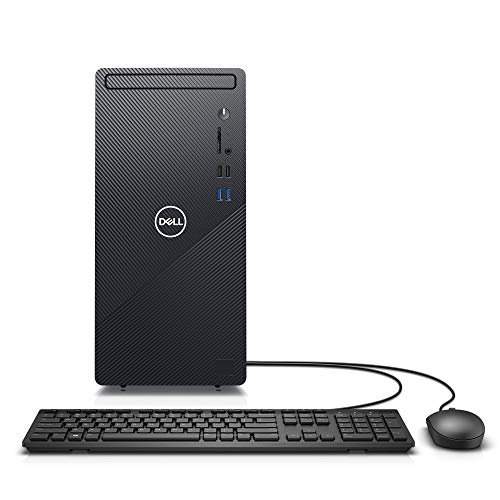
Dell Inspiron 3880 Desktop Intel Core i5 12GB Memory 512GB SSD

HP OmniStudio 27-inch FHD All-in-One Ryzen AI 7 16GB 512GB SSD

HP OmniStudio 23.8-inch FHD All-in-One Ryzen 5 8GB 512GB SSD

Skytech Azure 3 RTX 5060 Ti
Inside Each Recommended Option
I would consider this Acer for a small architectural studio where floor area matters. Its 8-liter chassis takes up much less room than a conventional workstation tower, yet the 512GB PCIe solid-state drive gives drawings and project files a responsive place to live.
Unlike the Lenovo all-in-one, this separates the computer from the display, which can be useful for desk-sharing studios or flexible monitor arrangements. The Intel N150 and 8GB of DDR5 memory lean toward everyday drafting, office work, and light CAD rather than demanding visualization.
Key Advantages
- The compact chassis fits neatly beside a monitor or beneath a desk.
- Fast PCIe storage shortens application and file-loading waits compared with a traditional hard drive.
- Wi-Fi 6 and wired Ethernet support flexible studio networking.
- HDMI and DisplayPort outputs make external-display connections straightforward.
Space To Plan
- Eight gigabytes of memory may feel limited once large drawings, browser tabs, and a full design suite are open together.
- A separate monitor adds another component to the workspace, unlike the integrated Lenovo display.
Feature Snapshot
Who It Suits Best
I recommend this model to architectural students, early-career designers, and small studios handling standard drafting and document workflows.
Where Another Pick Suits Better
The Lenovo 2026 24-inch All-in-One PC suits architects who need an integrated display and a tidier single-piece desk setup.
This Lenovo turns a 23.8-inch Full HD display and desktop into one compact unit, which I appreciate in a home office or small drafting room. The IPS panel offers wide viewing angles, while the anti-glare finish helps control reflections during long drawing sessions.
Its 16GB of DDR4 memory gives it more breathing room than the Acer’s 8GB configuration. The i3-N305 processor, NVMe solid-state drive, and integrated Intel graphics make this a balanced choice for 2D drafting, presentations, and project review rather than intensive 3D rendering.
A Few Strong Suits
- The all-in-one format reduces cable clutter and keeps the workspace visually calm.
- Color coverage reaches 99% sRGB, a useful range for reviewing design materials on screen.
- Sixteen gigabytes of memory handles CAD software and several open documents more comfortably.
- The built-in camera, microphone, and twin 2W speakers support client calls without extra desk equipment.
Display Brightness Trade-Off
- The 250-nit panel is suitable for an office, although a sunlit room may expose some brightness limitations.
- An external monitor remains possible through HDMI, but the rear port selection supports only one wired display output.
Technical Sheet
Made For
This system fits architects who value a clean workstation, integrated display, and sufficient memory for mixed office and drafting tasks.
Consider Something Else When
The HP OmniStudio 27-inch FHD All-in-One Ryzen AI 7 16GB 512GB SSD offers a larger canvas and stronger processing platform for more intensive visual work.
For a small firm, the Dell Inspiron 3880 combines Core i5 processing with Windows 10 Pro, giving architects a business-oriented platform for standard drafting and administration. Twelve gigabytes of memory is a practical middle ground between the 8GB Acer and the 16GB Lenovo.
Its 512GB solid-state drive supports faster access to plans and specifications than a hard-drive-based machine. More importantly for an office, the configuration includes two years of on-site service coverage, while the broader support options address setup, connectivity, and troubleshooting.
What Helps Most
- Windows 10 Pro suits organizations standardized on professional Microsoft features.
- Two years of on-site service can reduce disruption in a shared design office.
- The Core i5 processor provides a sensible platform for everyday CAD and documentation work.
- Solid-state storage keeps project directories responsive.
Legacy Software Fit
- Some studios may prefer Windows 11 for newer workflow and security requirements.
- Twelve gigabytes of RAM is less generous than the 16GB configurations offered by the Lenovo and HP OmniStudio models.
Right Fit For
I see this Dell as a practical choice for small practices that value Windows Pro and on-site service more than a large integrated display.
A Better Fit Elsewhere
The Lenovo 2026 24-inch All-in-One PC serves architects better who want a complete desk setup with fewer separate components.
The 27-inch OmniStudio gives me a larger working surface for comparing plans, reviewing model details, and presenting work to a client. The Ryzen AI 7 445 processor and 16GB of memory provide a more capable foundation than the smaller HP OmniStudio in this list.
It retains the tidy all-in-one approach of the Lenovo 24-inch model but enlarges the canvas. Radeon 840M graphics can handle general visual work, though the Skytech Azure 3 is the clearer choice when a project depends on a dedicated GPU with 16GB of graphics memory.
Practical Advantages
- The 27-inch display makes side-by-side drawing and specification review easier.
- Sixteen gigabytes of system memory supports mixed design and office applications.
- The Ryzen AI 7 platform suits moderately demanding architectural computing.
- Windows 11 Home provides a current environment for mainstream design workflows.
Resolution For Fine Detail
- Full HD resolution across 27 inches offers less pixel density than a higher-resolution 27-inch panel.
- The integrated all-in-one design leaves less flexibility for selecting a specialized CAD monitor.
Key Specs
Best Suited To
This model fits architects who regularly review drawings, prepare visual presentations, and work across several open applications.
Look Elsewhere When
The Skytech Azure 3 RTX 5060 Ti suits architects who regularly perform demanding 3D rendering and need dedicated graphics memory.
This 23.8-inch OmniStudio fits a home office where visual design and organization matter more than heavy rendering. The Ryzen 5 40 processor handles routine drafting, document editing, and presentations, while the integrated display keeps the setup compact.
I would place it between basic office computers and higher-powered design workstations. The 8GB memory configuration is the main constraint, particularly for architects who keep a large BIM model, a drawing suite, and several browser-based project portals open together.
A Favorable Mix
- The integrated display creates a ready-to-use drafting station with minimal desk clutter.
- A 512GB SSD provides quick file access and enough space for a focused project library.
- Windows 11 Home supports current mainstream office and design applications.
- The smaller screen remains practical for a compact studio or home workspace.
Memory For Multitasking
- Eight gigabytes of memory is the main limitation for simultaneous CAD, rendering, and communication tools.
- The 23.8-inch display offers less review space than the 27-inch HP OmniStudio.
Who Will Love This
This system suits architectural students, residential designers, and home-office users handling standard drawing and administrative workloads.
Another Choice May Suit
The Dell Inspiron 3880 Desktop Intel Core i5 12GB Memory 512GB SSD offers more memory and Windows Pro for architecture practices with heavier administrative requirements.
For intensive architectural work, the Azure 3 is the clear performance-focused option in this group. Its Ryzen 7 7800X3D processor, 16GB of DDR5 memory, and RTX 5060 Ti with 16GB of GDDR7 graphics memory create a much stronger foundation for 3D modeling, rendering, and visualization than the integrated systems.
A 1TB Gen4 NVMe drive adds meaningful project-storage capacity, while the 360mm liquid cooler suits extended processing loads. Compared with the compact Acer, this machine trades desk simplicity for considerably more computational headroom.
Where It Delivers
- The RTX 5060 Ti provides dedicated 16GB graphics memory for demanding visual workloads.
- The Ryzen 7 7800X3D processor is suited to sustained computing and multi-application work.
- A 1TB NVMe drive reduces pressure on local project storage.
- The 360mm all-in-one liquid cooler supports the higher-performance processor platform.
Wireless Standard Gap
- Wi-Fi 5 trails the Wi-Fi 6 connections offered by several all-in-one alternatives.
- Sixteen gigabytes of system memory can become restrictive for exceptionally large models and many simultaneous applications.
Core Details
Built With In Mind
This configuration fits architectural visualization teams, contract studios, and individual designers who regularly handle large models and rendered output.
Reach For A Different Pick When
The Lenovo 2026 24-inch All-in-One PC is a better fit for architects who prioritize a tidy desk and moderate computational demands over intensive 3D work.
Matching Desktop Power To Architectural Work
Memory And Application Load
I start with working memory because it determines how many applications and drawing files can remain active without slowing down. Eight gigabytes suits lighter drafting, while 16GB gives a more comfortable margin for BIM files, specifications, browser tabs, and video meetings. Large studios handling simultaneous rendering and modeling should prioritize memory capacity before subtle processor differences.
Graphics, Modeling And Rendering
Integrated graphics can handle everyday drafting and visual presentations, but complex 3D scenes place a much greater demand on the graphics processor. Dedicated graphics memory, such as the RTX 5060 Ti’s 16GB, matters when models involve detailed textures, lighting, animation, or rendering. I would reserve the dedicated option for regular visualization work rather than basic drafting.
Display, Desk Space And Connectivity
An all-in-one reduces cable clutter and creates a ready-to-use drawing station, but screen size and resolution determine how comfortably details can be reviewed. A 24-inch Full HD panel suits ordinary plans, while a 27-inch model offers a broader canvas. Tower systems support more flexible monitor arrangements but require additional desk planning.
Operating System And Support
Windows 11 Home covers mainstream creative and office software, while Windows 10 Pro provides professional features valued by some firms. On-site service can also matter in a shared office where a failed workstation creates immediate disruption. I compare the operating system and support terms alongside the hardware rather than treating them as afterthoughts.
Two Decisions That Prevent Regret
Mistakes Worth Dodging
I would avoid choosing solely by screen size or processor label. A large display cannot compensate for inadequate memory, and a fast processor does not overcome weak graphics in heavy 3D work. Matching the machine to the actual application mix prevents an expensive mismatch.
What The Higher Tier Buys
A higher tier adds capacity where heavy work creates pressure: more memory for larger files, dedicated graphics memory for rendering, and faster or larger storage for project access. Those gains matter most for daily intensive workflows, while standard drafting may not require them.
Frequently Asked Questions
Do Architects Need a Dedicated Graphics Card?
Architects need dedicated graphics most consistently for detailed 3D modeling, rendering, animation, and complex visualization. Basic drafting, specification work, and ordinary presentations can often function with integrated graphics.
Is 8GB of Memory Enough for Architectural Work?
Eight gigabytes can support standard drafting, document editing, and modest application loads. Projects involving large BIM files, many browser tabs, and several design programs benefit from 16GB or more.
Which Option Is Best for a Small Office?
The Acer Aspire Desktop Computer 8GB DDR5 512GB PCIe SSD Intel 4-Core Wi-Fi 6 suits space-constrained studios, while the Lenovo 2026 24-inch All-in-One PC offers a tidier integrated workspace.
Is an All-in-One Better Than a Tower for Design Work?
An all-in-one reduces desk clutter and simplifies setup, while a tower allows more display and component flexibility. I favor an all-in-one for general drafting and a tower or performance system for intensive rendering.
Which Selection Handles 3D Rendering Most Strongly?
The Skytech Azure 3 RTX 5060 Ti has the strongest graphics configuration, with an RTX 5060 Ti and 16GB of dedicated GDDR7 memory. It is the most fitting choice among these systems for GPU-heavy architectural visualization.
Final Verdict
I would match the desktop to the workload rather than the job title. The Acer and smaller HP OmniStudio suit lighter drafting, the Lenovo and Dell serve practical office environments, and the 27-inch HP adds display space. The Skytech Azure 3 stands apart for demanding 3D work, while the rest cover common architectural tasks with greater space efficiency.
