
A music-production desktop has to handle demanding software, project libraries, and a comfortable editing workflow without becoming a bottleneck. I focus on processor capability, memory, storage, display practicality, and graphics support for creators who work at home or in a small studio. The right computer depends less on the logo and more on the tools, sample libraries, and screen setup involved.
A Quick View Of The Lineup

HP i5-12500 Tower PC 32GB RAM
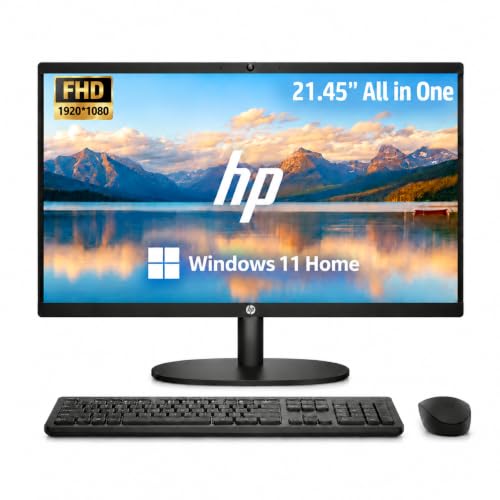
HP Touchscreen All-in-One 8GB

HP Touch All-in-One 16GB 1TB

HP Touch All-in-One 16GB 512GB
HP Touch All-in-One 32GB 1TB

ZOTAC MEK Ryzen 7 9700X PC
Taking A Closer Look At The Options
The HP i5-12500 Tower PC 32GB RAM brings a six-core processor and 32GB of memory to a conventional tower setup, which makes more sense for a permanent production desk than a compact all-in-one. I favor it for audio editing, mixing, and production work where headroom matters more than having the computer and display housed together.
The 1TB PCIe solid-state drive provides a useful combination of capacity and quick file access for active sessions, recordings, and project backups. Wi-Fi and Bluetooth reduce cable clutter around the desk, although a tower requires a separate display, so this choice suits creators who already have a suitable monitor or plan to add one.
What Makes Sense
- The six-core Intel Core i5-12500 provides a solid foundation for recording software, virtual instruments, and general production multitasking.
- 32GB of memory gives demanding sessions more room for large projects, multiple applications, and background applications.
- The 1TB PCIe SSD combines generous capacity with fast access to samples, recordings, and project files.
- Built-in Wi-Fi and Bluetooth support a cleaner setup with wireless keyboards, mice, and headsets.
- A wired keyboard and mouse are included, reducing the number of accessories needed for the initial setup.
Worth Noting
- A separate monitor is necessary for a complete workstation arrangement.
- The tower footprint takes more desk space than an all-in-one computer, making careful placement worthwhile in a small room.
Key Specs
Made For
This configuration best fits home-studio owners and working producers who want a powerful tower, use a separate display, and regularly handle sizable project libraries.
Look Elsewhere When
HP Touch All-in-One 32GB 1TB is a better fit for creators who prioritize an integrated display, a smaller footprint, and 32GB of memory in an all-in-one enclosure.
A small studio desk does not always have room for a tower, a monitor, and a separate computer. The HP Touchscreen All-in-One 8GB solves that physical problem by placing the computer, 23.8-inch display, camera, and speakers in one enclosure, making it a practical choice for a bedroom studio or shared workspace.
Full HD resolution, touch input, and an anti-glare coating make the screen convenient for arranging software, reviewing visual references, and handling everyday tasks. For music production, the touchscreen is more useful for quick adjustments than precision editing, while the Intel Core i3-N300 processor keeps the focus on general productivity, lessons, communication, and lighter music workflows.
A Few Highlights
- The 23.8-inch Full HD touchscreen supports direct interaction with arranging software and media libraries.
- IPS technology and 178-degree viewing angles help keep the image clear from different positions.
- Combining the computer and display reduces the number of separate desk components.
- The Full HD infrared camera supports sign-in, online classes, and video calls.
- Wi-Fi 6 and Bluetooth 5.3 provide modern wireless connectivity for compatible peripherals.
Small Caveats
- For large sample libraries or demanding production sessions, 8GB of memory is a practical limit compared with the higher-memory alternatives.
- Touch controls offer convenience, but a mouse and keyboard remain necessary for many editing tasks.
Who It Suits Best
This model best suits beginners, students, and compact-home-studio owners who need a complete computer and display for light music work and everyday tasks.
Another Choice May Suit
HP i5-12500 Tower PC 32GB RAM suits a creator who already owns a display and prioritizes processor capability, memory, and production headroom over a built-in touchscreen.
The HP Touch All-in-One 16GB 1TB strikes a more useful balance for music production than the smaller-memory version because it pairs an integrated display with 16GB of RAM and a 1TB SSD. That combination feels appropriate for a home studio handling recording software, browser-based references, and a meaningful collection of project files.
The 23.8-inch Full HD screen adds touch control, wide viewing angles, and an anti-glare finish without turning the desk into a collection of separate components. Compared with the HP Touchscreen All-in-One 8GB, this model preserves the same compact design while offering more memory and storage, which matters once a creator starts keeping multiple sessions and media folders close at hand.
What It Does Well
- 16GB of memory provides a more comfortable working range for music software and multiple open tasks.
- The 1TB SSD offers useful capacity for recordings, samples, installers, and active projects.
- The integrated touchscreen makes the system convenient for arranging libraries and navigating visual software.
- Windows 11 Pro, Wi-Fi 6, Bluetooth 5.3, a keyboard, and a mouse create a well-equipped everyday setup.
Points To Note
- The 23.8-inch Full HD panel is compact for arranging large plug-in windows and detailed mixer views.
- The Intel Core i3-N300 targets general productivity, so creators with processor-heavy virtual instruments should assess their software demands carefully.
Feature Snapshot
Right Fit For
This model fits independent musicians and home producers who want one screen-and-computer unit with enough memory and storage for regular studio work.
Swap It Out When
ZOTAC MEK Ryzen 7 9700X PC is a better fit for music creators who also handle GPU-intensive video processing, visual effects, or 3D work.
The HP Touch All-in-One 16GB 512GB makes sense for a creator who values 16GB of memory and a space-saving enclosure but does not need a large local library on the internal drive. Its 23.8-inch Full HD touchscreen provides enough room for routine editing, communication, and light visual work while keeping the desk relatively uncluttered.
That middle-ground position is the honest appeal here. Compared with HP Touch All-in-One 16GB 1TB, the storage is smaller, but the display, processor family, camera, wireless support, and memory remain practical for a focused home setup. I would favor it for active projects with media kept on an external drive or network location.
What Works In Its Favor
- 16GB of memory is more comfortable for production software than the 8GB configuration.
- The integrated touchscreen display removes the need for a separate monitor on a compact desk.
- The Full HD infrared camera is convenient for online lessons and production-related calls.
Practical Considerations
- A 512GB SSD offers less room for sample libraries, archives, and project backups than the 1TB alternative.
- The built-in screen may feel restrictive for a producer accustomed to a wider desktop workspace.
- Placing large media collections on external storage requires an additional drive and an organized folder system.
Built With In Mind
This all-in-one best fits students, instructors, and home producers who need a complete workstation without filling the desk with separate components.
Reach For A Different Pick When
HP Touch All-in-One 16GB 1TB suits a creator who keeps more audio and media inside the computer and wants the same 16GB of memory with greater local capacity.
The HP Touch All-in-One 32GB 1TB brings the most generous memory configuration in this HP group while retaining the convenient 23.8-inch touchscreen design. I see it as a practical choice for a busy home studio that keeps multiple applications open, holds substantial project collections, and benefits from having the display and computer in one unit.
Compared with HP Touch All-in-One 16GB 1TB, the main improvement is memory, not storage or screen size. That distinction matters for sessions with numerous virtual instruments, plug-ins, browser tabs, and background applications, although the Intel Core i3-N300 processor remains the main factor to consider for computationally heavy instruments.
Reasons It Performs
- 32GB of RAM gives complex sessions and busy desktops more working room.
- The 1TB SSD supports a substantial collection of recordings, samples, software, and active projects.
- The Full HD IPS touchscreen combines wide viewing angles with an anti-glare coating.
- Integrated speakers, camera, keyboard, and mouse make the all-in-one ready for a complete desk arrangement.
- Wi-Fi 6 and Bluetooth 5.3 support current wireless networks and compatible accessories.
Where It May Fall Short
- The compact 23.8-inch display remains less expansive than a larger production monitor, and the processor is intended primarily for general productivity.
Core Details
Whose Shelf It Belongs On
This model belongs in a busy home studio or shared family workspace where 32GB of memory, integrated storage, and a compact display solve several setup needs at once.
Skip It When
HP i5-12500 Tower PC 32GB RAM is the better option for a producer who prioritizes six-core processing and already has a larger monitor for detailed arranging and mixing.
The ZOTAC MEK Ryzen 7 9700X PC takes a different approach from the HP all-in-ones by emphasizing a Ryzen 7 9700X processor and dedicated GeForce RTX 5060 Ti graphics with 16GB of video memory. For a music creator who regularly handles video, animated visuals, 3D elements, or graphics-intensive effects, that hardware has a clearer reason to exist.
Audio-only producers may not need dedicated graphics at this level, and the gaming-oriented platform does not include the built-in touchscreen, camera, and speakers found in the HP displays. The trade-off is straightforward: I would choose the ZOTAC for graphics-heavy creative work and the HP models for a cleaner, self-contained office or home-studio desk.
Notable Gains
- The Ryzen 7 9700X provides a high-core-count processor option for demanding multitasking and production software.
- GeForce RTX 5060 Ti graphics add dedicated visual-processing capability for video and effects workflows.
- 16GB of dedicated graphics memory gives demanding visual tasks more dedicated working space.
- The MEK platform offers a compact alternative to a full-size tower for creators building a focused workstation.
Possible Compromises
- Its gaming-first hardware profile does not emphasize the integrated display and video-call features found in the HP all-in-ones.
- A creator focused only on audio may receive less practical value from the dedicated graphics than from additional memory and storage.
Technical Highlights
Who Will Love This
This desktop fits musicians who produce video clips, motion graphics, or visually intensive projects alongside their music and value dedicated graphics capability.
Where A Sibling Pick Shines
HP Touch All-in-One 32GB 1TB is a better fit for an audio-first creator who wants a built-in touchscreen, integrated camera, speakers, and generous local storage in one package.
What Matters Most For A Production Computer
Processor Headroom
The processor, or CPU, coordinates the calculations performed by recording software, virtual instruments, plug-ins, and export tasks. I start with the software that matters most: demanding instruments and effects deserve more processor headroom than a lightweight setup built mainly for mixing and learning.
Memory And Project Storage
RAM holds active applications and project data while the system is working, so 16GB gives a more comfortable production margin than 8GB. An SSD, which stores data on flash memory rather than a spinning disk, also shortens application loading and file access, while capacity determines how much recording and sample material fits locally.
Display And Dedicated Graphics
A larger display makes mixer views, arrangements, and plug-in windows easier to inspect, although an all-in-one can free desk space. Dedicated graphics becomes more relevant for video scoring, motion graphics, and 3D work than for conventional audio mixing.
Practical Decisions Before The Purchase
Common Shopping Slip Ups
The most common mistake is focusing on one component while ignoring the complete workflow. A large screen cannot compensate for insufficient memory, and abundant storage cannot replace a suitable processor for demanding virtual instruments. I compare the full software set, desk space, display size, and expected project size before choosing a configuration.
What Separates Premium From Basic
A higher-tier configuration usually adds more memory, storage, processor capability, or graphics performance. That extra capability is worthwhile for large sessions, heavy instrument libraries, and visual production, while a lighter setup can make more sense for voice recording, lessons, and basic editing.
Frequently Asked Questions
Is 16GB Of RAM Enough For Music Production?
Yes, 16GB is a practical starting point for many home-production workflows, especially with efficient project management. Larger sample collections, numerous virtual instruments, and several demanding applications can justify 32GB.
Is A Dedicated Graphics Card Necessary For Music Production?
No, conventional audio editing and mixing rarely require a dedicated graphics card. Dedicated graphics becomes more valuable when the work includes video editing, motion graphics, 3D visuals, or GPU-assisted effects.
Is An All-in-One Desktop Better For A Small Studio?
An all-in-one can be better for a small studio because the computer, display, camera, and speakers occupy one unit. A tower remains attractive when a larger display, more workspace, or separate accessories are priorities.
How Much Storage Does A Music Project Need?
The required capacity depends on audio length, recording quality, project backups, and installed sample libraries. 512GB may suit lighter work, while 1TB provides more room for active recordings and media kept on the internal drive.
Should A Music Production Desktop Be Upgraded Later?
I prefer choosing a configuration that handles the expected workload from the start, since compatibility and component availability can complicate later expansion. A higher-memory model offers more flexibility for plugin-heavy sessions and large project collections.
Final Verdict
The HP i5-12500 Tower PC 32GB RAM is my strongest music-focused choice, while the HP all-in-one models suit creators who want a compact screen-and-computer setup. The ZOTAC MEK Ryzen 7 9700X PC makes the most sense when video and graphics are central to the work. The right choice is the one that matches the software, desk, and project demands already in place.
