
A desk should not become a storage bin for a computer that does not fit the job. I looked across gaming rigs, compact office machines, a highly portable laptop, and a multi-screen desktop for people balancing play, study, remote work, and limited desk space. The practical decision comes down to performance, memory, expandability, connectivity, and whether a fixed chassis or a portable computer makes more sense.
The Essentials At A Glance
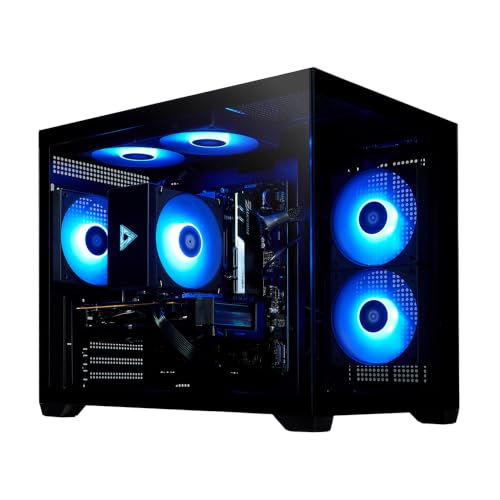
STORMCRAFT Sirius Gaming Desktop, i5-14400F, Arc B570 10GB GDDR6

Apple MacBook Neo 13-inch, A18 Pro, Liquid Retina Display, 8GB, 512GB SSD, Touch ID, Indigo
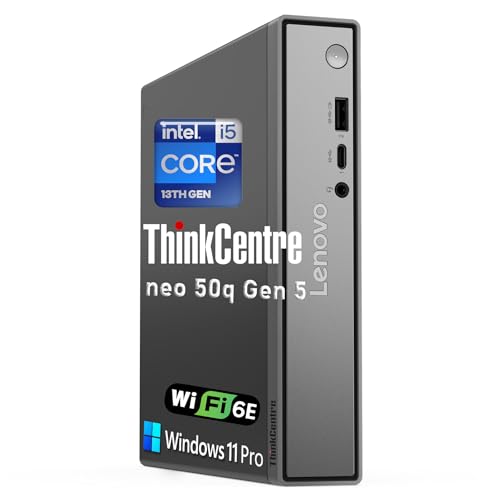
Lenovo ThinkCentre neo 50q Gen 5

Lenovo ThinkCentre neo 50q Gen 5, 16GB DDR5, 512GB PCIe SSD

Lenovo ThinkCentre neo 50q Gen 5 1L

HP OmniDesk Ryzen 5 Desktop, Radeon 740M, 32GB DDR5, 3TB Storage, Wireless Keyboard and Mouse
A Closer Look At Each Pick
Game-first rigs live or die by the graphics card, and the STORMCRAFT Sirius pairs an Intel Core i5-14400F with 10GB of Arc B570 graphics. That combination targets 1440p play, while 16GB of RGB DDR4 memory and a 1TB NVMe drive cover the usual gaming, streaming, and launch-time demands.
Compared with the business-oriented mini systems later in this roundup, this machine makes no attempt to hide its enthusiast focus. I favor it for a dedicated gaming desk, though the 16GB memory ceiling is the detail I would check before launching demanding games.
Reasons It Performs
- The 10-core, 16-thread i5-14400F reaches a stated 4.7GHz.
- Arc B570 graphics provide 10GB of dedicated GDDR6 memory.
- A 1TB NVMe drive shortens game and application loading times.
- RGB memory adds visible character to a gaming setup.
Things To Consider
- 16GB can feel limited when games, streaming, and many apps run together.
- The VR Ready label also depends on headset, game, and display compatibility.
Key Specs
Who It Suits Best
This desktop fits a PC gamer who wants 1440p-oriented hardware and RGB styling in a dedicated setup.
Where Another Pick Suits Better
The Apple MacBook Neo 13-inch suits a student who values portability and battery life more than gaming performance.
Among six desktop-focused options, the Apple MacBook Neo is the portable exception, and that makes sense for a student moving between classes, libraries, and shared tables. Its 13-inch aluminum body, A18 Pro chip, and stated battery life of up to 16 hours favor mobility rather than a permanent desk setup.
The 512GB SSD, Touch ID, Liquid Retina display, and Apple Intelligence features make it a capable everyday computer, but the 8GB unified memory is modest for sustained heavy multitasking. I see it as a laptop alternative, not a substitute for a gaming desktop.
A Strong Showing
- The A18 Pro chip supports everyday AI-assisted tasks and normal applications.
- Stated battery life reaches up to 16 hours for mobile study days.
- The enclosure contains 60% recycled aluminum by weight.
- Touch ID provides a quick way to unlock the machine.
Worth Noting
- Unified memory cannot be expanded after purchase.
- A 13-inch screen and laptop keyboard may feel limited at a fixed desk.
Made For
Mobile students and frequent travelers benefit most from the combination of portability, battery life, and Apple software integration.
Consider Something Else When
The STORMCRAFT Sirius Gaming Desktop fits a stationary gaming setup that needs discrete graphics and more memory headroom.
The ThinkCentre neo 50q Gen 5 solves a familiar space problem: the work computer no longer needs to occupy a large slab of desk. Its 7.05 x 7.20 x 1.42-inch chassis can sit near a monitor or under a desk, while the Core i5-13420H handles office applications, calls, and multitasking.
I recommend this listing for someone who values footprint first and can confirm the exact memory, storage, and connectivity setup. Compared with the fuller Lenovo configuration later, it offers a more flexible path for a tailored office build.
What It Does Well
- Eight CPU cores support office work and several running applications.
- The compact chassis preserves valuable desk space.
- A 12MB cache helps the processor manage working data.
Trade Offs
- The small enclosure offers less internal expansion room than a tower.
- Its processor emphasis favors productivity over gaming workloads.
- Monitor and accessory planning remains important for a compact setup.
Feature Snapshot
Right Fit For
Small-office and home-office users gain the most from this tiny footprint and capable productivity processor.
A Better Fit Elsewhere
The Lenovo ThinkCentre neo 50q Gen 5 with 16GB DDR5 suits offices that prefer a fully specified memory, storage, and operating system package.
The same ThinkCentre platform becomes easier to assess in this version because 16GB DDR5, a 512GB PCIe SSD, Wi-Fi 6, and Windows 11 Pro are named. I see it as the more complete office package, without giving up the 7.05 x 7.20 x 1.42-inch footprint.
For spreadsheets, browser work, conferencing, and a multi-monitor desk, that combination removes several configuration questions. The Core i5-13420H provides eight cores and 12 threads, while the compact enclosure keeps desk space in mind.
The Case For It
- 16GB of DDR5 memory supports smooth everyday multitasking.
- The 512GB PCIe SSD provides fast local storage.
- Windows 11 Pro arrives ready for business workflows.
- Wi-Fi 6 supports compatible newer wireless routers.
- The small chassis works well in crowded workspaces.
Small Caveats
- Compact construction leaves less expansion space than a full tower.
- Wi-Fi 6 requires a compatible router and network setup.
Technical Highlights
Best Suited To
Business users and remote workers benefit from the named memory, storage, Windows license, and wireless connection.
Another Choice May Suit
The Lenovo ThinkCentre neo 50q Gen 5 1L fits a compact productivity setup seeking the newer Core 5 210H platform.
The 50q Gen 5 1L Mini Desktop moves the ThinkCentre line to the Core 5 210H, an eight-core chip with four performance and four efficiency cores. For daily office work, that hybrid layout can balance foreground tasks with background work, while the one-liter enclosure keeps the footprint restrained.
Compared with the i5-13420H version, the newer chip reaches a stated 4.8GHz and carries a 12MB Intel Smart Cache. I favor it for a current productivity build, though memory and storage deserve confirmation before the machine enters a purchasing plan.
Useful Strengths
- Four performance cores handle demanding foreground applications.
- Four efficiency cores assist with lighter background tasks.
- The processor offers 12 threads for multitasking.
- The one-liter chassis suits compact desks.
Areas To Watch
- A one-liter enclosure limits expansion room compared with a tower.
- The 12-thread count matches the i5-13420H model despite the newer platform.
- Unlike the STORMCRAFT Sirius, its appeal centers on compact processing rather than gaming graphics.
The Right Fit
A compact-office user with room for a newer Core 5 platform gains a capable processor in a small footprint.
Where a Sibling Pick Shines
The Lenovo ThinkCentre neo 50q Gen 5 with 16GB DDR5 is the clearer choice when named memory, PCIe storage, and Windows 11 Pro matter most.
The HP OmniDesk takes a different approach from the tiny ThinkCentres: it bundles more memory, more total storage, and a full desktop setup for a multi-screen workspace. The Ryzen 5 8500G, Radeon 740M graphics, Wi-Fi 6, and support for four displays make it the most explicitly workstation-ready configuration in this group.
That breadth comes with a practical trade-off. The 2TB SSD handles active files, while the 1TB hard drive provides bulk storage, yet that hard drive is not the right place for demanding applications; the included keyboard and mouse also make setup simpler.
Notable Gains
- 32GB of DDR5 memory supports heavy multitasking.
- Three total terabytes combine SSD speed with bulk capacity.
- Four-display support suits analysis and productivity layouts.
- Wi-Fi 6 provides modern wireless connectivity.
- The wireless keyboard and mouse cover the basic input setup.
Practical Considerations
- Radeon 740M integrated graphics do not target high-end gaming.
- The 1TB hard drive is slower than the included SSD.
- A four-screen arrangement requires suitable cables and desk space.
Quick Facts
Built With In Mind
Multi-screen office users and content professionals benefit from the memory, storage mix, and bundled peripherals.
Look Elsewhere When
The STORMCRAFT Sirius Gaming Desktop is the better fit for 1440p gaming with dedicated Arc B570 graphics.
Matching a Desktop PC to the Workload
Processor First
A processor with more cores can handle more tasks at once, while threads let it divide complex work into additional streams. I start with everyday workload rather than peak speed, because office applications, video calls, and browser tabs rarely demand the same processor as modern gaming.
Memory and Storage
DDR5 is the newer memory standard, while NVMe SSDs connect directly to the PCIe interface for faster data access than older SATA drives. I recommend 16GB for a general office computer and 32GB for heavier multitasking, while separating frequently used files from bulk storage.
Graphics and Displays
Integrated graphics share system memory and handle basic display work, while a dedicated graphics card carries its own memory for demanding games and creative tasks. Display resolution also matters, since a 1440p panel demands more from the graphics system than a 1080p screen.
Form Factor and Connectivity
A mini PC saves desk space but usually offers less physical expansion than a tower. I also check monitor outputs, network standards, and peripheral requirements, because Wi-Fi 6 needs compatible equipment and a four-screen layout demands careful cable planning.
Two Decisions That Shape the Purchase
Mistakes Worth Dodging
I would avoid choosing from processor speed alone, since graphics, memory, and storage affect the actual experience. It is also easy to overlook monitor connections, operating-system needs, and desk space until the computer is ready to use.
What the Higher Tier Buys
A higher tier commonly adds a faster processor, a stronger graphics card, more memory, or a larger SSD. Those upgrades matter most for high-resolution gaming, demanding creative work, and large multitasking loads, while basic office tasks need much less.
Frequently Asked Questions
Which pick fits a small desk?
The Lenovo ThinkCentre neo 50q Gen 5 models have the smallest footprint, measuring 7.05 x 7.20 x 1.42 inches. The Apple MacBook Neo also saves space by serving as a portable computer rather than a fixed desktop.
Is the STORMCRAFT Sirius suitable for VR?
It is labeled VR Ready, but actual readiness also depends on the headset, game, and display configuration. I would confirm those requirements separately before purchase.
Which ThinkCentre listing includes Windows 11 Pro?
The model with 16GB DDR5, a 512GB PCIe SSD, and Wi-Fi 6 includes Windows 11 Pro. That configuration is the most clearly defined office package in the Lenovo group.
Which option has the most memory and storage?
The HP OmniDesk provides 32GB of DDR5 memory and 3TB of total storage. It combines a 2TB SSD with a 1TB hard drive for both speed and bulk capacity.
Can a laptop replace a desktop?
The Apple MacBook Neo covers portable study and general work better than any fixed desktop here. For stationary 1440p gaming, the STORMCRAFT Sirius provides more appropriate graphics hardware.
Final Verdict
I would choose the STORMCRAFT Sirius for gaming, the fully specified ThinkCentre for compact office work, and the HP OmniDesk for multi-screen productivity. The Apple MacBook Neo makes the most sense when portability matters more than a permanent desk setup.
