
A desktop has to fit the job, not merely fill a desk. I’ve organized these six systems around practical distinctions: dedicated gaming graphics, an all-in-one workspace, a compact office machine, and a high-end tower for demanding workloads. The right choice depends on screen space, desk room, and how much graphics performance the day actually requires.
The Leading Options At A Glance

Olialia 5600GT Gaming PC

Olialia Ryzen 7 5700X RTX 3060 Ti 8GB 32GB Gaming PC
Lenovo 24-inch FHD All-in-One Desktop

Empowered PC Panorama XL RTX 5080 Ryzen 7 9700F 32GB 2TB
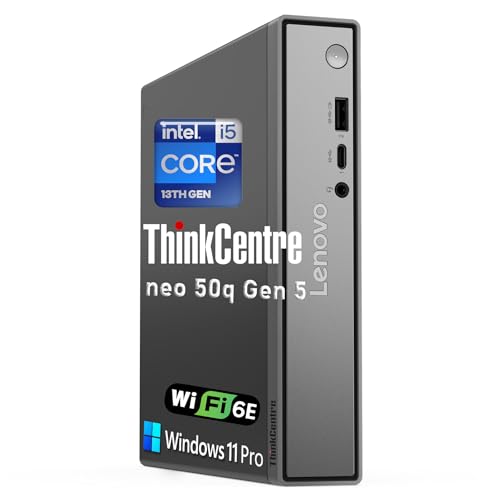
Lenovo neo 50q Gen 5 Tiny PC

Lenovo ThinkCentre neo 50q Gen 5 i5-13420H 16GB 512GB
A Closer Look At Each Pick
The Olialia 5600GT Gaming PC is a practical first tower for someone balancing office work, lessons, browsing, and lighter games. Its Ryzen 5 5600GT has six cores at 3.6 GHz, while Radeon integrated graphics handle everyday visuals and media without a separate graphics card. I see this as a sensible 1080p option for popular competitive and casual games, though more demanding titles may need lower settings.
Memory and storage are unusually generous for a general-purpose tower at 32GB of DDR4 and a 1TB PCIe SSD. Windows 11 Home is already installed, so the setup is straightforward. Compared with the discrete-GPU system in the next pick, this machine spends its capacity more on multitasking than advanced graphics.
The Value In It
- Six Ryzen cores support office applications, online learning, and concurrent background tasks.
- 32GB of DDR4 RAM makes the system comfortable for heavy browser sessions and multiple applications.
- A 1TB PCIe SSD combines quick loading with useful file capacity.
- Wi-Fi 6, Bluetooth, Ethernet, and front USB ports cover common desk connections.
Trade Offs
- Integrated Radeon graphics are a poor match for demanding 3D rendering or high-detail gaming settings.
- The tower needs more physical desk space than the Lenovo all-in-one and tiny desktop options.
Quick Facts
Made For
I recommend this tower for a home office, student room, or mixed-use family computer where gaming remains secondary.
Another Choice May Suit
The Olialia Ryzen 7 5700X RTX 3060 Ti 8GB 32GB Gaming PC fits a gamer who needs dedicated graphics for heavier titles and 3D applications.
The dedicated GeForce RTX 3060 Ti is the decisive change from the preceding Olialia tower. Its 8GB of GDDR6 memory supports ray tracing and DLSS, while the Ryzen 7 5700X provides eight cores for games, streaming tools, and creative applications. That combination makes more sense for AAA titles and GPU-accelerated work than an integrated display system.
The 32GB of DDR4 and 1TB PCIe SSD also suit a busy creative workstation, and HDMI plus DisplayPort opens a path to multiple displays. The tempered-glass case adds visual appeal, although ARGB lighting contributes little to actual performance. Windows 11 Home is preinstalled, and the 600W power supply carries an 80 PLUS Bronze rating.
Benefits That Matter
- Dedicated 8GB graphics give modern games and 3D software more headroom than integrated graphics.
- Eight processor cores help when gaming, editing, and communications run together.
- Dual display outputs support a larger or multi-screen workspace.
- Wi-Fi 6, Bluetooth, Ethernet, and several USB connections cover wired and wireless accessories.
Practical Considerations
- The 1TB SSD may feel limited for large game libraries and high-resolution project files.
- This full-size tower requires more room than the later compact Lenovo systems.
Technical Sheet
Who It Suits Best
I see this desktop as a strong match for a dedicated gaming setup, streamer, or creator who needs more graphics capability than the 5600GT offers.
Where A Sibling Pick Shines
The Empowered PC Panorama XL fits a creator seeking a newer Ryzen generation, an RTX 5080, and twice the listed SSD capacity.
The Lenovo A100 all-in-one turns a 23.8-inch Full HD display and computer into one tidy unit. That arrangement removes the need for a separate monitor and reduces cable clutter, making it useful in a dorm room, kitchen office, or shared study area. The IPS panel, 99% sRGB coverage, and anti-glare finish also make it more considered than a typical office display.
Its Core i3-N305 has eight cores, paired with 16GB of DDR4-3200 and a 512GB PCIe NVMe SSD. Compared with the RTX 3060 Ti tower, this system offers less graphics muscle but a much smaller footprint. The included keyboard and wireless mouse add convenience, while the tilt stand helps set the screen at a comfortable height.
Good Reasons To Consider
- The integrated 23.8-inch IPS display saves desk space and removes the need for a separate panel.
- 16GB of RAM supports browsing, documents, video calls, and several background applications.
- 99% sRGB color coverage adds useful accuracy for photos and media.
- Wi-Fi 6, Gigabit Ethernet, USB, HDMI, and an audio jack provide practical connectivity.
- The bundled keyboard and wireless mouse make the system easier to begin using.
Points To Note
- Integrated graphics are unsuitable for most modern AAA gaming and demanding 3D work.
- A 512GB SSD offers less room for a large game library than the gaming towers.
Feature Card
Right Fit For
This all-in-one best serves a student, remote worker, or family user who values a tidy desk more than gaming performance.
Swap It Out When
The Lenovo ThinkCentre neo 50q Gen 5 Tiny PC makes more sense when an existing display already provides the screen space.
The Empowered PC Panorama XL is built around the most capable graphics configuration in this group. Its RTX 5080 has 16GB of dedicated GDDR7 memory, while the Ryzen 7 9700F provides eight cores and 16 threads with boost speeds reaching 5.5 GHz. I would consider it for demanding games, 3D rendering, and GPU-heavy creative applications rather than routine browsing.
Storage is another meaningful advantage. The 2TB PCIe Gen4 SSD offers twice the listed capacity of the preceding gaming towers, which can matter with large game installs and 4K media. Wi-Fi 7, an Ethernet connection, HDMI, and Windows 11 Pro round out a high-end configuration, while the RGB tower still demands a permanent home on the floor or desk.
Where It Helps
- The RTX 5080 provides 16GB of dedicated graphics memory for demanding games and rendering.
- Eight Ryzen cores and 16 threads handle intensive parallel workloads.
- 32GB of DDR5 memory supports advanced editing, development, and multitasking.
- A 2TB PCIe Gen4 SSD provides substantial room for games and working files.
- Wi-Fi 7 and wired Ethernet support modern network setups.
Where It May Fall Short
- The size and high-end components are excessive for document work and routine streaming.
- Windows 11 Pro adds features that may not be necessary for a basic home setup.
Built With In Mind
I recommend this system to a serious gamer, 3D artist, or video editor whose workload justifies high-end graphics and fast storage.
Consider Something Else When
The Olialia 5600GT Gaming PC is a more practical choice for an office-centered setup with occasional casual gaming.
The Lenovo ThinkCentre neo 50q Gen 5 measures 7.05 by 7.20 by 1.42 inches, so it can sit behind a monitor or beneath a desk without taking over the workspace. That is a meaningful departure from the full-size gaming towers and the freestanding Lenovo all-in-one. I see the main appeal as flexibility: the computer can support an existing display rather than requiring a bundled screen.
Its Intel Core i5-13420H provides eight cores, 12 threads, and boost speeds up to 4.6 GHz. That processor is designed for business applications, video meetings, document work, and routine multitasking rather than gaming. The compact design is the central feature, but a separate display, keyboard, mouse, and suitable connections are part of the complete setup.
What Helps Most
- The tiny chassis leaves substantial room on a compact or shared desk.
- Eight cores and 12 threads provide useful capacity for office work and conferencing.
- The low-profile form can fit beneath a desk or behind a display.
- The processor’s 4.6 GHz boost supports responsive everyday tasks.
Some Limits To Know
- A monitor and input devices may need to be added separately.
- Integrated graphics do not target modern AAA gaming or demanding 3D rendering.
Who Will Love This
This tiny desktop suits an office, reception area, or home workstation where minimizing visible equipment matters most.
Look Elsewhere When
The Lenovo 24-inch FHD All-in-One Desktop fits a desk that needs a complete display-and-computer arrangement without separate accessories.
This specified ThinkCentre neo 50q configuration adds 16GB of DDR5 RAM, a 512GB PCIe SSD, Wi-Fi 6, and Windows 11 Pro to the tiny form factor. Compared with the earlier neo 50q listing, those details make this the more complete office choice. I would favor this version for professional workflows that need a defined operating system, wireless networking, and a usable amount of local storage.
The same Core i5-13420H processor and approximately 7-inch-wide chassis preserve the main appeal: substantial computing hardware in a small box. It can sit beside or behind an external display in a compact studio, consulting room, or home office. The 512GB drive is the modest point, especially for large project libraries or an extensive local game collection.
Notable Upsides
- Windows 11 Pro provides a professional operating environment without requiring a separate system install.
- 16GB of DDR5 memory supports office applications and regular multitasking.
- Wi-Fi 6 avoids a wired network dependency in many office layouts.
- The compact chassis preserves desk space and can operate with an external display.
Small Caveats
- A 512GB SSD may require careful file management for large creative projects.
- A complete workstation may still need separate display, keyboard, mouse, and connection cables.
Quick Technical Notes
Best Suited To
This configuration fits a professional office, creative studio, or home-office user who wants Windows Pro in a compact machine.
Reach For A Different Pick When
The Empowered PC Panorama XL fits a workstation where high-end graphics and 2TB of storage are central to the workload.
Matching A Desktop PC to the Work
The right desktop starts with the dominant task. Office work, school, and media use put processor efficiency, memory, display quality, and connectivity ahead of gaming graphics. Dedicated gaming hardware becomes more relevant with demanding titles, streaming, video editing, or 3D rendering.
Gaming also changes the storage calculation. A 1TB drive can hold a practical selection of games and applications, but large installs accumulate quickly. The Panorama XL’s 2TB SSD offers more breathing room, while the Lenovo A100’s 512GB drive favors documents, browsing, and schoolwork.
Desk layout is equally practical. The Lenovo A100 combines the computer and a 23.8-inch IPS display, reducing the number of visible objects. The ThinkCentre neo 50q takes up much less room but needs an external display, making it a better fit for an existing dual-monitor office setup.
Finally, Windows edition and connectivity should match the environment. Windows 11 Home suits personal use, while Windows 11 Pro on the specified ThinkCentre configuration offers a more professional foundation. I also check Wi-Fi, Ethernet, USB, video outputs, and audio connections before choosing a compact system.
Making Desktop Choices More Predictable
Mistakes Worth Dodging
A common mistake is choosing graphics first while ignoring the display, storage, and desk arrangement. A large tower still needs room, and a powerful processor cannot compensate for a small drive in a creative workspace. I also avoid assuming that every compact system includes a monitor, keyboard, or mouse.
What The Higher Tier Buys
Higher-tier desktops generally add faster or more capable processors, stronger dedicated graphics, larger solid-state drives, and newer connectivity. The additional capability matters for demanding games, rendering, and complex professional software, but it adds little to routine browsing or document editing. I pay for the performance I can actually use.
Frequently Asked Questions
Is an all-in-one desktop better than a tower?
An all-in-one is more convenient when desk space and cable management matter, while a tower offers more expansion flexibility. The Lenovo A100 suits a self-contained workspace, while the Olialia towers make more sense for dedicated gaming setups.
Can the Ryzen 5 5600GT handle gaming?
The Ryzen 5 5600GT can handle popular competitive and casual games at 1080p, depending on the title and settings. Demanding games are better served by the dedicated graphics in the Olialia RTX 3060 Ti or Empowered PC RTX 5080.
Is a 512GB SSD enough for a desktop?
A 512GB SSD is reasonable for documents, browsing, and a modest application library, but large game collections and media projects can fill it quickly. I favor 1TB or 2TB for a gaming or creative desktop intended for long-term use.
Does a tiny desktop need a monitor?
The Lenovo ThinkCentre neo 50q is designed for use with a separate display, so a monitor is generally part of the required setup. The Lenovo A100 all-in-one includes its own 23.8-inch screen, making it the more self-contained option.
Is Windows 11 Pro better than Windows 11 Home?
Windows 11 Pro adds business-oriented management and security features, while Windows 11 Home covers personal productivity and general gaming. I consider the Pro edition more relevant in a managed office or professional studio than in a typical family computer.
Final Verdict
The best choice depends on which constraint matters most. I favor the Lenovo A100 for a tidy, self-contained desk, the ThinkCentre neo 50q for compact professional setups, and the Olialia RTX 3060 Ti for dedicated gaming. The Ryzen 5 5600GT serves mixed everyday use, while the Empowered PC Panorama XL targets demanding graphics and storage needs. Matching the machine to the actual workspace makes the decision much simpler.
