
A screen can disappear behind a closed laptop or leave a desk covered in cables, and moving a television between rooms rarely fits the layout one had in mind. I rely on four checks when comparing these mounts: screen support, adjustment range, desk compatibility, and the footprint left behind.
The shortlist covers floor carts, cockpit frames, magnetic mounting, and articulated desk arms. I favor the option that matches the actual room and screen rather than one that merely looks adaptable on a product page.
An Overview Of The Picks

HOLMAXD Mobile TV Cart for 13-55 Inch TVs
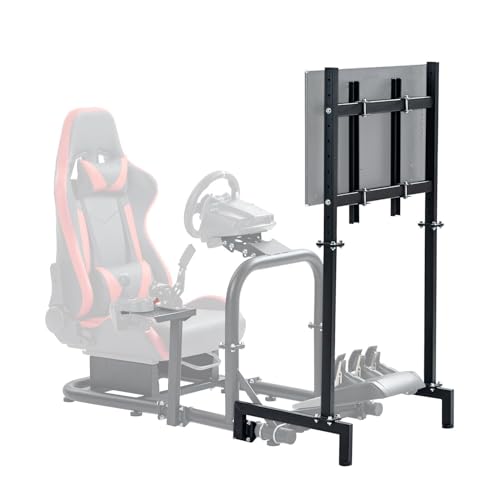
Marada Racing Cockpit Monitor Stand

Motiexic Magnetic Monitor Mount for 13-34 Inch Screens

ULTRARM MA20P-S Heavy Duty Monitor Arm for Ultrawides

HUANUO FlowLift Pro Monitor Arm for 13-32 Inch Screens

HUANUO FlowLift Dual Monitor Stand for 13-32 Inch Screens
A Breakdown Of The Leading Choices
This cart makes more sense than a fixed desk mount for a bedroom, dorm, or rental where the television changes rooms often. The four lockable casters make repositioning less disruptive, while the narrow base can sit beside or behind furniture in a tighter space.
The 13-to-55-inch range covers many common screens, and the steel construction supports as much as 77 pounds. For a living-room setup with regular viewing-height changes, I appreciate the eight-position adjustment and compact footprint, though it occupies more floor space than a conventional arm.
What It Does Well
- Eight height positions place the screen between 38.07 and 49.09 inches, covering seated and standing viewing.
- Single-knob tilt adjustment ranges from -10 to 15 degrees for reducing screen glare.
- The X-shaped base supports up to 77 pounds and reduces the visual bulk around the screen.
- Locking silent casters help the cart remain in place on carpet or wood.
- A cable tie keeps cords gathered behind the display.
Small Caveats
- The floor base needs enough clearance to roll safely, and the X-shaped support may crowd a very tight corner.
- Compatibility depends on the screen’s VESA pattern, which is the 100 mm or 75 mm square spacing between its mounting holes.
Key Specs
Made For
I recommend this cart for renters, dorm residents, and families who regularly move one television between rooms.
A Better Fit Elsewhere
The HUANUO FlowLift Dual Monitor Stand suits compact workstation desks that need two computer screens rather than a rolling television cart.
Built for a racing cockpit rather than a conventional desk, this stand puts a large display within the driver’s sightline. The height and position adjustments help the screen align with a seated driving posture, which makes it more useful for sim racing than the wheeled HOLMAXD cart.
Its square steel-tube frame supports displays from 24 to 60 inches and up to 110 pounds. I see it as a specialized fit for an existing cockpit or round-tube structure, not a substitute for a full racing rig, since the package contains only the monitor stand.
What Stands Out
- The 110-pound capacity comfortably accommodates large displays used in racing simulations.
- Height and positional movement help align the screen with a seated cockpit.
- Pre-drilled holes and included hardware simplify assembly at the rig.
- The compact steel structure fits round-tube cockpit frames without occupying a desktop.
Things To Consider
- The stand alone does not include a display, cockpit, seat, or other electronic equipment.
- A small hole mismatch may require on-site drilling, so careful alignment during assembly matters.
- Its racing-specific shape offers little advantage outside a cockpit setup.
Right Fit For
This option fits sim racers with a compatible cockpit frame who need a firm, adjustable display position.
Look Elsewhere When
The ULTRARM MA20P-S Heavy Duty Monitor Arm is a better fit for a desk-based ultrawide workstation than a cockpit installation.
A metal pegboard or cabinet gives this magnetic mount something most desk arms cannot offer: a no-drill installation point. I find that especially useful in workshops, engineering rooms, and compact offices where a permanent hole in a work surface is inconvenient.
Six magnets hold a 13-to-34-inch display, while rotation, tilt, and swivel movement provide several viewing angles. The setup suits lighter screens in active work areas, though a steel surface thicker than 1 mm remains an essential requirement.
Practical Advantages
- No-drill attachment keeps steel work surfaces unmarked.
- Full-surface foam protects the mounting surface and reduces movement noise.
- Two handles make installation and repositioning more controlled.
- The 360-degree rotation and broad tilt range suit several desk positions.
- Included hardware makes the magnetic base ready for assembly.
Practical Considerations
- The steel surface must measure more than 1 mm thick for the specified magnetic attachment.
- The 22-pound limit excludes heavier displays, and the VESA support covers only 75×75 and 100×100 mm patterns.
Quick Facts
Built With In Mind
I would pair this mount with a steel pegboard, shelving unit, or utility cabinet in a workshop or technical office.
Another Choice May Suit
The HUANUO FlowLift Pro Monitor Arm works better for a standard wood desk where clamp or grommet mounting is available.
A single 57-inch ultrawide changes the geometry of a desk, and the ULTRARM arm is designed around that larger canvas. Its pneumatic spring system supports up to 44 pounds, which gives heavy screens a steadier adjustment range than a basic fixed spring arm.
The MA20P-S supports flat or curved displays from 24 to 57 inches, including curved models up to 1000R. I see it as a strong choice for editing suites and immersive workstations, but the 100×100 mm VESA limit prevents use with a larger-hole mounting pattern.
Features That Help
- The 44-pound capacity accommodates heavy ultrawide displays.
- Pneumatic height adjustment makes repeated positioning more consistent.
- Extension arms provide additional reach around a deep desk.
- Clear cable management keeps the larger display setup tidier.
- A quick-release VESA plate simplifies screen attachment.
Possible Compromises
- The maximum VESA pattern is 100×100 mm, so hardware with wider spacing requires another mount.
- The arm and large screen need adequate desk strength, edge space, and room for the C-clamp or grommet base.
Technical Highlights
Who Will Love This
Video editors, developers, and analysts using a large ultrawide display on a deep workstation desk gain the most from this arm.
Swap It Out When
The HOLMAXD Mobile TV Cart for 13-55 Inch TVs is a better fit for relocating a television between rooms rather than managing one ultrawide screen.
The mechanical spring in this single-screen arm makes everyday height changes easier for a desk used throughout the day. It suits students, office workers, and programmers who alternate between sitting and standing while keeping one display in front of them.
Compatibility is narrower than the ULTRARM MA20P-S, with support for 13-to-32-inch screens and weights from 4.4 to 19.8 pounds for flat panels. Curved displays have a lower 15.4-pound limit, and the recommended wood-desk thickness ranges from 0.59 to 3.54 inches.
What Helps Most
- MechaSpring movement supports easier height changes throughout the workday.
- Tilt, swivel, and rotation provide flexible screen positioning.
- Tool-less VESA attachment simplifies installing a compatible monitor.
- Both C-clamp and grommet bases accommodate different desk structures.
Details To Watch
- The screen, weight, and VESA pattern must all satisfy the compatibility requirements.
- Wood desktops between 0.59 and 3.54 inches thick provide the stated mounting range.
- Curved screens face a lower maximum load than flat screens.
The Right Fit
This arm suits everyday office and study desks holding one lightweight flat monitor that changes position frequently.
Where A Sibling Pick Shines
The ULTRARM MA20P-S Heavy Duty Monitor Arm is the better choice for a heavier ultrawide display extending to 57 inches.
Two independent arms let a productivity desk place reference material beside a main document, with each display adjusted separately. That flexibility is more useful than the single-screen arrangement of the HUANUO FlowLift Pro, particularly for coding, editing, or streaming setups.
Each arm supports a 13-to-32-inch screen weighing 4.4 to 19.8 pounds, with 75×75 and 100×100 mm VESA patterns. I would expect a dual arrangement to need more desk depth than a single arm, so measuring the work area before assembly is the sensible move.
Bright Spots
- Independent positioning creates a more productive two-screen layout.
- Full-motion movement supports different viewing angles for each display.
- Each arm handles screens from 13 to 32 inches and up to 19.8 pounds.
- C-clamp and grommet mounting provide options for different desks.
Trade-Offs To Consider
- The dual layout needs more desk width and depth than a single-screen arm.
- Both screens must meet the stated size, weight, and VESA requirements.
Feature Snapshot
Whose Shelf It Belongs On
I recommend this stand to programmers, editors, and multitaskers with a deep desk and two compatible monitors.
Reach For A Different Pick When
The Motiexic Magnetic Monitor Mount for 13-34 Inch Screens better serves a steel surface where drilling is not an option.
What Matters Before Mounting a Screen
I start with VESA compatibility, the spacing between the four holes on a display’s rear plate. A screen can fit within the stated size and weight range and still lack a supported mounting pattern.
Desk or floor anchoring
A floor cart needs safe rolling clearance and a stable route between rooms. A desk arm needs enough edge thickness for its clamp or grommet attachment, while the magnetic mount needs a steel surface thicker than 1 mm.
Screen size and weight
Larger displays require more careful checking because size alone does not determine support. I compare the screen’s weight with the mount’s rated capacity, including the lower limit needed for spring and pneumatic mechanisms.
Adjustment range and space
Height, tilt, swivel, and rotation determine how comfortably the display fits a seated or standing posture. Articulated arms also need room beneath and behind the desk, and a dual-screen arrangement needs considerably more space than one arm.
Buying Guide Details That Change the Choice
The best mount is the one that fits the screen’s mounting pattern, the furniture beneath it, and the way the room is actually used. Screen size and weight provide the first filter, while mounting style and available space usually make the final decision.
Common Shopping Slip Ups
A common mistake is checking diagonal screen size while overlooking the rear mounting holes or weight. I also avoid assuming that every desk mount fits every tabletop, since clamp thickness, edge clearance, and grommet availability can rule out an otherwise suitable arm.
What Separates Premium From Basic
Premium models tend to add stronger load ratings, broader adjustment, better cable handling, or more substantial hardware. The added cost is worthwhile for a heavy ultrawide screen or frequent position changes, while a basic arm remains sensible for a lightweight display that stays in one place.
Frequently Asked Questions
What is the best desktop TV mount for a heavy monitor?
The ULTRARM MA20P-S Heavy Duty Monitor Arm fits heavy ultrawide screens because it supports up to 44 pounds. Its 100×100 mm VESA limit and 57-inch screen range still need to match the display.
Can a desktop TV mount hold a regular television?
The HOLMAXD Mobile TV Cart for 13-55 Inch TVs supports televisions up to 77 pounds. Its VESA range of 75×75 to 400×400 mm allows many wall-style mounting patterns.
Which mount needs no drilling?
The Motiexic Magnetic Monitor Mount for 13-34 Inch Screens attaches magnetically to steel without drilling. The steel surface must be thicker than 1 mm, and the display must remain within the 22-pound limit.
Can one monitor arm support two screens?
The HUANUO FlowLift Dual Monitor Stand provides one arm for each of two 13-to-32-inch screens. Each display must weigh 4.4 to 19.8 pounds and use a supported VESA pattern.
Is a floor-standing TV mount more stable than a desk arm?
A floor cart suits a television that moves between rooms, while a desk arm offers better positioning for a computer display. Stability depends on the base, anchoring method, screen weight, and surrounding floor or desk conditions.
Final Verdict
I would choose the HOLMAXD cart for a television that changes rooms, the Motiexic mount for a steel work surface, and the ULTRARM arm for a heavy ultrawide. Standard desks with two screens are best served by the HUANUO dual stand, while the FlowLift Pro handles one lighter monitor with frequent height changes. Matching the mount to the screen, furniture, and daily routine matters more than chasing a long feature list.
