
A slim desktop may no longer include an optical bay, yet CD/DVD discs remain useful for installing legacy software, archiving family recordings, or moving music between older systems. I focus on external optical drives and high-capacity portable storage, matching each option to tasks such as disc burning, card transfers, travel, and large file storage.
The Picks In Brief

Wbacon LightScribe DVD Drive

NOLYTH DVD Burner with Wireless Charger
Xadioei 8-in-1 LED DVD Drive

WD 20TB Elements Desktop External Hard Drive

GODBPNYMU 8-in-1 DVD Drive

GODBPNYMU 5-in-1 USB 3.0 DVD Drive with SD/TF Slots, Type-C
GODBPNYMU 5-in-1 USB 3.0 DVD Drive with SD/TF Slots, Type-C
More Details On Our Top Picks
LightScribe gives this slim Wbacon drive a purpose beyond ordinary disc playback. The feature uses a laser to etch labels or images onto compatible disc surfaces, which makes it appealing for archival projects and personalized gifts.
I would pair it with a computer that has an optical-drive workflow rather than treating it as a general-purpose hub. The SD and TF slots add useful transfer paths, while two USB 3.0 ports support peripherals such as a mouse or flash drive. Compared with the NOLYTH model, Wbacon trades wireless charging for disc labeling.
Why It Works Well
- LightScribe labeling creates a visible difference that ordinary burning software cannot produce.
- Disc reading, writing, playback, and ripping support everyday optical media tasks.
- SD and TF slots make camera media transfers more convenient.
- Its compact enclosure fits comfortably in a laptop bag.
Practical Considerations
- LightScribe requires compatible software and compatible writable discs.
- LightScribe does not work with OS X El Capitan 10.11 or later.
- The SD and TF slots cannot operate at the same time.
Quick Facts
Made For
This model suits archivists and gift makers who value customized disc labels more than wireless charging.
Consider Something Else When
The NOLYTH DVD Burner with Wireless Charger better serves a crowded desk that needs both disc access and phone charging.
A phone charger, card-transfer hub, and optical burner rarely share one enclosure, yet that is the central appeal here. The 15W magnetic charging module sits on top, while the rear connections provide disc access and peripheral support.
I find the charging arrangement more useful during a long workday than at a shared office desk, provided the required power is available. Unlike the Wbacon LightScribe DVD Drive, this model prioritizes connectivity and charging over personalized disc labels. The aluminum cover and rubber pads also give it a more deliberate desktop presence.
A Favorable Mix
- Wireless charging reduces cable clutter around the workstation.
- Three USB 3.0 ports support several external accessories.
- The Type-C and SD/TF paths support varied transfer equipment.
- Broad disc-format support suits mixed media collections.
- Its 0.8-pound weight makes business travel manageable.
Worth Noting
- Charging requires a 15W-or-higher adapter, which is not included.
- Stable operation calls for the included Type-C power cable connected to the DC-5V port.
- The SD and TF card slots cannot work simultaneously.
Feature Snapshot
Right Fit For
This model fits mobile professionals and power users who want one desk accessory to handle discs, cards, peripherals, and device charging.
Another Choice May Suit
The GODBPNYMU 5-in-1 USB 3.0 DVD Drive with SD/TF Slots, Type-C is a leaner option for basic disc work without wireless charging.
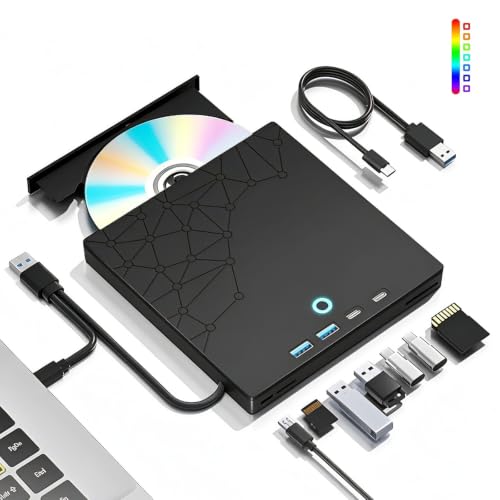
Most external optical drives disappear into a laptop bag, but the Xadioei model makes the hardware part of the desk setup. Seven RGB gradient lighting effects add a soft ambient glow, and the brightness can be adjusted for different levels of ambient light.
I would consider it for a nighttime workstation where a plain metal enclosure feels visually disconnected from the rest of the setup. The 8-in-1 format adds convenience around a busy computer, and USB 3.0 provides a familiar connection method. Unlike the GODBPNYMU 8-in-1 DVD Drive, the defining feature here is adjustable lighting rather than the port count alone.
What Stands Out
- Seven gradient effects create a more personalized desk appearance.
- Adjustable brightness gives some control over the visual effect.
- The multi-function design reduces the need for separate accessories.
Small Caveats
- The lighting adds little practical value in a brightly lit office.
- Peripheral requirements should be checked against the physical port layout before purchase.
Who Will Love This
This model appeals to creative desktop users who want a functional optical drive to blend into a colorful gaming or content-creation setup.
Look Elsewhere When
The WD 20TB Elements Desktop External Hard Drive is the better choice for large file storage rather than optical media and lighting.
Twenty terabytes changes the scale of local storage for photographs, video archives, and completed project files. The WD Elements drive is built as a desktop unit, which makes it a better fit for a fixed workstation than for a constantly packed laptop bag.
I would use it as a secondary library for media that no longer needs constant access while keeping active projects on the internal drive. Plug-and-play operation on Windows 10 or later keeps setup straightforward, and USB 3.0 works with USB 2.0 systems. Unlike the optical models, this drive stores files directly and does not handle CDs or DVDs.
The Upside
- The 20TB capacity supports substantial local media collections.
- USB 3.0 and USB 2.0 compatibility broadens system support.
- Plug-and-play operation reduces setup on compatible Windows PCs.
- A Rescue data recovery plan can attempt recovery from a failed drive.
Factors To Consider
- Mac use requires reformatting the drive.
- Recovery-plan coverage depends on plan terms, purchase timing, and receipt retention.
Technical Sheet
Built With In Mind
This drive suits photographers, video editors, and media collectors who need a spacious desktop archive close to a workstation.
A Better Fit Elsewhere
The Wbacon LightScribe DVD Drive is more appropriate for creating physical discs and reading legacy optical media.
The GODBPNYMU 8-in-1 DVD Drive approaches external storage from a simple angle: add optical access and several connection paths to a computer without an internal drive bay. That makes it relevant for older laptops and desktops that still encounter CD or DVD media.
Its USB-powered design avoids a separate power adapter, while plug-and-play operation should feel natural for routine disc tasks. I would keep expectations centered on basic optical use rather than advanced labeling or charging. Compared with the Xadioei 8-in-1 LED DVD Drive, the visual effect is not the main attraction here.
Strong Points
- USB power keeps the desk setup relatively uncluttered.
- Plug-and-play operation supports straightforward computer connections.
- The multi-port format consolidates several access points in one enclosure.
Where It May Fall Short
- Basic disc access offers less differentiation than specialized labeling or charging features.
- A direct computer connection may be preferable to a crowded external hub.
Whose Shelf It Belongs On
This drive fits a straightforward home or office computer that occasionally needs CD and DVD access alongside basic USB connections.
Reach For A Different Pick When
The NOLYTH DVD Burner with Wireless Charger better serves a multi-device desk that needs charging alongside disc and card functions.
This GODBPNYMU model balances disc handling with the connections common in a mobile work setup. USB 3.0 and Type-C suit modern computers, while SD and TF slots support transfer from camera or portable media.
I would choose it for a compact laptop kit that must handle older discs, removable cards, and wired accessories. Plug-and-play operation keeps the initial setup direct, and the operating-system coverage includes Windows, Linux, and Mac. Compared with the larger GODBPNYMU 8-in-1 DVD Drive, this option uses fewer connection functions but presents a more focused portable profile.
The Practical Payoff
- USB 3.0 and Type-C cover common modern connection methods.
- SD and TF slots simplify camera-card transfers.
- Disc burning and rewritable playback cover common optical tasks.
- Cross-platform support suits mixed personal and work setups.
Details To Watch
- Card and disc access may be unnecessary for a modern laptop with native storage.
- The five-function format offers fewer peripheral choices than an eight-in-one model.
At A Glance
The Right Fit
This model suits travelers and students who need discs and removable media in one portable accessory.
Swap It Out When
The WD 20TB Elements Desktop External Hard Drive better serves a fixed desk that needs extensive file capacity rather than optical functions.
What Matters Before Buying a Disk Drive
Match the drive to the media
An optical drive handles CDs, DVDs, and rewritable discs, while an external hard drive stores ordinary files. I would begin by deciding which format needs to move between devices. A computer lacking an internal optical bay may still have a USB port, making an external burner the practical solution.
Check the connection path
USB 3.0, Type-C, and built-in cables affect how a drive fits into a daily setup. Direct connections reduce cable clutter and avoid dependence on an extra adapter hub. Type-C is especially convenient for newer laptops, while a USB-A connection may fit older systems more easily.
Look beyond the port count
An eight-in-one hub can consolidate storage, input devices, and card transfers, but each included connection has a practical purpose. I would match each port to an actual peripheral rather than treating the total number as a benefit by itself. Wireless charging, disc labeling, and adjustable lighting serve more specialized needs.
Account for the workspace
Portable optical drives suit travel, while desktop hard drives need a stable surface and cable. Card slots also require enough front clearance for insertion, and high-capacity storage benefits from a fixed location. Checking desk space and connection reach prevents an otherwise capable drive from becoming awkward to use.
Common Mistakes in External Storage Choices
Mistake 1: Confusing optical and file storage
A CD/DVD drive and external hard drive serve different tasks, so treating them as interchangeable creates an expensive mismatch. I would choose the optical model for discs and the hard drive for large file collections.
Mistake 2: Ignoring port layout
A high function count can still be awkward when the required connectors sit in inconvenient positions. Checking the physical layout before ordering prevents cable strain and unnecessary desk clutter.
Mistake 3: Overlooking power requirements
Wireless charging and multiport performance may call for separate power. I would verify the required adapter and connection arrangement before expecting every feature to operate together.
What The Higher Tier Buys
More than a larger specification
Premium models tend to combine more functions, specialized disc features, or broader compatibility. The useful question is whether those additions remove a real problem, such as replacing separate charging and card-transfer accessories.
Spending where it pays off
Higher-feature drives make sense for a crowded workstation that regularly handles discs, cards, and peripherals. A simpler model remains easier to justify for occasional disc access, since unused functions add nothing to the task.
Frequently Asked Questions
Do I need an external DVD drive for a modern PC?
An external DVD drive is useful when the computer must handle physical discs. It also supports legacy software, archived recordings, and disc-based backups.
Can an external hard drive replace an optical drive?
No, an external hard drive stores files while an optical drive reads and writes CDs or DVDs. Each addresses a different storage format.
Which connection should I check before ordering?
The computer’s available port matters most, particularly USB-A versus Type-C. Built-in cables and direct connections can also reduce desk clutter.
Will these drives work with Mac computers?
Optical-drive compatibility varies by model, and the WD Elements drive requires reformatting for Mac use. I would verify the listed system support and setup steps for the selected model.
Is an eight-in-one optical drive worth the extra functions?
It is worthwhile for a desk that regularly connects several storage, media, or input devices. Occasional disc use can be handled more simply.
Final Verdict
The Wbacon LightScribe DVD Drive stands apart for labeled discs, while the NOLYTH model combines optical access with wireless charging. For large archives, the WD 20TB Elements drive provides a different kind of capacity, and the three GODBPNYMU models cover portable and multi-function optical needs. Match the drive to the actual media and workspace, then keep the connection layout in view.
