
A cramped laptop drive can turn routine upgrades into a frustrating juggling act, especially when moving between SSDs and HDDs or reorganizing Windows partitions. I focus on the disk partition program options here that support these jobs, while also noting which included products belong to separate organizational categories.
Before changing a drive, I prioritize a current backup, a clear destination, and software that matches the storage format and operating system. That preparation matters more than a crowded feature list because a partition error can affect access to files or the boot process.
A Fast Comparison Of The Options

Outus 24-Piece 7 x 9.25-Inch Discbound Planner Dividers

Versare Room Divider 360 Black 14 x 5 Partition

Versare Room Divider 360 Blue 14 x 5 Partition
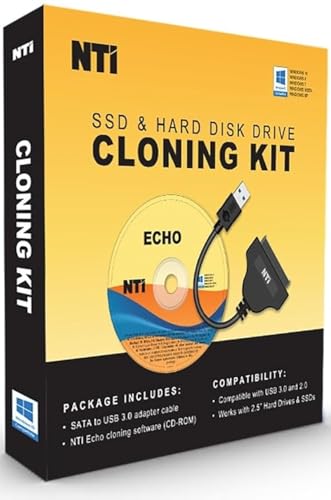
NTI Cloning Kit Version 7 with SATA-to-USB Adapter

Acronis True Image 2018 Backup Software

AOMEI Partition Assistant Professional Upgrade
A Closer Look At Each Pick
The Outus set is a paper-planning accessory rather than a disk partition program, so its place here comes down to useful organization hardware. It brings 24 disc-bound dividers, where disc-bound pages use punched edges to connect to a compatible planner, along with two sticker sheets for labeling sections.
Each divider measures 7 by 9.25 inches and is made from polypropylene, a lightweight plastic that resists bending and can be reused. In my view, the set works best for students separating homework and notes or for home planners dividing personal projects, finances, and schedules.
Everyday Wins
- Eight divider colors make planner sections easy to distinguish at a glance.
- Blank and monthly sticker sheets support quick custom labeling.
- The lightweight polypropylene construction suits portable planners.
Things To Consider
- This organizer does not resize, clone, or manage disk partitions.
- Compatibility depends on the planner accepting classic 7 by 9.25-inch disc-bound pages.
Key Specs
Made For
Students, journal users, and home organizers who want colorful sections in a compatible disc-bound planner.
Another Choice May Suit
AOMEI Partition Assistant Professional Upgrade serves computer owners who need actual partition-management functions instead of paper organization.
The black Versare partition solves physical space problems, not storage problems. Its rotating panels can form straight, L-shaped, or curved arrangements, making the 14-by-5-foot structure useful for separating desks, defining a classroom area, or creating a temporary home-studio zone.
Lightweight aluminum frames, movable wheels, and locking casters let the layout change when the room does. The fiberglass surfaces provide some noise reduction, with a Noise Reduction Coefficient, or NRC, of 0.10; that helps soften sound but does not make the partition fully soundproof.
The Good Stuff
- Rotating hinges permit many partition arrangements.
- Locking casters help hold the chosen layout in place.
- The frame arrives assembled, reducing setup work.
- Push-pin-ready surfaces support temporary notes and postings.
Trade Offs
- Its 14-foot width demands a suitable floor area and turning room.
- The NRC rating indicates modest sound absorption rather than complete isolation.
Technical Sheet
Who It Suits Best
Office managers, teachers, and home-studio operators who need a movable visual and acoustic boundary.
Reach For A Different Pick When
NTI Cloning Kit Version 7 is the relevant option for cloning an SSD or HDD rather than dividing a physical room.
The blue Versare partition shares the same movable core as the black version, including 360-degree panel hinges, aluminum framing, and locking wheels. The meaningful choice here is visual: blue can blend more naturally with brighter offices, classrooms, studios, or children’s activity spaces.
Its 14-by-5-foot panels can create a straight screen, an L-shaped workstation boundary, or a wider curved area. For a shared room where furniture moves often, that flexibility is likely more useful than treating the divider as a permanent wall.
Benefits That Matter
- Blue finish adds color to a functional partition.
- Rotating panels accommodate changing floor plans.
- Locking casters stabilize the screen after positioning.
Small Caveats
- The blue model provides the same modest NRC 0.10 acoustic performance as the black model.
- Its broad shape still requires enough open floor space for rearrangement.
- It has no connection to computer disk partitioning.
The Right Fit
Educators and creative-space managers who want the same rotating partition system in a color that suits a brighter interior.
Where A Sibling Pick Shines
Versare Room Divider 360 Black 14 x 5 Partition may coordinate more naturally with subdued office furniture and darker work areas.
The NTI Cloning Kit is built around a direct drive-to-drive migration rather than broad partition editing. It includes SATA-to-USB software and an adapter for connecting a 2.5-inch SSD or HDD, which makes it practical for moving an existing system onto a newer drive.
Version 7 supports copying between legacy 512-byte sectors and newer 4K-sector drives in either direction. Its file-and-folder exclusion feature also helps when the new drive has less capacity, excluding content that will not fit before the migration begins.
Useful Highlights
- The included adapter reduces the need for separate connection hardware.
- Bidirectional 512-byte and 4K-sector cloning broadens upgrade compatibility.
- Exclusion controls support migrations to smaller destination drives.
- The kit handles both SSD and HDD cloning workflows.
Points To Note
- The adapter is specified for 2.5-inch SATA drives rather than every storage format.
- Cloning replaces the destination drive contents, so its current data must be handled carefully.
Feature Snapshot
Built With In Mind
Computer owners replacing a 2.5-inch SATA drive with an SSD or larger hard drive while retaining an existing Windows installation.
Swap It Out When
AOMEI Partition Assistant Professional Upgrade better suits complex partition resizing, lost-partition recovery, and MBR-to-GPT operating-system migration.
Acronis True Image 2018 is centered on full-system backup and recovery rather than direct disk cloning. Its streamlined two-step workflow is intended to simplify routine image creation, while ransomware defense is presented as a central feature of the release.
That protection-first focus makes it a logical preparatory layer before resizing or replacing a drive. The 2018 version is the main issue to consider, though, since a dated release may not reflect the interfaces, operating-system support, and threat handling found in newer releases.
Well-Handled Touches
- Full-system imaging captures an entire installation rather than selected files.
- A simplified workflow suits routine backup routines.
- Ransomware protection forms a clear part of the product positioning.
Worth Bearing In Mind
- The 2018 release may be an older version rather than a current feature set.
- Current operating-system compatibility and support terms deserve checking before installation.
- This is a backup tool, not the best match for routine partition resizing.
Who Will Love This
Home computer owners who want a simple image-based backup routine before attempting a storage upgrade.
Look Elsewhere When
NTI Cloning Kit Version 7 is the better fit for copying an existing installation directly onto a compatible replacement drive.
AOMEI Partition Assistant Professional is the most conventional disk partition program in this group, with tools for resizing volumes, recovering a lost partition, and shifting unallocated space between partitions. It supports Windows editions and includes a license for two PCs.
Its operating-system migration function converts a disk from MBR, or Master Boot Record, to GPT, the GUID Partition Table. Digital delivery supplies a license key and download link, and the included upgrade entitlement keeps future versions within the licensed family.
What Pays Off
- Partition resizing and space redistribution cover common storage-management tasks.
- Lost-partition recovery adds value after accidental deletion or layout changes.
- MBR-to-GPT migration supports modern partition-table conversions.
- The two-PC license covers more than one Windows computer.
Practical Considerations
- Windows Server editions are excluded from this software version.
- Digital delivery requires access to the supplied license key and download information.
- Complex disk changes still call for a current backup and a clear recovery plan.
Core Details
Whose Shelf It Belongs On
Windows users managing multiple partitions, recovering deleted volumes, or preparing a system for a GPT layout.
Consider Something Else When
Acronis True Image 2018 Backup Software fits a routine full-system backup workflow better than detailed partition administration.
What Matters Before Changing Drive Layouts
Match The Task To The Tool
Cloning, imaging, and partition management solve different problems. A cloning kit reproduces an existing drive onto another, while backup software creates a recoverable image and a partition manager reorganizes storage boundaries. I choose by the required end state rather than by the number of controls shown in the interface.
Confirm Drive And Operating-System Compatibility
Drive format matters because SATA SSD and HDD support differs from NVMe and other bus types. For software migration, the operating system and partition-table format also need to match the supported workflow, particularly when converting MBR to GPT.
Protect Data Before Structural Changes
A current backup provides the recovery path when resizing, moving, or converting a partition changes unexpectedly. I also verify that important files are readable outside the partition being modified and that the intended destination has enough usable capacity.
Consider Included Connection Hardware
The NTI kit includes a SATA-to-USB adapter for supported 2.5-inch drives, which simplifies a desktop migration. No equivalent accessory is specified for the backup or partition-management software, so hardware compatibility needs separate attention before installation.
Avoiding Common Storage Mistakes
Common Shopping Slip Ups
The most consequential mistake is choosing software for a drive interface it does not support. Another is starting a partition change without confirming the backup can be restored or mistaking a full-system image for a routine file backup.
What The Higher Tier Buys
Advanced editions commonly add partition recovery, operating-system migration, larger licensing, and extended technical support. Those extras matter for complex storage layouts or multiple computers, while a straightforward backup or single-drive clone may need fewer tools.
Frequently Asked Questions
Is a disk partition program safe for SSD upgrades?
A careful backup and a compatibility check make the process safer, although no partition change is without risk. SSD cloning or migration is generally more direct than resizing an existing installation.
What is the difference between disk cloning and partition management?
Cloning reproduces an entire drive on another device, while partition management changes the organization of storage areas within a disk. The former supports replacement or migration, and the latter supports resizing, space allocation, and recovery.
Can disk partition software move an operating system to a larger drive?
Some products can move an installed operating system, provided the source and destination formats are supported. AOMEI Partition Assistant Professional specifically supports migration from MBR to GPT, while operating-system compatibility still requires verification.
Does a 4K-sector drive need special cloning support?
A cloning tool must recognize the drive’s sector format to copy it accurately. NTI Cloning Kit Version 7 supports transfers between legacy 512-byte sectors and newer 4K-sector drives in either direction.
Should a disk partition program replace a backup tool?
No. Backup software protects an existing installation, cloning reproduces that installation, and partition software reorganizes its storage structure. Using each for its intended purpose creates a clearer recovery plan.
Final Verdict
AOMEI Partition Assistant Professional Upgrade fits the core needs of this category with partition resizing, recovery, and MBR-to-GPT migration. NTI Cloning Kit Version 7 is the focused choice for replacing a supported SATA drive, while Acronis True Image 2018 emphasizes system-level backup preparation. The remaining products serve organization and space-separation needs rather than disk management, so matching the tool to the actual task is the deciding step.
