
Two screens can transform a crowded desk into a focused workspace, provided the mount fits the displays and leaves enough room to work. I compare desk clamps, grommet bases, weight limits, VESA patterns, and adjustment ranges to separate mounts that suit everyday productivity from those built for larger screens. The result is a practical shortlist for home offices, creative desks, gaming setups, and compact workstations.
An Overview Of The Picks

WALI Triple Mount, 49-Inch Ultrawide

HUANUO 17-32 Inch Dual Monitor Stand, Stacked Adjustable VESA Mount

HUANUO HNDS7 Premium Dual Monitor Stand for 13-40 Inch Screens with USB and VESA

HUANUO 32-Inch Dual Monitor Mount, 22-Pound Per Arm, Advanced Adjustable
HUANUO Single Monitor Arm for 13-49 Inch Screens, 26.48-Pound Capacity, USB

VIVO STAND-V002L Vertical Dual Monitor Stand, Two 34-Inch Screens
A Closer Look At Each Pick
A WALI triple mount makes sense when one 49-inch ultrawide shares a desk with two standard displays. The upper bracket carries the ultrawide, while separate lower arms position the other screens, creating a broad command center for editing, trading, or development.
Unlike the HUANUO stacked mount, this setup offers three independently placed screens. Steel arms and a clamp base support the arrangement, although the available desk space and rear clearance deserve careful planning.
Positive Takeaways
- Supports a 49-inch ultrawide above two screens of up to 34 inches.
- Independent tilt, swivel, and rotation make side-by-side viewing easier.
- Separate load limits provide clear guidance for each mounting position.
- Clamp and grommet options suit different desk constructions.
- Built-in cable management keeps the three-screen layout orderly.
Trade Offs
- Desk thickness must fall between 0.39 and 1.77 inches for either mounting method.
- All displays need compatible 75x75mm or 100x100mm VESA mounting holes.
At A Glance
Built With In Mind
This mount suits a power user who regularly works across one ultrawide display and two supporting screens.
Where Another Pick Suits Better
The HUANUO 17-32 Inch Dual Monitor Stand works better for a compact two-screen station without an ultrawide panel.
Two vertically stacked screens make this HUANUO mount a straightforward fit for a compact workstation. It accepts standard displays from 17 to 32 inches, with tilt, swivel, and rotation available for setting the viewing angles.
The WALI triple mount supports a much broader combination of screens, but that extra capacity is unnecessary for a focused two-display desk. This stacked model keeps the physical arrangement tighter, which may matter in a smaller room.
A Strong Showing
- Stacking reduces the horizontal space occupied by two displays.
- Height and orientation changes support different tasks and seating positions.
- The 19.8-pound per-arm limit covers many standard office monitors.
Practical Considerations
- Displays larger than 32 inches fall outside the stated size range.
- Each monitor requires 75x75mm or 100x100mm VESA mounting holes.
- The 19.8-pound limit excludes many heavier gaming displays.
Who It Suits Best
A student, office worker, or remote professional gains useful screen space without a wide three-panel footprint.
Consider Something Else When
The HUANUO 32-Inch Dual Monitor Mount is the stronger option for displays requiring up to 22 pounds per arm.
The HNDS7 bridges the gap between the lighter stacked HUANUO and the WALI’s three-screen arrangement. It accommodates two displays from 13 to 40 inches and supports up to 26.4 pounds on each arm, giving mixed-size setups considerable room.
Aluminum construction, a larger base, and dual C-clamp support make sense for desks holding larger panels. Height adjustment and the built-in USB connection add flexibility for a busy creative or office setup.
What Pays Off
- The broad screen range pairs common office displays with larger creative monitors.
- Higher per-arm capacity handles more substantial equipment.
- Clamp and grommet bases broaden the available installation methods.
- The USB connection adds a convenient desk connection point.
Points To Note
- Both displays still need compatible VESA mounting patterns.
- Larger aluminum arms require adequate rear clearance and a stable desk.
Feature Snapshot
The Right Fit
Creative professionals and serious multitaskers benefit from the wider size range and stronger load capacity.
Another Choice May Suit
The WALI Triple Mount, 49-Inch Ultrawide fits an ultrawide panel with two standard screens.
This HUANUO model offers a more conventional side-by-side arrangement for displays up to 32 inches. Height, tilt, swivel, and rotation adjustments let each screen move independently, which helps with mixed applications such as writing beside reference material.
Aluminum alloy construction and a 22-pound limit per arm place it between the lighter stacked model and the 26.4-pound HNDS7. It looks like the most straightforward option for two similarly sized productivity monitors.
A Few Highlights
- Independent adjustments provide practical flexibility for different tasks.
- Each arm accommodates a display weighing as much as 22 pounds.
- The aluminum alloy structure suits a modern workspace without adding visual clutter.
- Standard 75mm and 100mm VESA patterns cover many common displays.
Where It May Fall Short
- The 32-inch limit excludes larger professional panels.
- A monitor without rear mounting holes requires a separate adapter.
- The side-by-side layout needs more horizontal desk space than a vertical stack.
Made For
Office professionals, programmers, and students benefit from a conventional dual-screen arrangement with broad movement.
Where A Sibling Pick Shines
The HUANUO HNDS7 Premium Dual Monitor Stand handles screens up to 40 inches and 26.4 pounds per arm.
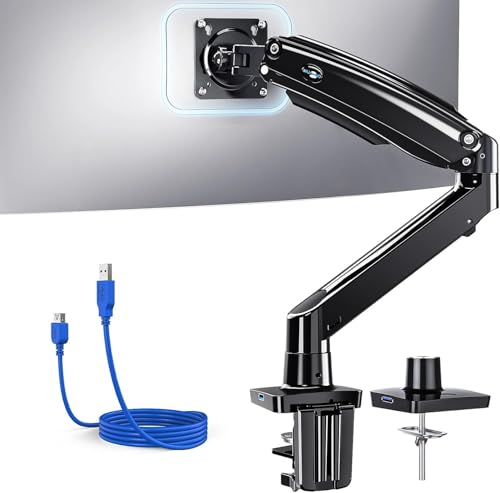
A single arm offers another route to an organized desk, especially where a second display is unnecessary. This HUANUO model supports screens from 13 to 49 inches and loads from 4.4 to 26.48 pounds, covering a wide range of sizes.
Unlike the dual mounts, it leaves a second arm absent rather than forcing a fixed two-screen arrangement. For a large single ultrawide, a laptop, or a monitor that changes position throughout the day, that flexibility can be more useful.
Where It Excels
- Supports small displays through 49-inch ultrawides.
- Tilt, 180-degree swivel, and 360-degree rotation allow frequent repositioning.
- Clamp and grommet bases accommodate different desk styles.
- The USB connection provides a convenient cable-routing point.
Some Limits To Know
- This arm supports one display rather than a dual-screen arrangement.
- Mounting requires compatible 75x75mm or 100x100mm VESA holes.
Quick Facts
Who Will Love This
A focused professional benefits from a single large screen that can move freely between landscape and portrait positions.
Reach For A Different Pick When
The VIVO STAND-V002L Vertical Dual Monitor Stand serves setups needing two vertically arranged screens.
The VIVO STAND-V002L turns a pair of ultrawide displays into a vertical workstation. Its center-pole design places one screen above the other, creating a narrow footprint for desks with limited side-to-side room.
Both displays can move between portrait and landscape positions, while the brackets handle tilt, swivel, and rotation. Compared with the clamp-mounted WALI, this stand uses a desktop-standing base and centers its flexibility around vertical use.
Practical Pluses
- The vertical arrangement preserves valuable desk width.
- Portrait mode suits documents, code, timelines, and detailed reference panels.
- Height adjustment along the center pole changes the overall screen position.
- Each bracket supports a 13-to-34-inch display weighing up to 22 pounds.
Details To Watch
- Each monitor must have 75x75mm or 100x100mm VESA mounting holes.
- Two vertically stacked displays need enough desk height and rear space.
Technical Reference
Whose Shelf It Belongs On
Editors, programmers, and traders benefit from a narrow vertical workstation with two large displays.
Look Elsewhere When
The WALI Triple Mount, 49-Inch Ultrawide fits a three-screen setup requiring independent clamp-mounted positioning.
What Matters Before Mounting Two Screens
VESA Compatibility Comes First
VESA refers to the pattern of mounting holes on the back of a display. Every monitor supported by these mounts must use 75x75mm or 100x100mm holes, and some curved or unusually designed panels may require an adapter. Checking the rear of each display prevents an installation day from ending with an incompatible mount.
Capacity Must Match Each Screen
Weight limits apply to each arm, not merely to the complete mount. The HUANUO models range from 19.8 to 26.4 pounds per arm, while the WALI assigns 44 pounds to the top and 26.4 pounds to each lower bracket. I would calculate the actual monitor weight and leave some margin rather than operate directly at the stated limit.
Layout Determines the Best Shape
A stacked or vertical mount suits a narrow desk because it uses height instead of width. A side-by-side arrangement feels more natural for documents beside communication apps. The WALI’s three-arm layout adds further complexity, making rear clearance, monitor depth, and cable routing essential parts of the decision.
Attachment Method Changes Installation
Clamp and grommet mounts provide alternatives for different desktops. Clamps attach to an exposed edge, while grommet installations pass through a cable opening and often suit thicker desks. The WALI supports both across a stated 0.39-to-1.77-inch thickness range, so desk construction and edge access deserve attention before ordering.
Two Details That Change the Fit
Common Shopping Slip Ups
The most common mistake is checking screen size while overlooking VESA holes or weight. Another error is planning the screen arrangement without measuring desk depth, since articulated arms need room behind the display. Checking the desk edge and grommet opening before installation prevents the mount from becoming a late project.
What Separates Premium From Basic
Additional capacity, broader adjustment, and more installation choices distinguish a higher-tier mount from a basic one. Those features matter with heavier panels, multiple displays, or frequent repositioning. A simpler arm remains sensible for one modest screen and a straightforward desk arrangement.
Frequently Asked Questions
What VESA pattern do dual arm monitor mounts use?
The mounts in this roundup support 75x75mm or 100x100mm VESA patterns. Each display needs compatible holes, and an adapter may be required for a monitor with a different pattern.
Can a dual monitor mount hold an ultrawide display?
Several models can, including the WALI triple mount and the VIVO vertical stand. Screen size, arm capacity, and VESA compatibility must all match the selected model.
Is a stacked monitor mount better for a small desk?
A stacked arrangement uses more vertical desk space while reducing horizontal width. That balance often works well in compact rooms, although the top display must remain comfortably visible.
How much weight should a monitor mount support?
The appropriate figure depends on the actual display weight and the mount’s per-arm limit. A modest margin below the stated capacity is sensible, particularly for mounts with moving arms.
Can dual monitor mounts rotate screens into portrait mode?
The VIVO STAND-V002L supports portrait and landscape placement, and the HUANUO single arm also offers 360-degree rotation. Rotation can be valuable for documents, code, or vertically oriented reference material.
Final Verdict
I would choose the WALI Triple Mount for a mixed three-screen workspace, the HUANUO HNDS7 for heavier dual-screen combinations, and the VIVO STAND-V002L for a narrow vertical arrangement. The smaller HUANUO models cover standard productivity displays, while the single arm serves a flexible one-screen desk. Matching the mount to the actual screens and available desk space matters more than chasing extra features.
