
Dual-screen work gets messy fast when the adapter doesn’t match your laptop, your operating system, or your desk layout. The right Dual Monitor Hdmi Adapters keep a work laptop, a home office, or a travel rig from turning into a cable tangle. You also need to pay attention to video output support, charging pass-through, and how each adapter handles Mac versus Windows. That’s where this roundup helps you sort the practical options without guessing.
Quick Look At The Shortlist
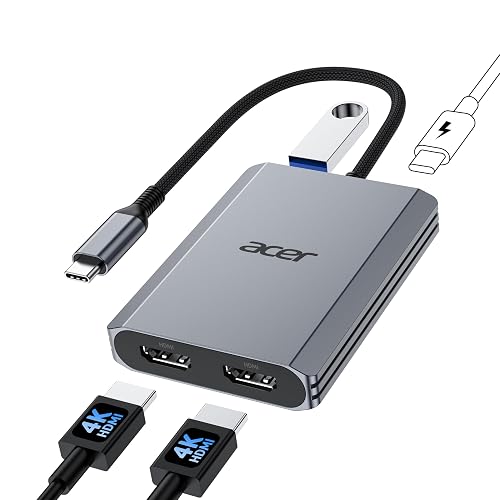
Acer 4-in-1 USB C Hub, Type C to Dual HDMI Adapter 4K@60Hz
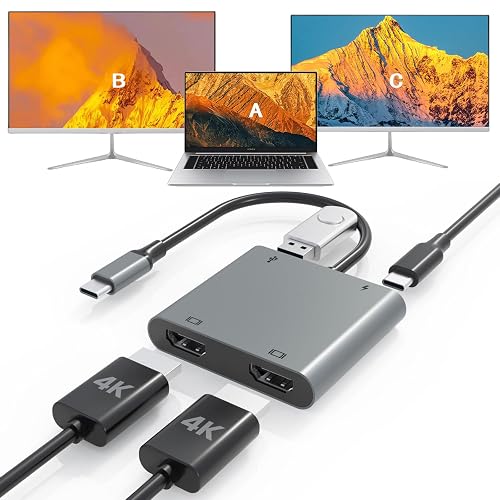
USB C to Dual HDTV Adapter, Fophmo 4K@60Hz HDTV Splitter Extend Display
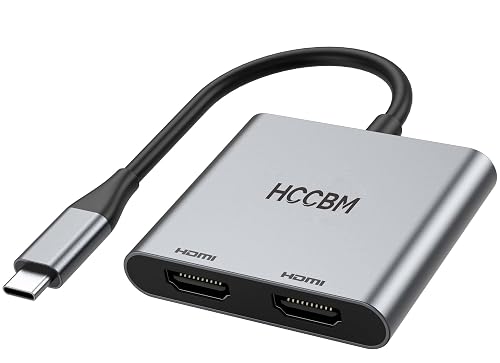
USB C to Dual HDMI Adapter, Dual Monitors Adapter USB C Hub with 2 HDMI Docking Station 4K @60hz

USB C to Dual HDTV Adapter, 4K@60Hz USB C Hub Multiport Adapter with 2xHDMI
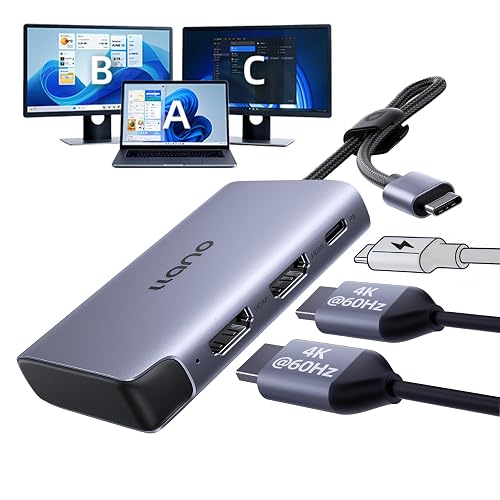
llano HDMI Splitter for Dual Monitors, MST 4K@60Hz Extend
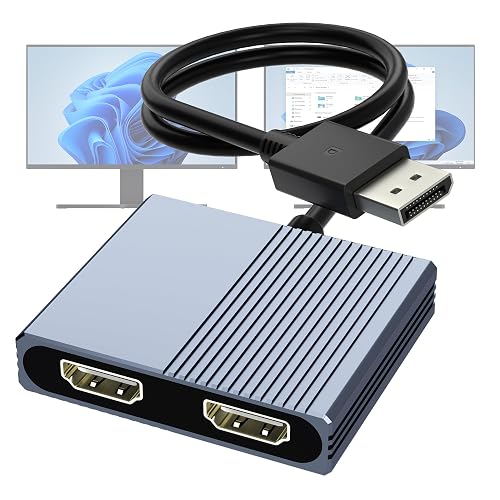
DisplayPort to Dual HDMI Adapter, 4K@60Hz DP to HDMI Splitter Extended Display
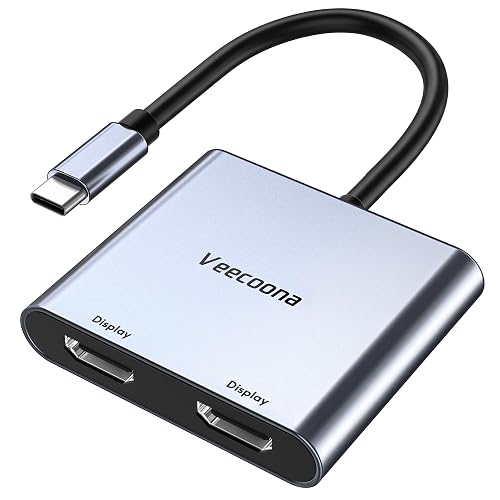
USB C to Dual HDMI Adapter, 4K@60Hz for Dual Monitors Windows/macOS

UANTIN 6-in-1 USB C Hub, Type C to Dual HDMI Adapter 4K@60Hz
More Details On Our Top Picks
The Acer hub fits the kind of desk where you want two HDMI screens without piling on extra boxes. Its 100W power delivery port matters for a laptop that stays plugged in through the workday, and the USB 3.0 port gives you a place for a drive or keyboard dongle.
The short 0.65-foot cable keeps the adapter close to the laptop, which suits a tidy desktop more than a shared conference table. Compared with the llano and UANTIN picks, this one feels simpler and lighter on extras, so it makes more sense for everyday office use than for a full peripheral hub.
Strengths
- Dual HDMI output keeps a two-screen setup straightforward.
- 100W pass-through charging helps your laptop stay powered during long sessions.
- USB 3.0 support adds practical room for a flash drive or accessory.
- Short cable length helps reduce desk clutter around a laptop stand.
Things To Consider
- The compact cable reach may feel tight on larger desks.
- Your USB-C port still needs DisplayPort Alt Mode for video output.
- It leaves out the extra port variety found on the UANTIN hub.
Feature Snapshot
Who It Suits Best
Office users and home workers with a USB-C laptop that supports video output get the most from this compact setup.
A Better Fit Elsewhere
The UANTIN 6-in-1 USB C Hub suits you better when you want extra USB-A ports along with the dual HDMI layout.
Fophmo takes a more specific route than the Acer hub, because it spells out the Mac and Windows behavior in plain terms. That matters on a mixed-device desk, since macOS stays in mirror mode while Windows machines with the right USB-C support can extend displays.
The built-in USB-A port and 100W power delivery make it handy for travel desks, hotel work, or a home office with a mouse receiver and charger plugged in. The honest read is that Mac users need to accept the mirror-only limit, but Windows shoppers get a clearer multi-monitor path than they do with many vague listings.
Upsides
- Clear OS guidance reduces guesswork before you connect anything.
- 4K@60Hz support keeps a single display sharp for detailed work.
- Windows extended-display support helps remote work and multitasking.
- USB-A and charging support make a small desk setup more practical.
Small Caveats
- Mac users only get mirrored output, not two separate screens.
- The display rules can feel limiting beside more flexible Windows-first options.
- Compatibility still depends on a USB-C port with video output support.
Core Details
Who Will Love This
Windows laptop users who want a clearer dual-display setup with a simple docking add-on will get the most from it.
Swap It Out When
The llano HDMI Splitter for Dual Monitors fits you better when you want a more premium-feeling upgrade for mixed display layouts.
This HCCBM dock-style option leans into the workstation idea more than the smaller Acer or Fophmo picks. The double HDMI layout is the obvious draw, but the docking-station shape makes it feel more at home beside a permanent laptop setup than in a travel bag.
For a desk with a monitor pair, a keyboard, and a mouse, that extra structure helps the whole setup feel less improvised. The trade-off is that it looks more like a desk accessory than a grab-and-go adapter, so frequent movers may prefer the shorter, simpler plugs above.
Bright Spots
- Docking-station styling suits a fixed desktop arrangement.
- Two HDMI ports support a practical multi-monitor workflow.
- 4K @60Hz support keeps a main screen comfortable for text work.
- Fits well beside laptops from HP, Dell, and Surface-style setups.
Areas To Watch
- The more dock-like shape takes up more desk presence than a tiny dongle.
- It can feel like more adapter than a travel kit needs.
- Compatibility still depends on the right USB-C video support.
Details At A Glance
The Right Fit
Desk-based laptop users who want a more anchored docking feel will appreciate this layout most.
A Better Fit Elsewhere
The Acer 4-in-1 USB C Hub suits lighter desk setups better because it keeps the footprint smaller and more portable.
Fophmo’s second listing keeps the formula tight: two HDMI ports, USB 3.0, and 100W charging in a single small hub. Compared with the first Fophmo pick, this one reads a little more like a general-purpose desk companion, especially for a setup that needs data transfer alongside dual displays.
That mix suits a home office where one cable handles monitors, a drive, and laptop charging at once. The catch is the same familiar one, macOS mirror mode still applies, so Mac users need to value convenience more than separate-screen flexibility.
Standout Traits
- Dual HDMI ports support a compact two-screen workstation.
- USB 3.0 adds useful room for peripherals and storage devices.
- 100W pass-through charging helps reduce the number of cords on your desk.
- Simple multiport layout keeps everyday use easy to sort out.
Honest Caveats
- Mac users still get mirrored output rather than two separate desktops.
- It offers fewer specialty ports than the heavier UANTIN hub.
- Video output still depends on the laptop’s USB-C support.
Quick Facts
Perfect Match For
Home-office users who want a tidy all-in-one adapter for monitors, storage, and charging will find the layout practical.
Another Choice May Suit
The llano HDMI Splitter for Dual Monitors is the better step up for power users who want more display flexibility and a more premium-feeling option.
The llano model feels like the more ambitious choice in this group, mainly because it pairs MST support with a broader display spec set. MST, or Multi-Stream Transport, lets one connection carry multiple displays, and that matters for a desk where you want more from a single port.
Compared with the simpler Acer and Fophmo units, this one leans harder into serious multitasking and mixed refresh-rate setups. The 100W charging support keeps it practical, though the real payoff shows up most clearly for users who care about display behavior more than just basic dual-screen access.
Reasons To Buy
- MST support gives the adapter a stronger workstation feel.
- Dual 4K@60Hz extended output suits demanding desk use.
- 2K@144Hz and 120Hz support adds flexibility for faster displays.
- 100W pass-through charging helps keep your laptop powered.
- Feels like a better long-term desk upgrade than simpler dongles.
Points To Note
- The richer feature set can be more than casual users need.
- Compatibility still hinges on the right USB-C or laptop support.
- It makes the most sense at a desk, not in a pocket.
Technical Sheet
Who Should Grab It
Power users who care about display flexibility, refresh behavior, and a more capable desk setup will get the best match here.
Look Elsewhere When
The Acer 4-in-1 USB C Hub is the easier fit for a simpler, smaller workspace that doesn’t need the extra display nuance.
Aibilangose switches the connection type entirely, which makes this a better fit for desktop towers and graphics-card setups with DisplayPort already in use. That matters because DisplayPort is common on PC workstations, so the adapter can slot into a more fixed monitor rig without asking you to rework the back of the machine.
Compared with the USB-C models above, this one feels less like a travel accessory and more like a workstation bridge. The honest read is that the format helps the right desktop user a lot, but laptop shoppers who rely on USB-C should keep moving.
Highlights
- DisplayPort input matches many desktop and graphics-card outputs.
- Dual HDMI output simplifies a two-monitor desk layout.
- 4K@60Hz support suits detailed office work and media use.
- Cleaner fit for a fixed PC setup than a laptop-first adapter.
Softer Spots
- It is not the right match for USB-C-only laptops.
- The design makes more sense beside a tower than in a travel bag.
- Details are lighter than the more fully described USB-C options.
Feature Rundown
Built With In Mind
Desktop users with a DisplayPort source and two HDMI monitors are the clearest match here.
Another Choice May Suit
The llano HDMI Splitter for Dual Monitors is the stronger alternative for laptop users who want a more flexible USB-C path.
Veecoona keeps the pitch straightforward, and that usually helps when you want a small adapter for hotel desks, coworking spaces, or a shared conference room. The plug-and-play setup stands out here, since no driver hunt means less friction before a meeting starts.
The wide compatibility list is useful, but the bigger real-world question is how your device handles MST mode, since Windows gets the stronger multi-screen behavior. Compared with the more desk-bound HCCBM and UANTIN picks, this one feels more travel-friendly and more forgiving for quick set-ups.
Best Bits
- Plug-and-play use keeps setup quick and simple.
- Dual HDMI output supports a compact portable workspace.
- Broad device support helps across USB-C, USB4, and Thunderbolt systems.
- Works well for mobile professionals who move between locations.
Minor Gripes
- Windows gets the stronger three-screen behavior.
- Mac users need to pay close attention to display mode expectations.
- Device compatibility still depends on the laptop’s video output support.
Feature Card
Right Fit For
Frequent travelers and mobile workers who need a simple, low-fuss adapter for temporary workspaces will appreciate this one.
Where A Sibling Pick Shines
The Fophmo USB C to Dual HDTV Adapter fits better for shoppers who want clearer notes about Mac and Windows display limits before connecting anything.
UANTIN is the most port-rich pick in this list, and that extra density makes sense for a desk that handles monitors plus accessories. Two HDMI outputs, 100W charging, and three USB-A ports create a hub that can anchor a lot of everyday gear without asking for separate adapters.
Compared with the Acer hub, this one suits a busier desk where mice, storage devices, and other peripherals need places to live. It’s not the lightest choice, but for a workstation that stays put, that extra weight in features can save you from a mess of little dongles.
Plus Points
- Three USB-A ports add room for multiple accessories.
- Two HDMI outputs support a dual-monitor work surface.
- 100W charging helps keep the laptop powered through longer days.
- Feels especially useful for a semi-permanent desk setup.
Worth Noting
- It brings more bulk than the slimmer USB-C-only adapters.
- The extra ports make more sense for users with several accessories.
- Like the rest of the USB-C group, it still needs video-capable USB-C support.
Spec Overview
Whose Shelf It Belongs On
Desk-bound users who want a strong mix of display output and peripheral support will get the clearest benefit here.
Skip It When
The Acer 4-in-1 USB C Hub suits you better when you want fewer ports and a smaller, cleaner footprint.
How To Choose The Right Dual Monitor Hdmi Adapters
Match The Adapter To Your Port Type
USB-C, USB4, Thunderbolt, and DisplayPort are not interchangeable in practice. A USB-C adapter only helps when the port supports video output, often called DisplayPort Alt Mode, while a DisplayPort model belongs on a desktop or graphics card with that output already present.
That detail sounds small, but it decides whether the adapter works at all. Once you know the host port, the rest of the choice gets easier because you stop comparing the wrong categories.
Check How Your Operating System Handles Displays
macOS and Windows handle dual screens differently, and that difference changes the whole purchase. Some models in this roundup support extended displays on Windows but only mirrored output on Mac, so you need to match the adapter to the computer you actually use every day.
That matters most for people who move between a MacBook at home and a Windows laptop at work. A clear OS rule is better than vague promises, because the adapter should fit your setup instead of asking you to adjust your workflow.
Look At Power And Peripheral Needs Together
A good hub does more than send video. Power Delivery, usually shortened to PD, lets the adapter pass charging power through to your laptop, while extra USB-A or USB 3.0 ports give you room for a mouse receiver, storage drive, or keyboard dongle.
For a permanent desk, that mix can keep the cable count down. For a travel bag, it can be overkill, so a slimmer adapter may make more sense than a feature-heavy hub.
Think About Desk Style, Not Just Specs
A compact adapter works well near a laptop stand, while a dock-style unit fits a more fixed workstation. Long-term comfort matters here, because a hub that stays tidy on a small desk can feel awkward on a wide monitor arm setup, and the reverse is true too.
That’s why the llano and UANTIN models suit heavier desk use, while the Veecoona and Acer options feel easier to carry. Your real match comes from the way you work, not just the resolution printed on the box.
What To Weigh Before You Click Through
Common Shopping Slip Ups
Common Shopping Slip Ups
A common mistake is assuming every Dual Monitor Hdmi Adapter works the same way across Mac and Windows. Another is overlooking the port on the laptop itself, especially when the machine has USB-C for charging but no video support.
Cable length causes trouble too, particularly on a wide desk with a monitor stand. A short lead can keep things neat, but it can also feel restrictive beside a tower or a shared worktable.
What The Higher Tier Buys
A pricier unit usually earns its place with stronger port variety, better display flexibility, or a more convincing dock-style build. In this category, that can mean MST support, higher-refresh output options, more USB-A ports, or a more comfortable layout for permanent desks.
That extra cost makes sense for heavy multitaskers, remote professionals, and anyone who plugs in several accessories at once. For basic email, spreadsheets, and a pair of standard monitors, a simpler model often covers the job just fine.
Frequently Asked Questions
Do Dual Monitor Hdmi Adapters Work With Any Laptop?
No, the laptop still needs the right video-capable port, and USB-C charging alone is not enough. DisplayPort Alt Mode support is the key detail for most USB-C models.
Can MacBooks Use These Adapters For Two Separate Screens?
Some can, but many of the USB-C models here mirror on macOS instead of extending two independent displays. The product page details matter a lot more than the connector shape.
What Does MST Mean In This Category?
MST stands for Multi-Stream Transport, a display mode that lets one connection carry more than one screen. It matters most on Windows and desktop-style setups.
Is 4K@60Hz Always Better Than 4K@30Hz?
Not always, because your screens and host device have to support it too. Higher refresh at 4K usually feels smoother, but the full benefit only shows up on compatible hardware.
Do You Need A Dock If You Already Have Two Monitors?
No, but a dock-style adapter can keep your cables cleaner and handle charging or accessories at the same time. A simple adapter works well when you only care about getting two screens connected.
Closing Thoughts
The right adapter depends less on the badge and more on your setup, your port type, and how many extras live on your desk. Acer and Fophmo suit simpler laptop use, llano leans harder into higher-end display behavior, and UANTIN makes sense when your desk needs more ports in one place. For a travel bag, the Veecoona style is easier to carry. For a fixed workstation, the DisplayPort and dock-style choices have their own appeal. Pick the one that matches your computer first, and the rest becomes much easier.



