
Clearing enough desk space for two displays can turn a cramped workstation into a much more comfortable setup. I know the frustration of balancing documents, messages, and creative work across limited surface area, especially in a home office where every inch matters. A dual screen monitor mount raises the displays, adds adjustment, and keeps the area beneath them available for a keyboard, notebook, or writing pad. The right model also depends on screen size, weight, VESA compatibility, and whether the displays sit side by side or stack vertically.
A Snapshot Of The Selections

HUANUO 17-32 Inch Stacked Dual Monitor Mount, 19.8 lbs, VESA

HUANUO HNDS7 Dual Monitor Mount, 13-40 Inch, 26.4 lbs per Arm

HUANUO Dual Monitor Mount, up to 32 Inch, 22 lbs per Arm, VESA

monTEK Triple Monitor Stand
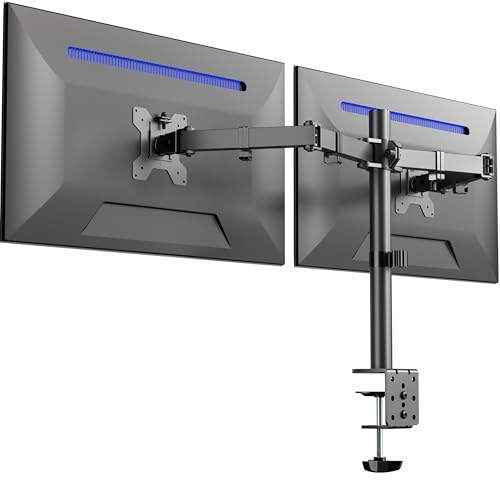
VIVO STAND-V032 Dual Monitor Mount, up to 32 Inch, 22 lbs per Arm
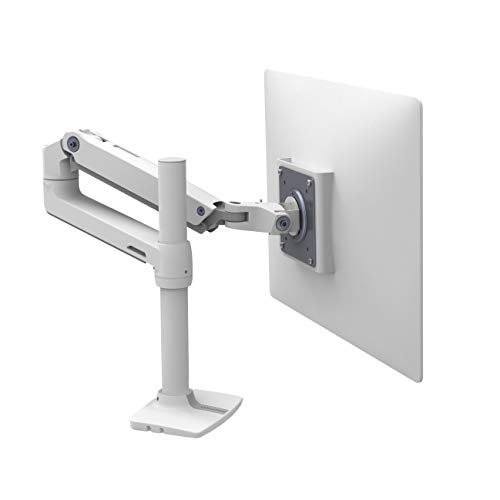
Ergotron LX Single Monitor Desk Mount, 34 Inch, 25 lbs, Tall Pole, White
More On The Choices That Made The List
Stacking two panels vertically gives a narrow desk more usable height than placing both screens across its full width. I favor this HUANUO model for compact workstations that need two displays without a sprawling footprint. Each side supports a 17-32 inch panel weighing as much as 19.8 pounds.
The screens can tilt, swivel, and rotate, which makes the mount practical for a shared desk or a workstation that changes throughout the day. Compared with the HUANUO HNDS7, the maximum screen size is smaller, but the stacked arrangement is the more interesting feature here.
Where It Helps
- Vertical placement keeps the desk footprint narrow.
- Tilt, swivel, and rotation provide several viewing positions.
- The 19.8-pound per-arm limit suits many everyday displays.
- Support for standard 75 mm and 100 mm VESA patterns covers common screen sizes.
Points To Note
- Both screens need VESA mounting holes and must fall within the stated size and weight limits.
- Stacked displays require enough vertical clearance and may feel tall on a compact desk.
Quick Facts
Made For
This model fits small home offices and narrow desks where two vertically stacked screens are preferable to a wide side-by-side arrangement.
Consider Something Else When
The HUANUO HNDS7 offers a better fit for displays larger than 32 inches or heavier than 19.8 pounds.
Large displays and substantial desk hardware raise the demands placed on a monitor mount. The HUANUO HNDS7 handles up to 40-inch screens and 26.4 pounds per arm, giving it more room than the stacked HUANUO model. Its aluminum arms and dual C-clamp base also suit heavier workstation equipment.
I would consider this mount for a spacious desk supporting large panels, especially when the screens need frequent repositioning. The clamp or grommet mounting choice adds installation flexibility, although a grommet requires a suitable hole in the desk.
What Makes Sense
- The 40-inch capacity handles larger desktop and productivity displays.
- A 26.4-pound rating per arm supports heavier monitor combinations.
- Longer arms provide useful reach for positioning the screens.
- Clamp and grommet bases accommodate different desk constructions.
Practical Considerations
- Each screen must measure 13-40 inches and fit the 75 mm or 100 mm VESA pattern.
- The dual C-clamp needs sufficient desk-edge thickness and underside clearance.
Feature Snapshot
Right Fit For
Large-display workstations, professional editing desks, and users combining two sizable or heavy monitors fit this mount particularly well.
A Better Fit Elsewhere
The HUANUO 17-32 Inch Stacked Dual Monitor Mount is a better fit for a narrow desk that prioritizes vertical placement over maximum screen size.
Most dual-screen setups live somewhere between a lightweight office display and a large ultrawide model. This HUANUO mount covers that middle ground with support for 17-32 inch flat or curved screens and up to 22 pounds per arm. The aluminum alloy construction gives it a purposeful feel without adding unnecessary desk furniture.
Height adjustment, tilt, swivel, and rotation make it easy to create a comfortable viewing position over a long workday. I see this as a straightforward choice for dual 27-inch or 32-inch displays, though it does not reach the 40-inch limit of the HUANUO HNDS7.
Everyday Wins
- Twenty-two-pound capacity suits many heavier 32-inch screens.
- Height and rotational adjustment support better viewing angles.
- Aluminum alloy arms offer a rigid frame for the listed capacity.
- The 32-inch ceiling covers many popular productivity and creative displays.
Trade-Offs To Consider
- Monitors above 32 inches fall outside the listed range.
- VESA mounting holes remain necessary for attachment.
Who Should Grab It
Office professionals, creators, and remote workers using a matched pair of 27-inch or 32-inch screens can make good use of this model.
Another Choice May Suit
The HUANUO HNDS7 suits a desk requiring support for one or both screens above 32 inches.
A two-screen arrangement covers many tasks, but a triple stand creates a much broader visual workspace. The monTEK option supports three 17-32 inch displays, with each arm handling up to 22 pounds. It is not a dedicated dual-screen model, yet it can serve a dual-screen setup while leaving room for a smaller third panel.
Integrated cable organizers help keep several display connections from spreading across the desktop. I would look closely at available width and desk depth before committing, since a freestanding three-arm structure generally needs more breathing room than a two-arm mount.
A Strong Showing
- Three arms support a larger multi-display workspace.
- Each position accepts displays up to 22 pounds.
- Integrated cable organizers reduce visible wire clutter.
- The 17-32 inch range covers several common screen sizes.
Where It May Fall Short
- Three displays require more physical space than a dedicated dual-screen stand.
- Every attached screen needs compatible 75 mm or 100 mm VESA holes.
- It may be unnecessary for a workstation using only two panels.
Key Product Details
Built With In Mind
Analysts, traders, editors, and dedicated multitaskers benefit from the added third screen and tidier cable arrangement.
Where A Sibling Pick Shines
The VIVO STAND-V032 is a better fit for a compact two-display arrangement that does not need a third screen arm.
The VIVO STAND-V032 makes frequent screen changes easy to manage. Its brackets provide tilt from plus 90 to minus 90 degrees, 180-degree swivel, and 360-degree rotation, allowing each display to move between landscape and portrait positions. That range is useful in offices where a vertical document sits beside a wide spreadsheet.
I also appreciate the central height adjustment, which raises the screens as a pair. Unlike the monTEK triple stand, this model stays focused on two displays and supports 13-32 inch screens weighing up to 22 pounds each.
Key Advantages
- Wide articulation supports portrait, landscape, and angled positions.
- The 13-inch lower size limit accepts smaller productivity displays.
- Central height adjustment helps align both screens together.
- A 22-pound rating per arm suits many mid-sized and 32-inch panels.
Factors To Consider
- Each monitor still requires 75 mm or 100 mm VESA mounting holes.
- The central pole and extended arms need adequate rear and vertical clearance.
Who Will Love This
Office layouts, creative workstations, and shared desks that need frequent changes between portrait and landscape viewing suit this VIVO mount well.
Reach For A Different Pick When
The HUANUO 17-32 Inch Stacked Dual Monitor Mount makes more sense when saving desk width matters more than extensive rotational movement.
A single ultrawide display can replace the visual footprint of two conventional screens without requiring a dual mount. The Ergotron LX is built for that situation, accepting flat, curved, or ultrawide displays up to 34 inches and 25 pounds. Its clean white finish also stands apart from the black office hardware common in the category.
The included 13-inch pole and extension give the arm additional vertical reach, while the two-piece desk clamp fits surface edges from 0.63 to 2.6 inches thick. A grommet base requires the separate 98-035 accessory, so desk installation deserves attention before ordering.
Positive Takeaways
- The 34-inch capacity accommodates large curved and ultrawide displays.
- A 25-pound maximum supports a broad range of substantial screens.
- The tall pole creates useful vertical clearance above the desk.
- Desk-edge thickness range covers many standard work surfaces.
Some Limits To Know
- This is a single-monitor arm rather than a dual-screen mount.
- The grommet base is a separate accessory.
- Compatible displays still need 75 mm or 100 mm VESA holes.
Technical Reference
The Right Fit
Designers, video editors, and analysts using one large curved or ultrawide display can benefit from the adjustable reach and vertical clearance.
Swap It Out When
The VIVO STAND-V032 is a better fit for an office that requires two separate displays rather than one expansive screen.
Fit, Clearance, and Mounting Details That Matter
Screen Size and Weight
A compatible mount must support each display’s diagonal size and actual weight. I start with those two figures, then check the VESA pattern. VESA refers to the square arrangement of mounting holes on the back of a display, and common supported patterns here are 75 x 75 mm and 100 x 100 mm.
Layout and Adjustment
Side-by-side arms suit panoramic work, while a stacked mount conserves horizontal space. Height, tilt, swivel, and rotation determine how easily the screens can move between tasks, so a desk that changes roles throughout the day benefits from broader articulation.
Base and Installation
Clamp and grommet bases attach in different ways. A clamp grips the desk edge, while a grommet uses a hole through the desktop. Both approaches require compatible dimensions, adequate thickness, and enough clearance behind the display.
Common Mistakes to Avoid in Monitor Mount Decisions
Mistakes Worth Dodging
Screen size and weight limits apply to each arm rather than the entire mount. VESA compatibility matters too, since a display without standard mounting holes cannot attach directly. Desk thickness, rear clearance, and mounting style deserve equal attention.
What The Higher Tier Buys
Premium construction may add load capacity, larger arms, and smoother adjustment than a basic model. The HUANUO HNDS7 earns that consideration with 40-inch and 26.4-pound-per-arm support, while a lighter display may never require that added capability.
Frequently Asked Questions
What VESA pattern is needed for a dual screen monitor mount?
Most mounts support either 75 x 75 mm or 100 x 100 mm VESA holes. The rear of each display should be checked before installation.
Can one monitor arm hold two screens?
Several models use two separate arms attached to one support structure. A true dual-screen setup also requires two compatible displays and sufficient capacity on each arm.
What size screens fit the mounts in this roundup?
Screen limits range from 13 to 40 inches depending on the model. Each display must also remain within the corresponding weight limit.
Is a stacked monitor arrangement practical?
A stacked layout reduces horizontal desk usage and gives both screens more vertical separation. Adequate height and stable viewing angles remain important.
Do monitor mounts require VESA-compatible displays?
Yes, standard VESA mounting holes are needed for direct attachment. Displays without that pattern require a separate compatible mounting adapter.
Final Verdict
I find the HUANUO HNDS7 the most capable option for large or heavy dual-screen setups, while the stacked HUANUO model serves narrow desks with a specific vertical preference. The VIVO STAND-V032 stands out for frequent positioning changes, and the Ergotron LX is worth considering when one ultrawide display replaces the dual-screen plan. Checking screen dimensions, weight, VESA holes, and desk construction first keeps the selection grounded in the actual workspace.
