
A MacBook Pro feels awkward when a typing session stretches beyond the screen, especially at a shared desk or during late-night work. I consider these six wireless keyboards for people who want Mac-oriented layouts, backlit keys, and a choice between compact portability and a full-size workstation setup. The main decision is not the backlighting, but how much desk space and equipment each setup needs.
Your Options, Compared

ProtoArc K90-A Mac Keyboard
ProtoArc K110-A Mac Keyboard

ProtoArc KM110-A Mac Combo

ProtoArc K100-A Mac Keyboard

ProtoArc KM100-A Gray Combo

ProtoArc KM100-A White Combo
What Each Pick Brings To The Table
I reach for the ProtoArc K90-A Mac Keyboard when desk space matters more than having every key. Its compact layout removes the numeric keypad, so it takes up less room than the full-size ProtoArc KM100-A Gray Combo and slips more easily into a laptop bag. The space-gray finish also blends neatly with a MacBook Pro.
For evening writing or low-light study sessions, the backlit keys add practical visibility without adding a separate desk lamp. I value its Mac-specific design for MacBook Pro, MacBook Air, MacBook Neo, iPad, and iPhone use, though the smaller layout may feel less natural for people accustomed to a full number row.
Everyday Perks
- The compact design leaves more usable desk space beside a MacBook Pro.
- Backlit keys improve visibility during dim evening sessions.
- Bluetooth connectivity removes the need for a keyboard cable.
- Mac-oriented keys suit macOS, iOS, and iPadOS workflows.
- Portable proportions make it practical for travel and shared spaces.
Trade Offs
- The missing numeric keypad is a poor match for frequent spreadsheet entry.
- Older Macs and Windows or Linux systems fall outside the supported compatibility range.
Feature Snapshot
Made For
This keyboard fits mobile Mac users, students, and commuters who value portability over a numeric keypad.
Where Another Pick Suits Better
Data-entry specialists will find the numeric keypad on the ProtoArc KM100-A Gray Combo more useful.
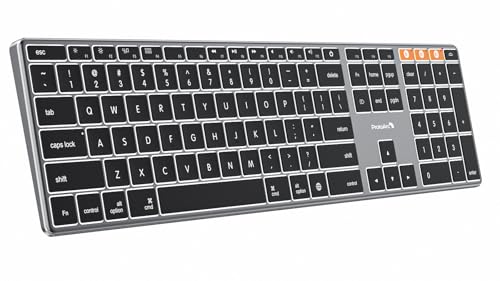
The ProtoArc K110-A Mac Keyboard gives my desk a more substantial centerpiece than the compact ProtoArc K90-A. Aluminum gives the body a refined appearance, while the backlit Mac-style keys keep the layout familiar. That combination makes sense for a permanent home-office arrangement built around a MacBook Pro.
Bluetooth 5.1 or later provides a cable-free connection, a useful distinction for anyone rearranging a desk or working across Mac and iPad. The keyboard supports several Apple computers, but the Mac-only design narrows its appeal for mixed Windows and Mac offices.
Well-Handled Touches
- Aluminum construction gives the keyboard a polished desk presence.
- Backlit Mac keys support comfortable low-light work.
- Bluetooth 5.1 connectivity supports modern Apple devices.
Practical Considerations
- Windows, Linux, and Macs manufactured before 2013 are not supported.
Quick Facts
Right Fit For
Mac-focused professionals appreciate the aluminum finish and cable-free setup at a permanent workstation.
A Better Fit Elsewhere
The ProtoArc K100-A Mac Keyboard may suit someone who prioritizes a full-size layout over an aluminum body.
The ProtoArc KM110-A Mac Combo simplifies a fresh workstation because it pairs the keyboard with a mouse. Compared with the keyboard-only ProtoArc K110-A, the set covers both core pointing and typing devices in one coordinated choice. Its aluminum body and backlit Mac keys also suit a desk built around Apple hardware.
I would favor this arrangement for a new MacBook Pro setup that needs more comfortable peripheral access. Bluetooth 5.1 keeps the desk uncluttered, though the set does not solve a need for a numeric keypad like the ProtoArc KM100-A Gray Combo.
Advantages To Know
- The included mouse completes a basic wireless workstation.
- Aluminum construction coordinates with a modern desk setup.
- Backlit keys make the combination practical in dim rooms.
Points To Note
- Windows, Linux, and Macs from before 2013 are outside the supported range.
- Anyone needing dedicated number entry should look at a keypad model.
Who Will Love This
First-time MacBook Pro owners can find this combination especially convenient for building a complete desk setup.
Look Elsewhere When
Spreadsheet-heavy users may prefer the ProtoArc KM100-A Gray Combo and its numeric keypad.
The ProtoArc K100-A Mac Keyboard takes the straightforward route: a full-size layout, backlit keys, and wireless connectivity. I see it as a practical fit for a home office where a MacBook Pro spends most of the day on a desk. The larger format gives the keyboard a more familiar presence than the compact ProtoArc K90-A.
Its design centers on macOS, which keeps the experience aligned for Mac users. Media and function-key behavior on Windows can differ, so this is a less natural choice for a mixed-OS desk, though the hardware still connects through Bluetooth.
Positive Points
- The full-size layout provides a conventional desktop footprint.
- Backlighting adds visibility for evening work.
- Bluetooth 5.1 supports a cable-free MacBook Pro desk.
- Space gray suits both home and professional interiors.
Details To Watch
- The keyboard is designed primarily for macOS rather than mixed-platform use.
- Some media and function keys may behave differently on Windows.
At A Glance
Built With In Mind
Everyday home offices and Mac-focused students benefit from the full-size layout and backlit keys.
Another Choice May Suit
Travelers can find the smaller ProtoArc K90-A Mac Keyboard easier to carry between locations.
The ProtoArc KM100-A Gray Combo is the practical choice for a desk that handles both prose and numbers. Its full-size layout includes a numeric keypad, a major difference from the compact ProtoArc K90-A. The matching mouse also removes the need to assemble a separate pointing device.
Backlit keys make the set easier to use in dim conditions, while Bluetooth 5.1 keeps the connection wire-free. The trade-off is desk area: a numeric keypad adds width, so this setup suits a permanent workstation better than a compact table.
A Few Strong Suits
- The numeric keypad supports frequent number entry.
- A bundled mouse creates a coordinated input setup.
- The full-size layout feels natural for desktop work.
- Backlit keys remain visible in darker rooms.
- Space gray complements common MacBook finishes.
Small Caveats
- Windows, Linux, and Macs manufactured before 2013 are not supported.
Best Suited To
Accountants, analysts, and administrative professionals gain the most from the dedicated numeric keypad.
Reach For A Different Pick When
People who value an aluminum body over a numeric keypad may prefer the ProtoArc KM110-A Mac Combo.
The white-and-silver finish gives the ProtoArc KM110-A White Combo a brighter desk presence than the gray version. It retains the full-size layout, numeric keypad, backlit keys, and bundled mouse, so the decision comes down largely to appearance and the available desk area.
I favor this version for a light, uncluttered workspace where a dark keyboard would feel visually heavy. The core functionality matches the gray ProtoArc KM100-A, but the lighter finish can suit a brighter room or coordinated accessories.
Points In Its Favor
- The white-and-silver finish suits lighter desk arrangements.
- The numeric keypad and mouse support a complete workstation.
Where It May Fall Short
- The full-size layout occupies more space than the compact ProtoArc K90-A.
- Older Macs and non-Mac operating systems are outside the supported range.
- Aluminum-focused shoppers may find more to like in the ProtoArc K110-A.
Core Details
Whose Shelf It Belongs On
Design-conscious Mac users appreciate the light finish alongside a full-size keyboard and mouse set.
Swap It Out When
Minimalist workspaces with darker accessories may look more cohesive with the ProtoArc KM100-A Gray Combo.
What Matters Before the Purchase
Desk Layout and Key Coverage
A compact keyboard creates more room for a mouse, notes, or a larger display, while a full-size layout adds familiar key coverage. The numeric keypad is a separate section of dedicated number keys, which makes it useful for accounting, inventory work, and spreadsheet entry, but it also increases the keyboard’s width.
Bluetooth and Mac Compatibility
Bluetooth is a short-range wireless connection, so a compatible keyboard and Mac can operate without a cable. These models support macOS 10.12 or later and work with iOS and iPadOS 13.0 or later, but Macs made before 2013 are excluded. Anyone using Windows or Linux should treat the Mac-oriented layouts as a compatibility limitation.
Backlighting in Real Work Areas
Backlighting illuminates the keys, which matters in a dim bedroom office or during evening work. It does not change the physical layout, so I would choose the layout first and treat illumination as a usability benefit. The K90-A remains the most portable option, while the KM100-A variants prioritize number entry.
Materials and Included Equipment
Aluminum gives the K110-A and KM110-A a more substantial appearance than a basic plastic peripheral. Keyboard-and-mouse combinations reduce the number of separate accessories, although the mouse specifications differ little across this category. The choice comes down to convenience, desk coordination, and whether a numeric keypad is part of the daily workflow.
Common Mistakes Worth Dodging
Buying by Appearance Alone
A slim aluminum body can look excellent on a display shelf while occupying more space than expected. I would measure the desk, then check whether the required number pad or extra function keys are genuinely useful. Mac compatibility and the surrounding operating system also matter more than the finish.
Ignoring the Existing Work Flow
A compact keyboard saves room but removes the numeric keypad. A full-size set consumes more desk area but supports number-heavy tasks. Comparing the actual workload prevents an attractive color or material from leading the decision.
What Separates Premium From Basic
The main upgrade is the aluminum body on the K110-A and KM110-A, paired with backlit Mac-oriented keys. That makes sense for a permanent desk where material and appearance matter. A basic Mac-focused model remains more rational for occasional use, limited space, or a straightforward full-size layout without a bundled mouse.
Frequently Asked Questions
Do These Keyboards Work with Every MacBook Pro?
No, they require macOS 10.12 or later, and Macs manufactured before 2013 are not supported. I would confirm the operating system before purchasing any of these models.
Can I Use These Keyboards with an iPad?
Yes, every listed model supports iOS and iPadOS 13.0 or later alongside compatible Macs. Bluetooth 5.1 is required for the K110-A, KM110-A, K100-A, and both KM100-A versions.
Which Option Is the Most Portable?
The ProtoArc K90-A Mac Keyboard is the most compact because it omits the numeric keypad. I would choose it for travel or a small shared desk where carrying a full-size keyboard would be inconvenient.
Are Any of These Keyboards Suitable for Windows?
The listed models are designed for Apple systems, and the K100-A may not support every media or function key on Windows. I would avoid them for a mixed-platform setup and choose a keyboard with explicit cross-platform support.
Should I Choose a Keyboard-and-Mouse Combo?
A combo is convenient for a new MacBook Pro workstation because it supplies both core input devices. The numeric keypad makes the KM100-A combinations particularly useful for data entry, while the compact K90-A serves portability better.
Closing Thoughts
I would choose the ProtoArc K90-A Mac Keyboard for small desks and travel, the ProtoArc K110-A Mac Keyboard for an aluminum-centered workstation, and the ProtoArc KM100-A Gray Combo for number-heavy office work. The white KM100-A serves the same functional role with a lighter finish. Compatibility and layout should decide the purchase before color does.
