
A keyboard that folds into a briefcase can change the way I work on a plane, at a café table, or during a temporary desk setup. I focus on six ProtoArc models that add physical typing to phones and tablets, with designs ranging from pocket-sized layouts to full-size 105-key arrangements. The key differences come down to typing comfort, folded size, navigation features, lighting, and how many separate accessories I need to carry.
The Shortlist At A Glance
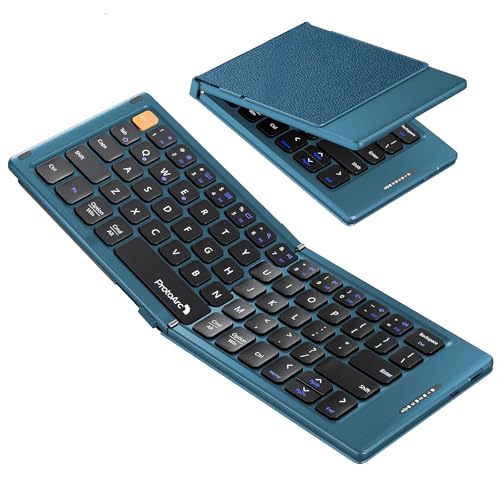
ProtoArc XK04 Compact Foldable Keyboard

ProtoArc XK03 Ergonomic Foldable Keyboard

ProtoArc XK01 Full-Size Foldable Keyboard

ProtoArc XKM01 Full-Size Keyboard Mouse Combo

ProtoArc XK01 TP Foldable Touchpad Keyboard

ProtoArc XK01 Plus Backlit Keyboard
More Details On the Shortlist
The XK04 puts a familiar, compact layout into a keyboard that folds in two and weighs 7.8 ounces. At 10.76 by 4.07 inches unfolded, it feels purpose-built for a phone or tablet rather than a replacement for a desktop keyboard. That makes it a natural fit for messaging, note-taking, and short documents during a commute.
Unlike the split XK03, the XK04 preserves a conventional key arrangement, so adaptation may be easier. I also appreciate that the PU leather cover protects the folding sections while eliminating the need for a separate sleeve. For most mobile travel setups, the small footprint matters more than a number pad.
A Favorable Mix
- Its 7.8-ounce weight reduces the burden of carrying a typing accessory.
- Three Bluetooth device channels simplify switching among a phone, tablet, and computer.
- The 33-foot wireless range provides useful freedom on a café table or airplane tray.
- USB-C recharging and standby time up to 150 days suit intermittent travel use.
Practical Considerations
- The compact key arrangement offers less room for extended typing than the 105-key models.
- The keyboard must be powered on before pairing, which adds a small step to setup.
Key Specs
Made For
This model suits commuters, travelers, and note-takers who prioritize a tiny footprint over full desktop spacing.
A Better Fit Elsewhere
ProtoArc XK01 Plus Backlit Keyboard serves spreadsheet-heavy work better with its 105-key layout and number pad.
The XK03 shifts attention from maximum compactness to a more natural typing position. Its two sections meet at a 166-degree V-shape, creating a split layout that places the hands farther apart. I would favor this design for prolonged tablet notes or email sessions, particularly on a flat table with room to unfold the keyboard.
Compared with the smaller XK04, the XK03 uses a more expansive, flexible design, though both connect to three Bluetooth devices. Magnetic sections help keep the keyboard closed inside a bag. The trade-off is a period of adjustment, because a split keyset does not feel identical to a standard laptop keyboard.
Key Advantages
- The V-shaped split supports a more natural hand position during extended typing.
- Three device channels make it practical for anyone moving between a tablet, phone, and computer.
- Compatibility extends across iOS, Android, Windows, and Mac systems.
- The ultra-slim folding profile fits neatly into a backpack or briefcase.
- Unfolding or folding the keyboard controls its power, reducing the number of buttons to manage.
Points To Note
- The split layout may require initial practice before touch typing feels natural.
- Typing on a soft lap or narrow tray can limit the benefit of the wider shape.
Who Will Love This
Long-session tablet typists and people working across several operating systems benefit most from the split design.
Where Another Pick Shines
ProtoArc XK04 Compact Foldable Keyboard offers a lighter, more conventional option for quick mobile messages.
The XK01 preserves the parts of a desktop layout that mobile work often needs most: 105 keys, a number pad, function keys, and navigation controls. I find that combination useful for quick spreadsheet corrections, inventory notes, and laptop-style shortcuts that a compact mobile keyboard cannot accommodate.
Its tri-fold construction reduces the footprint of a full-size board, with internal aluminum hinges joining the sections. The folded dimensions are 8.46 by 4.68 by 0.78 inches. Compared with the V-shaped XK03, this model prioritizes familiar key placement and number entry rather than an ergonomic split.
Good Reasons To Consider
- The complete 105-key layout supports familiar desktop shortcuts and number entry.
- Bluetooth 5.1 connects with up to three devices for multi-screen workflows.
- The tri-fold shape makes a full-size layout more practical to transport.
- Aluminum hinges provide a defined structure at the folding points.
Storage Matters
- The full-size layout remains bulkier than the XK04 or XK03.
- Its 0.65-inch keycaps take more room than the XK04’s compact key arrangement.
Feature Snapshot
Built With In Mind
Travel-focused accountants, data-entry workers, and spreadsheet users get the most benefit from the number pad.
Consider Something Else When
ProtoArc XK01 TP Foldable Touchpad Keyboard is lighter on accessories for tablet work that needs navigation but no number pad.
The XKM01 answers a simple travel problem by pairing a 105-key folding keyboard with a mouse. I see the appeal for trips where both full-size typing and precise pointer control are required, particularly for spreadsheets, document editing, and remote desktop sessions.
Like the XK01, it preserves dedicated function and number pads, but the included mouse removes the need to pack a second pointing device. Its flat typing surface has no built-in tilt, which keeps the profile low and simple to deploy. For some touch typists, that neutral angle may feel less familiar than an inclined desktop board.
Notable Gains
- The included mouse creates a more complete mobile workstation.
- A 105-key layout supports desktop-style shortcuts and number entry.
- The flat, slim design packs neatly into travel equipment.
- A simple folding mechanism avoids separate locking clips during setup.
Possible Compromises
- Carrying both pieces adds bulk compared with a single integrated model.
- The flat surface may not suit someone who strongly prefers an inclined keyboard.
- The full-size footprint remains less compact than the XK03 or XK04.
Core Details
Right Fit
Remote workers, spreadsheet users, and travelers who refuse to rely on a touch screen benefit from the complete set.
Another Choice May Suit
ProtoArc XK03 Ergonomic Foldable Keyboard offers a smaller split layout for comfort-focused typing without a mouse.
The XK01 TP combines a physical keyboard with an integrated multi-touch touchpad, reducing the number of accessories needed around a phone or tablet. Gesture support allows common navigation movements to function on the touchpad. For light editing, email, and document work, that combination can replace a separate mouse without leaving a small desk surface empty.
The tri-fold design also incorporates a phone stand and PU leather carrying pouch. Compared with the XKM01, this model combines pointer control into the keyboard itself, but it drops the full number pad. I would favor the integrated approach for a minimal travel kit, while a spreadsheet specialist may still prefer separate hardware.
Useful Highlights
- The multi-touch pad supports familiar tablet-style gestures without a separate mouse.
- The phone stand creates a more useful two-screen workspace.
- One folding unit simplifies packing compared with a keyboard-and-mouse set.
- A carrying pouch provides a place for the accessory during transit.
Less-Strong Areas
- Touchpad navigation may not replace a separate mouse for detailed precision work.
- The absence of a number pad reduces convenience for frequent data entry.
- The integrated design still needs enough table space for the touchpad area.
The Right Fit
Minimalist travelers and tablet-focused professionals benefit from carrying one combined input device.
Look Elsewhere When
ProtoArc XKM01 Full-Size Keyboard Mouse Combo suits spreadsheet work better with a 105-key layout and dedicated mouse.
The XK01 Plus adds adjustable lighting to the full-size folding format, making it useful during evening travel or dim shared workspaces. Three lighting levels let me adjust the keys for different surroundings. The 105-key QWERTY layout includes a number pad and a complete row of shortcut keys, preserving familiar desktop habits.
Its tri-fold construction follows the same broad idea as the standard XK01, but the illumination is the meaningful distinction. I would choose this version for mobile work in variable lighting, though a traveler spending most of the day in bright locations may rarely need that added control.
Real Benefits
- Adjustable backlighting improves key visibility in dim surroundings.
- The 105-key layout supports number entry and desktop-style shortcuts.
- The number pad adds a separate column for efficient numeric tasks.
- Three lighting levels offer flexibility without excessive adjustment.
- The tri-fold design keeps a full-size layout reasonably portable.
Worth Noting
- The full-size footprint is bulkier than the compact XK04.
- Travelers without a need for lighting may carry extra controls without receiving much daily value.
Technical Highlights
Who Should Grab It
Night travelers, remote workers, and spreadsheet users gain the most from illuminated full-size typing.
Swap It Out When
ProtoArc XK01 Full-Size Foldable Keyboard is the more restrained choice for travel without a need for adjustable lighting.
What Matters Before Choosing an External Keyboard
Layout Comes First
A 105-key keyboard includes a number pad, navigation cluster, and full shortcut row, making it the practical choice for spreadsheets and desktop-style work. Compact layouts travel more easily but demand more adaptation on a phone screen. A split design may feel more natural during long sessions, though it takes practice.
Portability Has Several Layers
Weight affects a backpack, while folded dimensions determine whether a keyboard fits a laptop sleeve. Unfolded width also matters on airplane trays and café tables. I compare the complete footprint rather than focusing on a narrow folded measurement that conceals the working area.
Connectivity And Power
Bluetooth models with three device channels reduce the friction of moving among a phone, tablet, and computer. USB-C recharging simplifies cable handling, while advertised standby time helps assess whether frequent charging is needed. Compatibility with the intended operating system remains an essential fit check.
Match The Workload
Number entry favors a full-size number pad, and long-form writing may justify the added spacing of a split keyboard. Touch navigation favors an integrated touchpad, while precise pointer work may still call for a separate mouse. Backlighting matters most during evening travel or use in shared rooms with variable lighting.
Shopping Traps in Foldable Keyboards
Mistakes Worth Dodging
Comparing only the folded size can hide a cramped working area, so I check the unfolded dimensions and key count. A number pad adds usefulness for numeric work but also adds width. Compatibility and device-switching details deserve attention before purchase, particularly for mixed phone, tablet, and computer setups.
What The Higher Tier Buys
The XK01 Plus adds adjustable lighting to a layout that other full-size models already provide. That feature earns its place during evening travel or dim workspaces, while brighter conditions offer little benefit. The XK01 remains the more focused choice for users who value compact full-size typing without added lighting controls.
Frequently Asked Questions
Which ProtoArc model is the smallest?
The ProtoArc XK04 Compact Foldable Keyboard is the smallest option in this group, weighing 7.8 ounces and opening to 10.76 by 4.07 inches. Its focus is quick mobile typing rather than full-size document work.
Which model includes a number pad?
The ProtoArc XK01 Full-Size Foldable Keyboard, ProtoArc XKM01 Full-Size Keyboard Mouse Combo, and ProtoArc XK01 Plus Backlit Keyboard each provide 105 keys and a number pad. These models suit spreadsheets and numeric entry better than the more compact alternatives.
Which model is best for prolonged typing?
The ProtoArc XK03 Ergonomic Foldable Keyboard offers a split V-shaped layout intended to support a more natural hand position. New users may need an adjustment period, so the XK04 remains easier for someone who prefers a conventional arrangement.
Can one keyboard connect to several devices?
The XK04, XK03, and XK01 Full-Size Foldable Keyboard support connections with up to three Bluetooth devices. Dedicated controls make switching among paired screens more convenient for people who divide work across a phone, tablet, and computer.
Which option reduces the number of travel accessories?
The ProtoArc XK01 TP Foldable Touchpad Keyboard combines typing, touch navigation, and a phone stand in one folding unit. It also includes a carrying pouch, making it a streamlined choice for light mobile work.
Final Verdict
I would choose the ProtoArc XK04 for the lightest travel setup, the XK03 for split typing comfort, and the XK01 for familiar full-size input. The XKM01 suits work that needs both a number pad and a mouse, while the XK01 TP reduces the number of carried accessories. For low-light sessions, the XK01 Plus adds useful illumination without changing the core full-size layout. The most practical choice comes down to the amount of space available and the type of typing actually performed.
