
A dedicated external numeric keypad can make data entry easier, but the six HUION devices in this roundup serve a different purpose. They are pen displays and standalone drawing tablets, not number-entry pads, so I compare their screens, pen systems, portability, and computer requirements without dressing them up as something else.
How The Shortlist Stacks Up
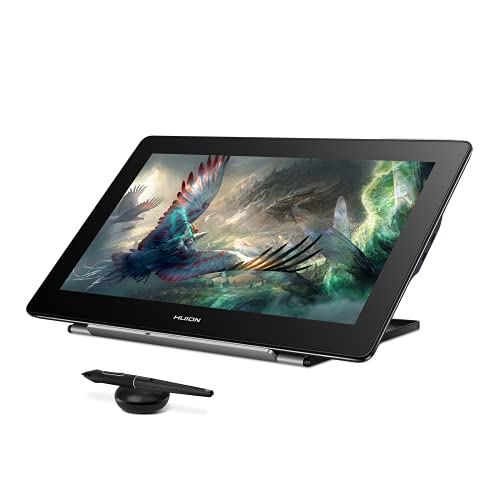
HUION KAMVAS Pro 16 Plus 4K Drawing Tablet
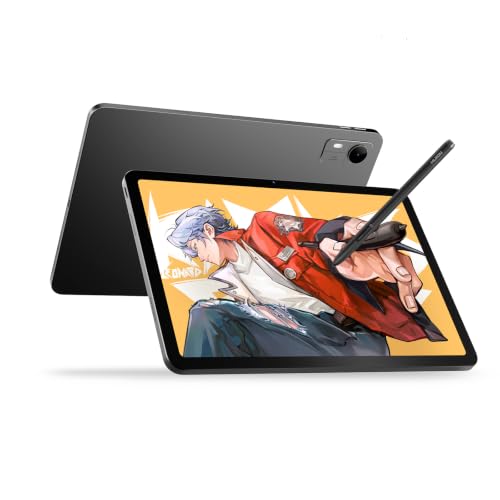
HUION KAMVAS Pad 12 2K+ Tablet
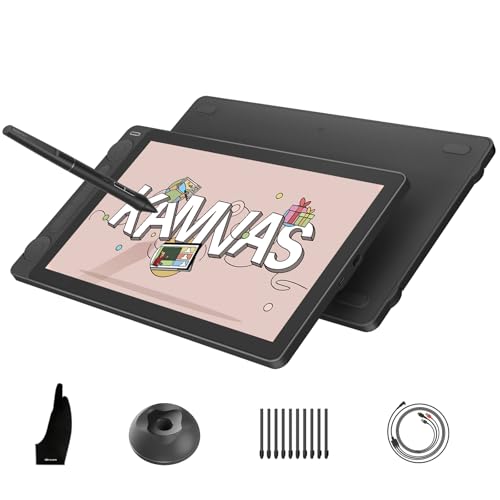
HUION Kamvas 13 Gen 3 Pen Tablet

HUION KAMVAS Pro 19 4K Touch Display

HUION KAMVAS Slate 11 Standalone Tablet
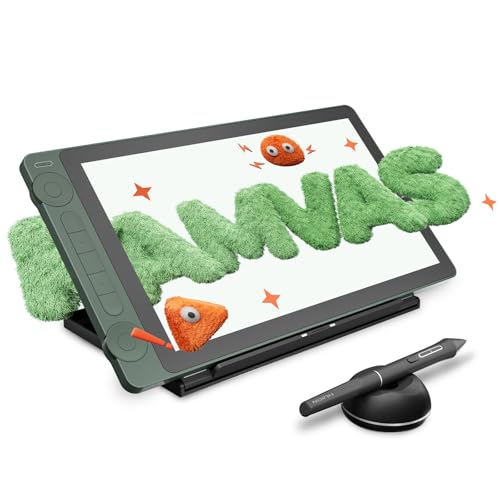
HUION KAMVAS 13 Gen 3 SE Tablet
Meet The Standout Selections
A 15.6-inch 4K screen gives an illustrator more room to place references, tools, and brush controls without constantly resizing the canvas. Full lamination joins the display layers, while the etched surface gives the PW517 pen a more tactile, paper-like landing point.
The main decision is straightforward: this is a computer-dependent display rather than a self-contained tablet. I favor it for detailed desktop artwork, where 145% sRGB coverage, deep contrast, and precise pen input matter more than carrying the device between locations.
Key Advantages
- The 4K panel preserves fine line work and small on-screen interface details.
- Pressure sensitivity at 8,192 levels supports controlled changes between light and heavy strokes.
- Tilt recognition up to 60 degrees helps with shading and broad brush marks.
- Dual USB-C ports simplify connections to PCs, Macs, and compatible Android devices.
- The included cable options support both a tidy single-cable setup and full-featured operation.
Things To Consider
- A compatible computer or Android device is required for normal operation.
- The 15.6-inch footprint demands more desk space than the smaller HUION displays.
Feature Snapshot
Who Will Love This
Professional illustrators, concept artists, and color-focused hobbyists with a dedicated workstation will appreciate the large, detailed canvas.
A Better Fit Elsewhere
The HUION KAMVAS Pad 12 2K+ Tablet suits creators who need a lighter standalone device instead of a stationary 4K display.
Unlike the larger KAMVAS Pro 16 Plus, this model does not need a computer nearby. Its 12.2-inch 3:2 screen, 8,000mAh battery, and 1.47-pound weight make it the more natural choice for sketching in a café, taking notes during classes, or capturing ideas away from a desk.
I also appreciate the combination of 16,384 pressure levels and a 90Hz refresh rate. The first refines line weight, while the second keeps motion and strokes visually fluid, though the 2K+ panel is less detailed than the 4K HUION KAMVAS Pro 16 Plus 4K Drawing Tablet.
Real-World Strengths
- Standalone Android operation removes the need for a separate workstation.
- The 3:2 canvas offers more vertical working area than a typical widescreen display.
- A 90Hz refresh rate makes drawing and video playback appear smoother.
- Factory color calibration and 99% sRGB coverage support consistent color work.
- Preinstalled creative applications reduce the setup needed for a first sketch.
Minor Gripes
- The 2K+ resolution gives less fine detail than the Pro 16 Plus and Pro 19 models.
- Creative app access depends on what is available through Android and the device’s app store.
At A Glance
Made For
Mobile artists, students, and travelers benefit most from the combination of standalone operation, modest weight, and a generous vertical canvas.
Consider Something Else When
The HUION KAMVAS Slate 11 Standalone Tablet is the lighter alternative for users who prioritize pocketability over the Pad 12’s larger canvas and stronger specifications.
The 13-inch format lands between the portable KAMVAS Pad 12 2K+ Tablet and the desk-filling KAMVAS Pro 19 4K Touch Display. That middle position works well for artists who want a dedicated pen screen without carrying a larger workstation display.
Its Canvas Glass 2.0 surface uses nano-etching to reduce glare, sparkle, and image noise while giving the pen more friction. Full lamination keeps the display and glass visually unified, although the device still requires a computer or laptop for its main drawing function.
Notable Gains
- A 13-inch screen offers a practical balance between detail and desk footprint.
- PenTech 4.0 supports 16K pressure levels for nuanced line variation.
- The textured surface improves pen control while reducing distracting reflections.
- Full lamination helps create a clear, cohesive view of the artwork.
Points To Note
- Computer dependence limits spontaneous use away from a workstation.
- The smaller canvas offers less working space than the Pro 19 display.
The Right Fit
Desktop illustrators and drafting students who want a compact, pen-on-glass workflow will find the 13-inch format easy to manage.
Swap It Out When
The HUION KAMVAS Pad 12 2K+ Tablet fits creators who need a self-contained Android device for work away from a computer.
An 18.4-inch 4K canvas changes the scale of a digital workspace. At 3840 by 2160 resolution, the screen can hold detailed references and editing panels beside the artwork, which makes the Pro 19 feel closer to a professional studio monitor than a conventional drawing pad.
Compared with the 15.6-inch HUION KAMVAS Pro 16 Plus 4K Drawing Tablet, this model offers more physical room and touch input. The trade-off is obvious, though: a large display demands a spacious desk and a considered viewing position.
Real Benefits
- The 4K resolution keeps fine drawing and reference detail legible.
- Touch input provides a practical alternative to pen or mouse navigation.
- Etched Canvas Glass 2.0 adds friction for a more controlled pen experience.
- Full lamination supports a clear, unified view across the large panel.
Practical Considerations
- The 18.4-inch screen requires considerably more desk area than a 13-inch model.
- A roomy viewing position matters more with a display this wide.
Quick Facts
Built With In Mind
Professional illustrators, retouchers, and educators working across a large desk will benefit from the expansive canvas.
Where Another Pick Shines
The HUION KAMVAS Pro 16 Plus 4K Drawing Tablet serves the same professional purpose on a smaller, easier-to-manage display.
The Slate 11 starts drawing without a computer connection, which makes it useful for quick ideas at a meeting or sketches during a trip. Its aluminum back also gives the tablet a more substantial feel than a basic plastic tablet would.
The 10.95-inch full HD Plus display provides a practical mobile workspace, although it cannot match the 2K+ clarity of the HUION KAMVAS Pad 12 2K+ Tablet. For short sketches and note-taking, that difference is less consequential than the compact footprint.
Standout Benefits
- Standalone operation supports immediate sketching without computer setup.
- The 10.95-inch size fits more readily into a small bag or notebook sleeve.
- An aluminum body adds a more refined feel to a highly portable device.
- The screen-and-pen format handles both drawing and handwritten notes.
Small Caveats
- The smaller screen offers less room for detailed illustration than the Pad 12.
- Creative software availability should be checked against the tablet’s operating system before purchase.
On-The-Go Choice
Traveling artists, students, and people recording ideas away from a desk get the most from this compact standalone format.
Reach For A Different Pick When
The HUION KAMVAS Pad 12 2K+ Tablet suits users who need a larger screen and stronger hardware for extended creative sessions.
The SE version narrows the KAMVAS 13 Gen 3 concept to a 13.3-inch pen display. It fits a home studio where a full-size drawing monitor would crowd the desk, yet it retains the central benefits of direct-on-screen drawing with PenTech 4.0.
I see this model as a practical middle ground between the compact Slate 11 and the larger HUION KAMVAS Pro 19 4K Touch Display. The thinner nib and tilt alignment support precise placement, while three customizable side keys provide shortcuts without taking up screen space.
The Upside
- 16K pressure levels provide detailed transitions between light and heavy marks.
- The 2g IAF helps the pen register light initial strokes accurately.
- Three side keys keep common drawing commands close at hand.
- Canvas Glass 2.0 adds a textured surface for controlled pen movement.
Things That May Matter
- A pen display centers the workflow on a compatible computer rather than a fully mobile tablet.
- The 13.3-inch canvas remains less expansive than the Pro 19 display.
Feature Facts
Who Should Grab It
Hobbyist illustrators and students who want direct pen control on a manageable screen will find this format approachable.
Another Choice May Suit
The HUION Kamvas 13 Gen 3 Pen Tablet is the closer fit for creators who prefer the full-glass surface of the standard generation-three model.
Drawing Display Decisions That Matter
Screen Size And Workspace
I start with the available desk area because the difference between a 10.95-inch tablet and an 18.4-inch display changes the entire workflow. A compact screen supports travel and quick sketches, while a large display gives detailed artwork and reference material more breathing room.
Standalone Or Computer-Powered
A standalone tablet can start drawing without another device, which is useful on long trips or in shared spaces. Computer-dependent pen displays offer a more traditional workstation setup and may suit creators who already rely on desktop creative applications.
Pen Response And Screen Detail
Pressure sensitivity describes how finely the stylus responds to changes in pressure. A higher level count can support subtle line variation, while screen resolution and pixel density determine how crisp small details and interface elements remain.
Glare, Color, And Surface Feel
Anti-glare or etched glass reduces distracting reflections and can provide more pen friction than a smooth surface. Color coverage and contrast matter most for illustration, photo editing, and other visual work where accurate tones guide the result.
Mistakes Worth Dodging
Common Shopping Slip Ups
The most consequential mistake is confusing screen size with overall capability. A large panel still depends on its pen system, resolution, software, and connection requirements, so I compare those factors before focusing on the diagonal measurement.
Where The Extra Money Goes
Higher-tier displays often spend their premium on 4K resolution, broader color coverage, stronger glass construction, and more advanced pen electronics. Those additions matter for professional detail, while a standalone tablet may provide more value for portable, computer-free work.
Frequently Asked Questions
What Is an External Numeric Keypad?
An external numeric keypad is a separate device containing number-entry keys for tasks such as spreadsheets, accounting, and data forms. It does not provide a drawing surface, pressure-sensitive pen, or creative application access.
Are the HUION Devices in This Roundup Numeric Keypads?
No, the six HUION devices are pen displays or standalone drawing tablets. They can create digital artwork and notes, but they do not replace a dedicated number-entry keypad for spreadsheet-heavy work.
Which Model Is Best for Traveling?
The HUION KAMVAS Slate 11 Standalone Tablet emphasizes compact size, while the HUION KAMVAS Pad 12 2K+ Tablet offers a larger canvas, stronger specifications, and a longer battery claim for mobile creative work.
Which Option Needs No Computer?
The HUION KAMVAS Pad 12 2K+ Tablet and HUION KAMVAS Slate 11 Standalone Tablet are designed for computer-free operation. The other pen displays rely on a separate computer for their primary creative workflow.
What Matters Most in a Drawing Display?
The right choice depends on workspace, portability, pen response, screen detail, and software needs. A large 4K display suits detailed desktop work, while a compact standalone tablet favors sketching away from a workstation.
Final Verdict
The HUION KAMVAS Pad 12 2K+ Tablet stands out for people who want a capable standalone creative device, while the Pro 16 Plus and Pro 19 serve detail-focused desktop artists. The Slate 11 favors portability, the Kamvas 13 models offer practical 13-inch options, and none replaces an actual external numeric keypad.
