
Friday evening can bring homework, a work deadline, and a request for one more round of family games into the same room. I understand that mix, and the right family computer needs to handle each role without turning a shared space into a stack of complicated equipment. These six options cover nostalgic gaming, compact productivity, everyday computing, and more demanding creative work, with clear differences in power, size, and purpose. My choices reflect the hardware each model emphasizes, helping me narrow the field without pretending every household needs the same machine.
A Fast Comparison Of The Options

Kulivloa Retro Gaming Console
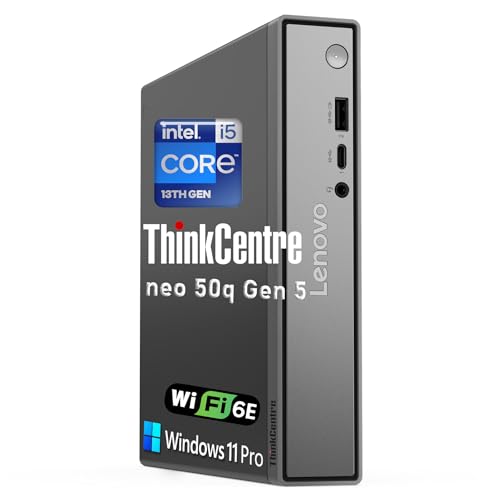
Lenovo ThinkCentre neo 50q Gen 5

Lenovo ThinkCentre neo 50q i5 16GB 512GB Wi-Fi 6

Lenovo ThinkCentre neo 50q 1L Core 5

Nintendo Classic Mini Family Computer Postcards

GEEKOM IT13 MAX 24GB Mini PC
What Each Pick Brings To The Table
The Kulivloa Retro Gaming Console keeps setup refreshingly uncomplicated for family game nights. HDMI, the standard connection used for televisions and many monitors, handles the picture, while the included extension cable makes a rear-panel setup less awkward. Two wireless controllers immediately distinguish it from the single-controller Nintendo Classic Mini Family Computer later in this list.
Its built-in library covers racing, puzzles, action, and arcade-style games, with a menu that supports searching, saving, pausing, and favorites. In my view, that makes this a practical shared-console option for adults and older children who want simple two-player entertainment without managing a conventional desktop operating system.
Useful Strengths
- Two 2.4G wireless controllers support cooperative and competitive play.
- The menu makes finding and saving games straightforward.
- HDMI output works with televisions, monitors, and projectors.
- The compact 0.39-pound body suits crowded shelves.
- English and Chinese menu languages add household flexibility.
Things To Consider
- AAA controller batteries are required and not included.
- The power adapter is excluded, and some regional game listings may repeat.
Quick Facts
Who It Suits Best
Families wanting a dedicated retro game station with two controllers and minimal computer setup will find this format especially approachable.
A Better Fit Elsewhere
The Lenovo ThinkCentre neo 50q Gen 5 serves households that need office productivity rather than television gaming.
A desk crowded with a full-size tower leaves little room for family members to spread out. The Lenovo ThinkCentre neo 50q Gen 5 answers that problem with a 7.05 by 7.20 by 1.42-inch chassis, small enough to sit behind a monitor or beneath a desk. Unlike the Kulivloa Retro Gaming Console, this is a conventional productivity computer built around a 13th-generation Intel Core i5-13420H processor.
The eight-core, 12-thread chip handles business applications, communication, and multitasking, though I would compare the final configuration and operating-system details before placing it at the center of a shared family setup. For a home office or managed work area, its compact footprint makes the strongest case.
Real Benefits
- Eight cores support multitasking and productivity applications.
- The tiny chassis saves meaningful desk and shelf space.
- The processor reaches up to 4.6GHz for demanding work.
- Listed support options include round-the-clock troubleshooting.
Practical Considerations
- Confirm the included memory, storage, operating system, and ports match the household needs.
- A compact chassis may limit convenient access to internal components.
Made For
Remote workers, students, and home offices that value processor capability and a very small desktop footprint will get the most from this model.
Consider Something Else When
The Lenovo ThinkCentre neo 50q i5 16GB 512GB Wi-Fi 6 is the stronger fit when a preconfigured memory, storage, and connectivity package matters.
The distinction between this Lenovo and the earlier neo 50q listing is practical: this version states its memory, storage, wireless standard, and operating system. That saves me from assembling a configuration around a shared family computer, which matters when parents need schoolwork, office applications, and household browsing in one place. The i5-13420H processor remains the same eight-core, 12-thread platform.
DDR5 memory supports current multitasking, while a 512GB PCIe SSD provides local file storage. PCIe is a compact interface commonly used for fast internal solid-state drives, and Windows 11 Pro adds the business-oriented environment this model is designed to support. I would choose this for a home office that needs a clear, coherent bundle.
A Few Highlights
- 16GB of DDR5 memory handles school and office multitasking.
- The 512GB SSD keeps documents and applications together.
- Wi-Fi 6 supports compatible wireless routers and networks.
- Windows 11 Pro arrives with the system.
- The compact chassis preserves desk space.
Small Caveats
- Wi-Fi 6 requires a compatible router and network to deliver its intended benefits.
Feature Snapshot
Right Fit For
Students and remote workers who want a compact, fully specified Windows desktop will appreciate this balanced configuration.
Not Your Match When
The GEEKOM IT13 MAX 24GB Mini PC suits creative professionals who need substantially higher core count and processing headroom.
The newer Core 5 platform gives this compact Lenovo a different performance profile from the i5-13420H versions. Its eight-core processor combines four performance cores, which handle demanding tasks, with four efficiency cores, which conserve energy during lighter work. That hybrid arrangement can be useful in a busy family room where the computer alternates between school projects, video calls, and background applications.
The 1L chassis designation refers to a one-liter-class enclosure, reinforcing the space-saving purpose established by the earlier neo 50q model. Unlike the fully specified i5 16GB 512GB Wi-Fi 6 option, this listing places more emphasis on the processor generation and compact form, so I would check the remaining configuration details before choosing it for a primary family workstation.
Useful Highlights
- The hybrid design balances demanding and lighter workloads.
- Performance cores reach speeds up to 4.8GHz.
- The 12MB cache supports efficient processor operations.
- A one-liter-class body suits compact workspaces.
Trade Offs
- Memory, storage, and operating-system details need confirmation for a complete household build.
- Its compact case offers less room for internal expansion than a full-size desktop.
Core Details
Built With In Mind
Households wanting a newer efficient-core platform in a compact office enclosure will find this model especially relevant.
Look Elsewhere When
The Lenovo ThinkCentre neo 50q i5 16GB 512GB Wi-Fi 6 makes more sense when confirmed memory, storage, wireless support, and Windows 11 Pro are priorities.
The Nintendo Classic Mini Family Computer is built around nostalgia rather than general-purpose computing. Its miniature hardware recalls the look of Nintendo’s classic home systems, making it more of a display piece and dedicated retro machine than a modern household computer. I can see it adding character to a game room, desk, or display shelf where historical design matters.
The set includes 30 original postcards, adding collectible material beyond the console itself. Compared with the Kulivloa Retro Gaming Console, its appeal is more restrained and presentation-focused, while the Kulivloa model emphasizes a larger built-in library, two wireless controllers, and menu-based game organization. This Nintendo option is best treated as a specialized centerpiece rather than the family’s primary work computer.
The Good Stuff
- The miniature design gives nostalgic hardware a prominent shelf presence.
- Thirty original postcards create an additional collectible set.
Points To Note
- The legacy focus limits its role in modern productivity tasks.
- Households wanting two wireless controllers and broad game organization should consider the Kulivloa model instead.
Who Will Love This
Retro gaming collectors and families seeking a carefully presented Nintendo display piece will appreciate its compact heritage design.
Another Choice May Suit
The Kulivloa Retro Gaming Console suits families wanting a larger playable library and two-player wireless controls.
The GEEKOM IT13 MAX 24GB Mini PC brings substantially more processing headroom than the Lenovo neo 50q models, making it the most compelling fit for compute-heavy creative work. Its Intel Core Ultra 9 185H processor has 16 cores and reaches speeds up to 5.1GHz, a combination suited to demanding multitasking, media production, and development environments. That capability comes with a more specialized purpose than a straightforward family browsing machine.
The 24GB of LPDDR5 memory provides generous working capacity, while LPDDR5 is a power-efficient memory format designed for compact devices. A 500GB SSD, which stores data on flash memory, handles project files and applications. For a shared household, I would treat this as the stronger creative workstation rather than the simplest shared family machine.
Everyday Advantages
- Sixteen cores support demanding multitasking and parallel work.
- The Core Ultra 9 reaches speeds up to 5.1GHz.
- 24GB of LPDDR5 memory accommodates heavier applications.
- The 500GB SSD provides local project and application storage.
Areas To Watch
- The 500GB capacity may feel limited for large video libraries or extensive project archives.
- Confirm that the operating system and required creative applications are included.
Technical Highlights
Whose Shelf It Belongs On
Video editors, developers, and advanced home creators who need a compact workstation with high core count will benefit most.
Reach For A Different Pick When
The Lenovo ThinkCentre neo 50q i5 16GB 512GB Wi-Fi 6 suits households prioritizing a conventional Windows desktop and everyday productivity.
Matching a Family Computer to the Household
The right family computer starts with the room where it will live. A shared family room needs simple controls, a clear display connection, and enough storage for school files or family photos. A home office favors a quiet, compact desktop that can live behind a monitor. A dedicated game area calls for a television-oriented system with comfortable controllers. I start with that setting because it quickly removes options that solve the wrong problem.
Form Factor and Placement
Tiny desktops free up more than desk space. The Lenovo neo 50q models measure 7.05 by 7.20 by 1.42 inches, allowing a computer to sit behind a monitor or beneath a desk without dominating the workspace. Retro systems take a different approach, with HDMI output connecting them directly to a television. I recommend checking the available cables, power location, and display arrangement before choosing a compact form.
Memory, Storage, and Processor Role
Memory helps several applications run at once, while storage determines how many files remain on the computer. The 16GB Lenovo configuration is a practical productivity package, and the GEEKOM’s 24GB suits heavier creative workflows. Processors matter most for demanding work, so an eight-core i5 or Core 5 handles typical office tasks, while the 16-core Core Ultra 9 gives demanding software more room to operate. I would not pay for additional processor power that the household will never use.
Gaming Versus General Computing
A family game stick and a classic Nintendo miniature serve different purposes. The Kulivloa model supports two wireless controllers, a searchable library, and a 1080p maximum game output. The Nintendo Classic Mini emphasizes historical design and collectible postcards. Neither replaces a modern productivity desktop, so my practical approach is to choose a dedicated entertainment machine only after confirming that the household still needs a separate computer for work and school.
Two Mistakes That Can Distort a Computer Decision
Wrong Turns To Avoid
A common mistake is judging a family computer by processor wording alone, since memory, storage, operating system, and connectivity determine daily usefulness. Another mistake is ignoring the physical room and power arrangement. I would confirm those practical details before ordering, especially for a television-connected console or a mini desktop intended to sit behind a monitor.
The Upgrade Payoff
Additional money can buy more cores, greater memory capacity, and faster storage, but that investment only pays off when the software demands it. The GEEKOM makes sense for intensive creative workloads, while the specified Lenovo i5 model covers more ordinary household tasks. Paying more is worthwhile when the computer regularly handles demanding projects rather than casual browsing and schoolwork.
Frequently Asked Questions
Which option is best for family game nights?
The Kulivloa Retro Gaming Console fits shared game nights best because it includes two wireless controllers and a searchable built-in library. It also supports HDMI televisions, monitors, and projectors.
Can a Lenovo ThinkCentre handle school and office work?
The Lenovo ThinkCentre neo 50q i5 16GB 512GB Wi-Fi 6 is the more complete option for school and office work. Its Windows 11 Pro environment, 16GB memory, and 512GB SSD cover common productivity needs.
Is the Nintendo Classic a regular desktop computer?
No, the Nintendo Classic Mini is a specialized retro system rather than a general-purpose productivity computer. It is better suited to nostalgic gaming, display, and collecting.
Which model handles demanding creative work?
The GEEKOM IT13 MAX 24GB Mini PC has the strongest stated processing hardware for demanding creative tasks. Its 16-core processor and 24GB of memory provide more headroom than the Lenovo options.
What should I check before buying?
I would check the operating system, memory, storage, ports, display connection, and power requirements. These details determine whether the computer can handle the household’s existing devices and files.
Final Verdict
I would choose the Kulivloa Retro Gaming Console for two-player family entertainment, the fully specified Lenovo neo 50q for everyday productivity, and the GEEKOM IT13 MAX for intensive creative work. The Nintendo Classic Mini earns its place through nostalgic design and collectible postcards, while the other Lenovo configurations suit households prioritizing compact desks and processor capability. Match the machine to the actual family routine, and the choice becomes much easier.
