
A late-night match can turn on one overlooked part of a gaming setup: the display. For a gaming computer in the 2000 range, I prioritize monitor speed, resolution, color coverage, and desk fit rather than chasing a headline specification.
The six KTC screens below cover distinct priorities, from competitive 400Hz models to sharp 1440p panels with built-in speakers. I focus on the details that affect real play, including motion handling, image clarity, connectivity, adjustment options, and how each screen fits beside a gaming PC.
A Side-By-Side Look

KTC 25M2 Pro 400Hz 24.5-Inch Fast IPS Gaming Monitor, 1ms GTG, Adaptive Sync

KTC H27T6 27-Inch 2K Fast IPS Gaming Monitor, 200Hz, Speakers, Adaptive Sync

KTC H27F7 27-Inch FHD 240Hz Fast IPS Gaming Monitor, 1ms MPRT, Adaptive Sync

KTC 27M1 27-Inch 1440P Gaming Monitor, 200Hz, Fast IPS, Speakers, Shielding Hood
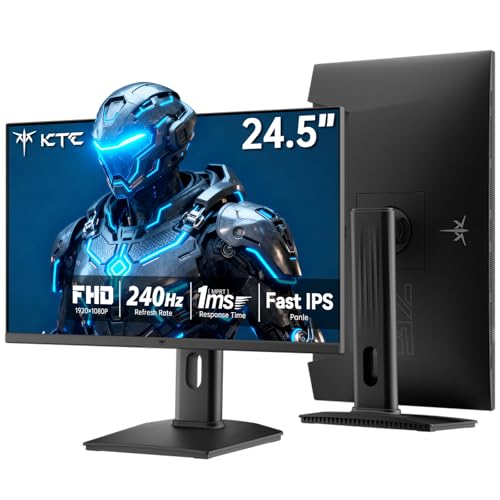
KTC H25T7-3 24.5-Inch FHD 240Hz Gaming Monitor, HDR 400, 94% DCI-P3

KTC H24T7 24-Inch 1440P Gaming Monitor, 180Hz, HDR 400, Adaptive Sync
What Each Pick Brings To The Table
The KTC 25M2 Pro puts refresh rate ahead of almost everything else in this group. Its advertised 400Hz refresh rate targets competitive shooters, rhythm games, and other fast scenes where frequent visual updates can make aiming feel more immediate. The 1ms GTG figure describes how quickly a pixel changes from one color to another.
Fast IPS technology and Adaptive Sync work alongside that speed, while the shielding hood helps reduce distractions during long sessions. Compared with the other KTC models, this is the most aggressive choice for competitive play, though its 1080p resolution leaves more visual detail on the table than the 1440p alternatives.
The Value In It
- The 400Hz advertised refresh rate prioritizes exceptionally rapid visual updates.
- A 1ms GTG response suits players focused on fast-moving targets and immediate transitions.
- Adaptive Sync helps coordinate the displayed frame rate with compatible graphics output.
- Height, pivot, tilt, swivel, and VESA support make desk and mounted placement easier to tailor.
Practical Considerations
- Full HD resolution provides less detail than the 1440p KTC models.
- A gaming PC and connected graphics output need to support the monitor’s advertised high refresh modes.
Feature Snapshot
Who Will Love This
Competitive players who value maximum refresh rate and fast response over higher-resolution detail will appreciate this screen.
Another Choice May Suit
The KTC H27T6 is a better fit for gamers who prefer 1440p detail and built-in speakers over the highest refresh rate.
The KTC H27T6 offers the most balanced combination of sharpness and practical convenience in the group. Its 2560 x 1440 panel provides more usable detail than Full HD for dense game interfaces, open environments, and desktop work. Fast IPS and a 1ms response target keep that added clarity responsive.
Built-in speakers remove the need for separate desktop audio in a compact bedroom or dorm setup. The listed 200Hz mode and Adaptive Sync make it a sensible all-rounder, although the KTC H27F7 reaches 240Hz for competitive 1080p play.
Good Reasons To Consider
- The 2560 x 1440 resolution improves clarity in games, video calls, and multitasking.
- Integrated speakers provide convenient audio for a streamlined desk arrangement.
- Adaptive Sync supports smoother coordination with compatible graphics output.
- Tilt, swivel, pivot, and height adjustment accommodate different seating positions.
Trade Offs
- Its listed 200Hz refresh rate trails the 240Hz and 400Hz models.
- Driving 1440p requires a gaming PC capable of rendering at the resolution and refresh combination being used.
Made For
Students, apartment dwellers, and mixed-use gamers gain useful sharpness and convenient audio in one display.
Look Elsewhere When
Competitive players focused on maximum frame rate may prefer the faster KTC H27F7.
The KTC H27F7 brings 240Hz motion handling to a 27-inch Full HD display, making it a practical middle ground between visual detail and competitive speed. Fast IPS and Adaptive Sync complement the refresh rate, while the 1ms MPRT figure refers to a motion response measurement that differs from the 25M2 Pro’s GTG specification.
For esports sessions, the larger 27-inch footprint can make distant targets easier to track than on a 24-inch display. Its limitation appears in fine scenery and productivity, where the KTC H27T6 and KTC 27M1 provide 1440p resolution.
What Pays Off
- The 240Hz refresh rate supports smooth, fast competitive scenes.
- A 27-inch Full HD panel gives competitive players more viewing space without moving to 1440p.
- Adaptive Sync helps reduce the mismatch between rendered frames and display timing.
- Height, tilt, pivot, and VESA compatibility support several installation positions.
Small Caveats
- Full HD provides less fine detail than the 1440p models.
- The display lacks the built-in speakers included with the KTC H27T6 and KTC 27M1.
Quick Facts
The Right Fit
Competitive gamers who want a large screen and high refresh rate without moving to 1440p will find this model practical.
Reach For A Different Pick When
The KTC 25M2 Pro suits players who place an even higher premium on refresh rate and response speed.
The KTC 27M1 is built around a focused gaming setup rather than a general-purpose desk. Its 2560 x 1440 resolution gives game environments more definition than the Full HD alternatives, while the shielding hood helps block peripheral distractions during concentrated matches.
Dual 2W speakers add convenient audio without filling the desk with separate units. Compared with the KTC H27T6, this model adds a shielding hood and reaches 210Hz through its listed overclocked mode, though the 200Hz base specification remains lower than the H27F7’s 240Hz.
Benefits That Matter
- Native 1440p detail benefits dense game worlds and desktop applications.
- The shielding hood supports a more focused visual field during matches.
- Dual 2W speakers simplify audio setup in a dedicated gaming station.
- Adaptive Sync and a 1ms MPRT specification complement the Fast IPS panel.
- Extensive adjustment and VESA support provide placement flexibility.
Possible Compromises
- The 27-inch footprint takes more desk space than the 24-inch models.
- Its base 200Hz refresh rate falls short of the KTC H27F7 and KTC 25M2 Pro.
Technical Highlights
Built With In Mind
Dedicated gaming stations benefit from the combination of sharp 1440p visuals, built-in audio, and a distraction-reducing hood.
A Better Fit Elsewhere
The KTC H25T7-3 is a better fit for compact desks where screen footprint matters more than built-in speakers.
The KTC H25T7-3 combines a 24.5-inch footprint with 240Hz refresh, giving competitive players a familiar compact format without sacrificing motion speed. Fast IPS and 1ms MPRT reinforce its gaming focus, while Adaptive Sync helps maintain timing consistency with compatible graphics output.
The feature that separates it from the KTC H27F7 is visual presentation. Its HDR 400 support and 94% DCI-P3 color coverage are meaningful additions for vivid games and video, though Full HD still limits fine detail compared with the 1440p models.
Useful Strengths
- A 24.5-inch vertical format leaves more desk space than a 27-inch model.
- The 240Hz refresh rate supports fast competitive movement.
- HDR 400 adds a brighter-range target for supported content.
- The listed DCI-P3 coverage suits colorful games and video.
Less Ideal Details
- Full HD resolution trails the detail offered by the KTC 27M1 and KTC H24T7.
- There are no listed built-in speakers, so external audio may be needed.
Whose Shelf It Belongs On
Competitive gamers with a compact desk and an interest in colorful HDR content will find this format well suited to the space.
Consider Something Else When
The KTC H24T7 better serves productivity-minded gamers who prefer 1440p sharpness over maximum refresh rate.
The KTC H24T7 makes a persuasive case for resolution before refresh rate. Its 24-inch 2560 x 1440 panel fits more visual information into a smaller frame than the 27-inch Full HD models, making detailed interfaces and productivity applications easier to view.
The listed 180Hz mode can overclock up to 185Hz, while HDR 400 and Adaptive Sync cover important display priorities. It falls behind the KTC H27F7 and KTC H25T7-3 for raw speed, yet the trade-off may suit a setup that handles gaming, video, and work on one screen.
The Good Stuff
- The 24-inch 1440p format combines useful detail with a manageable footprint.
- HDR 400 supports brighter-range presentation for compatible games and video.
- Adaptive Sync assists timing between the display and compatible graphics output.
- Height, pivot, tilt, and VESA mounting provide practical positioning choices.
Details To Watch
- The 180Hz base refresh rate is lower than every other 240Hz-or-higher option listed here.
- The gaming PC must be capable of driving the desired 1440p output for smooth play.
Important Details
The Right Fit
Mixed-use gamers and remote workers who need a compact, sharp display for several everyday tasks will appreciate this balance.
Swap It Out When
The KTC H27F7 is a stronger choice for competitive play where rapid motion takes priority over 1440p detail.
What Matters In A High-End Gaming Display
Refresh Rate and Competitive Motion
Refresh rate indicates how often a display redraws each second, which is especially noticeable during fast camera movement and rapid aiming. I prioritize 240Hz or 400Hz for competitive games, while 180Hz to 210Hz remains sensible for a broader mix of entertainment and productivity.
Resolution and Panel Speed
Resolution determines how much information the screen can display at once. Full HD emphasizes speed and compactness, whereas 1440p provides sharper interfaces, text, and scenery. Response specifications also differ, so I compare GTG with MPRT carefully rather than treating them as interchangeable measurements.
Desk Space and Audio
Screen size changes the practical layout of a gaming setup. A vertical 24-inch or 24.5-inch monitor leaves more room for keyboard movement, while a 27-inch panel provides a larger viewing area. Built-in speakers also reduce desk clutter, although dedicated audio remains preferable for louder entertainment.
Connectivity and Adjustment
HDMI and DisplayPort cover the main connections needed for a gaming PC, but the graphics output must match the intended resolution and refresh rate. Height, pivot, tilt, swivel, and VESA support make it easier to align the panel with a chair, desk, and arm.
Two Details That Shape The Choice
Mistakes Worth Dodging
A high refresh number cannot compensate for a gaming PC that cannot produce the corresponding frames. I also check physical desk dimensions before choosing a 27-inch vertical monitor, since a narrow workstation can make even a well-chosen panel feel crowded.
What The Higher Tier Buys
Moving from 180Hz to 240Hz or 400Hz places greater emphasis on competitive motion. Moving from Full HD to 1440p improves detail instead, so the worthwhile upgrade depends on whether the setup prioritizes fast aiming, visual clarity, or a balance of both.
Frequently Asked Questions
Is a 400Hz monitor better than a 240Hz gaming monitor?
A 400Hz monitor offers a higher advertised refresh rate, which can benefit fast competitive games. A 240Hz model may still provide the motion handling and resolution combination that fits a particular setup better.
Is a 1440p gaming monitor better than 1080p?
A 1440p monitor displays more detail than Full HD, making text, menus, and distant game elements clearer. The gaming PC must also drive the higher resolution smoothly for competitive play.
Does Adaptive Sync eliminate screen tearing?
Adaptive Sync helps synchronize display timing with compatible graphics output, which can reduce tearing caused by mismatched frame rates. Actual smoothness still depends on the game, graphics settings, and system configuration.
Are built-in speakers enough for a gaming computer setup?
Built-in speakers handle menus, system sounds, and casual video viewing with less desk clutter. Dedicated headphones or speakers provide a clearer and more powerful audio experience for competitive communication and entertainment.
Which KTC monitor is best for a compact gaming desk?
The KTC H25T7-3 is the most compact competitive-oriented option in this group because it pairs a 24.5-inch vertical format with 240Hz refresh. The KTC H24T7 offers a similar footprint with sharper 1440p detail and HDR 400 support.
Final Verdict
I would choose the KTC 25M2 Pro for competitive speed, the KTC H27F7 for a large high-refresh Full HD display, and the KTC H27T6 for a balanced 1440p setup with speakers. For smaller desks, the KTC H25T7-3 and KTC H24T7 cover opposite priorities: rapid motion or sharper detail. The right choice comes down to how the gaming computer, desk, and most-played games work together.
