
A gaming setup has to fit more than a wish list. I built this roundup around practical needs, including fixed-desk power, travel-friendly size, fast displays, expandable storage, and enough memory for games and creative work.
How The Shortlist Stacks Up

Olialia Gaming PC Ryzen 7 5700X RTX 3060 Ti 8GB 32GB DDR4 1TB SSD
LG gram 15-inch Copilot+ Laptop Ryzen AI 7 350 16GB 1TB

Empowered PC Panorama XL RTX 5080 Ryzen 7 9700F 32GB DDR5 2TB NVMe

Acer Nitro V 16S Copilot+ Laptop Ryzen AI 7 350 RTX 5060

ASUS V16 16-inch 144Hz Core 7 240H RTX 5060 32GB 1TB Windows 11
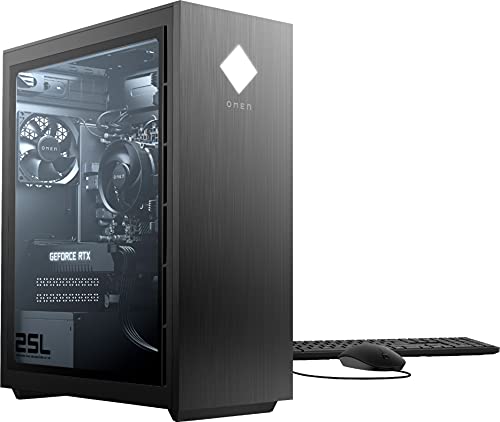
OMEN 25L Gaming PC RTX 2060 Core i7-10700F 16GB 512GB SSD 1TB HDD
A Breakdown Of The Leading Choices
The Olialia setup lands in a useful middle ground for someone who games, streams, and edits on the same machine. Its Ryzen 7 5700X has eight cores, while 32GB of DDR4 memory gives background applications room without making the build feel oversized.
Compared with the RTX 5080 Panorama XL, this tower makes fewer demands on the graphics card and power supply. The tempered-glass case, ARGB lighting, 1TB PCIe NVMe solid-state drive, and preinstalled Windows 11 make it a straightforward fixed-desk setup.
The Practical Payoff
- The eight-core Ryzen 7 5700X handles gaming, streaming, and substantial multitasking in one package.
- 32GB of DDR4 memory supports games, editing software, and multiple open applications.
- The RTX 3060 Ti includes 8GB of GDDR6 graphics memory for dedicated visual processing.
- Wi-Fi 6, Bluetooth, Gigabit Ethernet, front USB, and audio connections cover common desk setups.
Worth Noting
- The 1TB SSD is smaller than the Panorama XL’s 2TB drive, so large game libraries may need careful storage management.
- The 600W power supply deserves a compatibility check before adding a substantially more demanding graphics card.
Key Specs
Built With In Mind
I recommend this for a household computer that divides its time among games, streaming, editing, and everyday productivity.
Where Another Pick Suits Better
The Empowered PC Panorama XL fits high-end gaming and content creation that benefits from an RTX 5080 and 16GB of graphics memory.
The LG gram weighs 2.8 pounds and measures 0.7 inches thick, so it makes more sense as a portable productivity companion than as a dedicated gaming tower. A 15.6-inch touch display gives it a comfortable balance of screen space and portability for commuting, classes, and travel.
Unlike the Olialia desktop, this machine prioritizes carrying weight and a 1TB SSD over dedicated gaming graphics. The Ryzen AI 7 350, 16GB of memory, and Windows 11 make it a sensible daily machine for school, office work, and lighter gaming.
Well-Handled Touches
- The 2.8-pound chassis is easy to carry between a home desk, classroom, or café.
- The thin 0.7-inch body adds mobility without creating a bulky daily bag.
- A 1TB SSD provides useful room for documents, media, and installed applications.
- The listed coverage includes accidental-damage protection and round-the-clock expert support.
Small Caveats
- With 16GB of memory, heavy game streaming and large creative projects require more attention to open applications.
- It lacks the dedicated graphics emphasis of the RTX-equipped laptops and desktops in this roundup.
Quick Facts
Who Will Love This
I see the best fit with students and mobile workers who need a full Windows laptop for productivity and occasional lighter games.
Consider Something Else When
The ASUS V16 suits competitive gamers who prioritize a 144Hz display and an RTX 5060 over maximum portability.
The Panorama XL puts the most substantial graphics hardware in this group, centered on an RTX 5080 with 16GB of GDDR7 memory. That matters for demanding games, 3D work, and video rendering, although a system built around this class of card needs a desk that can accommodate a serious tower.
The Ryzen 7 9700F supplies eight cores and 16 threads, reaching 5.5 GHz at boost. Compared with the Olialia’s Ryzen 7 5700X and DDR4 memory, this configuration pairs a newer processor architecture with faster DDR5 memory and twice the solid-state storage.
Everyday Wins
- The RTX 5080 provides 16GB of dedicated GDDR7 memory for demanding visual workloads.
- 32GB of DDR5 memory supports advanced multitasking and content creation.
- The 2TB PCIe Gen4 NVMe drive offers room for large game installations and project files.
- Wi-Fi 7, RJ45 Ethernet, HDMI, and included keyboard and mouse create a connected desk setup.
- Windows 11 Pro provides a ready-made foundation for advanced software and configuration.
Practical Considerations
- The keyboard, mouse, and full-size tower need more desk area than a laptop or compact system.
- The RTX 5080 configuration is a major step up from the other desktops, so my fit check would include room, cooling, and power planning.
The Right Fit
I recommend this for a dedicated gaming desk where high-end graphics, large storage, and advanced creative work justify a substantial tower.
A Better Fit Elsewhere
The Olialia Gaming PC fits mixed gaming and productivity needs with a more moderate component configuration and a stated 600W power supply.
The Acer Nitro V 16S brings dedicated RTX 5060 graphics into a slim gaming-laptop format. That combination suits a dorm room, temporary apartment, or travel setup where a desktop tower would be inconvenient, though it remains a more specialized machine than the LG gram.
The Ryzen AI 7 350 handles the processor side, while the Copilot+ platform adds AI-oriented computing tools to a Windows 11 environment. Compared with the ASUS V16, the Nitro V 16S shares the RTX 5060 focus but presents a more portability-led design rather than a display-centered one.
What It Does Well
- The dedicated RTX 5060 provides a clear gaming advantage over a typical ultraportable laptop.
- The slim 16S format lets one machine handle gaming, schoolwork, and travel.
- The Ryzen AI 7 350 supports everyday computing alongside game-related workloads.
- The listed coverage includes accidental-damage protection and 24/7 assistance.
Points To Note
- Repeated travel with a gaming laptop calls for careful charger and storage planning.
- For a stationary competitive setup, the ASUS V16’s specified 144Hz display is the more relevant feature.
Core Details
Best Suited To
I recommend it for a student or commuter who needs capable gaming hardware without carrying a desktop tower.
Look Elsewhere When
The LG gram serves people whose main requirement is an exceptionally light productivity laptop rather than a dedicated gaming GPU.
The ASUS V16 puts its emphasis on the screen, making it the clearest laptop choice here for competitive gaming. Its WUXGA panel measures 1920 by 1200 in a 16:10 format, while the 144Hz refresh rate updates the image more frequently than a standard 60Hz display.
That display matters for fast movement, while the Intel Core 7 240H provides 10 cores and 16 threads for games, streaming, and editing. The RTX 5060 has 16GB of dedicated memory, and 32GB of system memory gives the system more breathing room than the LG gram’s configuration.
A Strong Showing
- The 144Hz refresh rate provides smoother motion in competitive games that support higher frame rates.
- The 16:10, 1920-by-1200 display offers more vertical space than a familiar 16:9 panel.
- 32GB of memory supports gaming, streaming, and creative applications together.
- The 1TB SSD provides useful capacity without requiring a separate drive for every game.
Less Ideal Details
- The 300-nit sustained brightness may be less comfortable than a brighter panel in a brightly lit room.
- A 144Hz display makes the greatest difference in games and settings that can produce sufficiently high frame rates.
Who Should Grab It
I recommend the V16 to competitive gamers and creators who want a large, fast-refreshing laptop with generous memory.
Swap It Out When
The LG gram fits people who value a 2.8-pound carry weight and everyday portability more than a high-refresh gaming display.
The OMEN 25L is an older desktop built around a 10th-generation Core i7-10700F and RTX 2060. Its practical appeal lies in the combination of a 25L chassis, an upgrade-friendly design, and separate solid-state and hard drives, making it worth examining for games already in an older gaming library.
Compared with the Olialia, the storage arrangement provides a quicker system drive for the operating system and applications while the 1TB hard drive holds bulk files. The 16GB of memory is lighter by current standards, though the OMEN Command Center and component access support ongoing configuration.
Useful Strengths
- The 25L desktop has an upgrade-oriented design for people who prefer improving components over replacing the whole system.
- A 512GB SSD keeps Windows and frequently used applications on faster storage.
- The separate 1TB hard drive provides inexpensive room for larger game archives and media.
- The OMEN Command Center centralizes hardware-related configuration on the system.
Factors To Consider
- The RTX 2060 and 10th-generation processor belong to an older hardware generation than the other systems here.
- Windows 10 and 16GB of memory reflect the system’s 2020 configuration, so current software needs deserve attention.
- Files stored on the hard drive will operate more slowly than those kept on the SSD.
Technical Sheet
Made For
I recommend the OMEN 25L for an existing gaming setup that values expandability and already targets older titles.
Another Choice May Suit
The Olialia Gaming PC better fits a current mixed-workload desktop with 32GB of memory, Wi-Fi 6, and a newer RTX 3060 Ti configuration.
What Matters Before Committing To A Gaming PC
Start With The Graphics Card
I begin with the graphics card because it drives most gaming choices. The RTX 5060 laptops suit high-refresh mobile gaming, the RTX 3060 Ti offers a balanced desktop configuration, and the RTX 5080 targets demanding visual workloads. The RTX 2060 option reflects an older generation of games and hardware.
Give Games And Background Tasks Room
Memory matters when a game, streaming tool, browser, and editing application share the same machine. The 16GB configurations can handle standard use, while 32GB gives heavier multitasking more flexibility. My rule is simple: frequent multitaskers benefit from the extra headroom.
Check Storage And Connection Needs
A 1TB SSD is a practical starting point for active games and applications, while 2TB reduces the need to move large installations. The OMEN’s separate hard drive adds bulk capacity, although files there remain slower. Wi-Fi 6, Wi-Fi 7, Ethernet, HDMI, and USB access also shape how a system fits into a particular desk.
Match The Form To The Routine
A fixed desk makes a tower easier to accommodate and usually leaves more room for cooling and components. A laptop adds mobility but carries a screen, keyboard, battery, and portable power supply. I prefer the desktop for a permanent gaming station and the lighter models for work that regularly crosses locations.
Common Mistakes Worth Avoiding
Mistakes Worth Dodging
I see shoppers focus on the processor while overlooking graphics memory, display quality, or system memory. A quick check of the complete configuration prevents a high-core-count processor from hiding an unsuitable GPU or too little RAM.
What The Higher Tier Buys
The Case For Spending Up
The RTX 5080 model adds a more substantial graphics card, DDR5 memory, and double the SSD capacity. Those components make sense for demanding games and content creation, but a smaller RTX 3060 Ti setup can be more rational for mixed work and established game libraries.
Frequently Asked Questions
Is a desktop or laptop better for gaming?
A desktop suits a permanent gaming station because it offers more room for internal components and avoids carrying a display, battery, and charger. A laptop better serves people who game in different locations and value a single portable setup.
How much RAM does a gaming computer need?
16GB can support standard gaming and everyday multitasking, while 32GB provides more room for streaming, browsing, editing, and game-launcher software. Heavy content creation benefits from the additional memory.
Does graphics memory affect gaming?
Yes. Graphics memory stores textures, frame data, and other information handled by the graphics card. The RTX 5080’s 16GB gives it more room for demanding visual workloads than the 8GB configuration in the Olialia system.
Is SSD storage important for games?
An SSD, which stores data electronically without moving parts, shortens loading times and makes system and application access feel more responsive. Games stored on the OMEN’s hard drive will still benefit from leaving the operating system and active programs on its SSD.
Should I buy a prebuilt gaming computer?
A prebuilt system can be convenient for someone who wants a working configuration without selecting every component. Parts enthusiasts gain more control by choosing parts individually, while prebuilt buyers should still check the graphics card, memory, storage, operating system, and connection options.
The Takeaway
I would start with the form factor, then match the graphics card and memory to the games and background tasks that matter. The Olialia desktop offers the most balanced configuration, the ASUS V16 leads for high-refresh laptop gaming, and the Empowered PC Panorama XL serves the most demanding hardware needs. A well-matched computer matters more than chasing a particular model name.
