
A cramped apartment desk can make a gaming setup feel even tighter. I compare six computers that serve different needs, from a dedicated RTX desktop to compact mini PCs with integrated graphics and large built-in screens. The key is matching graphics capability, memory, storage, and desk space to how the system will actually be used.
A Quick View Of The Lineup

VZMORE AX9 Max Ryzen AI 9 Mini PC

VZMORE iX9 Max Core Ultra 9 Mini PC

VZMORE iX7 Core Ultra 7 Mini PC

VZMORE iX5 Max Core Ultra 5 Mini PC
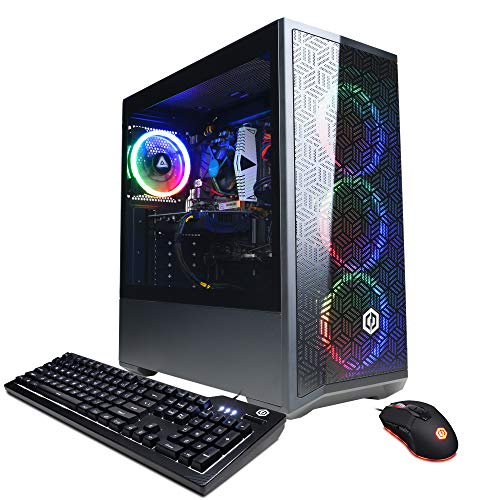
CYBERPOWERPC Gamer Xtreme VR Desktop RTX 3050 8GB i5-12400F

HP OmniStudio 27-Inch All-in-One Desktop Ryzen AI 7 445 Radeon 840M
Inside Each Recommended Option
A gaming station squeezed onto a small desk needs more processing power than its shell suggests. The VZMORE AX9 Max pairs the Ryzen AI 9 HX 470 with Radeon 890M graphics, 32GB DDR5 memory, and a 1TB SSD, making it my strongest compact option for supported 1080p games and demanding creative work.
Unlike a conventional tower such as the CYBERPOWERPC Gamer Xtreme VR, the AX9 Max trades a dedicated graphics card for portability and a broad port selection. For a gamer who also compiles code, edits video, or runs local AI tools, that balance can be more useful than a larger case occupying the center of the desk.
A Few Strong Suits
- Radeon 890M graphics support 1080p gaming in compatible titles.
- Three power modes range from 45W quiet operation to 65W sustained performance.
- 32GB DDR5 and 1TB storage suit multitasking and large game libraries.
- Four-display support helps traders and creators build a dense workspace.
- Local AI acceleration supports compatible tools such as LM Studio and Ollama.
Worth Noting
- Integrated Radeon graphics remain below the capability of a dedicated RTX card.
- Four-screen setups require compatible displays, cables, and desk space.
Quick Facts
Who It Suits Best
The AX9 Max suits a gamer with a compact desk who also needs strong multitasking, local AI, and multi-display capability.
Consider Something Else When
The CYBERPOWERPC Gamer Xtreme VR suits a shopper whose priority is dedicated RTX graphics rather than a compact footprint.
The VZMORE iX9 Max brings more CPU power than most compact PCs, so it works well for a gaming desk that also handles streaming software, compilation, and heavy multitasking. Its Intel Core Ultra 9 185H has 16 cores and can reach 5.1GHz, though Intel Arc integrated graphics make it better suited to light gaming than graphics-heavy titles.
The contrast with the AX9 Max is instructive. The AMD system offers Radeon 890M graphics, while this Intel version prioritizes processor throughput, media acceleration, and dedicated NPU assistance. I would favor the iX9 Max for production work that shares the same compact desk.
The Practical Payoff
- The Core Ultra 9 processor offers 16 cores for compilation and multitasking.
- Intel Arc graphics accelerate video encoding and decoding.
- The NPU handles compatible AI effects while leaving more CPU resources available.
- Eight USB ports and four-display support simplify a full workstation.
Trade Offs
- Light gaming is the sensible expectation from integrated Intel Arc graphics.
Feature Snapshot
Made For
The iX9 Max fits a developer, streamer, or editor who needs fast CPU performance and a compact multi-screen workstation.
Another Choice May Suit
The VZMORE AX9 Max is a better fit for a gamer who values Radeon 890M graphics and 32GB memory over Intel Arc and higher core count.
The VZMORE iX7 makes sense when a gaming computer will double as the main home office machine. Its 32GB DDR5 memory leaves room for several demanding applications, while the Core Ultra 7 356H handles productivity, media processing, and software development in a compact enclosure.
Compared with the iX9 Max, the iX7 has fewer CPU cores and lower boost speeds, but it gains expandable memory and a 50 TOPS NPU. TOPS means trillion operations per second, a broad measure of AI throughput rather than a direct gaming score. The practical result depends on whether compatible applications use that hardware.
Reasons It Performs
- 32GB DDR5 supports demanding multitasking and creative workflows.
- The 50 TOPS NPU supports compatible transcription, editing, and local assistance.
- Four-display connectivity suits trading, development, and monitoring setups.
Practical Considerations
- Integrated Intel graphics are not suited to demanding 3D gaming.
- The 50W performance ceiling is lower than the 65W mode in the AX9 Max and iX9 Max.
- Four-display operation depends on compatible monitors and cables.
Right Fit For
The iX7 suits a productivity-heavy gamer who needs generous memory, expansion, and a compact four-monitor system.
Reach For A Different Pick When
The VZMORE iX9 Max offers a better match for software compilation and heavier processor workloads.
A shared family computer often needs to handle office applications, browsing, media, and occasional games without taking over the room. The VZMORE iX5 Max focuses on that combination with a Core Ultra 5 125U processor, 32GB LPDDR5 memory, and a compact 1TB storage configuration.
Unlike the iX7, this model uses onboard LPDDR5 rather than conventional DDR5, so memory upgrades are not part of its plan. That limitation may matter less for a fixed-purpose household computer, but it reduces flexibility compared with the expandable iX7.
The Good Stuff
- 32GB LPDDR5 and a 1TB SSD suit daily productivity and media-heavy use.
- Dual 2.5GbE, Wi-Fi 7, and Bluetooth 5.4 provide flexible connectivity.
Small Caveats
- The Core Ultra 5 processor is less suited to demanding games and heavy compilation.
- Onboard memory cannot be expanded after purchase.
- Integrated Intel graphics favor media and lighter games rather than graphics-intensive play.
Technical Sheet
Best Suited To
The iX5 Max suits households needing a quiet, compact computer for office work, media, and light gaming.
A Better Fit Elsewhere
The VZMORE iX7 is a better fit for a gamer who may later expand memory or add PCIe storage.
A dedicated gaming desktop still makes sense when graphics performance matters more than a compact footprint. The CYBERPOWERPC Gamer Xtreme VR pairs an Intel Core i5-12400F with 8GB of RTX 3050 graphics, giving games access to a dedicated GPU instead of relying on integrated graphics like the VZMORE mini PCs.
The tradeoff appears in the supporting specifications. Its 16GB DDR4 and 500GB NVMe SSD are smaller than several mini PC configurations, while a tower setup generally consumes more room. That makes it a straightforward gaming-first choice rather than an all-purpose compact workstation.
Features That Help
- RTX 3050 graphics provide a clear advantage for supported gaming titles.
- The Core i5-12400F handles gaming and background applications.
- NVMe storage supports faster everyday file operations than SATA storage.
- Round-the-clock support assists with setup and troubleshooting needs.
Details To Watch
- 16GB memory may be less comfortable than 32GB for heavy multitasking.
- A 500GB SSD offers less room than the 1TB configurations elsewhere.
- Accidental-damage and breakdown coverage depend on the selected plan terms.
Who Will Love This
The Gamer Xtreme VR suits a dedicated PC gamer with sufficient desk space and a clear preference for a discrete graphics card.
Where A Sibling Pick Shines
The HP OmniStudio 27-cw0102 is a better fit for an entertainment setup that prioritizes a built-in display and a clean, unified design.
The HP OmniStudio 27-cw0102 removes the separate monitor from the equation, making it attractive for a creative desk, bedroom setup, or shared media space. Its 27-inch full HD display, Ryzen AI 7 445 processor, and Radeon 840M graphics create a tidy package for work, streaming, and lighter gaming.
The all-in-one design does not make this a gaming powerhouse. Compared with the CYBERPOWERPC Gamer Xtreme VR, its Radeon 840M is integrated, while 16GB of memory and 512GB of storage are modest beside several mini PC configurations. The advantage is simplicity rather than maximum gaming capability.
What Earns Its Place
- The built-in 27-inch display reduces desk clutter and cable complexity.
- Radeon 840M graphics support media work and lighter compatible games.
- The Ryzen AI 7 platform suits everyday AI and productivity applications.
Less Ideal Details
- Integrated graphics trail a dedicated RTX card for graphics-heavy gaming.
- 16GB RAM and 512GB storage provide less breathing room than the leading mini PCs.
Key Product Details
The Right Fit
The OmniStudio suits a creative professional or casual gamer who values a large integrated display more than dedicated gaming graphics.
Not Your Match When
The CYBERPOWERPC Gamer Xtreme VR is the stronger choice for a gamer whose main requirement is dedicated RTX graphics.
What Matters Before Buying a Gaming Computer
Graphics capability sets the gaming ceiling
Integrated Radeon and Intel graphics can handle lighter games, media work, and everyday applications. A discrete RTX card is the more relevant choice for demanding 3D titles. I would prioritize GPU capability over processor model when gaming is the dominant activity.
Memory and storage affect long-term comfort
16GB can handle normal use, while 24GB or 32GB gives demanding games, creative applications, and background software more room. A 1TB SSD also reduces the need for frequent game transfers, particularly for large libraries.
A mini PC needs room to operate
V-Cooling systems draw air through the bottom, so placing a mini PC inside a closed shelf can restrict cooling. The AX9 Max, iX9 Max, iX7, and iX5 Max also support multiple displays, but that flexibility requires compatible monitors, cables, and enough desk space.
Dedicated graphics fit gaming-first rooms
A tower gives a gamer access to a discrete graphics card and easier internal expansion. The extra footprint is the main cost, but dedicated graphics may matter more than a compact enclosure for a permanently installed gaming station.
Avoiding Common Gaming Computer Traps
Common Shopping Slip Ups
The easiest mistake is comparing core counts while overlooking the graphics card. Another is assuming that a large screen compensates for weaker gaming hardware. I would check graphics capability, memory, and the available desk area before choosing a model.
What The Higher Tier Buys
Higher-tier hardware can provide stronger sustained performance, more memory, faster storage, and a dedicated GPU. That extra capability becomes worthwhile for demanding games, video work, or a long-term gaming setup, rather than casual play.
Frequently Asked Questions
Is a mini PC suitable for gaming?
A mini PC works well for supported games that run within the capability of its integrated graphics. Dedicated graphics remain preferable for demanding titles and settings.
How much memory matters for a gaming computer?
16GB handles typical gaming, while 24GB or 32GB provides more room for games and background applications. Heavy creative work benefits from the additional capacity.
Should a gaming computer have an NVMe SSD?
An NVMe SSD responds faster than traditional SATA storage and keeps game loading and file transfers responsive. Capacity matters too, so a 1TB drive offers more room for modern game libraries.
Are all-in-one computers good for gaming?
All-in-one computers suit light gaming, entertainment, and creative work because they include a display and need fewer desk cables. Gaming-focused setups generally favor a tower with a dedicated graphics card.
What should be checked before considering gaming computer price?
Compare the graphics card, processor, memory, storage, display needs, and available space before focusing on cost alone. A cheaper system that meets the required specifications can be more practical than a pricier model with unnecessary components.
Closing Verdict
The right gaming computer depends on the graphics workload and the room available. I favor the VZMORE AX9 Max for compact performance, the CYBERPOWERPC Gamer Xtreme VR for dedicated RTX graphics, and the HP OmniStudio 27-cw0102 for a streamlined display setup. Matching the machine to the desk and the games creates the most sensible long-term fit.
