
A gaming setup on a tight budget often forces a choice between a capable desktop and a better display. I’ve separated both options so shoppers can compare complete systems with monitor upgrades that make an existing gaming PC more competitive.
The ASUS ROG G700 models lead the desktop side with an RTX 5070 and 32GB of DDR5 memory, while the YAWYORE system takes a more component-focused approach. Among the displays, KTC covers three distinct needs: a large curved screen, a high-refresh QHD panel, and a curved QHD model with HDR.
A Snapshot Of The Selections

ASUS ROG G700 (2025) Intel Core Ultra 7 265KF RTX 5070 Desktop, 32GB, 1TB

KTC H32S17C 32-Inch 165Hz

KTC H27T22C-3 27-Inch 220Hz
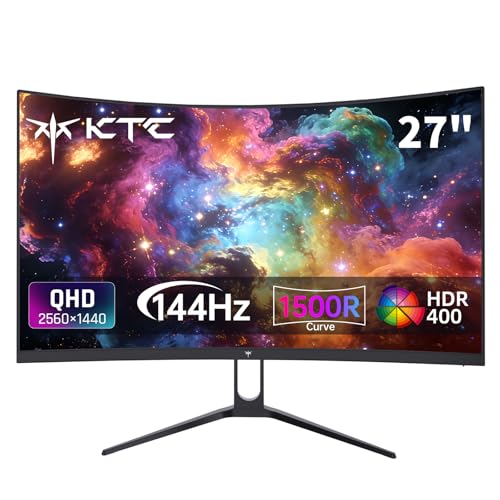
KTC H27S5C 27-Inch QHD 144Hz

ASUS ROG G700 (2025) Intel Core Ultra 7 265F RTX 5070 Desktop, 32GB, 1TB

YAWYORE Ryzen 7 5700X RTX 5060 Gaming PC, 32GB, 1TB
A Breakdown Of The Leading Choices
The ROG G700 brings more visual presence than a plain office tower, with a dual-glass enclosure, ROG Slash detailing, and Aura Sync lighting. The 58-liter chassis gives it room for a triple-slot graphics card, making the design more than decoration for people who expect to upgrade.
Core Ultra 7 265KF processing and an RTX 5070 form the stronger foundation compared with the component-based YAWYORE system. For a gaming room that can accommodate a substantial desktop, this looks like a polished all-in-one package, although its size may matter more than another feature.
Useful Touches
- The RTX 5070 provides the graphics foundation for high-detail games and demanding settings.
- Thirty-two gigabytes of DDR5 memory supports gaming, streaming, and background applications together.
- A quad-fan arrangement and 240mm liquid cooler provide a defined cooling approach.
- 2.5Gbps Ethernet, WiFi 6, and varied ports cover wired, wireless, and peripheral connections.
- Tool-less access simplifies component access, though the 58-liter enclosure remains substantial.
Points To Note
- The chassis needs more desk or floor space than a compact gaming tower.
- The 265KF processor relies on the RTX 5070 for display output because it lacks integrated graphics.
Feature Snapshot
Built With In Mind
This desktop suits gamers with room for a large chassis who value a strong GPU, fast storage, and a coordinated factory configuration.
Where Another Pick Shines
The YAWYORE Ryzen 7 5700X RTX 5060 Gaming PC, 32GB, 1TB may suit shoppers who prefer named motherboard and power-supply components over a stylized enclosure.
A 32-inch curved panel can change the feel of a gaming desk by placing more of the action directly in front of the player. The H32S17C combines that scale with a 165Hz refresh rate, meaning the display can present up to 165 frame updates per second when the connected graphics card allows it.
The practical distinction is its Full HD resolution. Compared with the 2560-by-1440 KTC models, the H32S17C uses fewer pixels, which may show more readily on a large display, but it can still suit fast shooters and multiplayer sessions where immediate motion matters more than fine detail.
What Pays Off
- The 32-inch size gives competitive games and entertainment a wide viewing area.
- A 165Hz refresh rate reduces the wait between frame updates compared with a standard 60Hz panel.
- The 1500R curve wraps the edges slightly around the field of view.
- A 1ms advertised response time targets minimal visual delay during rapid movement.
Small Caveats
- Full HD is less detailed than the QHD resolution offered by the other KTC displays.
- The large curved footprint needs a desk with enough width, and the 165Hz rate trails the 220Hz model.
Quick Facts
Made For
The H32S17C fits competitive gamers and casual players who value a large, curved screen more than QHD-level detail.
A Better Fit Elsewhere
The KTC H27T22C-3 27-Inch 220Hz may suit competitive players who prefer finer QHD detail and a higher refresh rate over a larger Full HD panel.
Rapid movement is where a high-refresh display earns its place, and this 27-inch KTC reaches 220Hz. That figure concerns frame updates per second, not the graphics card’s rendering capability, so the full rate still depends on the game, graphics settings, and connected system.
Unlike the larger H32S17C, this model uses QHD resolution, defined here as 2560 by 1440 pixels. The combination gives competitive players finer detail and a very high refresh rate, while built-in speakers add convenient audio for a compact gaming desk.
Everyday Advantages
- The 220Hz refresh rate is well suited to shooters, racing games, and other fast-moving genres.
- QHD resolution provides more visible detail than the 1920-by-1080 H32S17C.
- An advertised 1ms response time supports a quick transition between frames.
- Integrated speakers remove the need for extra desktop audio during casual sessions.
Possible Compromises
- Reaching 220Hz requires a capable graphics card and game settings that support the target rate.
- The 27-inch panel offers less desktop area than the 32-inch H32S17C.
Right Fit For
This model suits competitive players with a powerful PC who want a high-refresh QHD display for fast games and detailed desktop work.
Consider Something Else When
The KTC H27S5C 27-Inch QHD 144Hz may suit mixed-use setups that place more emphasis on a curved panel and HDR than maximum refresh rate.
The H27S5C lands between the 165Hz Full HD panel and the 220Hz QHD alternative. Its 2560-by-1440 resolution supplies useful detail for games, documents, and video editing, while the 144Hz refresh rate remains smooth for most fast-paced titles.
Its 1500R curve adds a more involved shape than a flat monitor, and HDR 400 supports a broader brightness range. For a mixed gaming and work station, that combination may be more useful than pushing the refresh rate beyond what everyday play requires.
Where It Delivers
- QHD resolution keeps desktop text and game environments reasonably crisp at 27 inches.
- The 144Hz rate provides fluid movement for a wide range of games.
- A 1500R curve brings the display edges closer to the viewing position.
- HDR 400 adds high-dynamic-range support for compatible content.
Less-Strong Areas
- The 144Hz refresh rate is lower than the H27T22C-3’s 220Hz figure.
- HDR 400 is an entry-level format, so its impact may be less dramatic than more capable HDR standards.
Who It Suits Best
This monitor fits gamers and remote workers who want a curved QHD panel for both entertainment and everyday productivity.
Look Elsewhere When
The KTC H27T22C-3 27-Inch 220Hz may suit tournament-minded players who prioritize the highest refresh rate over HDR support.
The second G700 configuration keeps the recognizable dual-glass ROG enclosure and the RTX 5070 while changing the processor from the 265KF to the 265F. That distinction matters for system planning, although the 265F still provides eight cores and sixteen threads for gaming and background tasks.
Compared with the YAWYORE system, this machine has a more integrated appearance and a newer Intel platform with DDR5 memory. The trade-off is that the G700’s 58-liter design and coordinated lighting are less minimalist than a conventional component-first tower.
Reasons It Performs
- The RTX 5070 provides ample graphics capability for high-detail games.
- Thirty-two gigabytes of DDR5 memory gives games and multitasking software room to operate together.
- A 1TB PCIe 4.0 NVMe SSD combines high storage capacity with a fast interface.
- Dual glass panels and Aura Sync lighting create a distinctive display for a gaming room.
Trade-Offs To Consider
- The 265F processor lacks integrated graphics, so troubleshooting display output depends on the RTX 5070.
- The large G700 enclosure requires more space than a compact micro-ATX system.
Built For
This G700 configuration suits gamers who want a polished full-size desktop with a strong discrete GPU and modern memory.
Reach For A Different Pick When
The YAWYORE Ryzen 7 5700X RTX 5060 Gaming PC, 32GB, 1TB may suit smaller-space setups that prioritize a compact motherboard and explicitly named components.
The YAWYORE desktop takes a direct approach to component selection. A Ryzen 7 5700X, MSI B550M-A PRO motherboard, RTX 5060, and 32GB of DDR4 memory provide a clear foundation for gamers who understand the parts inside a desktop.
Unlike the two G700 systems, this machine uses DDR4 rather than DDR5 and a micro-ATX motherboard. That can suit a compact installation, provided the chosen case accepts the board and power supply, while the Ryzen processor still handles gaming and several background tasks well.
Well-Handled Touches
- The eight-core, sixteen-thread Ryzen 7 5700X supports demanding games and multitasking.
- Thirty-two gigabytes of dual-channel DDR4 memory offers useful capacity for modern titles.
- The 1TB NVMe SSD provides fast storage for games and applications.
- A 650W 80 Plus Bronze power supply supplies a defined foundation for the listed components.
- ARGB fans add adjustable case lighting for a more personalized gaming setup.
Practical Considerations
- The RTX 5060 card may arrive from a different manufacturer, so its physical design and cooling package may vary.
- DDR4 provides less memory bandwidth than the DDR5 configuration in the G700 desktops.
- The MSI B550M-A PRO is a micro-ATX board, so case and power-supply compatibility deserve a fit check.
Core Details
Made For
This desktop suits component-aware gamers with a suitably sized case who value named internals and a straightforward AMD platform.
Another Choice May Suit
The ASUS ROG G700 (2025) Intel Core Ultra 7 265F RTX 5070 Desktop, 32GB, 1TB may suit gamers who favor DDR5, a larger chassis, and a more integrated visual design.
What Matters Most In A Budget Gaming Setup
Start With The GPU
The graphics card usually shapes the gaming experience more directly than the processor because it renders the images on screen. The RTX 5070 configurations provide a stronger foundation for high-detail games than the RTX 5060 system, while the different processor tiers still support background tasks. I would prioritize the GPU for play, then consider the processor for streaming, editing, and other demanding applications.
Resolution Changes The Display Choice
Full HD at 32 inches emphasizes physical size, while QHD at 27 inches provides more pixels in a smaller panel. The 220Hz KTC prioritizes competitive motion, the 165Hz KTC provides a larger view, and the 144Hz KTC adds HDR for mixed entertainment and work. I would match the display to the existing graphics card because a high refresh rate cannot exceed what the PC can render.
Memory And Storage Affect Daily Use
Thirty-two gigabytes of memory gives modern games and several background applications room to operate. Both DDR4 and DDR5 serve that capacity, but DDR5 carries greater bandwidth, while the micro-ATX YAWYORE platform may fit more easily into a smaller case. A 1TB NVMe SSD provides a useful game library, and PCIe 4.0 offers a faster storage path than older interfaces.
Check The Physical Fit
A capable desktop still needs room around it. The two G700 systems use 58-liter cases, which can be less convenient on a crowded desk than the compact motherboard used by YAWYORE. Monitor size and curvature also matter, so I would measure the desk before committing to a 32-inch curved panel.
Practical Lessons Before Buying
Mistakes Worth Dodging
The most common mistake is treating refresh rate as an isolated number. A 220Hz panel needs a capable graphics card, suitable game settings, and compatible software settings. Another error is choosing screen size before checking desk width, since a curved 32-inch display changes the footprint as well as the viewing experience.
Where The Extra Money Goes
Higher-tier systems commonly spend more on the graphics card, processor platform, memory, cooling, and enclosure. The G700 desktops emphasize the GPU, DDR5 memory, cooling, and case design, while the YAWYORE system puts more emphasis on the named component configuration. I would pay for a stronger GPU for gaming, but component choice may matter more to someone building around a compact case.
Frequently Asked Questions
Is a gaming computer under 500 better than a monitor upgrade?
A complete desktop offers more processing, memory, and storage capacity, while a monitor upgrade improves the visual presentation of an existing system. I would choose a desktop when the current PC struggles to run games, and prioritize a faster display when the hardware already maintains smooth frame rates.
Does a 220Hz monitor require a 220Hz graphics card?
No. A graphics card must render enough frames for the display, and the resulting frame rate may be lower than the monitor’s maximum. I would treat 220Hz as an upper limit and check the settings of each game before assuming that rate will appear.
What does QHD mean for gaming?
QHD is a 2560-by-1440 resolution, which provides more detail than Full HD’s 1920-by-1080 output. The KTC H27T22C-3 and KTC H27S5C use QHD, and that extra detail is particularly noticeable on a 27-inch panel.
Is DDR5 better than DDR4 for gaming?
DDR5 generally provides greater memory bandwidth, although real gaming results also depend on the processor, graphics card, and game. I would view the G700’s DDR5 as a more modern platform, while the YAWYORE’s 32GB of DDR4 remains a capable amount for many games and multitasking setups.
Should a compact gaming PC use a micro-ATX motherboard?
A micro-ATX motherboard can reduce the space needed for a desktop build, but the case must support the board and its power supply. I would check those dimensions before ordering, especially for a prebuilt system with a case that also needs room for cooling and airflow.
Final Verdict
The ASUS ROG G700 (2025) Intel Core Ultra 7 265KF RTX 5070 Desktop, 32GB, 1TB is the strongest all-around choice for shoppers who value graphics power and a polished full-size enclosure. The YAWYORE system suits component-focused planning, while the three KTC displays cover large-screen, high-refresh, and curved QHD priorities. The right decision comes down to whether the budget needs a whole computer or a better gaming display.
