
A gaming desktop should handle demanding games, background streaming, and everyday work without making the setup feel disposable. I built this shortlist around distinct needs, including compact hardware, high-refresh laptops, upgradeable desktops, and family-friendly systems. Several options also work as portable alternatives for people who game away from a permanent desk.
A Closer Look At The Lineup
LG gram 15-inch Copilot+ Laptop, Ryzen AI 7 350, 16GB, 1TB SSD, Black
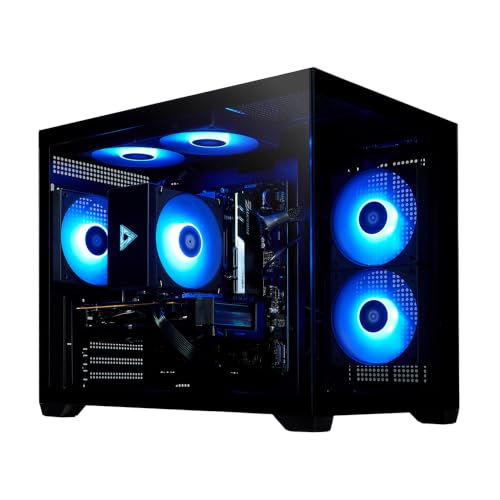
STORMCRAFT Sirius Gaming Desktop, Core i5-14400F, Arc B570 10GB

Acer Nitro V 16S RTX 5060

ASUS V16 Gaming Laptop, 16-inch 144Hz, Core 7 240H, RTX 5060, 32GB
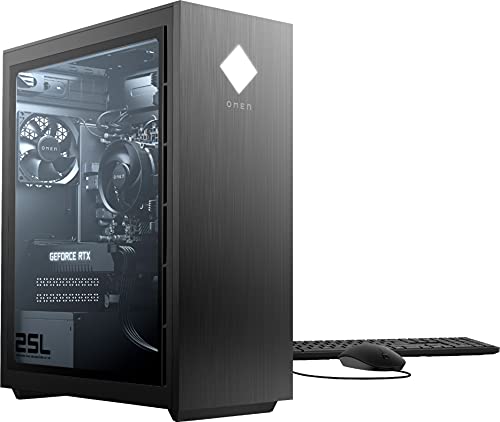
OMEN 25L Gaming Desktop, Core i7-10700F, RTX 2060, 16GB RAM, 512GB SSD

HP Pavilion Desktop, Core i5-9400, 12GB RAM, 1TB HDD, 256GB SSD
A Deeper Look At The Lineup
The LG gram is the lightweight alternative in this group, weighing 2.8 pounds and measuring about 0.7 inches thick. That portability suits commutes, school, and hotel rooms where carrying a desktop would be impractical. It is a laptop rather than a gaming desktop, so I see it as a mobile productivity option.
The Ryzen AI 7 350 processor, 16GB of memory, and 1TB SSD give it a sensible foundation for browsing, documents, creative applications, and multitasking. Compared with the Acer Nitro V 16S, it favors mobility over gaming hardware, making the two systems useful in very different settings.
What Stands Out
- The 2.8-pound chassis is easy to carry between classes, offices, and travel stops.
- A 1TB SSD provides useful room for applications and active work files.
- The 16GB memory configuration suits everyday multitasking.
- The thin profile makes it comfortable to use away from a fixed desk.
Things To Consider
- This is not a conventional gaming desktop, so its role in a gaming setup is limited.
- A permanent desk arrangement still requires separate display and input planning.
Quick Facts
Built With In Mind
This model benefits students and commuters who need capable everyday hardware in a highly portable form.
Another Choice May Suit
The STORMCRAFT Sirius Gaming Desktop suits people who need a dedicated 1440P gaming system at a permanent desk.
The STORMCRAFT Sirius is the most direct response to the desktop category here. Its Intel Core i5-14400F processor has 10 cores and 16 threads, while the Arc B570 contributes 10GB of GDDR6 graphics memory and support for 1440P gaming. That combination targets a dedicated desk with a capable monitor.
Colorful DDR4 memory and a 1TB NVMe SSD add practical personality and fast local storage. Unlike the LG gram, this machine remains in one place, and unlike the gaming laptops, it offers a more natural home for sustained desktop use and peripheral connections.
Notable Upsides
- The Arc B570’s 10GB of graphics memory supports the listed 1440P gaming focus.
- Ten processor cores and 16 threads help with games, streaming, and background applications.
- The NVMe SSD reduces waiting compared with a mechanical drive.
- RGB memory gives the interior a recognizable gaming appearance.
- The desktop format suits a permanent monitor, desk, and full-size peripheral setup.
Trade Offs
- Its 16GB memory is less generous than the ASUS V16’s 32GB configuration.
- Future memory upgrades depend on the motherboard’s available slots and supported capacity.
Technical Sheet
Made For
This desktop suits gamers with a 1440P monitor who want dedicated graphics and room for streaming alongside play.
Consider Something Else When
The ASUS V16 Gaming Laptop suits people who value a specified 1440Hz display and need to take gaming between locations.
The Acer Nitro V 16S brings dedicated gaming hardware into a slim laptop format. Its Ryzen AI 7 350 processor and RTX 5060 graphics give it a clearer gaming focus than the LG gram, particularly for people who regularly play away from a permanent desk.
The design feels more restrained than many overtly aggressive gaming systems. Compared with the STORMCRAFT Sirius, the Acer trades the fixed desktop setup for portability; compared with the ASUS V16, it emphasizes the slim chassis rather than a specified high-refresh display.
Everyday Advantages
- The RTX 5060 provides dedicated gaming graphics within a portable body.
- The slim profile makes it easier to carry than a full desktop tower.
- The Ryzen AI 7 350 processor handles everyday work alongside gaming.
- The understated styling works in school, travel, or a shared space.
Points To Note
- A laptop chassis is less convenient for component access than the STORMCRAFT desktop.
- A permanent multi-screen arrangement calls for extra display planning.
Right Fit For
This model suits students, travelers, and commuters who want RTX 5060 gaming without carrying a desktop tower.
Where A Sibling Pick Shines
The STORMCRAFT Sirius Gaming Desktop is the better fit for a fixed 1440P station where portability is secondary.
The ASUS V16 makes the strongest display case in this group. Its 16-inch WUXGA panel uses a 1920 by 1200 resolution with a 144Hz refresh rate, meaning the screen can present more frames per second than a conventional 60Hz panel. Fast movement and competitive games benefit from that distinction.
The RTX 5060, Intel Core 7 240H processor, 32GB memory, and 1TB storage form a capable gaming and creation package. The Acer Nitro V 16S also carries an RTX 5060, but the ASUS adds a clearly specified high-refresh screen and twice the listed memory.
Useful Touches
- The 144Hz refresh rate keeps motion smooth during fast-paced play.
- The 16:10 screen offers more vertical space than a standard 16:9 laptop display.
- Thirty-two gigabytes of memory gives games and creative tools more room.
- A 1TB drive provides useful capacity without requiring immediate storage planning.
- The RTX 5060 supports a focused gaming configuration.
Soft Spots
- The 1920 by 1200 resolution is less detailed than the 1440P target of the STORMCRAFT desktop.
- A 300-nit sustained brightness may appear modest in a brightly lit room.
Feature Snapshot
Best Suited To
This laptop suits competitive players who value smooth motion, a large screen, and generous memory in a portable design.
Look Elsewhere When
The STORMCRAFT Sirius Gaming Desktop better serves someone committed to a fixed desk and a 1440P monitor.
The OMEN 25L is an older desktop platform with a practical reason to remain interesting: it separates fast SSD storage from a larger mechanical drive. Games and applications can live on the 512GB SSD, while the 1TB hard drive provides room for a large media library.
The 10th-generation Core i7-10700F and RTX 2060 reflect the system’s 2020 design, while OMEN Command Center adds centralized control. Compared with the newer STORMCRAFT Sirius, this machine offers a more established upgrade-oriented foundation but a less modern component mix.
What Earns Its Place
- The RTX 2060 provides a dedicated option for older and midrange gaming libraries.
- Splitting storage across SSD and hard drive balances speed and capacity.
- The desktop format supports internal component upgrades.
- OMEN Command Center provides a dedicated management interface.
- Windows 10 Home covers the core needs of a traditional gaming PC.
Potential Drawbacks
- The 512GB SSD is smaller than the STORMCRAFT Sirius’s 1TB NVMe drive.
- The RTX 2060 represents an older graphics generation than the newer alternatives here.
- A modern game library can fill the SSD, making storage planning important.
Who Will Love This
This desktop suits a hands-on enthusiast who enjoys improving an older OMEN system and already has compatible components.
Swap It Out When
The STORMCRAFT Sirius Gaming Desktop suits someone starting with newer parts and a direct 1440P configuration.
The HP Pavilion Desktop is a general-purpose family computer rather than a focused gaming build. Its six-core Intel Core i5-9400 operates at 2.9GHz, while the combination of a 256GB SSD and 1TB hard drive gives quick storage for applications alongside inexpensive capacity for documents and media.
Natural Silver gives it a more neutral appearance than the RGB-focused STORMCRAFT system, and 12GB of memory is sufficient for many household tasks. Compared with the OMEN 25L, its gaming identity is less pronounced, while its two-drive approach serves general storage needs well.
A Strong Showing
- The SSD keeps frequently used applications in a faster storage tier.
- The hard drive provides a large second volume for less demanding files.
- Six CPU cores support mainstream computing and light background tasks.
- The neutral finish fits comfortably into a home office or shared room.
Small Caveats
- Twelve gigabytes of memory can feel limited during heavy multitasking.
- The mechanical hard drive is slower than the NVMe storage used in the STORMCRAFT desktop.
- This general-purpose configuration is less focused on dedicated gaming than the OMEN 25L.
Essential Details
The Right Fit
This desktop suits households needing an affordable general-purpose computer for school, browsing, documents, and media storage.
Reach For A Different Pick When
The OMEN 25L Gaming Desktop suits someone who places dedicated gaming hardware and internal upgrade access ahead of everyday value.
What Matters Before Building A Gaming PC
Start With The Setup
A permanent desk favors the STORMCRAFT Sirius and OMEN 25L because both remain stationary and can anchor a multi-peripheral setup. Portable gaming points toward the Acer Nitro V 16S or ASUS V16. The LG gram serves light mobile productivity more directly, so its place in a gaming system depends on how often the hardware travels.
Match The Graphics To The Display
Graphics capability and monitor resolution need to work together. The STORMCRAFT configuration is designed around 1440P gaming, while the ASUS V16 pairs its RTX 5060 with a specified 144Hz display. For competitive games, refresh rate matters because it controls how many frames the screen can present per second.
Give Games Room To Load
Fast SSD storage keeps game launches and application loading responsive. The STORMCRAFT’s 1TB NVMe drive offers the largest solid-state allocation among the desktop-focused choices here. The OMEN combines a smaller SSD with a mechanical drive, while the HP Pavilion uses the same basic split but with less capacity in its faster drive.
Check Memory For More Than Games
Games often share the processor and memory with browsers, voice chat, recording software, and launchers. Sixteen gigabytes covers the basics, while the ASUS V16’s 32GB gives heavy multitasking more breathing room. The HP Pavilion’s 12GB is the leanest configuration here and deserves extra thought for busy family use.
Avoiding Common Gaming PC Traps
Mistakes Worth Dodging
A high refresh rate does not automatically create a better system, so I look at the processor, graphics, memory, and storage together. Oversized cases and unnecessary lighting can also distract from practical needs such as desk space and monitor support.
What The Higher Tier Buys
More money can provide a newer graphics card, additional memory, larger SSD capacity, or a faster processor. Those upgrades matter most when games are constrained by frame delivery, storage capacity, or multitasking rather than basic display quality.
Frequently Asked Questions For Gaming Desktop Pc
Is A Gaming Desktop Better Than A Gaming Laptop?
A desktop usually offers more room for internal components and a permanent setup, while a laptop provides portability. The STORMCRAFT Sirius and OMEN 25L favor desktop flexibility, whereas the ASUS V16 and Acer Nitro V 16S suit people who regularly game away from home.
What Graphics Memory Should I Look For?
More graphics memory can help with higher resolutions and demanding textures, but the GPU model and monitor also matter. The STORMCRAFT’s Arc B570 includes 10GB of GDDR6 memory and targets 1440P gaming.
How Much RAM Does A Gaming PC Need?
Sixteen gigabytes is a practical starting point for many games and everyday multitasking. The ASUS V16’s 32GB gives demanding applications and background tools more room, while the HP Pavilion’s 12GB configuration is better suited to lighter workloads.
Is An SSD Necessary For Gaming?
An SSD provides much faster application and file access than a mechanical hard drive. The OMEN 25L and HP Pavilion combine SSDs with hard drives, allowing fast storage for active programs and inexpensive capacity for larger files.
Should I Buy A Desktop Or Build My Own?
A ready-made desktop offers a defined configuration with less assembly work. Building my own provides greater control over each component, but it also requires compatible parts, technical knowledge, and careful assembly.
Final Verdict
The STORMCRAFT Sirius is my strongest starting point for a dedicated 1440P desk, while the ASUS V16 stands out for portable high-refresh gaming. The Acer Nitro V 16S suits travel, the OMEN 25L appeals to hands-on upgraders, and the LG gram and HP Pavilion make more sense as lightweight productivity and family-computing alternatives. The right choice comes down to where the machine lives and how it will be used.
