
A gaming desk should not require a tower, monitor, keyboard, and mouse to crowd out everything else. I looked closely at six compact and full-size options for gamers who want capable hardware, practical connectivity, and a setup that still leaves room for daily work. The strongest configuration for serious gaming pairs a Ryzen 5 5500 processor with an RTX 3060 Ti and 8GB of dedicated graphics memory. Smaller systems work well for light gaming, streaming, and multitasking, while all-in-one designs trade upgrade room for a cleaner desk.
The Essentials At A Glance

Acer Aspire 8L Desktop, 8GB DDR5, 512GB PCIe SSD, Wi-Fi 6

Olialia RTX 3060 Ti Ryzen 5 5500

HP Pavilion Gaming Desktop TG01-1020, GTX 1650, i5-10400F, 8GB RAM, 256GB SSD
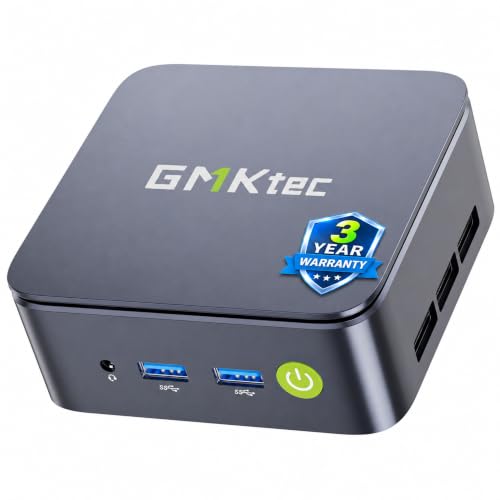
GMKtec G10 Mini PC, Ryzen 5 3500U, 16GB RAM, 512GB SSD, Triple 4K, 2.5GbE

HP Pro Tower 290 G9, 16GB RAM, 256GB PCIe SSD, 1TB HDD, Win 11 Pro, Dual 4K

HP OmniStudio 27-cw0102 All-in-One, Ryzen AI 7 445, 16GB RAM, 512GB SSD
A Breakdown Of The Leading Choices
The Acer Aspire packs an Intel N150 processor, 8GB of DDR5 memory, and a 512GB PCIe solid-state drive into an 8-liter chassis. That small footprint suits a shared study desk, a dorm room, or a secondary gaming PC where space matters more than dedicated graphics. Intel graphics handle everyday tasks and lighter games, making this more of a compact all-rounder than a high-settings gaming machine.
Unlike the larger gaming towers later in this roundup, the Aspire includes a wired keyboard and mouse and connects through Wi-Fi 6, Bluetooth 5.2, HDMI, and DisplayPort. Its front USB Type-C port is useful for compatible accessories. For most casual gaming and home-office combinations, that makes the Acer a practical desktop, although demanding 3D titles may expose the limits of integrated graphics.
A Few Strong Suits
- The 8-liter body preserves a useful amount of desk and floor space.
- DDR5 memory and PCIe storage provide a responsive foundation for browsing, office work, and lighter games.
- Wi-Fi 6, Bluetooth 5.2, Ethernet, and dual display outputs offer practical connection choices.
- The included keyboard and mouse make the initial setup less demanding.
Practical Considerations
- Integrated Intel graphics make this a limited choice for graphically demanding games.
- The compact shell may constrain future component upgrades, so storage and memory plans deserve an early check.
Key Specs
Made For
Students, casual gamers, and remote workers who value a small footprint and straightforward everyday computing.
A Better Fit Elsewhere
Serious 1080p gamers should consider the Olialia RTX 3060 Ti Ryzen 5 5500 for its dedicated 8GB graphics memory.
For a straightforward gaming desktop, the Olialia combines a Ryzen 5 5500 processor with the GeForce RTX 3060 Ti and 8GB of GDDR6 graphics memory. That discrete GPU is the decisive feature here, since dedicated graphics memory gives demanding games and creative applications more room to work than integrated graphics. I would treat 1080p as its natural high-refresh target rather than promising identical results across every title and setting.
Compared with the Acer Aspire, this machine makes a much more convincing case for regular gaming. Sixteen gigabytes of DDR4 memory also supports a game, streaming software, and several background applications at once, while a 512GB PCIe SSD provides fast loading and enough space for a respectable library. Dual HDMI and DisplayPort outputs also make a two-monitor arrangement practical.
Practical Advantages
- The RTX 3060 Ti provides dedicated graphics memory for demanding games and GPU-accelerated work.
- Sixteen gigabytes of DDR4 RAM gives streaming and multitasking more headroom than the Acer configuration.
- Wi-Fi 6, Bluetooth, Gigabit Ethernet, and legacy PS/2 connections cover modern and older peripherals.
- The tempered-glass case makes the internal components visible and provides room for cable management.
Where It May Fall Short
- The Ryzen 5 5500 is an older platform, so future processor upgrades are less straightforward than starting with a newer generation.
- The 512GB drive can fill quickly once several large games and creative projects share the drive.
Feature Snapshot
Built With In Mind
Gamers and streamers who want dedicated graphics without assembling a custom system will find the most balanced fit here.
Consider Something Else When
Minimal desk space matters more than gaming capability, making the GMKtec G10 Mini PC the more practical option.
The HP Pavilion TG01-1020 brings a recognizable gaming tower format to a more restrained configuration. Its GTX 1650 has dedicated graphics, which gives it an edge over the integrated Acer Aspire, but the 4GB graphics memory and older processor make it better suited to moderate settings than demanding 1080p releases. The included keyboard and mouse also reduce the number of accessories required for a first setup.
That older platform changes the comparison with the Olialia considerably. The Ryzen 5 5500 and RTX 3060 Ti offer more processing and graphics capacity, while the Pavilion’s compact tower still appeals to anyone who wants a conventional case and an expandable interior. OMEN Command Center support adds a useful way to view system metrics and manage the chassis lighting.
Everyday Perks
- A compact tower gives dedicated gaming hardware a smaller footprint than many full-size desktops.
- Windows 11 and the supplied mouse and keyboard create a straightforward starting point.
- The expandable interior offers more room for component changes than the compact Acer system.
- OMEN Command Center centralizes performance monitoring and lighting controls.
Less-Strong Areas
- Eight gigabytes of memory and a 256GB SSD make this a lean configuration for large game libraries.
- The 2020 platform limits its appeal compared with newer Ryzen-based systems in this roundup.
Who It Suits Best
Casual gamers and families seeking a recognizable HP tower with dedicated graphics, bundled accessories, and room for upgrades.
Look Elsewhere When
Players who regularly launch demanding new releases benefit more from the Olialia RTX 3060 Ti Ryzen 5 5500 and its 8GB of GDDR6 memory.
The GMKtec G10 approaches desktop computing from the opposite direction of the Pavilion. Its Ryzen 5 3500U processor, Radeon Vega 8 graphics, 16GB of memory, and 512GB SSD fit into a mini PC chassis that can sit beside a monitor or behind one. That makes it appealing for a home media center, office, or compact gaming setup where several large games are not the main priority.
Unlike the Acer Aspire, the G10 offers faster 2.5GbE Ethernet, which carries more data per second than standard gigabit Ethernet when the network and connected equipment support it. Triple-display output, HDMI 2.1, DisplayPort, USB-C, Wi-Fi, and Bluetooth create several connection routes. For lighter games, the trade-off is integrated graphics rather than the dedicated memory found in the Olialia and HP Pavilion.
What Helps Most
- The compact chassis makes the system easy to position around a multi-monitor desk.
- Sixteen gigabytes of RAM supports office applications, media, and several browser tasks at once.
- Triple 4K display support is useful for a trading, editing, or productivity workstation.
- The 2.5GbE port offers a faster wired connection than ordinary gigabit Ethernet.
Small Caveats
- Radeon Vega 8 graphics are better suited to lighter games than modern titles with demanding texture settings.
- The mini-PC format offers less internal expansion room than a standard tower.
Quick Facts
Right Fit For
Media enthusiasts and productivity-focused gamers who value a tiny footprint, multiple displays, and fast wired networking.
Another Choice May Suit
Dedicated gaming performance fits the Olialia RTX 3060 Ti Ryzen 5 5500 better than this mini PC.
The HP Pro Tower 290 G9 is built more like a work computer than a dedicated gaming rig. Its 12th-generation Intel Core i3-12100 has four cores and eight threads, while 16GB of RAM handles office work, remote meetings, browsing, and background applications with room to spare. Windows 11 Pro adds the management and security features that make sense for a shared workplace or home office.
Storage is the more unusual strength. A 256GB PCIe SSD provides fast access to Windows and active applications, while the 1TB hard drive holds documents, media, and less frequently accessed files without crowding the faster drive. Compared with the Olialia, however, this tower is optimized for productivity rather than graphically demanding games, even though HDMI and VGA support two-monitor arrangements up to 4K.
Points In Its Favor
- Windows 11 Pro provides useful identity, management, and security features for work environments.
- The combination of a PCIe SSD and hard drive separates fast system access from high-capacity storage.
- HDMI and VGA outputs support two displays, including older projectors and monitors.
- The DVD drive adds a useful option for physical media in offices and older setups.
Trade-Offs To Consider
- The stated configuration is better aligned with productivity than demanding gaming.
- The hard drive is useful for capacity but slower than the system SSD, so active files benefit from the faster drive.
Made For
Office-focused gamers and students who need Windows 11 Pro, dual displays, and separate system and storage drives.
Reach For A Different Pick When
The Olialia RTX 3060 Ti Ryzen 5 5500 serves dedicated 1080p gaming better than this productivity-focused tower.
The HP OmniStudio 27-cw0102 is the cleanest desk option in this group because the computer and 27-inch full-HD display arrive as one unit. Its Ryzen AI 7 445 processor, Radeon 840M integrated graphics, 16GB of RAM, and 512GB SSD suit everyday computing, media, and casual gaming. For a home office or dorm room, replacing a separate tower and monitor with one all-in-one system can save both space and visual clutter.
Unlike the GMKtec G10, which can drive a multi-display arrangement, the OmniStudio centers the experience around its built-in screen. That screen makes it easier to move between work and entertainment, while the integrated Radeon 840M graphics avoid the separate graphics card found in the Olialia. For demanding games, though, the dedicated RTX 3060 Ti remains the stronger choice, and the all-in-one housing also limits internal upgrade access.
What Works In Its Favor
- The integrated 27-inch display removes the need for a separate monitor and associated desk space.
- Sixteen gigabytes of memory gives office applications and entertainment software useful headroom.
- The 512GB SSD provides fast storage for the operating system, games, and media.
- The Ryzen AI platform and Radeon 840M graphics suit general productivity and lighter gaming.
Possible Compromises
- Integrated graphics place a ceiling on demanding 3D gaming compared with the RTX 3060 Ti configuration.
- The sealed-looking all-in-one format is less convenient for internal component upgrades than a conventional tower.
Core Details
Who Will Love This
Minimalist workspaces, students, and casual gamers who prefer one tidy all-in-one computer over a separate desktop tower and monitor.
Swap It Out When
Players prioritizing demanding 1080p graphics and future component flexibility should consider the Olialia RTX 3060 Ti Ryzen 5 5500.
What Matters Before Setting The Budget
GPU Memory Drives Gaming Choice
Graphics memory is dedicated working space for the GPU, and it matters most in games with detailed environments, high-resolution textures, and heavy visual effects. The Olialia RTX 3060 Ti provides 8GB of GDDR6 memory, while the HP Pavilion uses a GTX 1650 with 4GB. Integrated-graphics systems are better reserved for lighter games, everyday tasks, and media.
Memory And Storage Shape Daily Use
A larger memory allocation helps when games, browsers, voice chat, and creative software run together. The 16GB configurations in the Olialia, GMKtec, HP Pro Tower, and OmniStudio offer more breathing room than the 8GB Acer and Pavilion systems. Storage needs also differ: a single SSD keeps things simple, while the HP Pro Tower separates fast system files from a roomier hard drive.
Display Connections Matter Before The Tower Arrives
HDMI and DisplayPort cover most modern gaming monitors, but older equipment may require VGA. The HP Pro Tower supports HDMI and VGA, the Acer includes HDMI and DisplayPort, and the GMKtec adds USB-C with three-display support. I also check the monitor’s resolution and refresh target before assuming a graphics card will deliver the intended experience.
Compact Cases Carry Real Limits
A smaller chassis can free significant desk space, but component access and cooling room may be limited. The GMKtec G10 works well as a media and productivity system, while the Acer offers a similar compact approach for routine computing. Dedicated gaming typically needs more graphics hardware, making a full-size tower such as the Olialia or HP Pavilion a more practical gaming choice.
Key Lessons Before Finalizing A Desktop
Mistakes Worth Dodging
A dedicated GPU matters more than a flashy case, and storage capacity deserves attention before games are installed. I would also check every display connection and avoid expecting a compact mini PC to match a full gaming tower.
What Separates Premium From Basic
Higher-tier systems add graphics memory, stronger processing, and larger memory allocations. The extra hardware is worthwhile for demanding games, streaming, and content creation, while basic models suit lighter titles and mixed office use.
Frequently Asked Questions
Which is the best gaming desktop under 1000 dollars for 1080p gaming?
The Olialia RTX 3060 Ti Ryzen 5 5500 is the strongest fit because it combines an RTX 3060 Ti with 8GB of GDDR6 memory and 16GB of system RAM. Actual settings still depend on the game, monitor, and background applications.
Can a mini PC handle gaming?
A mini PC can handle lighter games, and the GMKtec G10 is suited to casual titles, media, and general computing. Dedicated graphics systems offer a better fit for demanding 3D games and higher visual settings.
Is 16GB of RAM enough for gaming?
Sixteen gigabytes is a practical amount for modern games, streaming software, and several background applications. The 8GB systems remain usable, but they offer less room for demanding games and multitasking.
Does an SSD matter more than a graphics card?
A fast SSD makes a noticeable difference in system and game loading times, while the graphics card directly affects gaming performance. The better balance depends on how often the system is used and how demanding the games are.
Should I choose a tower or an all-in-one desktop?
A tower offers more internal expansion room and usually stronger gaming options. An all-in-one such as the HP OmniStudio creates a cleaner desk and includes its display, making it more convenient for casual gaming and everyday work.
Final Thoughts
The Olialia RTX 3060 Ti Ryzen 5 5500 stands out for dedicated 1080p gaming, while the HP Pavilion offers a more modest tower design. Compact and tidy setups have credible alternatives in the GMKtec G10 and HP OmniStudio, and the HP Pro Tower 290 G9 serves mixed work and gaming needs. The right choice comes down to graphics demand, desk space, and how much room I want for future changes.
