
A prebuilt gaming desktop should make setup easier without locking you into an underpowered machine. The difficult part is balancing graphics memory, processor capability, storage, cooling, and connectivity without paying for components you will never use. I evaluated six systems for 1080p and 1440p gaming, streaming, editing, and mixed desktop work, with special attention to how each configuration handles a busy home office or shared living space. The best fit depends less on the longest specification list than on the games, monitor, and workloads you actually plan to run.
A Snapshot Of The Selections

Olialia RTX 3060 Ti Gaming PC

Olialia Ryzen 7 5700X RTX 3060 Ti Desktop

Olialia RTX 3060 Ti Ryzen 7 PC

The Horizon Dragon Core i9 RTX 5070 Gaming PC

ZYNEEX Ryzen 5 5500 RTX 3050 Gaming PC
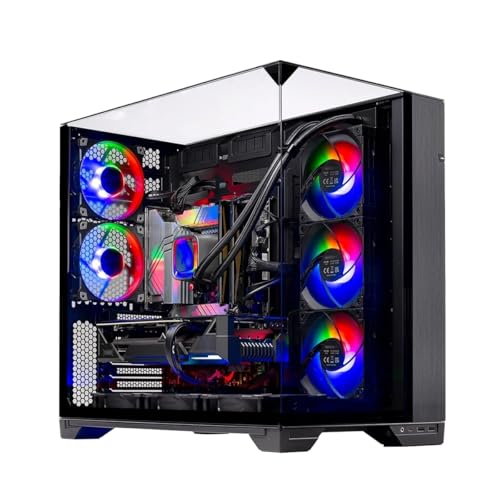
Skytech O11 Vision Ryzen 7 7700X RTX 5070 PC
Meet The Standout Selections
The Olialia RTX 3060 Ti Gaming PC puts a capable 1440p graphics card into a compact mid-tower with a Ryzen 5 5500, 16GB of memory, and a 512GB SSD. That combination suits a player moving beyond 1080p, especially with a monitor suited to the RTX 3060 Ti rather than a high-refresh 4K display.
DLSS, an upscaling technology that renders at a lower internal resolution and increases output resolution, gives supported games more flexibility. The dual tempered-glass panels, six adjustable RGB fans, dust filters, and an RGB CPU cooler also make this an appealing desk centerpiece for a colorful gaming room.
What Makes Sense
- The RTX 3060 Ti offers a strong foundation for 1440p gaming.
- The six-core, 12-thread Ryzen 5 5500 reaches 4.2GHz for mainstream games and background applications.
- Dual tempered-glass panels reveal the internals without hiding them behind a solid side panel.
- Top USB ports, HDMI, DisplayPort, and Ethernet support several practical desk arrangements.
- Windows 11 is already installed, reducing the initial setup.
Things To Consider
- The 512GB SSD may become cramped after several large games and creative files.
- The Ryzen 5 5500 has fewer cores than the Ryzen 7 configurations, which matters more in heavy editing and streaming.
- Display cables connect to the lower graphics-card ports, a detail worth checking before arranging the desk.
Key Specs
Who It Suits Best
This system best suits 1440p players who want a capable prebuilt and can manage a modest game library.
Consider Something Else When
Streamers and editors may prefer the Olialia Ryzen 7 5700X RTX 3060 Ti Desktop for its additional memory and storage.
This Olialia desktop keeps the RTX 3060 Ti found in the first selection, but surrounds it with an eight-core Ryzen 7 5700X, 64GB of DDR4 memory, and a 2TB NVMe SSD. That extra capacity makes more sense in a busy home office where a game, Discord, browser windows, and editing software may all stay open.
Wi-Fi 6, Bluetooth, front USB and audio connections, and a tempered-glass case broaden its usefulness beyond the desk. The RTX 3060 Ti carries 8GB of GDDR6 memory, while the Ryzen 7 gives the processor more room for parallel work than the Ryzen 5 model.
Everyday Advantages
- 64GB of RAM comfortably supports heavy multitasking and large project files.
- The 2TB NVMe SSD provides fast loading and useful room for games, media, and backups.
- Wi-Fi 6 and Bluetooth simplify wireless peripheral connections.
- The 600W 80 PLUS Bronze-rated power supply adds practical efficiency and headroom for this configuration.
- HDMI and DisplayPort connections support multi-monitor arrangements.
Practical Considerations
- 64GB of memory exceeds the needs of many pure gaming setups, so budget-conscious shoppers should assess the full configuration cost.
- The power supply has less expansion headroom than larger wattage units on higher-end systems.
- Front and rear ports should be compared with the placement of hubs and legacy PS/2 peripherals.
Technical Sheet
Made For
It fits streamers, editors, and power users who need generous memory alongside a capable gaming GPU.
Another Choice May Suit
The Skytech O11 Vision Ryzen 7 7700X RTX 5070 PC offers a newer platform for higher-end gaming and editing.
The middle ground here is convincing: the Olialia RTX 3060 Ti Ryzen 7 PC retains the 1440p-focused RTX 3060 Ti while using the eight-core Ryzen 7 5700X. Compared with the first Olialia system, it adds two processor cores and doubles storage to 1TB without moving into the much larger memory configuration.
Its 32MB of processor cache provides more headroom for demanding games than smaller-cache Ryzen 7 alternatives, a useful detail for a system intended to alternate between gaming and ordinary computer work. The case also carries six adjustable RGB fans, an RGB CPU cooler, tempered glass, and dust filters.
Good Reasons To Consider
- The RTX 3060 Ti and Ryzen 7 5700X form a balanced 1440p gaming combination.
- A 1TB NVMe SSD leaves more room for a larger game library than the 512GB model.
- The 32MB processor cache supports smoother performance in cache-heavy titles.
- The dual-chamber case separates airflow from the visible component area.
Small Caveats
- 16GB of RAM is less generous than the 64GB available in the larger Olialia configuration.
- The 1TB SSD still requires selective game management once the library grows.
- RGB lighting adds visual appeal but contributes nothing to gaming performance.
The Right Fit
This is a sensible match for 1440p players who also browse, stream, and edit in the same session.
Where A Sibling Pick Shines
The ZYNEEX Ryzen 5 5500 RTX 3050 Gaming PC may suit players focused on 1080p gaming and simpler everyday tasks.
The Horizon Dragon Core i9 RTX 5070 Gaming PC moves into a more advanced class with an unlocked Core i9, an RTX 5070 OC carrying 12GB of graphics memory, and 64GB of RAM. It makes the most sense for someone who games and creates substantial media on the same machine rather than simply needing a PC for one title.
Storage is unusually generous: a 1TB NVMe SSD is paired with a 4TB 7200RPM hard drive, creating a sensible division between fast system files and bulk media. The 360mm AIO liquid cooler, Windows 11 Pro, and VR support add further appeal for a dedicated setup.
Real-World Strengths
- The RTX 5070 OC provides 12GB of VRAM for demanding games and GPU-assisted creative work.
- 64GB of RAM supports large editing timelines and numerous background applications.
- A 360mm AIO liquid cooler gives the processor more thermal headroom than a basic boxed cooler.
- The combination of NVMe and hard-drive storage balances speed with capacity.
Where It May Fall Short
- The premium component mix may exceed the needs of a focused 1080p gaming setup.
- Its large cooling and storage hardware calls for adequate desk and floor space.
- The 5.4GHz figure represents the stated upper speed rather than a constant operating clock.
Feature Snapshot
Built With In Mind
It suits dedicated gaming rooms and creators managing large files, media libraries, and demanding applications.
Reach For A Different Pick When
The Olialia RTX 3060 Ti Ryzen 7 PC offers a more modest path for 1440p gaming without the premium component mix.
The ZYNEEX Ryzen 5 5500 RTX 3050 Gaming PC is the most straightforward starting point here. Its Ryzen 5 5500 has six cores and 12 threads, while the RTX 3050 carries 6GB of GDDR6 graphics memory for 1080p gaming, ray tracing, and lighter creative work.
For a first gaming room, the included 1TB NVMe SSD is a useful balance of speed and capacity, especially since it uses nonvolatile memory, which stores data without continuous power. Wi-Fi and ARGB air cooling keep the setup convenient and visually coordinated, though the graphics card is the main limitation for higher resolutions.
A Few Strong Suits
- The RTX 3050 6GB provides a practical starting point for 1080p games.
- 16GB of DDR4 memory at 3200MHz handles everyday multitasking.
- The 1TB NVMe SSD provides fast startup and room for several large games.
- Wi-Fi avoids a wired connection for routine browsing and online play.
Less Ideal Details
- The RTX 3050 is less suitable for demanding 1440p workloads than the RTX 3060 Ti alternatives.
- Six gigabytes of graphics memory can become restrictive in texture-heavy games.
- Air cooling keeps the design straightforward, but the RTX 3060 Ti systems offer more graphics capability.
Who Should Grab It
This configuration suits newcomers playing at 1080p and students handling schoolwork on the same machine.
A Better Fit Elsewhere
The Olialia RTX 3060 Ti Ryzen 7 PC is the stronger choice for games that benefit from additional graphics memory and 1440p output.
The Skytech O11 Vision Ryzen 7 7700X RTX 5070 PC combines a current Ryzen 7 processor, RTX 5070 graphics, and DDR5 memory in a transparent case designed for a polished gaming setup. Compared with The Horizon Dragon Core i9 RTX 5070 Gaming PC, it uses an X670 motherboard and 32GB of DDR5 rather than 64GB of DDR4.
The Ryzen 7 7700X runs at 4.5GHz with a 5.4GHz boost speed, giving demanding games and applications plenty of processor headroom. A 360mm ARGB AIO liquid cooler supports sustained performance, while the 850W Gold ATX 3 power supply offers substantial capacity for the graphics card and other components.
What Pays Off
- The Ryzen 7 7700X provides eight cores for gaming, streaming, and editing.
- The RTX 5070 has 12GB of GDDR7 memory for modern graphics workloads.
- DDR5 memory and an X670 board create a newer platform for compatible upgrades.
- The 850W power supply gives serious expansion headroom.
- The O11 Vision case makes the coordinated components a central part of the room.
Trade-Offs To Consider
- The 32GB memory allocation is less generous for unusually large editing projects.
- The large case and 360mm cooler need careful placement near a wall.
- The 1TB NVMe SSD provides less storage than the 5TB configuration from The Horizon system.
Core Details
Whose Shelf It Belongs On
It fits a polished 1440p or 4K gaming setup where modern platform features and visual design carry equal weight.
Not Your Match When
The The Horizon Dragon Core i9 RTX 5070 Gaming PC offers more storage for creators who keep extensive media archives.
Start With The Games, Resolution, and Workload
A 1080p display changes the equation substantially. The RTX 3050 6GB in the ZYNEEX system can be sensible for mainstream 1080p gaming, while the RTX 3060 Ti models provide more headroom for 1440p output and demanding settings. Matching the GPU to the monitor prevents spending on capability the screen cannot show.
DLSS can improve usable frame rates in supported games by upscaling a lower-resolution image, but it does not change the fundamentals of monitor resolution or game settings. For competitive play, refresh rate and input response may influence the setup more than extra storage or decorative lighting.
Treat Memory and Storage Separately
RAM supports active applications, while SSD capacity determines how many games and files fit without constant cleanup. The 16GB Olialia configuration suits lighter multitasking, whereas 64GB gives editors and streamers more room to keep demanding software open.
An NVMe SSD is faster than a mechanical hard drive because it stores data electronically without moving parts. The Horizon system separates 1TB of NVMe storage from a 4TB hard drive, a sensible arrangement when fast project access and large media archives matter equally.
Check the Parts as One System
A modern GPU still depends on adequate processor capability, memory, cooling, and power. The RTX 5070 systems benefit from the stronger processors and generous power supplies listed in their configurations, while the RTX 3060 Ti options use more modest components.
Ports and wireless connections also deserve attention. Wi-Fi 6 can handle a busy household more effectively than older wireless standards, but wired Ethernet remains useful for online gaming. Display outputs, front USB access, and case dimensions should be checked against the planned desk and monitor arrangement.
Leave Room for Future Use
Extra memory and storage provide flexibility, although unused capacity adds little to a simple gaming session. A creator running large video projects may value 64GB of RAM, while a player with a modest library can prioritize the GPU and spend less on excess capacity.
Upgrades also depend on the motherboard, power supply, and case openings. A larger power supply offers more room for high-power graphics, while a compact chassis may restrict cooling or cable routing. I would keep the planned monitor resolution and most demanding game at the center of the decision.
Mistakes Worth Dodging
Chasing a long component list can hide an unbalanced system. A powerful graphics card paired with limited memory or an undersized power supply creates a less convincing setup than the headline GPU suggests. Confirm the processor, memory, storage, and power requirements together.
Another common mistake is buying beyond the display’s capabilities. A high-end GPU does not make a basic 1080p monitor more detailed, and added storage has no effect on frame rates. Matching the system to the monitor and games avoids paying for unused capability.
Where The Extra Money Goes
A higher-tier system may include a faster processor, more graphics memory, newer platform components, stronger cooling, or a larger power supply. Those additions help with demanding games, editing, future expansion, or a polished setup rather than ordinary desktop tasks.
The premium is worthwhile when the current hardware limits a specific workload. It becomes unnecessary when the main goal remains light 1080p gaming and the lower configuration already covers the required games and applications.
Frequently Asked Questions
Is a $1,200 gaming desktop good for 1440p gaming?
Most configurations in this roundup are well suited to 1440p gaming, especially those with an RTX 3060 Ti or RTX 5070. The monitor, game settings, and competing background tasks also affect the final experience.
Is 16GB of RAM enough for gaming?
16GB is sufficient for many games, but 32GB or more gives streaming, editing, and heavy multitasking more breathing room. Fast DDR4 or DDR5 memory also helps the processor manage active workloads.
Should I choose an RTX 3060 Ti or RTX 5070?
The RTX 3060 Ti generally serves mainstream 1080p and 1440p gaming, while the RTX 5070 offers more graphics memory and higher-tier capability. Choose the RTX 5070 for demanding games, creative GPU work, or a higher-resolution display.
Is a 1TB SSD enough for a gaming library?
A 1TB SSD can hold several games while leaving room for system files and applications. Larger libraries benefit from 2TB or more storage, while a secondary hard drive can hold less frequently accessed media.
Does Wi-Fi 6 work well for online gaming?
Wi-Fi 6 improves wireless efficiency in congested networks, though latency still depends on the router, connection quality, and surrounding interference. Wired Ethernet remains a dependable choice for a fixed gaming desk.
