
A gaming desktop has to balance graphics power, memory, cooling, and enough storage for a growing game library. I keep coming back to those practical limits when comparing systems in the Gaming Desktop Under 2000 category, rather than chasing a long specification sheet that may not match real needs.
These six desktops cover distinct priorities, from a straightforward RTX 2060 Pavilion to an RTX 5060 Ti Skytech system with 16GB of graphics memory. Several include large memory, fast solid-state storage, liquid cooling, and multiple display connections. My aim is simple: clarify which system suits a particular setup, where each one compromises, and which details deserve a closer look before checkout.
The Main Contenders
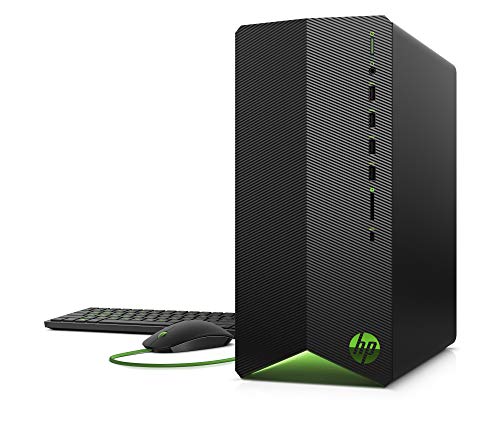
HP Pavilion TG01-1260 RTX 2060 Desktop, 16GB RAM, 512GB SSD

HP OMEN 45L i7-12700KF, 64GB, 1TB SSD

HP OMEN 45L RTX 3060Ti, i7-14700F, 64GB DDR5

HP OMEN 45L i7-12700KF, 32GB, 1TB
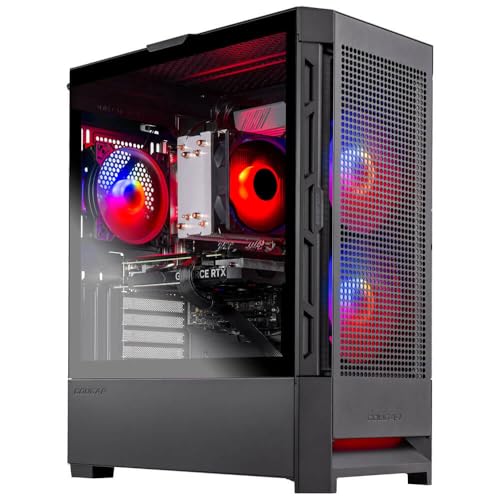
Skytech Nebula Gaming PC, i5-13400F, RTX 4060, 16GB RAM, 1TB SSD, Black

Skytech Azure 3, 7800X3D, RTX 5060 Ti 16GB
More On The Choices That Made The List
At the entry point, this Pavilion combines a 10th-generation Core i5-10400F, an RTX 2060, and 16GB of DDR4 memory. Ray tracing, a rendering technique that calculates lighting effects, makes the older graphics card more relevant for modern games, although the GPU remains the main limit for high-resolution play.
During a shared-room gaming session or an ordinary desktop switch, Windows 11 Home and dual-display support keep the Pavilion practical. I favor this setup for straightforward 1080p gaming, but 16GB of memory and a 512GB drive leave less breathing room for large libraries and demanding multitasking.
Points In Its Favor
- RTX 2060 graphics support ray tracing and modern gaming features.
- The i5-10400F provides six cores for games and background applications.
- Dual-display support suits a gaming screen and productivity monitor.
Things To Consider
- 16GB of RAM can feel limited once games, chat, and browser tabs share the system.
- The 512GB SSD may require careful storage management for large libraries.
Feature Snapshot
Made For
This Pavilion fits a budget-conscious gamer who mainly plays at 1080p and occasionally uses a second display.
Look Elsewhere When
The Skytech Nebula Gaming PC offers a newer RTX 4060 for a shopper who expects more graphics headroom.
Compared with the Pavilion’s RTX 2060, this OMEN trades up to a GTX 1660 SUPER for stronger 1080p positioning while adding a 12-core i7-12700KF. Its 64GB of RAM is unusually generous, giving streaming software, editing tools, chat programs, and a game plenty of room to coexist.
For a desk that doubles as a production machine, the 1TB PCIe Gen4 NVMe SSD is more useful than extra processor cores. NVMe is a high-speed solid-state storage connection, while the 800W 80 Plus Gold power supply and liquid cooling create room for sustained workloads, depending on the selected configuration.
The Case For It
- The 12-core processor handles gaming, streaming, and editing simultaneously.
- 64GB of RAM eliminates memory pressure for heavily multitasked sessions.
- Front and rear USB connections support peripherals and external storage.
- RGB lighting adds visual control without changing core operation.
Trade Offs
- The GTX 1660 SUPER is a step down from the RTX 3060 Ti used by the next OMEN.
- 64GB of RAM offers little extra for gaming alone, making the memory surplus noticeable.
Right Fit For
This OMEN suits a streamer or creator who values memory capacity, fast storage, and extensive ports alongside 1080p gaming.
Another Choice May Suit
The HP OMEN 45L RTX 3060Ti, i7-14700F, 64GB DDR5 better serves a shopper focused on 1440p graphics performance.
The component mix changes substantially here. A 14th-generation Core i7-14700F with 20 cores and 28 threads handles games, streaming, and editing, while the RTX 3060 Ti brings ray tracing, DLSS upscaling, and a stronger emphasis on 1440p gaming than the preceding OMEN.
I find the 2TB NVMe drive and 64GB of DDR5 especially practical for creators storing large project files. The 240mm AIO liquid cooler, meaning a sealed liquid-cooling unit with a radiator, includes an LCD for system information, while the Z790 platform provides room for future expansion.
The Value In It
- The RTX 3060 Ti supports ray tracing, DLSS, and high-refresh 1440p configurations.
- DDR5 memory handles heavy multitasking with better bandwidth than DDR4.
- A 2TB NVMe drive accommodates games, recordings, and project files.
- Three DisplayPort and one HDMI output support several displays.
- The liquid cooler’s LCD adds useful operating information.
Practical Considerations
- The 240mm radiator requires adequate case clearance.
- The RTX 3060 Ti is the main reason this system no longer feels like the strongest high-end option in the group.
The Numbers That Matter
Who Will Love This
This OMEN fits a 1440p gamer who also records streams or edits video and values generous memory and storage.
Where A Sibling Pick Shines
The Skytech Azure 3, 7800X3D, RTX 5060 Ti 16GB offers a newer graphics option with more dedicated video memory for a graphics-focused setup.
A more restrained OMEN configuration places the same 12th-generation Core i7-12700KF alongside 32GB of memory and a 1TB SSD. The processor provides 12 cores and 20 threads, which gives a busy gaming setup a useful amount of multitasking capacity without reaching the 64GB level of the earlier OMEN.
Liquid cooling and the familiar OMEN chassis make this a sensible general-purpose desktop for a family gaming room. I would verify the exact graphics card and display outputs before pairing it with a particular monitor, since OMEN 45L configurations can differ in those areas.
A Favorable Mix
- The 12-core processor handles games and regular background applications well.
- A 1TB SSD provides practical room for a modern game selection.
Details To Watch
- I would confirm the graphics configuration against the intended display resolution.
- 32GB is less generous than the 64GB offered by the HP OMEN 45L i7-12700KF, 64GB, 1TB SSD.
- The liquid-cooled chassis needs enough desk space for comfortable airflow.
Core Details
Built With In Mind
This configuration fits a household that wants strong processor power, liquid cooling, and 32GB of memory without buying the 64GB specification.
Reach For A Different Pick When
The HP OMEN 45L RTX 3060Ti, i7-14700F, 64GB DDR5 better suits a shopper whose priority is 1440p graphics and large creative workloads.
Skytech’s Nebula pairs a 13th-generation Core i5-13400F with an RTX 4060 carrying 8GB of GDDR6X memory. That combination feels well matched to modern 1080p and 1440p gaming, with the processor reaching 4.6GHz boost speed during suitable workloads.
For a first gaming desktop in a bedroom or home office, the 1TB NVMe SSD, 16GB of DDR4-3200 memory, and 600W Gold power supply cover the core needs without an elaborate component list. The included 802.11ac Wi-Fi also keeps a wired network from becoming mandatory.
Real-World Strengths
- The RTX 4060 provides a contemporary path into 1440p gaming.
- Windows 11 Home arrives ready for a standard gaming setup.
- HDMI and DisplayPort outputs support common monitor arrangements.
- The 600W power supply provides suitable capacity for the included RTX 4060.
Small Caveats
- 16GB of DDR4 memory is adequate for gaming but modest for heavy creation work.
- The listing notes that the graphics-card brand and some additional ports may vary.
- A larger power supply would offer more room for a substantial future graphics upgrade.
The Right Fit
This Nebula fits a mainstream gamer who wants a modern RTX 4060, 1440p capability, and a simple preinstalled Windows setup.
Consider Something Else When
The HP Pavilion TG01-1260 RTX 2060 Desktop, 16GB RAM, 512GB SSD is the more restrained alternative for a shopper centered on 1080p play.
For a graphics-focused build, the Azure 3 leads this group with an RTX 5060 Ti and 16GB of dedicated GDDR7 memory. The Ryzen 7 7800X3D runs at a 4.2GHz base speed and boosts to 5GHz, giving games efficient processing power while the graphics card carries the heavier visual workload.
Unlike the Nebula’s 16GB of system memory, this system uses 16GB of DDR5-6000 memory with a 1TB Gen4 NVMe drive. A 360mm ARGB liquid cooler provides a more substantial cooling solution, although I would confirm case clearance before arranging the installation.
Everyday Perks
- The RTX 5060 Ti provides 16GB of graphics memory for detailed textures.
- The Ryzen 7 7800X3D supports demanding games and background applications.
- DDR5-6000 memory provides a modern foundation for gaming.
- The 1TB Gen4 NVMe drive supports quick game and file loading.
- Windows 11 Home and 802.11ac Wi-Fi are included.
Points To Note
- The 360mm radiator requires a chassis with matching mounting support.
- 16GB of system memory is modest beside the 64GB configurations in the OMEN range.
Technical Highlights
Best Suited To
This Azure 3 fits a dedicated gamer who prioritizes graphics memory and high-detail 1440p play over large creative workloads.
A Better Fit Elsewhere
The HP OMEN 45L RTX 3060Ti, i7-14700F, 64GB DDR5 is a better match for a creator who needs 64GB of memory and a 2TB drive.
What Matters Most in an Under-2000 Gaming Desktop
GPU First, Then the Rest
I start with the graphics card because it drives most of the visible workload in games. The RTX 5060 Ti and RTX 3060 Ti make more sense for demanding 1440p settings, while the RTX 4060 and RTX 2060 fit more typical 1080p configurations. I also compare the CPU afterward, since an older processor can become the constraint during streaming or editing.
Memory for Busy Sessions
A 16GB configuration can handle a game, chat, and background applications, though 32GB feels more comfortable in 2026. The move to 64GB matters most for video editing, 3D work, large browser sessions, or several demanding programs running together. DDR5 also carries more bandwidth than DDR4, although memory capacity and speed answer different needs.
Cooling and Case Space
Liquid cooling helps manage sustained processor load, but radiator size still matters. I would check whether a 240mm or 360mm AIO cooler fits the chassis, especially for a compact desk setup. The power supply also deserves attention because the included GPU and any planned graphics upgrade need to work within its capacity.
Storage and Connections
NVMe SSDs provide much faster loading than traditional hard drives, so I prefer one for the operating system and active games. A 1TB drive remains a practical middle ground, while 2TB suits larger libraries and stored recordings. DisplayPort, HDMI, USB Type-C, and wired Ethernet determine how neatly the desktop fits into a multi-screen or accessory-heavy workspace.
Getting the Details Right
Mistakes Worth Dodging
I would avoid focusing on processor cores while ignoring the graphics card and memory balance. Another common error is overlooking case clearance or monitor connections. Checking the exact configuration before checkout prevents most of these avoidable mismatches.
Where The Extra Money Goes
Additional spending may fund faster graphics, more memory, larger storage, or better cooling. I consider those upgrades worthwhile when they remove a real bottleneck, but an oversized memory package adds little to a simple gaming-only setup.
Frequently Asked Questions
Should I Prioritize the GPU or CPU for Gaming?
I usually prioritize the GPU first because it handles most in-game graphics processing. The processor matters more for streaming, editing, and background applications.
How Much RAM Is Enough for Gaming?
I find 16GB workable for many games, while 32GB offers more comfortable multitasking. A 64GB configuration mainly benefits streamers, creators, and heavily loaded workstations.
Does a 1TB SSD Hold Enough Games?
A 1TB SSD usually provides a practical balance for the operating system and several large games. I would consider 2TB when a large library, recordings, or project files need room.
Is Liquid Cooling Necessary?
I view liquid cooling as useful for sustained heavy workloads and tidy processor temperature management. The radiator size must match the case, and the system does not need liquid cooling to handle ordinary gaming.
Which Pick Has the Most Graphics Memory?
The Skytech Azure 3, 7800X3D, RTX 5060 Ti 16GB provides 16GB of dedicated graphics memory. The HP OMEN 45L RTX 3060Ti, i7-14700F, 64GB DDR5 offers a different balance centered on 1440p graphics, system memory, and a 2TB drive.
The Takeaway
I would choose the Skytech Azure 3 for graphics memory, the HP OMEN 45L RTX 3060Ti, i7-14700F, 64GB DDR5 for a 1440p creation setup, and the Skytech Nebula Gaming PC for a more straightforward RTX 4060 build. The Pavilion and 32GB OMEN remain sensible choices for 1080p gaming, with the right balance depending more on display resolution and workload than on any single specification.
