
A laptop near the 1500 mark has to balance gaming performance, screen quality, memory, and everyday portability without wasting money on features that rarely affect the experience. I built this guide for students, commuters, and dedicated players who need enough power for games while still handling classes, work calls, and creative projects. The key is finding the right graphics, display, memory, and upgrade path for a particular setup.
The Lineup, Simplified

MALLRACE 2026 AMD Gaming Laptop Ryzen 7 5700U 16GB 512GB

Lenovo IdeaPad Gaming 3 15 Ryzen 5 5600H GTX 1650

Acer Nitro 5 AN515-54-5812 i5-9300H GTX 1650
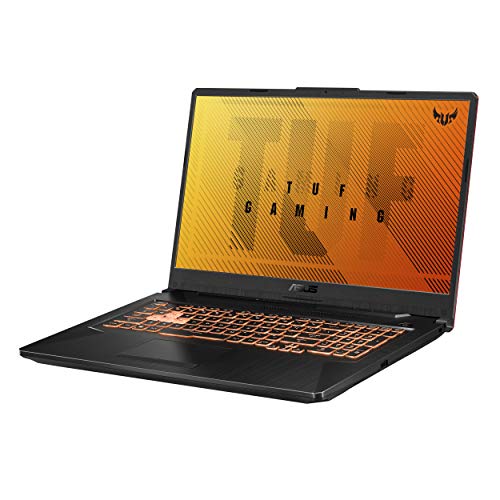
ASUS TUF Gaming F17 FX706LI 144Hz GTX 1650 Ti

NIMO 15.6 FHD Gaming Laptop Ryzen 7 8745HS 32GB 1TB

ASUS TUF Gaming A15 FA506IH 144Hz Ryzen 5 4600H GTX 1650
A Breakdown Of The Leading Choices
The MALLRACE setup makes more sense for a mixed-use laptop than for hard-core gaming. Its Ryzen 7 5700U processor has eight cores and 16 threads, giving me confidence in classroom software, browser-heavy research, and light creative work. The metal body and 15.6-inch footprint remain manageable for a student moving between classes and a remote office.
Unlike the Lenovo IdeaPad Gaming 3 15, this model relies on integrated Radeon graphics rather than a dedicated gaming GPU. In practice, I would expect it to favor general responsiveness, display work, and media over demanding 3D games.
Key Advantages
- Eight processor cores and 16 threads support demanding multitasking.
- 16GB of dual-channel DDR4 memory handles everyday applications well.
- The 1920 x 1080 display offers a practical full HD workspace.
- USB, HDMI, full-function Type-C, and a card reader cover common accessories.
- A backlit keyboard, 54.72Wh battery, and 180-degree hinge suit long study sessions.
Small Caveats
- Integrated Radeon graphics are the main limitation for modern 3D-heavy games.
- The 512GB drive may require careful file management once a large game library is installed.
At A Glance
Made For In Mind
This laptop best fits students and hybrid workers who need strong multitasking, flexible ports, and occasional casual gaming.
Where Another Pick Suits Better
The Lenovo IdeaPad Gaming 3 15 suits dedicated PC gamers better because its GTX 1650 provides dedicated graphics hardware.
For straightforward PC gaming, the Lenovo IdeaPad Gaming 3 15 has a clearer role than the MALLRACE. The Ryzen 5 5600H handles everyday processing, while the GTX 1650 supplies dedicated graphics for games that need more help than integrated hardware can provide. Its 15.6-inch full HD IPS panel also fits a compact bedroom or shared office setup.
A 120Hz refresh rate gives the display a smoother feel during fast movement than a standard 60Hz screen. The trade-off is the modest 8GB of memory and 256GB storage, so I would treat the memory and storage configuration as important parts of the purchase decision.
Notable Gains
- GTX 1650 graphics provide a dedicated path for PC gaming.
- The six-core Ryzen 5 5600H balances gaming and daily tasks.
- A 120Hz full HD IPS display improves motion clarity.
- The 15.6-inch chassis remains more manageable than the ASUS TUF F17.
Practical Considerations
- Only 8GB of RAM can become limiting with games, chat, and browser tabs running together.
- A 256GB drive leaves limited room for several large game installs.
Quick Facts
Who It Suits Best
This model fits budget-conscious PC gamers who value a dedicated GPU and high-refresh display over maximum storage capacity.
A Better Fit Elsewhere
The NIMO 15.6 FHD Gaming Laptop fits multitaskers better with 32GB of DDR5 memory and a 1TB SSD.
Desktop replacement ambitions suit the Acer Nitro 5 AN515-54-5812 better than a compact travel setup. Its full HD IPS display, GTX 1650 with 4GB of dedicated graphics memory, and 256GB NVMe drive form a familiar gaming foundation. I would consider it for a stationary desk where games, streaming, and schoolwork share the same machine.
Compared with the Lenovo IdeaPad Gaming 3 15, the Nitro offers an extra M.2 storage position, which can make ownership more flexible as the installed game collection grows. The older ninth-generation Intel processor and 8GB memory are the parts I would scrutinize before purchasing.
Where It Delivers
- The GTX 1650 includes 4GB of dedicated graphics memory.
- An available second M.2 position supports additional storage.
- Wi-Fi 6 supports faster local wireless connections.
- The backlit keyboard helps during late-night sessions.
- Alexa is built into the listed configuration.
Small Limitations
- The i5-9300H belongs to an older platform, so newer software may benefit from a more recent processor.
- 8GB of DDR4 memory is a modest starting point for heavy multitasking.
- The 256GB SSD can feel cramped beside the ASUS TUF models’ larger drives.
Right Fit For
This Nitro model fits gamers at a fixed desk who value dedicated graphics and an open storage slot over the newest processor generation.
Another Choice May Suit
The ASUS TUF Gaming A15 FA506IH suits mobile players better with a 144Hz display in a smaller 15.6-inch format.
The ASUS TUF Gaming F17 makes its case through screen size and motion clarity. Its 17.3-inch 144Hz IPS-type panel gives competitive matches more visual room, while the GTX 1650 Ti and Core i5-10300H provide a dedicated gaming configuration. I see it as a natural fit for a dorm room, bedroom desk, or shared gaming setup where the laptop mostly stays put.
The F17 carries 512GB of PCIe SSD storage and an RGB keyboard, making it more accommodating for a long session than the Acer Nitro’s 256GB drive. The trade-off is bulk, since the 17.3-inch display makes this the least convenient option for carrying between locations.
The Value In It
- The 17.3-inch full HD panel creates an immersive gaming area.
- A 144Hz refresh rate keeps fast movement visually smooth.
- The GTX 1650 Ti provides a dedicated graphics option.
- RGB keyboard lighting adds visibility and personality.
- A 512GB SSD provides more initial game storage than the Nitro 5.
Factors To Consider
- The large chassis takes more room in a bag and on a lap than a 15.6-inch model.
- Only 8GB of DDR4 memory may need upgrading for sustained multitasking.
Feature Snapshot
Who Will Love This
This F17 fits dedicated players who want a large display, smooth motion, and a stationary gaming setup.
Look Elsewhere When
The Lenovo IdeaPad Gaming 3 15 suits those who need dedicated graphics in a smaller and lighter-looking 15.6-inch chassis.
The NIMO 15.6 FHD Gaming Laptop is built around workload headroom rather than dedicated gaming graphics. Its Ryzen 7 8745HS processor has eight cores and 16 threads, while 32GB of 5600MHz DDR5 memory supports heavy multitasking. I would favor it for code compilation, spreadsheets, video editing, and classroom software, especially alongside a demanding game at medium settings.
The integrated Radeon 780M graphics use RDNA 3 architecture and benefit from the large memory and storage allocation. Compared with the MALLRACE Ryzen 7 5700U system, the newer processor, DDR5 memory, and 1TB SSD create a stronger foundation for productivity, but neither model offers a dedicated gaming GPU.
The Good Stuff
- Eight cores and 16 threads benefit heavily threaded work.
- 32GB of DDR5 memory provides excellent multitasking capacity.
- The 1TB SSD reduces immediate storage pressure.
- The 45-watt Ryzen 7 8745HS is designed for sustained workloads.
- Integrated Radeon 780M graphics support general graphics tasks.
Where It May Fall Short
- Integrated graphics place a ceiling on demanding 3D gaming.
- The 15.6-inch full HD screen does not offer the same motion advantage as the 144Hz ASUS models.
- The large memory and storage configuration may be unnecessary for a game-only use.
The Right Fit
This laptop fits students, developers, and remote workers who need serious multitasking capacity alongside lighter gaming.
Reach For A Different Pick When
The ASUS TUF Gaming F17 FX706LI suits competitive players better through dedicated graphics and a 144Hz 17.3-inch display.
Between the two ASUS TUF options, the A15 FA506IH makes more sense for a student who carries a laptop between classes. The 15.6-inch full HD IPS display still offers a 144Hz refresh rate, yet it occupies less space than the F17 panel. The Ryzen 5 4600H and GTX 1650 provide a capable base for mainstream games and simultaneous school applications.
Storage is another advantage, with 512GB of PCIe SSD space compared with the Lenovo IdeaPad Gaming 3 15’s 256GB. The older processor and Wi-Fi 5 connection are less attractive, so I would regard this as a value-oriented mobile gaming option rather than a cutting-edge platform.
Useful Touches
- The 144Hz display supports smoother competitive gaming.
- GTX 1650 graphics handle games more readily than integrated hardware.
- A 512GB SSD provides useful initial game and application space.
- The 15.6-inch format is easier to carry than the TUF F17.
Details To Watch
- The Ryzen 5 4600H is an older processor generation.
- Only 8GB of DDR4 memory is included for demanding multitasking.
- Wi-Fi 5 is less current than the Wi-Fi 6 options in this lineup.
Technical Highlights
Whose Shelf It Belongs On
This A15 fits mobile students and casual competitive players who value a high-refresh screen in a 15.6-inch package.
Where A Sibling Pick Shines
The ASUS TUF Gaming F17 FX706LI suits players who prefer a larger 17.3-inch display and can manage a bulkier desk setup.
Specs That Matter for a 1500-Level Gaming Laptop
Graphics Memory and Display
Dedicated graphics matter most for 3D games, while an integrated GPU can still handle browser titles, media, and lighter games. I also consider the display carefully: refresh rate is the number of times the screen updates per second, so 144Hz offers smoother motion than 60Hz. Resolution, panel quality, and screen size should support the games and viewing habits involved.
Processor and Memory Balance
A modern processor keeps game launches, system tasks, and background applications responsive. Memory needs to match the workload, with 16GB serving as a more comfortable starting point than 8GB for gaming, calls, and many browser tabs. I would treat 32GB as useful for heavy creative or development work rather than a requirement for every game.
Storage and Upgrade Path
Modern games can consume substantial space, making a 512GB drive more comfortable than 256GB. NVMe is a fast storage interface that supports quicker file transfer and application access. An available memory slot or storage position can extend the life of an otherwise capable laptop, although the exact upgrade procedure deserves attention before purchase.
Everyday Portability
A 17.3-inch display creates an immersive gaming area but takes more room than a 15.6-inch model. Weight, battery capacity, and keyboard comfort become important for daily commuting. I would prioritize the configuration that remains comfortable to carry rather than selecting a larger chassis solely for gaming.
A Quick Lesson in Gaming Laptop Value
Wrong Turns To Avoid
The most common mistake is focusing on one specification while ignoring the whole configuration. A fast processor cannot compensate for insufficient storage, and a high-refresh screen does not make integrated graphics suitable for demanding games. I would also compare the exact listed memory and storage figures, since similar model names can appear in several configurations.
Where The Extra Money Goes
Additional budget often moves toward newer processors, faster graphics, additional memory, larger storage, or a higher-refresh display. Those upgrades have the greatest effect when the laptop must handle demanding games and serious multitasking. A lower-cost configuration can still make sense for casual gaming, coursework, and general productivity, provided the limits are clear.
Frequently Asked Questions
Is 16GB of RAM Enough for Gaming?
Yes, 16GB is a comfortable starting point for most mainstream games and ordinary multitasking. 8GB configurations work more smoothly after a memory upgrade.
Does Refresh Rate Matter for PC Games?
A 120Hz or 144Hz display can make fast movement appear smoother than a standard 60Hz panel. The GPU and game settings still determine how consistently the laptop reaches that refresh rate.
Is 256GB of Storage Enough?
It can be enough for a small collection of games, but storage fills quickly with modern titles. A 512GB drive offers more breathing room, while an available M.2 slot can provide a practical expansion path.
Can These Gaming Laptops Be Upgraded?
Several models support additional memory or M.2 storage, depending on the exact configuration. I would verify the internal slots, supported component formats, and opening procedure before ordering parts.
Are Older Gaming Laptop Platforms Still Useful?
They can remain useful for older and lighter games, coursework, browsing, and media. A newer processor or graphics card becomes more important for recent releases, demanding 3D software, and long-term multitasking.
Final Verdict
My strongest all-around match is the MALLRACE for productivity, the Lenovo IdeaPad Gaming 3 15 for straightforward dedicated gaming, and the ASUS TUF A15 for mobile high-refresh play. The NIMO configuration stands apart for heavy multitasking, while the TUF F17 and Acer Nitro 5 serve stationary setups. The right choice comes down to the workload and portability, not the model badge alone.
